facebookresearch/sam2: what the repository actually gives you
The repository provides code for running inference with the Meta Segment Anything Model 2 (SAM 2), links for downloading the trained model checkpoints, and example notebooks that show how to use the model.
At a glance
- What is it?
- SAM 2 is Meta's promptable segmentation model for images and video, shipped as a pip-installable Python package with downloadable checkpoints. The repository is the code and weights, not a product, and the install path has a few sharp edges.
- Who is it for?
- Adopt facebookresearch/sam2 if you need promptable segmentation of video with a per-object memory and you can supply the GPU and the CUDA toolchain. Do not adopt it if you want a hosted service, a supported product with a release cadence, or anything that must run comfortably on CPU-only hardware.
- Can I use it commercially?
- Yes. Apache-2.0 is a permissive licence: you can use, modify and sell software built on it, as long as you keep its copyright and licence notices.
- Is it still maintained?
- Yes. The repository last received commits 169 days ago.
- What is it written in?
- Mainly Jupyter Notebook, according to GitHub's language statistics.
Answers come from the project's GitHub data, last synced on November 15, 2026, and from our analysis. They are not legal advice.
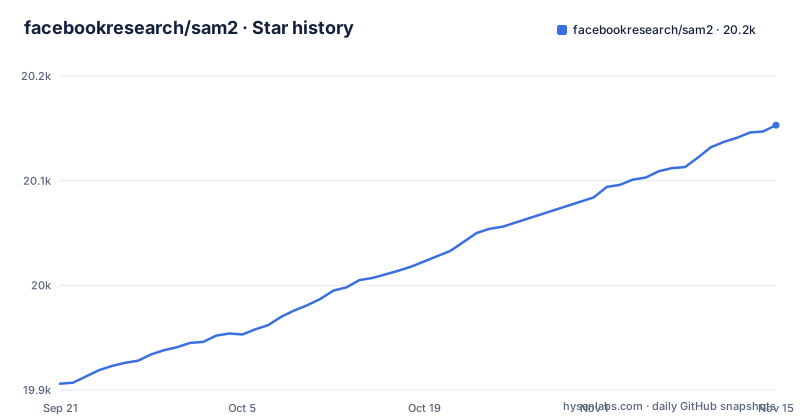
Star history
- facebookresearch/sam220,153 ★ · +247
| Repository | 2026-09-21 | 2026-11-15 |
|---|---|---|
| facebookresearch/sam2 | 19.9k | 20.2k |
247 Stars in the last 55 days, measured from the daily GitHub snapshot. Compare with other projects
Editorial analysis
What SAM 2 is and who the repository is for
SAM 2 is a foundation model for promptable visual segmentation. The README describes it as extending SAM to video by treating an image as a video with a single frame. That framing is the whole design: the same predictor handles a still photo and a clip, and the video case is the interesting one because the model carries a streaming memory across frames rather than segmenting each frame from scratch.
The repository is aimed at people who will write Python against a model, not at people who want a segmentation tool with a window. It contains the inference code, the training and fine-tuning code, the frontend and backend for a web demo, and a link to the SA-V dataset. The primary language shown for the repository is Jupyter Notebook, which is a fair signal of how the maintainers expect you to meet the model first: through the example notebooks rather than a CLI. If your job is to segment one object in one image, SAM 2 works, but you are paying for video machinery you will not use. The image predictor API is deliberately close to the original SAM, so the migration cost for existing SAM image code is small.
The streaming memory mechanism and the SAM2VideoPredictor split
The architecture is a transformer with streaming memory, described in the README as designed for real-time video processing. The practical consequence is that the predictor is stateful. You initialize it on a video, add prompts for one or more objects, and then propagate those prompts forward through frames. Objects you add later do not invalidate the earlier ones.
That per-object independence arrived in the 12/11/2024 update. Before it, multi-object tracking assumed you prompted everything up front. The release notes for that update state that the implementation was changed to support independent per-object inference, which relaxes the up-front prompting assumption and allows new objects to be added after tracking has started. The same update added full model compilation for video object segmentation, switched on by passing vos_optimized=True to build_sam2_video_predictor. That is a compile-time trade for inference speed, and it is opt-in rather than default.
The 09/30/2024 release is the other structural change: SAM 2.1 checkpoints, released training code, and the web demo's frontend and backend. The README is explicit that the new checkpoints require the latest model code, and gives the upgrade path as pip uninstall SAM-2, git pull, then reinstall. Note the package name: the distribution is SAM-2 while the import package is sam2. That mismatch trips people up in requirements files.
Installing facebookresearch/sam2 and running a first prediction
The README requires python>=3.10, torch>=2.5.1 and torchvision>=0.20.1, and points at the PyTorch site for those two. Install SAM 2 itself from a clone, in editable mode:
pip install -e .Add the notebooks extra if you want the example notebooks, which pull in jupyter and matplotlib:
pip install -e ".[notebooks]"The README recommends a fresh Anaconda environment and warns that if your current environment has PyTorch below 2.5.1, the install will try to upgrade it with pip. On Windows it strongly recommends WSL with Ubuntu.
Checkpoints are separate from the package. Either run the download script or fetch a file directly:
cd checkpoints && \
./download_ckpts.sh && \
cd ..
The four SAM 2.1 files are sam2.1_hiera_tiny.pt, sam2.1_hiera_small.pt, sam2.1_hiera_base_plus.pt and sam2.1_hiera_large.pt. Then image prediction looks like this, using the large checkpoint and its matching config:
import torch
from sam2.build_sam import build_sam2
from sam2.sam2_image_predictor import SAM2ImagePredictor

checkpoint = "./checkpoints/sam2.1_hiera_large.pt"
model_cfg = "configs/sam2.1/sam2.1_hiera_l.yaml"
predictor = SAM2ImagePredictor(build_sam2(model_cfg, checkpoint))

with torch.inference_mode(), torch.autocast("cuda", dtype=torch.bfloat16):
    predictor.set_image(<your_image>)
The thing to notice is that model_cfg is a path string, not an object, and it must correspond to the checkpoint you downloaded. For the web demo, the repository also ships docker-compose.yaml, which builds a frontend on port 7262 and a backend on port 7263, mounts ./demo/data/ into the backend at /data/, and reserves one NVIDIA GPU via the deploy block.
The CUDA extension is the part that breaks
The install compiles a custom CUDA kernel, and that step needs nvcc on the machine with a version matching your PyTorch CUDA version. The README is unusually candid here: if you see Failed to build the SAM 2 CUDA extension during installation, you can ignore it and still use SAM 2, with the caveat that some post-processing functionality may be limited. That caveat is doing real work. It means the failure is survivable but not free, and the README does not enumerate which post-processing paths degrade. If your pipeline depends on the exact masks the paper reports, a silent fallback to a non-CUDA path is a result you cannot fully trust without checking yourself.
The build is also controllable. setup.py reads SAM2_BUILD_CUDA from the environment and defaults it to "1", so export SAM2_BUILD_CUDA=0 turns the CUDA build off deliberately rather than by accident. That is the cleaner way to handle a machine with no nvcc than waiting for the warning.
The larger limitation is scope. This is a research repository from Meta AI, and the README describes research artifacts: a paper, a project page, a demo, a dataset, a blog post. There are no published GitHub releases, so there is no versioned changelog to pin against beyond the release notes file. The last push was on 2026-05-30. Nothing in the README describes a support commitment, a deprecation policy, or a compatibility guarantee across future PyTorch versions. If your project needs a dependency with a stated maintenance contract, this is not that.
How it differs from the original SAM and from classical tracking
The obvious alternative is the original facebookresearch/segment-anything, which the README names directly. The difference is not accuracy on still images; the README says SAM 2 has all the capabilities of SAM on static images and provides image prediction APIs that closely resemble SAM. The difference is that the original has no memory across frames, so applying it to video means running it per frame and then solving the correspondence problem yourself. SAM 2 folds that correspondence into the model through the streaming memory and the propagation loop, which is why the video predictor is stateful and why per-object inference had to be reworked to allow objects to be added after tracking starts.
A second alternative is a classical tracker such as optical flow or a correlation-filter tracker seeded by a mask from SAM. Those are far cheaper and need no CUDA extension. They also fail differently: they drift, and they have no notion of the object's appearance beyond the pixels they were initialized with. SAM 2's memory is what lets it recover an object after occlusion, but that memory is also what makes the video predictor hold state and consume GPU memory across a clip. For a short clip with one well-textured object and a tight compute budget, a classical tracker seeded by SAM is a defensible choice, and the repository gives you no reason to think otherwise.
Licence and the cost of upgrading
The repository is Apache-2.0, and setup.py declares LICENSE = "Apache 2.0" in the package metadata. There is also a LICENSE_cctorch file at the top level, which suggests a separate licence applies to some component; if you redistribute the package or a derivative, read both files rather than assuming Apache-2.0 covers everything in the tree. This is a description of what the repository contains, not legal advice.
The upgrade cost is concrete and the README spells it out for the SAM 2.1 transition: uninstall the old distribution with pip uninstall SAM-2, pull the latest code, reinstall. Because the package is installed in editable mode from a clone, upgrading means tracking the main branch, and the README's own instruction to use the latest model code to use the new checkpoints means checkpoint and code versions move together. If you pin the checkpoint file but not the code, you can end up with a config path that no longer resolves. The safe pattern is to pin both the checkpoint filename and the config path string in your own code, and to re-read RELEASE_NOTES.md before moving either.
Editorial conclusion
Adopt facebookresearch/sam2 if you need promptable segmentation of video with a per-object memory and you can supply the GPU and the CUDA toolchain. Do not adopt it if you want a hosted service, a supported product with a release cadence, or anything that must run comfortably on CPU-only hardware. Before you commit, verify three things on your own machine: that nvcc matches your PyTorch CUDA version so the custom kernel builds, that the checkpoint file you downloaded matches the model_cfg path you pass to build_sam2, and that your frame-loading path fits in memory, since the video predictor holds state across frames rather than treating each frame independently.
Frequently asked questions
What is facebookresearch/sam2 used for?
It runs promptable segmentation on images and videos with the SAM 2 model. The README describes it as a foundation model for promptable visual segmentation, extending SAM to video by treating an image as a video with a single frame.
What is the difference between SAM 2 and SAM3?
The README compares SAM 2 to the original SAM, noting that SAM 2 has all the capabilities of SAM on static images.
What is facebookresearch/sam2?
It is the Meta AI repository providing code for running inference with the Segment Anything Model 2, links for downloading trained checkpoints, and example notebooks. It also includes training code, a web demo frontend and backend, and a link to the SA-V dataset.
Official sources
Add this badge to your README
If you maintain this project, the badge below links readers to this analysis and shows its maintenance status from the daily GitHub snapshot. Paste the markdown into your README; add ?metric=license or ?metric=stars to the image URL for a different field.

[](https://hysenlabs.com/projects/facebookresearch-sam2)Star history chart for your README
[](https://hysenlabs.com/projects/facebookresearch-sam2)Was this useful?