FailproofAI puts one policy layer in front of twelve agent harnesses, but enforces nothing until you add a pack
Observability and enforcement for AI agent harnesses. Capture every run and runtime reliability with policy enforcement. 40 built-in policies, a local dashboard, no account required with a generous free cloud plan
At a glance
- What is it?
- FailproofAI hooks coding CLIs such as Claude Code and Codex, plus the Hermes and OpenClaw gateways, and can block a tool call before it executes. The mechanism is sound; the defaults, the per-harness gaps and an unasserted licence are what to check before rollout.
- Who is it for?
- Adopt FailproofAI if your agents already run in one of its twelve harnesses and you want block-rm-rf, block-env-files or block-force-push enforced the same way across all of them, with a local dashboard and no account. Skip it if your agent runs in its own runtime and you need enforcement rather than tracing, because the Python SDK path stops at observability.
- Can I use it commercially?
- Check first. The repository uses a licence we do not classify automatically, so read its LICENSE file before any commercial use.
- Is it still maintained?
- Yes. The repository last received commits 1 day ago.
- What is it written in?
- Mainly MDX, according to GitHub's language statistics.
Answers come from the project's GitHub data, last synced on November 14, 2026, and from our analysis. They are not legal advice.
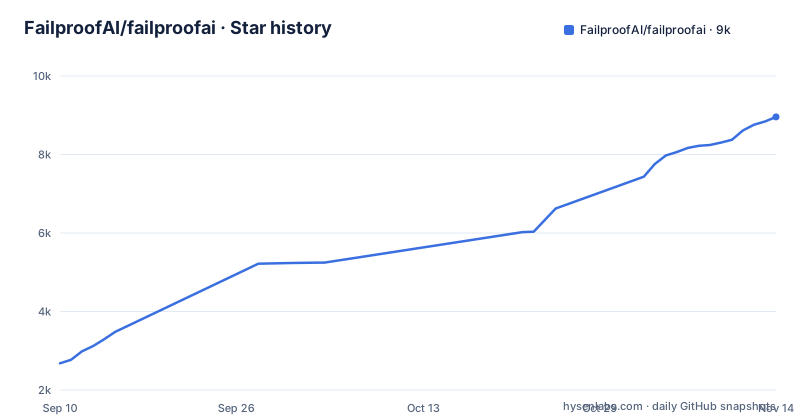
Star history
- FailproofAI/failproofai8,957 ★ · +6,277
| Repository | 2026-09-10 | 2026-11-14 |
|---|---|---|
| FailproofAI/failproofai | 2.7k | 9k |
6,277 Stars in the last 65 days, measured from the daily GitHub snapshot. Compare with other projects
Editorial analysis
One policy API wired into twelve harnesses
Engineers who let Claude Code, Codex or Cursor Agent CLI run shell commands on a real machine have one recurring worry: the agent reads a .env file, force-pushes to main or runs a recursive delete before anyone looks. FailproofAI sits in the harness's own hook points and refuses the call before it executes.
Twelve harnesses are covered in two classes. Ten are coding CLIs: Claude Code, OpenAI Codex, GitHub Copilot CLI, Cursor Agent CLI, OpenCode, Pi, Factory Droid, Devin CLI, Antigravity CLI and Goose. Two are chat and assistant gateways, Hermes and OpenClaw. All of them share one policy API and one session history, so a rule written once applies wherever the agent happens to be running.
The npm package shows how that reach is built. package.json declares two binaries, failproofai (the CLI, built to dist/cli.mjs) and failproofaid (a daemon shim in bin/), and it ships pi-extension/, hermes-plugin/ and openclaw-plugin/ alongside a prebuilt Next.js standalone server for the dashboard. The repository also carries a Cargo workspace under crates/, so part of the code is Rust. Harnesses without a usable hook surface get a plugin; the rest are wired by the config step.
Four commands, and the second one is what enforces
Installation is a global npm package followed by three subcommands. The engines field asks for Node 20.9.0 or newer.
npm install -g failproofai
failproofai config                             # wire up your agents and the daemon
failproofai policies add FailproofAI/policies  # choose what to enforce
failproofai                                    # dashboard on localhost:8020
The first line puts the failproofai binary on the path. config detects your agents and wires their hooks plus the daemon. policies add pulls a policy pack from a GitHub-style owner/repo name; FailproofAI/policies is the project's own pack, and any third-party pack is added with the same failproofai policies add <owner>/<repo> form. Running policies show against a pack prints it before you commit to it, which is the sensible order for a pack you did not write. The bare failproofai command starts the dashboard on localhost:8020, where captured runs appear.
The ordering matters. config deliberately selects no policies, so a reader who stops after the second line has hooks, a daemon and a session history, and no guardrails.
A fresh install guards only itself
Until a pack is added, exactly one policy is live: block-failproofai-commands. It is always on and cannot be switched off or paused. The project's reasoning is stated plainly: an agent that can pause enforcement can switch off every other policy, so the agent is never allowed to drive failproofai itself.
That design closes an obvious hole, and it creates a trap for anyone evaluating the tool quickly. Install it, run config, open the dashboard, watch sessions arrive, and it is easy to assume the machine is protected. It is not. block-rm-rf, block-env-files and the rest do nothing until policies add has run. The consequence for a team rollout is concrete: if your provisioning script copies only the first two lines of the install block, every developer machine ends up observed but unguarded. Put the policies add line in the script, and check the dashboard for an active pack rather than for incoming sessions.
What block-rm-rf, block-env-files and the warn policies gate
Forty built-in policies are counted in the project description. The README highlights a handful: block-env-files stops reads of .env and other secret files, block-sudo stops privilege escalation, block-rm-rf stops recursive deletion, block-terraform and block-kubectl stop unreviewed changes to live infrastructure, and block-force-push and block-push-master stop git push --force and direct pushes to main. Two more carry a different prefix. warn-destructive-sql targets DROP, TRUNCATE and unbounded DELETE, and warn-repeated-tool-calls catches an agent looping on the same call.
Every one of these gates the call before it runs, which is why they hold on all twelve harnesses. The block and warn prefixes are not cosmetic, though. If your real fear is an agent issuing a TRUNCATE against a shared database, confirm what a warn-level policy does at runtime in the policy reference before treating warn-destructive-sql as a hard stop.
Custom rules are possible. The repository ships examples/policies-basic.js, examples/policies-stop.js, examples/policies-notification.js and folders of convention and advanced policies, which are the place to start before writing your own.
Turn-end gates reach eight harnesses, not twelve
FailproofAI is candid that enforcement capability varies by harness. Stopping a tool call before it runs is verified on all twelve. Turn-end gates, the policies that act when the agent finishes a turn rather than when it reaches for a tool, work on only eight. The per-harness matrix at docs.befailproof.ai lists which events each harness honours.
For a reader this means a policy file is not portable in the way the single policy API suggests. A turn-end rule that holds in one harness can silently never fire in another, and an agent on one of the four uncovered harnesses finishes its turn unchecked. If your team runs a mix of CLIs, look up each one in the matrix before writing any turn-end policy, and keep the rules you cannot afford to lose on the pre-tool-call path, which is the only path covered everywhere.
Agents outside the twelve get tracing, not enforcement
An agent that runs in none of the supported harnesses reports through the Python SDK. That gives tracing, sessions and audits in the same history. It does not give blocking. Enforcement there needs a hook inside your own runtime, and the project's answer is to email [email protected] so the team can map it.
That is an honest boundary and a significant one. A company building its own agent loop in Python, which is exactly the team most likely to want custom guardrails, gets the dashboard half of FailproofAI and has to build or negotiate the enforcement half. The closest self-built alternative for those teams, and for anyone on a single harness, is the harness's own hook mechanism: Claude Code, for example, can run a script of yours on tool events. That approach costs nothing to adopt but leaves you maintaining one script per harness with no shared session history. FailproofAI's case rests on the opposite trade: one policy API and one history in exchange for a daemon and a global npm install.
The setup wizard runs itself unless FAILPROOFAI_NO_FIRST_RUN is set
Two behaviours of the CLI change what it does on a machine nobody is watching. First, failproofai config run without a terminal, in CI, a container or under an agent, applies its changes rather than asking. Second, on a machine that has never been set up, any other failproofai command runs the same setup wizard first.
Together these mean an innocent status check in a build image can rewrite hook configuration for every agent installed in that image. That is convenient for a golden image and surprising anywhere else. Set FAILPROOFAI_NO_FIRST_RUN=1 in the environment of any job that should call the CLI without triggering setup, and run config explicitly at the step where you want the wiring to happen.
One related variable sits in package.json rather than in the install section: the dev and start scripts set FAILPROOFAI_TELEMETRY_DISABLED=1, and the build marks posthog-node as an external dependency. Teams with strict egress rules should check the telemetry setting for the installed CLI before the first run.
Back-to-back betas, a Node 20.9 floor and a NOASSERTION licence
Release activity is heavy. v1.0.13 shipped on 2026-11-02, preceded by v1.0.13-beta.2 on 2026-10-28 and v1.0.13-beta.3 on 2026-11-02, and the last push to main was on 2026-11-03. package.json and Cargo.toml in the repository already read 1.0.14-beta.0. Short release intervals on a tool that rewrites agent hooks are a mixed blessing: fixes arrive fast, and each upgrade is a change to the code sitting between your agent and your shell. Pin the npm version on shared machines and upgrade deliberately.
The runtime floor is Node 20.9.0, with Bun 1.3.0 listed for development builds. Older LTS lines on locked-down workstations will need upgrading first.
Licensing needs a direct look. GitHub reports NOASSERTION for the repository, and Cargo.toml points at license-file = "LICENSE" instead of naming an SPDX identifier, so no standard licence is detected automatically. Read the LICENSE file itself before deploying FailproofAI across a company, and before forking any of its policies into an internal pack.
Editorial conclusion
Adopt FailproofAI if your agents already run in one of its twelve harnesses and you want block-rm-rf, block-env-files or block-force-push enforced the same way across all of them, with a local dashboard and no account. Skip it if your agent runs in its own runtime and you need enforcement rather than tracing, because the Python SDK path stops at observability. Before rollout, read the LICENSE file, since GitHub reports NOASSERTION, and check the per-harness matrix for any turn-end policy you plan to depend on.
Frequently asked questions
Does FailproofAI need an account to work?
No. FailproofAI runs locally with a dashboard on localhost:8020 and no account required; a free cloud plan exists for teams that want one.
Which agents does FailproofAI support?
It hooks twelve harnesses: Claude Code, OpenAI Codex, GitHub Copilot CLI, Cursor Agent CLI, OpenCode, Pi, Factory Droid, Devin CLI, Antigravity CLI, Goose, Hermes and OpenClaw. Agents outside those report through a Python SDK that provides tracing, sessions and audits but not enforcement.
Can an AI agent turn off FailproofAI enforcement?
The block-failproofai-commands policy is always on and cannot be switched off or paused, so an agent cannot use the failproofai CLI to disable the other policies.
Does FailproofAI block anything right after installation?
Only block-failproofai-commands. The config step picks no policies, so you need to run failproofai policies add with a pack such as FailproofAI/policies before rules like block-rm-rf take effect.
Official sources
Add this badge to your README
If you maintain this project, the badge below links readers to this analysis and shows its maintenance status from the daily GitHub snapshot. Paste the markdown into your README; add ?metric=license or ?metric=stars to the image URL for a different field.

[](https://hysenlabs.com/projects/failproofai-failproofai)Star history chart for your README
[](https://hysenlabs.com/projects/failproofai-failproofai)Was this useful?