FlowEdit: text-based image editing without inversion
Official implementation of the paper: "FlowEdit: Inversion-Free Text-Based Editing Using Pre-Trained Flow Models"
At a glance
- What is it?
- FlowEdit is the official PyTorch implementation of the ICCV 2025 best student paper, a training-free method that edits a pre-trained flow model from a source prompt to a target prompt without inverting the image into the noise domain first. It suits researchers working with Stable Diffusion 3 or Flux who want edits that preserve the original image rather than reconstructing it, and it comes as a script driven by two YAML files.
- Who is it for?
- Adopt FlowEdit if you need training-free text-guided edits of pre-trained flow models and want to keep the parts of the image the prompts did not mention, since that is what skipping the inversion step buys you. Skip it if you need a maintained library with an API, because this is a research implementation with a script, two YAML files and pinned dependency versions.
- Can I use it commercially?
- Yes. MIT is a permissive licence: you can use, modify and sell software built on it, as long as you keep its copyright and licence notices.
- Is it still maintained?
- Yes. The repository last received commits 83 days ago.
- What is it written in?
- Mainly Python, according to GitHub's language statistics.
Answers come from the project's GitHub data, last synced on November 7, 2026, and from our analysis. They are not legal advice.
Star history
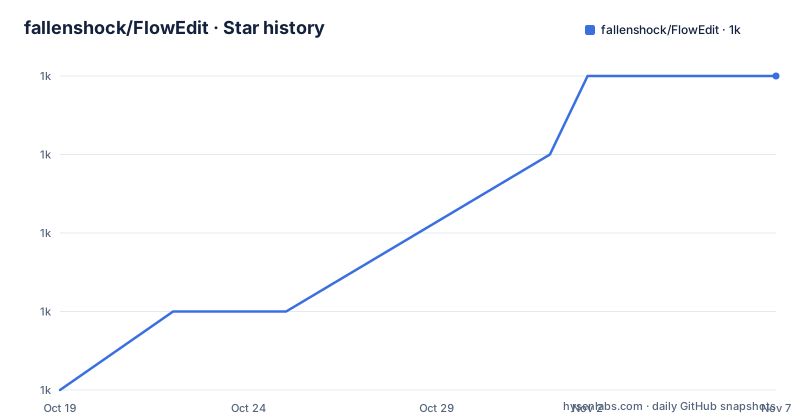
- fallenshock/FlowEdit1,024 ★ · +4
| Repository | 2026-10-19 | 2026-11-07 |
|---|---|---|
| fallenshock/FlowEdit | 1k | 1k |
4 Stars in the last 19 days, measured from the daily GitHub snapshot. Compare with other projects
Editorial analysis
The problem with inversion in flow models
FlowEdit is the official PyTorch implementation of the paper FlowEdit: Inversion-Free Text-Based Editing Using Pre-Trained Flow Models, which received the ICCV 2025 Best Student Paper award. The word inversion in the title is the whole idea and the whole problem. The prevailing approach to editing a diffusion or flow model is to invert the input image back into the noise domain, edit the noise, and then regenerate. The inversion step is lossy, and the reconstruction that follows is not the original image, so an edit that only touches one part of a picture can disturb the rest of it. FlowEdit's claim is that you can skip that step entirely and work with the pre-trained flow model as it is, using the difference between a source prompt and a target prompt as the signal. The project is written in Python, licensed MIT, and the last push was on 2026-08-16. The topics list places it squarely in the text-guided image editing and rectified flow area, alongside diffusion models.
Installation, and the diffusers version that matters
The setup is a clone and one pip command:
pip install torch diffusers transformers accelerate sentencepiece protobufThe version notes are the part to read carefully. A new version of diffusers may have compatibility issues, and the documentation suggests trying `diffusers==0.30.1`. The tested combination is stated as CUDA version 12.4 with diffusers 0.30.0. The badges confirm the expected environment at a glance, with Python 3.8 or newer and PyTorch 2.0.0. The project tested CUDA 12.4 with diffusers 0.30.0 and suggests trying 0.30.1 if a newer version causes compatibility issues. Test the combination you deploy.
Two YAML files drive the whole run
The usage model is a script with a single argument. You run editing with Stable Diffusion 3 with `python run_script.py --exp_yaml SD3_exp.yaml`, and with Flux with `python run_script.py --exp_yaml FLUX_exp.yaml`. The experiment file holds the hyperparameters FlowEdit needs, the documented examples being `n_max` and `n_min`, and it also includes the path to the edits file. The edits file is where the actual work is described, and it specifies four things: a path to the input image, a source prompt, target prompts, and target codes. The target codes summarise the changes between the source and the target prompts, and they are not merely cosmetic, since they appear in the output filename. That last detail is worth internalising, because it means the same edits file can drive a batch of variations over one image and the results stay distinguishable on disk without a separate naming scheme.
The repository is small, and that is the point
The top level of the repository is ten entries, three of them directories, which is worth noting for anyone deciding whether the project is complete. There is `run_script.py` as the entry point, `FlowEdit_utils.py` with the helper functions, the two experiment files `FLUX_exp.yaml` and `SD3_exp.yaml`, `edits.yaml` as the example edits file, and three directories: `Data/`, `example_images/` and `imgs/`. The `Data/` directory is linked from the README as the data location, `example_images/` is where you put your own images, and `imgs/` holds the teaser image used in the README. There is no package structure, no test suite and no model zoo directory, unlike a typical diffusion repository. FlowEdit is a method rather than a service, so the code implements the edit and the models come from Hugging Face through the diffusers pipeline, and the practical consequence is that the clone is quick to read and there is little hidden machinery between the config and the computation.
Two models, one method, two different experiment files
The two shipped experiment files are the practical evidence that the method is not tied to one architecture. `SD3_exp.yaml` targets Stable Diffusion 3 and `FLUX_exp.yaml` targets Flux, and the method is described as working with pre-trained flow models, so the setup that carries the hyperparameter choices differs per model while the algorithm does not. A third path exists outside this repository. The README links community ComfyUI implementations for FLUX and for HunyuanLoom, both implemented by logtd, and points to the LTX-Video official repository for an LTX-Video ComfyUI implementation of the same idea, which moves the method into video. There is also a Hugging Face Space demo, and a recorded talk from the project. For someone who wants to try the method before installing a Python environment, the ComfyUI route is the cheaper experiment.
Where the method has been extended
The community and follow-up work section is unusually informative about the method's trajectory. Training-Free-WAN-Editing combines WAN2.1 with FlowEdit to extend the training-free approach to video editing, implemented by Kyujinpy. DNAEdit refines the Gaussian noise in the noise domain to improve image and video editing, and it was a NeurIPS 2025 Spotlight. FlowAlign adds optimal control-based trajectory control to the inversion-free process and appeared at ICLR 2026. DynaEdit extends FlowEdit for dynamic video editing at EECV 2026. The pattern across these is worth noting. Each of them takes FlowEdit's central move, the absence of an inversion step, and adds something to it, a different backbone model, a refinement of the noise, a control mechanism or a temporal dimension. That is a reasonable signal that the approach is seen as a foundation rather than a one-off trick, though it also means the code here is a starting point rather than the finished article.
What this repository does not give you
There is no inference server, no API, no documentation beyond the README, and no released versions. The GitHub repository has no releases, so there is no tagged artefact to pin and no changelog to check, and the project is a paper implementation rather than a maintained library, which means upstream API changes in diffusers or transformers can break it without notice. The hyperparameter discussion is deferred to the paper, and the documentation says so explicitly, referring the reader to the paper for a detailed discussion on the impact of different hyperparameters and the values used. That is a reasonable thing for a research repository to do, but it does mean that tuning the method beyond the shipped configuration means reading the paper rather than the code. There is also no stated support for images outside the prompt-driven edit case, and the edits file format has no batch mode documented beyond the target codes appearing in filenames.
Editorial conclusion
Adopt FlowEdit if you need training-free text-guided edits of pre-trained flow models and want to keep the parts of the image the prompts did not mention, since that is what skipping the inversion step buys you. Skip it if you need a maintained library with an API, because this is a research implementation with a script, two YAML files and pinned dependency versions. Before you run it, pin `diffusers==0.30.1` or use the tested combination of CUDA 12.4 with diffusers 0.30.0, because newer diffusers versions are documented as having compatibility issues, and read the `edits.yaml` and `SD3_exp.yaml` files before the first run, since the target codes in the edits file end up in the output filenames.
Frequently asked questions
How do I install FlowEdit?
Clone the repository and run `pip install torch diffusers transformers accelerate sentencepiece protobuf`. Newer diffusers versions may have compatibility issues, so try `diffusers==0.30.1`. The tested setup is CUDA 12.4 with diffusers 0.30.0.
How do I run an edit with FlowEdit?
Put your images in the example_images folder, describe the edits in an edits file, and run `python run_script.py --exp_yaml SD3_exp.yaml` for Stable Diffusion 3 or `python run_script.py --exp_yaml FLUX_exp.yaml` for Flux. The experiment file holds the hyperparameters and points to the edits file.
What goes into a FlowEdit edits file?
Four things: a path to the input image, a source prompt, target prompts, and target codes. The target codes summarise the changes between the source and target prompts and appear in the output filename. See edits.yaml for an example.
What makes FlowEdit inversion-free?
The method edits a pre-trained flow model directly from a source prompt to a target prompt, without first inverting the input image into the noise domain. The paper is FlowEdit: Inversion-Free Text-Based Editing Using Pre-Trained Flow Models, published at ICCV 2025, where it received the Best Student Paper award.
Can I use FlowEdit without installing the Python code?
There are community ComfyUI implementations for FLUX and for HunyuanLoom, an LTX-Video ComfyUI implementation in the LTX-Video repository, and a Hugging Face Space demo.
Official sources
Add this badge to your README
If you maintain this project, the badge below links readers to this analysis and shows its maintenance status from the daily GitHub snapshot. Paste the markdown into your README; add ?metric=license or ?metric=stars to the image URL for a different field.

[](https://hysenlabs.com/projects/fallenshock-flowedit)Star history chart for your README
[](https://hysenlabs.com/projects/fallenshock-flowedit)Was this useful?