coc-rust-analyzer: putting rust-analyzer behind coc.nvim, and the glue around it
rust-analyzer extension for coc.nvim
At a glance
- What is it?
- coc-rust-analyzer is a coc.nvim extension that runs rust-analyzer for Vim and Neovim, and its real content is the plumbing around the language server: installing and upgrading the binary, keeping cargo out of the sysroot, exposing the server's inspection commands, and handing runnables to Vimspector. It suits people who already live in coc.nvim and would rather not run a second LSP client alongside it.
- Who is it for?
- Adopt coc-rust-analyzer if you already use coc.nvim for other languages and want rust-analyzer to join that one client, rather than running a separate LSP plugin beside it, and if you want the server's inspection commands exposed as editor commands. Do not adopt it if you want a self contained Rust setup with no Node toolchain in the picture, since the extension is a TypeScript package built with esbuild and expects a coc.nvim installation.
- Can I use it commercially?
- Yes. MIT is a permissive licence: you can use, modify and sell software built on it, as long as you keep its copyright and licence notices.
- Is it still maintained?
- Yes. The repository last received commits 3 days ago.
- What is it written in?
- Mainly TypeScript, according to GitHub's language statistics.
Answers come from the project's GitHub data, last synced on November 7, 2026, and from our analysis. They are not legal advice.
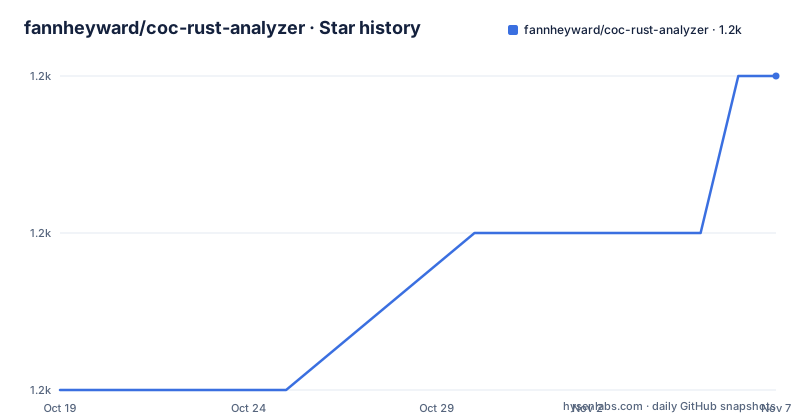
Star history
- fannheyward/coc-rust-analyzer1,156 ★ · +2
| Repository | 2026-10-19 | 2026-11-07 |
|---|---|---|
| fannheyward/coc-rust-analyzer | 1.2k | 1.2k |
2 Stars in the last 19 days, measured from the daily GitHub snapshot. Compare with other projects
Editorial analysis
The extension is a wrapper, and the wrapper is the product
coc-rust-analyzer is described simply as rust-analyzer for Vim and Neovim, working as an extension with coc.nvim, and the language server it wraps is a separate project with its own binary distribution. That division shapes everything. rust-analyzer is a long running server that speaks the language server protocol, and a Vim or Neovim user needs a client that starts it, talks to it, restarts it and turns its replies into editor actions. coc.nvim is that client for many languages, so this extension's job is to be a good coc.nvim citizen rather than to reimplement language support. The package.json shows how little it carries: the name is `coc-rust-analyzer`, the version is 0.89.2, the main entry is `lib/index.js`, the engine requirement is a coc version of `^0.0.80`, and the activation event is `onLanguage:rust`, so the extension only loads when a Rust file is opened. The author is Heyward Fann, and the README notes the extension is built with the create-coc-extension scaffolding.
Installing it, and the one setting you must change first
Installation is a single editor command, run inside Neovim or Vim with coc.nvim installed:
:CocInstall coc-rust-analyzerThe README attaches a warning to it that is easy to skim past: remove the `rust-analyzer` config from `coc-settings.json` if you have set one, because the extension configures the server itself and a leftover entry from a manual setup conflicts with it. The second piece of setup is the `workspace.ignoredFolders` list, and the reason given is specific rather than generic. It is recommended to add `$CARGO_HOME` to that list to stop rust-analyzer running `cargo check` on sysroot crates, which is the standard library sources that ship with a Rust toolchain. The README shows the pattern with the cargo and rustup directories included:
"workspace.ignoredFolders": [
  "$HOME",
  "$HOME/.cargo/**",
  "$HOME/.rustup/**"
],
Configuration for the extension itself lives in a jsonc file that you open with the `:CocConfig` command, and it is typically at `$HOME/.config/nvim/coc-settings.json`. The README points at the configuration list in the extension's own package.json for the full set of keys.
Managing the server binary, and the commands for when it goes wrong
A language server that has to be downloaded, started, restarted and occasionally interrogated is where a wrapper earns its place, and the command table is long. Two commands handle the binary itself: `rust-analyzer.install` installs the latest rust-analyzer from its GitHub release, and `rust-analyzer.upgrade` downloads the latest one from the same place. Two more handle the running process: `rust-analyzer.reload` restarts the server and `rust-analyzer.reloadWorkspace` reloads the workspace. Then there are the diagnostics for a server that is not behaving: `rust-analyzer.analyzerStatus` shows the status, `rust-analyzer.serverVersion` shows the current server version, and `rust-analyzer.memoryUsage` reports memory usage and clears the database, which is the command you want when the server has been running for a long session and has grown. The last of these is a reminder of what a language server in an editor really is: a process that lives for as long as your editor session, with a cache that can degrade.
Thirty commands, and how they map onto what rust-analyzer can do
Every command is invoked as `:CocCommand XYZ`, and the table reads like an index of the language server's capabilities rather than a themed feature list. Navigation and inspection cover the parts of the compiler most editors cannot show you: `rust-analyzer.viewHir` views the high level IR, `rust-analyzer.viewMir` views the mid level IR, `rust-analyzer.viewSyntaxTree` shows the syntax tree, `rust-analyzer.viewCrateGraph` and `rust-analyzer.viewFullCrateGraph` show the crate graph with a `shuffleCrateGraph` variant that reorders it, `rust-analyzer.parentModule` locates the parent module, `rust-analyzer.matchingBrace` finds the matching brace, and `rust-analyzer.openDocs` opens documentation under the cursor. Editing commands cover the ones an editor can do but a server can do better across files: `rust-analyzer.expandMacro` expands a macro recursively, `rust-analyzer.ssr` performs a structural search and replace, `rust-analyzer.joinLines` joins lines, and `rust-analyzer.moveItemUp` and `rust-analyzer.moveItemDown` move an item. Diagnostics and tests have their own group, with `rust-analyzer.explainError`, `rust-analyzer.runFlycheck`, `rust-analyzer.cancelFlycheck`, `rust-analyzer.clearFlycheck`, `rust-analyzer.peekTests`, `rust-analyzer.testCurrent` and `rust-analyzer.rebuildProcMacros` for rebuilding proc macros and build scripts. That last one exists because proc macros and build scripts are compiled by the server in its own environment, and a stale one produces errors that look like your code's.
Debugging runnables through Vimspector instead of a built in debugger
Running and debugging are separate commands here, `rust-analyzer.run` lists the runnables of the current file and runs the one you select, while `rust-analyzer.debug` lists them and debugs the selected one. The debug path is delegated to Vimspector, and the README documents the whole arrangement, which is unusual and useful. You set the debug runtime in `coc-settings.json`:
{
  "rust-analyzer.debug.runtime": "vimspector"
}
You then install Vimspector and the CodeLLDB adapter with the `:VimspectorInstall CodeLLDB` command, and add a Vimspector configuration, either in the project root as `.vimspector.json` or in a global Vimspector configuration file:
{
  "$schema": "https://puremourning.github.io/vimspector/schema/vimspector.schema.json",
  "configurations": {
    "launch": {
      "adapter": "CodeLLDB",
      "configuration": {
        "request": "launch",
        "program": "${Executable}",
        "args": ["*${Args}"]
      }
    }
  }
}
Two conventions tie the two halves together. The `launch` key must match `rust-analyzer.debug.vimspector.configuration.name`, which defaults to `launch`, so the name is the join point between the extension and your debugger configuration. And `:CocCommand rust-analyzer.debug` passes `Executable` and `Args` to Vimspector for the selected runnable, which is why the configuration refers to `${Executable}` and `${Args}` as the program and its arguments. The design choice is that the extension does not implement a debugger, it selects a runtime, and everything debugger specific stays in the debugger's own configuration file.
How the extension is built, and what the package contributes to the editor
The build tooling is modern and small. The scripts in package.json are `check`, which runs biome over the source, `schema`, which runs a Node script called generate-config-schema.js, `build` and `watch`, both of which run esbuild through the esbuild.mjs file, and `prepare`, which builds on install. The repository carries a `biome.json` for formatting and linting, a `tsconfig.json`, and a `coc-rust-analyzer-configurations.json` file that sits alongside the generated schema, which suggests the configuration surface is written once and derived from there rather than maintained by hand. The editor contributions are as interesting as the code. The extension declares root patterns for the Rust filetype of `Cargo.toml` and `rust-project.json`, so a Rust project is detected from either file, and it adds JSON validation for `rust-project.json` and `.rust-project.json` pointing at the schema published by schemastore, which means a mistyped project file is flagged in the editor. The runtime dependencies for the extension itself are modest, with adm-zip, node-fetch, which and the vscode languageserver protocol package among the dev dependencies, alongside coc.nvim itself and the TypeScript and esbuild tool chain. The licence is MIT, there are no GitHub releases to speak of, and the last push was on 2026-10-01.
Editorial conclusion
Adopt coc-rust-analyzer if you already use coc.nvim for other languages and want rust-analyzer to join that one client, rather than running a separate LSP plugin beside it, and if you want the server's inspection commands exposed as editor commands. Do not adopt it if you want a self contained Rust setup with no Node toolchain in the picture, since the extension is a TypeScript package built with esbuild and expects a coc.nvim installation. Before you install, remove any rust-analyzer entry you have in `coc-settings.json`, and add the cargo and rustup folders to `workspace.ignoredFolders` so the server does not run cargo check over sysroot crates. The licence is MIT, the package version is 0.89.2, the repository publishes no GitHub releases, and the last push was on 2026-10-01.
Frequently asked questions
How do I install coc-rust-analyzer?
Run `:CocInstall coc-rust-analyzer` from inside Neovim or Vim with coc.nvim installed. The README also asks you to remove any rust-analyzer config you have set in `coc-settings.json`, since the extension configures the server itself.
Why does rust-analyzer run cargo check on the standard library?
The README recommends adding `$CARGO_HOME` to `workspace.ignoredFolders` in the coc configuration, with the pattern covering `$HOME/.cargo/**` and `$HOME/.rustup/**`, to stop rust-analyzer running `cargo check` on sysroot crates.
How do I debug a Rust program with coc-rust-analyzer?
Set `rust-analyzer.debug.runtime` to `vimspector` in `coc-settings.json`, install Vimspector and the CodeLLDB adapter with `:VimspectorInstall CodeLLDB`, and add a Vimspector configuration whose `launch` key matches `rust-analyzer.debug.vimspector.configuration.name`. The `rust-analyzer.debug` command passes Executable and Args to Vimspector.
Which rust-analyzer inspection commands are exposed?
Commands include viewHir, viewMir, viewSyntaxTree, viewCrateGraph, viewFullCrateGraph, shuffleCrateGraph, viewFileText, parentModule, matchingBrace, openDocs and expandMacro, alongside edit commands such as ssr, joinLines, moveItemUp and moveItemDown.
How do I update the rust-analyzer server used by the extension?
The `rust-analyzer.install` command installs the latest rust-analyzer from its GitHub release and `rust-analyzer.upgrade` downloads the latest one. `rust-analyzer.reload` restarts the server and `rust-analyzer.reloadWorkspace` reloads the workspace.
Official sources
Add this badge to your README
If you maintain this project, the badge below links readers to this analysis and shows its maintenance status from the daily GitHub snapshot. Paste the markdown into your README; add ?metric=license or ?metric=stars to the image URL for a different field.

[](https://hysenlabs.com/projects/fannheyward-coc-rust-analyzer)Star history chart for your README
[](https://hysenlabs.com/projects/fannheyward-coc-rust-analyzer)Was this useful?