feder-cr/dots: a self-hosted AI agent that gets its own VM and its own browser
Open-source dots for the web: an AI agent with its own browser, one that does not get blocked.
At a glance
- What is it?
- A self-hosted, MIT-licensed AI agent in which each Dot gets its own hardware-accelerated Linux VM and a browser (invisible_playwright_mcp, Firefox patched in C++), installed from source with Node 24+, Go 1.25+, Git and an OpenRouter key.
- Who is it for?
- dots is a self-hosted agent that gives each Dot a computer of its own and a browser that the README says is built to be undetectable by anti-bot systems. Start with the guide's quickstart and the architecture document, remember that the browser claims live in invisible_playwright_mcp, and check the hardware virtualization requirement (x86-64) and the OpenRouter key before you begin.
- Can I use it commercially?
- Yes. MIT is a permissive licence: you can use, modify and sell software built on it, as long as you keep its copyright and licence notices.
- Is it still maintained?
- Yes. The repository last received commits 2 days ago.
- What is it written in?
- Mainly Python, according to GitHub's language statistics.
Answers come from the project's GitHub data, last synced on November 25, 2026, and from our analysis. They are not legal advice.
Star history
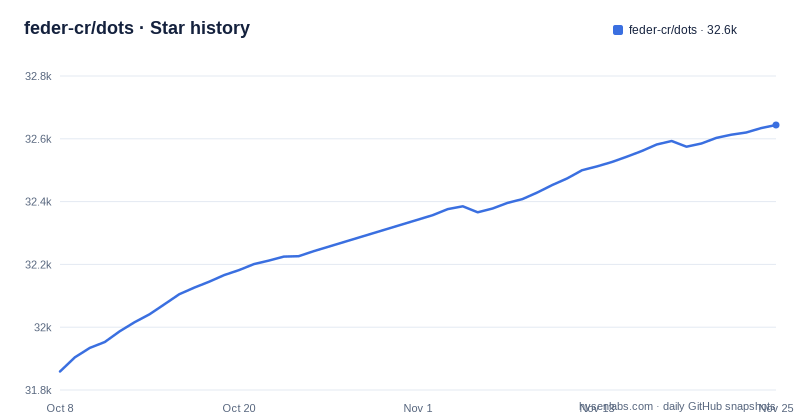
- feder-cr/dots32,644 ★ · +785
| Repository | 2026-10-08 | 2026-11-25 |
|---|---|---|
| feder-cr/dots | 31.9k | 32.6k |
785 Stars in the last 48 days, measured from the daily GitHub snapshot. Compare with other projects
Editorial analysis
The dependency line that explains the repository
The most revealing text in this repository is not in the README. It is a comment above the single entry in the `dependencies` list of `pyproject.toml`, and it is unusually blunt about what the project is:
dependencies = [
    # THE WHOLE PRODUCT IS THIS LINE.
    "invisible-playwright-mcp==0.70.2",
]
The comment goes on to explain that `dots` is the interface of `invisible-playwright-mcp` under another name, that the agent loop, the browser and the page all come from there, and that nothing in this repository re-implements any of it. The version is an exact pin rather than a floor, and the stated reason is that `cli.py` calls into that package's command group, which is not published API, so a new version is adopted on purpose with the test suite run against it.
That is a design decision, not an accident, and it is easy to respect. Depending on an unpublished internal entry point means a dependency release can break you without a breaking change notice, so freezing the version is the correct response. What it also means is that reading this repository tells you very little about how the agent actually works. The tree has eleven entries: `.gitattributes`, `.githooks/`, `.github/`, `.gitignore`, `LICENSE`, `README.md`, `pyproject.toml`, `src/` and `tests/`. There is no browser source here to read.
Installation from git, because there is no release
The Quickstart needs Node 24+, Go 1.25+, Git and hardware virtualization (x86-64), plus an OpenRouter key. On Linux (Ubuntu 24.04) it installs Node, git and Go, then runs git clone https://github.com/feder-cr/invisible_dots, npm ci and npm run build --workspace @invisible-dots/cli, then node apps/cli/dist/invisible-dots.mjs setup --all and node apps/cli/dist/invisible-dots.mjs server. The Windows PowerShell route uses winget to install Node.js LTS, Go and Git and then the same npm and node commands. The README says setup --all installs QEMU and turns on the accelerator (KVM, or the Windows Hypervisor Platform), then builds or downloads the Dot's images, and that running it again after a restart carries on. Then open http://127.0.0.2:3000, paste your OpenRouter key and create your first Dot. package.json reads version 0.0.0 and the release list holds golden image tags such as golden-9c2b3c5b93ef (2026-10-31) rather than version numbers.
The patched Firefox claim and the repository that would contain it
The README's browser claim is short: a Dot's browser is invisible_playwright_mcp, described as Firefox patched in C++ with the fingerprint set inside the engine, and each identity keeps its own cookies and logins. The Related projects section says that browser is built on invisible_playwright and invisible_core, and that the engine is a fork of nanobot. The patching lives in those other repositories, not in this one, so the claim cannot be checked from here. The README's example prompts show the intended workload: opening a named browser identity, checking one-way fares from Milan to Lisbon every morning and writing them to ~/workspace/fares.csv, and logging in to a shop with a shopping identity to download invoices. The repository has 32,357 stars and 4,738 forks.
Seeds, proxies and a profile directory as the identity surface
The README's table lists what a Dot has. Every tool belongs to a permission: allow, ask or deny, and an ask waits in your Inbox, survives a restart and runs the call once. Any MCP server you declare can be used, as in Claude Code, and its keys stay out of the config. A Dot writes its own notes and how-tos in its home folder and reads them on the next task. Tasks and automations run from a queue with priorities and start times, and it can be reached through the web UI, command line, HTTP API with live events, Telegram, and WhatsApp as an opt-in. A restart or a kill -9 keeps every message and task you saw accepted, and a tool call cut short is never run twice. The README's Disclaimer adds that a Dot acts with your accounts and from your connection, so you should respect the terms of the sites it visits and their robots.txt.
Topics that contradict the project's own disclaimer
The README opens by calling the project an open-source, self-hosted alternative to OpenAI Dots and Grok Bot, and its Disclaimer says the project is provided as-is, with no warranties, to be used at your own risk and in compliance with the laws of your jurisdiction. The licence is MIT: LICENSE exists in the tree, the metadata reports MIT, package.json declares MIT, and THIRD_PARTY_NOTICES.md lists third-party components and their licences. The repository is not archived; the last push was on 2026-10-31, with 4,738 forks and 5 open issues.
Where the README stops
The README is a short front page. It sends you to docs/guide.md for install, the web UI, the command line, the browser, channels, configuration and updating, and to docs/architecture.md for every component and why it is there, with troubleshooting and development-and-tests sections in the guide. For details of the engine, the browser patching and the VM images, read those documents and the linked invisible_playwright_mcp repository, and start with the guide's quickstart, which lists every step and its failure modes.
Editorial conclusion
dots is a self-hosted agent that gives each Dot a computer of its own and a browser that the README says is built to be undetectable by anti-bot systems. Start with the guide's quickstart and the architecture document, remember that the browser claims live in invisible_playwright_mcp, and check the hardware virtualization requirement (x86-64) and the OpenRouter key before you begin.
Frequently asked questions
Is feder-cr/dots the same thing as OpenAI's DOTS?
The README describes dots as an open-source, self-hosted alternative to OpenAI Dots and Grok Bot, so it is a separate project rather than OpenAI's own product.
Does dots contain its own patched Firefox build?
Not in this repository. The README's Related projects section says a Dot's browser is invisible_playwright_mcp, on invisible_playwright and invisible_core, and the feature table describes it as Firefox patched in C++ with the fingerprint set inside the engine.
How do I install dots, and how do I pick a version?
dots installs from source rather than with uvx: clone https://github.com/feder-cr/invisible_dots, run npm ci and npm run build --workspace @invisible-dots/cli, then node apps/cli/dist/invisible-dots.mjs setup --all and node apps/cli/dist/invisible-dots.mjs server, and open http://127.0.0.2:3000. The README shows no version selection; package.json reads 0.0.0 and the releases are golden image tags.
What do the --seed, --proxy and --profile-dir options actually control?
The current README does not list --seed, --proxy or --profile-dir. What it does describe is that each browser identity keeps its own cookies and logins, and that every tool belongs to a permission: allow, ask or deny.
Official sources
Add this badge to your README
If you maintain this project, the badge below links readers to this analysis and shows its maintenance status from the daily GitHub snapshot. Paste the markdown into your README; add ?metric=license or ?metric=stars to the image URL for a different field.

[](https://hysenlabs.com/projects/feder-cr-dots)Star history chart for your README
[](https://hysenlabs.com/projects/feder-cr-dots)Was this useful?