Glamorous Toolkit: a Smalltalk environment you reshape per problem instead of per project
Glamorous Toolkit is the Moldable Development Environment. It empowers you to make systems explainable through contextual micro tools.
At a glance
- What is it?
- Glamorous Toolkit is a Pharo-based environment whose central claim is that code reading is the bottleneck, and whose answer is contextual micro tools built inside the running system rather than a fixed set of IDE features. Adopting it means learning to program the environment, which is also the recommended way to learn it.
- Who is it for?
- Adopt Glamorous Toolkit if you spend your time reading other people's code, whether that is a Pharo codebase or, more often, a system in another language you have to understand before you can touch it, because the contextual tools are built for exactly that and can be authored with an LLM inside the same environment.
- Can I use it commercially?
- Yes. MIT is a permissive licence: you can use, modify and sell software built on it, as long as you keep its copyright and licence notices.
- Is it still maintained?
- Yes. The repository received new commits within the last day.
- What is it written in?
- Mainly Smalltalk, according to GitHub's language statistics.
Answers come from the project's GitHub data, last synced on November 7, 2026, and from our analysis. They are not legal advice.
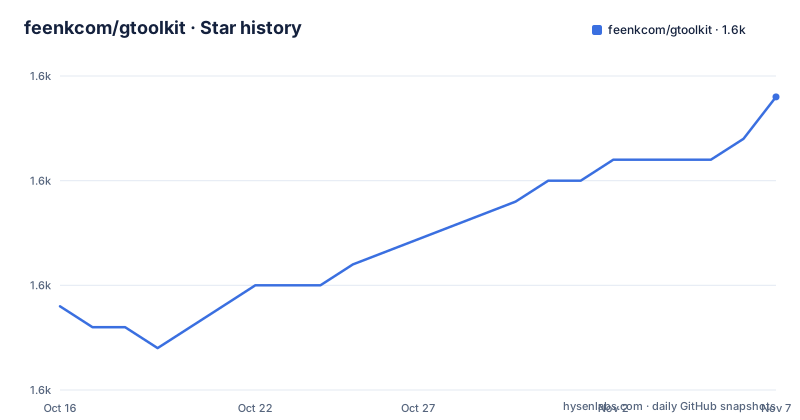
Star history
- feenkcom/gtoolkit1,594 ★ · +10
| Repository | 2026-10-16 | 2026-11-07 |
|---|---|---|
| feenkcom/gtoolkit | 1.6k | 1.6k |
10 Stars in the last 22 days, measured from the daily GitHub snapshot. Compare with other projects
Editorial analysis
The premise: code reading is the bottleneck
Glamorous Toolkit opens with a claim rather than a feature list: code reading is the bottleneck. Systems are too large, and AI generates code too fast.
That framing determines everything about the tool. An IDE treats understanding as something you do by navigating an existing set of views. A moldable development environment treats understanding as something you build a view for, per problem, and then throw away or keep.
The mechanism the README names is deterministic contextual tools that compress the system around each problem, helping humans and AI explore faster. Two words there carry weight. Deterministic means the tool gives the same answer when run twice, which is what distinguishes an analysis from a guess and what makes the output usable by an agent as well as by a person. Contextual means the tool is specific to the question, which is why they are described as micro tools rather than as features.
And the environment is meant to be built with, not just used. Build these tools yourself or with AI in one integrated environment. Writing the tool is a normal activity in the same environment where you read its output, so there is no boundary between analysis code and the system being analysed.
The audience, then, is people whose job is comprehension: engineers joining an unfamiliar codebase, or anyone trying to understand a system that is growing faster than they can read it.
Getting it: one download, or three build scripts
There are two ways in, and the difference is roughly ten minutes.
The ready made distribution is a download from gtoolkit.com/download. The README describes it as a self contained installation made of a Glamorous Toolkit image, a virtual machine, and a few other resources and libraries. So the artefact bundles the image and the runtime rather than asking you to assemble a Pharo environment first, which is the main reason to take it if your goal is to use the tools rather than to modify the toolkit.
Building from sources is for developing Glamorous Toolkit itself, and the README says it takes about ten minutes. It installs the VM, clones the sources and builds an image, through one script per operating system:
curl https://dl.feenk.com/scripts/mac.sh | bashcurl https://dl.feenk.com/scripts/linux.sh | bashOn Windows it is a PowerShell script rather than a pipe:
wget https://dl.feenk.com/scripts/windows.ps1 -OutFile windows.ps1; ./windows.ps1Two practical notes. Piping a script from a remote host into a shell is the same supply chain decision as the Fe one, in reverse: if you build from source you are executing code from dl.feenk.com. And the repository is organised for that workflow, with feenk-releaser.version, gtoolkit-builder.version and gtoolkit-vm.version at the root recording the component versions, plus a Jenkinsfile and scripts/ for the release process.
The learning problem, stated plainly by the project
The README is unusually direct about what adopting this costs: to leverage Glamorous Toolkit, you need to program it.
That is the whole learning story, and the recommended way through it is to learn from inside the environment rather than from documentation. The distribution is described as containing thousands of contextual tools that the maintainers used to develop and explain the environment itself, so the toolkit is its own worked example and its own tutorial.
Underneath the tools is a language made out of visual and interactive operators that can be combined in many ways. Learning that language is presented as the prerequisite rather than an optional extra, which is why the first thing recommended is a set of seven minute introductory videos.
The documentation shape is worth noting as well. The environment ships with an elaborate live book, and the README describes what is in it: concrete starting steps through selected introductory videos, hands-on tutorials such as exploring CSV data, practical setup notes for working with Git, and guidance for setting up LLM connections. The book is at book.gtoolkit.com and is the place where the actual learning material lives.
That structure, videos plus a live book plus a Discord, describes a project that expects to be learned socially rather than from a reference manual.
Moldable Development in practice: pick your own problem
Moldable Development is defined as adapting the environment to match the context. The README's guidance to a new user is specific and unusual: pick a problem you care about and work your way through it, ideally a reading problem related to understanding various artifacts.
The reasoning is stated too. It is one thing to see the environment applied to someone else's problem, and a whole other experience when you apply it to your problem. So a demo of Glamorous Toolkit on the maintainers' codebase is presented as evidence that it works, not as a workflow to copy.
Case studies in the book are offered for inspiration rather than as templates, which is consistent with that framing.
The areas the README names concretely are instructive for what the tools are for. CSV exploration is a data-shaped reading problem. Git setup notes are a workflow problem, not a code problem, which suggests the environment is intended to reach past the source tree into the surrounding work. And guidance for setting up LLM connections matters because the tools can be built with AI, which requires a configured model inside the environment rather than an external assistant.
That last point is the sharpest edge for a reader deciding today. The AI-assisted path to writing contextual tools depends on a setup step that has to happen inside the environment, and the README does not claim that path is instant.
Limitations and what you are committing to
The first limitation is language. Glamorous Toolkit is a Smalltalk system built on Pharo, and its operators, its tooling and its community are Smalltalk shaped. A team comfortable in another language can still use it as a reading environment, since reading another language's code is the stated problem, but nobody will be editing Pharo with it who does not already know Smalltalk.
The second is the learning investment the project does not hide. You need to program the environment, and the underlying operator language has to be learned before the tools make sense. There is no subset of Glamorous Toolkit you can adopt that avoids this, which is the cost of an environment rather than a tool.
The third is the release cadence, which is very fast. v1.1.618 shipped on 2026-10-12, v1.1.619 on 2026-10-13 and v1.1.620 on 2026-10-15. For an environment used daily, that pace means frequent updates and a moving target for anything you build on top. It also means the source is not stale, which matters given the age of the underlying Smalltalk tradition.
The fourth is that the project is self described around a workflow rather than around a feature set, so evaluating it by checking off capabilities is the wrong method. And the fifth is narrow in a way worth naming: it is an environment for understanding systems, not a place to run production code, and nothing in the README suggests otherwise.
The repository is not archived, the last push was on 2026-10-15, and the project is MIT licensed with a LICENSE file at the root plus a CITATION.cff, so it is fundable and citable in the usual way.
How the alternatives differ
The alternatives are a conventional IDE with a debugger, and a code intelligence tool that indexes a repository.
A debugger is the closest comparison and the difference is one of timing. A debugger answers questions you thought of in advance, by stopping and stepping. Contextual micro tools answer questions you had not thought of yet, by compressing the system into a view built for the moment. Neither replaces the other, and the reason to choose this environment is that your problem is comprehension rather than diagnosis.
A code intelligence tool, meaning a cross reference index plus semantic search, differs in that its views are fixed and built ahead of your questions. That is a real advantage on a codebase you already know, since no authoring is needed. It becomes a disadvantage exactly when the codebase is unfamiliar and the useful views are the ones nobody would have thought to write.
The third alternative is a notebook, and it is the closest in spirit if what you want is a place to write analysis next to results. The difference is scope: a notebook holds your analysis, while this environment lets you change the tools the analysis is made of, and the README makes that the point rather than the notebook.
So the deciding question is whether your next hour will be spent understanding something. If it will, an environment you reshape is the one that pays off.
Editorial conclusion
Adopt Glamorous Toolkit if you spend your time reading other people's code, whether that is a Pharo codebase or, more often, a system in another language you have to understand before you can touch it, because the contextual tools are built for exactly that and can be authored with an LLM inside the same environment. Do not adopt it expecting a familiar IDE: this is a Smalltalk environment with its own language of visual and interactive operators, so the first real cost is the learning curve the README describes as learning how to learn. Verify first which distribution you take, since the ready made download bundles an image, a virtual machine and libraries while building from sources takes about ten minutes and a per-OS script, and and note that releases are frequent, with v1.1.618 through v1.1.620 all landing by 2026-10-15.
Frequently asked questions
How do I download and install Glamorous Toolkit?
The ready made distribution at gtoolkit.com/download is a self contained installation of an image, a virtual machine and libraries. To build from sources, which the README says takes about ten minutes, run the mac.sh or linux.sh script from dl.feenk.com, or download and run windows.ps1 on Windows.
Do I need to know Smalltalk to use Glamorous Toolkit?
You need to program the environment, and the underlying language is made of visual and interactive operators rather than a text syntax. The project positions learning that language from inside the environment, through the distribution's own tools and a set of seven minute introductory videos, as the prerequisite.
What does moldable development mean in Glamorous Toolkit?
It means adapting the environment to match the context, so you build contextual micro tools that compress the system around a specific problem rather than using a fixed set of IDE views. The README encourages picking a problem you care about, ideally a reading problem, and working through it.
How often are Glamorous Toolkit releases published?
Very frequently. v1.1.618 was released on 2026-10-12, v1.1.619 on 2026-10-13 and v1.1.620 on 2026-10-15, and the last push to the repository was on 2026-10-15 with the repository not archived.
What licence is Glamorous Toolkit released under?
The project is MIT licensed, with a LICENSE file at the repository root. The repository also carries a CITATION.cff, a Jenkinsfile, and feenk-releaser.version, gtoolkit-builder.version and gtoolkit-vm.version recording component versions.
Official sources
Add this badge to your README
If you maintain this project, the badge below links readers to this analysis and shows its maintenance status from the daily GitHub snapshot. Paste the markdown into your README; add ?metric=license or ?metric=stars to the image URL for a different field.

[](https://hysenlabs.com/projects/feenkcom-gtoolkit)Star history chart for your README
[](https://hysenlabs.com/projects/feenkcom-gtoolkit)Was this useful?