FlaskBB: a classic Python forum you can host and extend
A classic Forum Software in Python using Flask.
At a glance
- What is it?
- FlaskBB is a Flask-based message board with a plugin system, a CLI and a Docker release stack. It suits small communities that want to own the code, not teams that want a managed service.
- Who is it for?
- Adopt FlaskBB if you want a self-hosted, themeable message board whose behaviour you can change in Python, and you are comfortable with a Flask deployment that includes PostgreSQL, Redis and Celery. Do not adopt it if you need a hosted service or a forum that runs without a worker and a database behind it.
- Can I use it commercially?
- Check first. The repository uses a licence we do not classify automatically, so read its LICENSE file before any commercial use.
- Is it still maintained?
- Yes. The repository received new commits within the last day.
- What is it written in?
- Mainly Python, according to GitHub's language statistics.
Answers come from the project's GitHub data, last synced on November 24, 2026, and from our analysis. They are not legal advice.
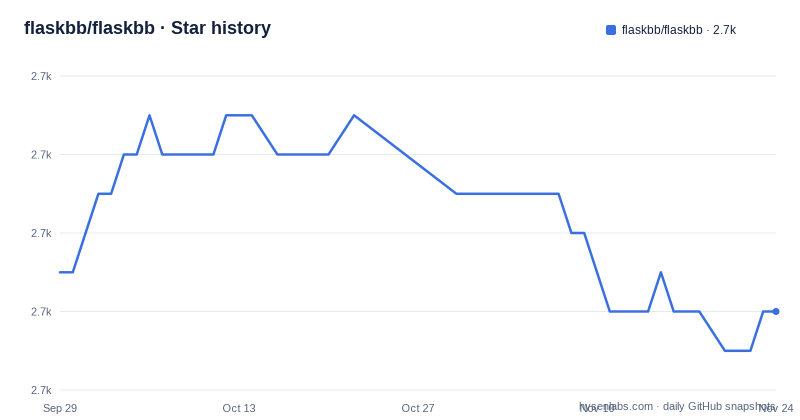
Star history
- flaskbb/flaskbb2,662 ★ · -1
| Repository | 2026-09-29 | 2026-11-24 |
|---|---|---|
| flaskbb/flaskbb | 2.7k | 2.7k |
-1 Stars in the last 56 days, measured from the daily GitHub snapshot. Compare with other projects
Editorial analysis
What FlaskBB solves, and for whom
Running a community usually means choosing between a hosted forum product and a pile of custom code. FlaskBB sits in the middle: it is a complete message board (categories, forums, topics, posts, unread tracking) written in Python on top of Flask, and the README frames the goal as staying "small enough that it is easy to host, theme and extend." That sentence is the whole pitch. If you are a Python developer who wants a forum you can read end to end, modify, and deploy on your own server, the project is aimed at you. If you are a community manager who wants to sign up somewhere and never touch a terminal, it is not.
The feature list is deliberately conventional. Markdown posts with syntax highlighting and emoji, attachments and avatars, group-based permissions with per-forum moderators, an admin panel, and full-text search for PostgreSQL and SQLite. None of that is unusual for forum software in 2026. What is less common is that the extension points are Python packages rather than a webhook API or a template hack. Plugins are discovered through entry points, and two of them, flaskbb-plugin-conversations and flaskbb-plugin-portal, are hard dependencies in pyproject.toml rather than optional extras. That tells you something about the intended shape of a FlaskBB install: conversations and a portal page are treated as part of the product, not add-ons.
How the pieces fit: Flask, pluggy and Celery
FlaskBB is a Flask application, so the request path is the familiar one: WSGI entry point, blueprints, Jinja2 templates, SQLAlchemy models. The repository has wsgi.py at the top level and a separate celery_worker.py, which is the clearest signal of the runtime shape. Anything that should not block a request (mail, and whatever else a plugin registers) is meant to go through Celery, with Redis as the broker. The dependencies back this up: celery, redis, Flask-Mail and Flask-Caching are all first-class requirements, not suggestions.
Extension happens through pluggy, the plugin library behind pytest. Plugins are regular Python packages that register entry points; FlaskBB discovers them, and they stay disabled until an administrator enables them in the admin panel or through the CLI. That two-step install is worth understanding before you plan a deployment: installing a plugin's Python package and activating it are separate actions. Themes work differently, through Flask-Themes2, which is why the README can point at a theme cookiecutter alongside the plugin one.
The rest of the stack is conventional Flask tooling: Flask-SQLAlchemy for models, Alembic (via Flask-Alembic) for migrations, Flask-Login for sessions, Flask-WTF for forms, Flask-Limiter for rate limiting, and Flask-BabelPlus for translations. The project ships translations for more than a dozen languages and manages them on Weblate. The practical consequence is that upgrading FlaskBB is not just a pip upgrade: it is an application upgrade plus a database migration plus, potentially, a plugin compatibility check.
Installing FlaskBB with Docker and starting a forum
The README gives two install paths. The Docker path pulls a release image built for linux/amd64 and linux/arm64. The repository also ships a complete release stack with PostgreSQL, Valkey, a Celery worker and gunicorn, which is the closest thing to a production-shaped setup you will get without writing your own compose file.
Start by pulling the image if you only want to inspect it:
docker pull ghcr.io/flaskbb/flaskbb:latestFor the full stack, clone the repository, copy the example environment file, and fill in the secrets. The README names SECRET_KEY, POSTGRES_PASSWORD and the ADMIN_* variables as the ones you must set:
git clone https://github.com/flaskbb/flaskbb.git
cd flaskbb
cp docker/.env.example docker/.env
Then bring the stack up. The README states the forum is served on localhost:8000:
docker compose -f docker/compose.release.yaml up -d --buildIf you would rather run from source, FlaskBB requires Python 3.12 or newer and uses uv to manage the environment. The Makefile wires the three steps together; make install prompts for the administrator's username, email and password, and the development server listens on localhost:5000:
git clone https://github.com/flaskbb/flaskbb.git
cd flaskbb
make devconfig
make install
make run
Once the forum is up, the first genuinely useful thing to try is the plugin flow, because it exercises the CLI and the enable step in one go. The README uses the like plugin as the example:
uv pip install flaskbb-plugin-like
uv run flaskbb plugins install like
uv run flaskbb plugins enable like
If those three commands succeed, your entry-point discovery, CLI and admin plumbing all work. Note the order: installing the package alone does nothing visible. The plugin stays disabled until it is enabled.
Where FlaskBB is the wrong choice
The deployment surface is the first thing to weigh. A serious FlaskBB install is a Flask app plus PostgreSQL plus Redis plus a Celery worker plus gunicorn plus a reverse proxy. The README points at the deployment guide for exactly that combination. If your community is a few dozen people on a small VPS, you are now operating a queue and a cache for a forum. The Docker release stack makes that manageable, but it does not make it small.
Plugin compatibility is the second constraint. Plugins are Python packages that hook into the application, so a plugin written against an older FlaskBB can break when the core changes. The project's own release history shows the risk: v2.1.0 in September 2021, then v2.2.0 in February 2026 and v2.2.1 in July 2026. A gap of more than four years between minor releases means plugins in the wild were written against a much older core. Check the plugin's own repository before you plan on it.
The third is licensing ambiguity in the metadata. The README badge and pyproject.toml both say BSD-3-Clause, but the repository's licence field is reported as NOASSERTION, and the README notes that code adapted from other projects is listed in NOTICE. If you are shipping FlaskBB inside a commercial product, read LICENSE and NOTICE together rather than trusting the badge alone. That is a factual observation about the files, not legal advice.
Finally, search is only as good as your database. Full-text search is documented for PostgreSQL and SQLite; if you run MySQL, do not assume the same behaviour.
FlaskBB against Discourse and Flarum
The obvious alternatives are Discourse (Ruby on Rails, PostgreSQL, Redis, Sidekiq) and Flarum (PHP, typically MySQL). Both are mature forum platforms with large theme and extension ecosystems, and both are heavier products than FlaskBB in terms of features out of the box: real-time updates, richer notification systems, and in Discourse's case a long list of moderation and trust-level machinery.
The difference that matters is the extension model. Discourse extensions are Ruby plugins loaded into the Rails app; Flarum extensions are PHP packages. FlaskBB plugins are Python packages discovered through pluggy entry points, which means a Python developer can write one without learning a new framework's plugin conventions. If your team already writes Python and you want forum logic to live in the same language as the rest of your tooling, that is a real advantage and it is the main reason to pick FlaskBB over the other two.
If your team does not write Python, the advantage disappears and you are left comparing feature lists, where FlaskBB is the smaller product. A classic message board with Markdown, attachments and group permissions is what it advertises, and that is what it delivers.
Maintenance, upgrades and what a version bump costs
The repository is not archived, and the last push was on 2026-09-19. Releases are infrequent rather than continuous: v2.1.0 in 2021, v2.2.0 in February 2026, v2.2.1 in July 2026. The Makefile exposes the maintenance tasks you will actually run: make test runs the suite with pytest, make format runs ruff for import sorting and reformatting, and make docs builds the Sphinx documentation. There is also a pre-commit configuration in the repository, so the project expects contributors to run those checks.
Upgrade cost comes from three places. First, database migrations: Flask-Alembic and Alembic are dependencies, so a version bump can require a migration step. Second, plugin compatibility, as described above. Third, the dependency floor is high: Python 3.12 or newer, Flask 3.1.3 or newer, and a long list of pinned minimums in pyproject.toml. If you are maintaining an older Python deployment, FlaskBB is not the place to stay on it.
On licensing, the README and pyproject.toml both state BSD-3-Clause, and the repository includes LICENSE, NOTICE and AUTHORS files. The NOTICE file exists specifically to record code adapted from other projects, so a redistribution review should include it. Nothing here suggests a copyleft obligation, but the discrepancy between the stated licence and the repository's NOASSERTION field is worth resolving with your own legal review before you ship.
Editorial conclusion
Adopt FlaskBB if you want a self-hosted, themeable message board whose behaviour you can change in Python, and you are comfortable with a Flask deployment that includes PostgreSQL, Redis and Celery. Do not adopt it if you need a hosted service or a forum that runs without a worker and a database behind it. Before committing, check the deployment guide for the gunicorn and reverse proxy setup, confirm that FlaskBB works with your target Python version (3.12 or newer), and review the NOTICE file for the licence status of code adapted from other projects.
Frequently asked questions
What Python version does FlaskBB require?
The README states that FlaskBB requires Python 3.12 or newer, and pyproject.toml sets requires-python to ">=3.12". The classifiers list Python 3.12 and 3.13.
How do I install FlaskBB?
The README gives two paths: pull the release image from the GitHub Container Registry and run the Docker release stack, or clone the repository and run make devconfig, make install and make run from source. The Docker stack serves the forum on localhost:8000, and the source setup on localhost:5000.
Does FlaskBB support plugins?
Yes. Plugins are regular Python packages discovered through entry points and built on pluggy. Newly installed plugins stay disabled until they are enabled in the admin panel or with the CLI, for example flaskbb plugins install and flaskbb plugins enable.
What is FlaskBB licensed under?
The README badge and pyproject.toml both state BSD-3-Clause, and the repository contains LICENSE, NOTICE and AUTHORS files. The repository's licence field is reported as NOASSERTION, and the README notes that code adapted from other projects is listed in NOTICE.
Which databases does FlaskBB full-text search support?
The README lists full-text search for PostgreSQL and SQLite, and notes it can be extended through plugins. No other database is mentioned for search.
Official sources
Add this badge to your README
If you maintain this project, the badge below links readers to this analysis and shows its maintenance status from the daily GitHub snapshot. Paste the markdown into your README; add ?metric=license or ?metric=stars to the image URL for a different field.

[](https://hysenlabs.com/projects/flaskbb-flaskbb)Star history chart for your README
[](https://hysenlabs.com/projects/flaskbb-flaskbb)Was this useful?