beets: a command line music library manager that fixes your tags
music library manager and MusicBrainz tagger
At a glance
- What is it?
- beets catalogs a local music collection, matches releases against MusicBrainz and rewrites metadata in place. It is built for people who own files, not for people who stream.
- Who is it for?
- beets is worth adopting if you keep music as files and want metadata corrected at the source, and you can accept that the first import is an interactive, reviewable pass rather than a one-shot command. It is the wrong tool if your library lives in a streaming service, or if you want a graphical player that manages the collection for you.
- Can I use it commercially?
- Yes. MIT is a permissive licence: you can use, modify and sell software built on it, as long as you keep its copyright and licence notices.
- Is it still maintained?
- Yes. The repository last received commits 3 days ago.
- What is it written in?
- Mainly Python, according to GitHub's language statistics.
Answers come from the project's GitHub data, last synced on November 13, 2026, and from our analysis. They are not legal advice.
Star history
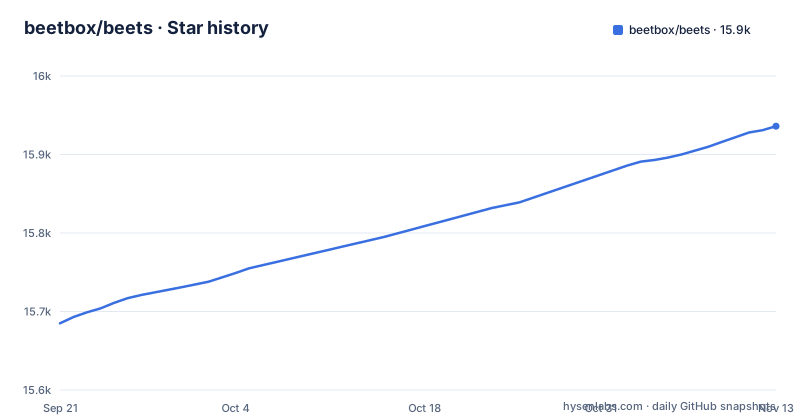
- beetbox/beets15,936 ★ · +251
| Repository | 2026-09-21 | 2026-11-13 |
|---|---|---|
| beetbox/beets | 15.7k | 15.9k |
251 Stars in the last 53 days, measured from the daily GitHub snapshot. Compare with other projects
Editorial analysis
The problem beets solves: tags that do not match the release
A ripped or downloaded album usually arrives with tags that are almost right. A track title is missing a word, an artist name is spelled two ways across two albums, and the folder structure reflects whoever uploaded it rather than the record. Players group by tag, so the album splits into three entries. beets is aimed at that specific mess. The README calls it "the media library management system for obsessive music geeks" and states its purpose plainly: to get a collection right once and for all. The audience is people who keep audio files on disk and care about the metadata inside them. If your listening happens entirely through a subscription service, there is nothing here for you to manage.
How import works: matching, similarity and the review step
The core command is beet import, pointed at a directory. The README shows an example run against a Ladytron album. beets queries MusicBrainz for candidate releases, compares them against the files it found, and prints a similarity percentage. In the README's example the match is 98.4 percent, and the output lists each proposed change as a before and after pair, for instance "Beauty -> Beauty*2". That diff is the mechanism worth understanding: beets does not silently overwrite tags. It proposes a set of edits, and the user reviews them. The project is a Python library first and a command line tool second. The README says that because beets is designed as a library it "can do almost anything you can imagine for your music collection", and that plugins are how that surface area is reached. The repository layout backs this up: the beets/ directory holds the core, and beetsplug/ holds the bundled plugins. Metadata sources beyond MusicBrainz are also plugins, and the README names Discogs and Beatport among them.
Installing beets and importing a first album
The README gives one install command: pip install beets. The package also appears in the software repositories of several distributions, and the README points to a Getting Started guide for that route. The pyproject.toml requires Python >=3.11 and <3.16. After installation the command line entry point is beet. The Getting Started guide is where the README sends readers for configuration details, so treat the defaults as a starting point rather than a final layout.
pip install beetsImporting is a single command against a directory of files. The README's example uses a folder of one artist's albums.
beet import ~/music/ladytronWhat you should see is a tagging report: the matched release, a similarity percentage, and a list of proposed tag changes. At that prompt you decide whether the match is correct. Approving writes the new tags to the files. Running the same command against a small test folder first is the cheap way to learn what the prompts look like before you point it at a library you cannot easily rebuild.
What the plugin list adds, and what it costs you
Plugins are where beets stops being a tagger. The README lists album art, lyrics, genres, tempos, ReplayGain levels and acoustic fingerprints as things beets can fetch or calculate. It also lists transcoding to other formats, duplicate detection, detection of albums missing tracks, embedding and extracting art from file metadata, a web browser interface with HTML5 audio playback, and an MPD-compatible server. Each of those is a separate plugin, not a default. That matters for two reasons. First, a fresh install does much less than the README's feature list suggests, and the configuration file is where you switch capabilities on. Second, plugins that reach the network (art, lyrics, fingerprints, genre lookup) introduce external services into your import path, and the README does not describe what happens when one of them is unavailable. The README does say that writing your own plugin is simple if you know a little Python, and the repository includes a docs/ tree with a plugin development section.
Where beets is the wrong tool
beets edits files. That is the design, and it is also the main hazard. An approved match rewrites tags in place, and the README does not document a rollback or an undo for an import that matched the wrong release. The similarity percentage is a heuristic; a compilation, a live bootleg or a self-released album may have no good MusicBrainz entry at all, in which case you are reviewing every field by hand or accepting a bad match. Libraries that are already carefully tagged gain little and risk churn. Anyone who wants a player rather than a librarian should look elsewhere: beets browses through a web interface and speaks MPD, but it is not a desktop music player, and the README presents those as access paths to a library, not as the product. Finally, the tool is Python and command line first. If you are not comfortable reading a config file and a terminal prompt, the import review flow will be friction rather than control.
Alternatives and the difference in approach
The closest comparison is MusicBrainz Picard. Picard is a graphical tagger: you load files, it fingerprints or looks them up, and you drag releases onto them. beets inverts the direction. It owns a library database, it decides where files live based on configuration, and it treats tagging as one step in an ongoing management process rather than a one-off session. That is why beets has plugins for duplicates, missing tracks and transcoding: those only make sense if the tool considers itself the keeper of the collection. If your need is occasional cleanup of a few albums, a graphical tagger is less setup. If your need is a rule for where every file goes and a way to re-apply that rule as the library grows, beets is the one built for it. The two are not mutually exclusive, but they assume different answers to the question of who holds the canonical state of the collection.
Maintenance, licence and upgrade cost
The repository is not archived, and the last push was on 2026-11-02. Releases are frequent: v2.14.1 on 2026-09-17, v2.14.0 on 2026-09-07, v2.13.1 on 2026-07-29. That cadence is a real cost as well as a benefit. The Python requirement is a floor of 3.11 and a ceiling below 3.16, so an interpreter upgrade on your machine can put you outside the supported range. The dependency list in pyproject.toml is not tiny: mediafile for tag reading and writing, confuse for configuration, jellyfish for string comparison, numpy with version-dependent pins, requests and requests-ratelimiter for network calls. Every one of those is a thing that can break an import. The licence is MIT, stated in both pyproject.toml and the LICENSE file. MIT is permissive, which means you can use beets in your own work with few obligations, but the licence text is the authority and this is not legal advice. The practical upgrade question is whether your configuration and plugin set still behave after a version bump, and the release notes are where that would be answered.
Editorial conclusion
beets is worth adopting if you keep music as files and want metadata corrected at the source, and you can accept that the first import is an interactive, reviewable pass rather than a one-shot command. It is the wrong tool if your library lives in a streaming service, or if you want a graphical player that manages the collection for you. Before pointing it at anything irreplaceable, copy one album into a scratch directory, run beet import on that copy, and read the similarity report before you press the key that approves the match. The configuration file and the plugin list are the two things to check next: they decide where files land and which of the optional features exist at all.
Frequently asked questions
How do I install beets?
The README gives pip install beets as the install command, and notes that beets is also packaged in the software repositories of several distributions. The project requires Python 3.11 or newer and below 3.16.
How do I use beets on a music folder?
Point the beet import command at a directory, as in the README's example beet import ~/music/ladytron. beets matches the files against MusicBrainz, prints a similarity percentage and a list of proposed tag changes, and waits for you to approve them.
Does beets need a separate server or web interface to work?
No. The command line tool is the core, and browsing through a web browser or playing through an MPD client are optional plugins listed in the README rather than requirements.
Can I undo an import if beets matched the wrong album?
The README does not document a rollback for an approved import, so the review prompt before approval is the point at which a bad match should be rejected. Testing on a copy of an album is the safe way to see the prompt flow first.
Which metadata sources can beets use besides MusicBrainz?
The README names MusicBrainz, Discogs and Beatport as sources, and also mentions guessing metadata from filenames or acoustic fingerprints. Discogs and Beatport access come through plugins.
Official sources
Add this badge to your README
If you maintain this project, the badge below links readers to this analysis and shows its maintenance status from the daily GitHub snapshot. Paste the markdown into your README; add ?metric=license or ?metric=stars to the image URL for a different field.

[](https://hysenlabs.com/projects/beetbox-beets)Star history chart for your README
[](https://hysenlabs.com/projects/beetbox-beets)Was this useful?