Flatcar: the hub repository for an immutable container Linux
Flatcar project repository for issue tracking, project documentation, etc.
At a glance
- What is it?
- The flatcar/Flatcar repository is the project's community and documentation hub rather than the operating system source itself. It points at Ignition provisioning, automatic updates, the release process, governance and the interop matrix, and it has no releases of its own.
- Who is it for?
- flatcar/Flatcar is worth reading if you are evaluating Flatcar Container Linux, because it is the map of the project: the documentation entry points, the release channels, the governance model and the security policy, in one place. It is not the operating system, so cloning it gives you no kernel, no SDK and nothing to run, and it publishes no GitHub releases, so it will never show up as a version you can pin.
- Can I use it commercially?
- Yes. Apache-2.0 is a permissive licence: you can use, modify and sell software built on it, as long as you keep its copyright and licence notices.
- Is it still maintained?
- Yes. The repository last received commits 2 days ago.
- What is it written in?
- GitHub does not report a main language for this repository.
Answers come from the project's GitHub data, last synced on November 7, 2026, and from our analysis. They are not legal advice.
Star history
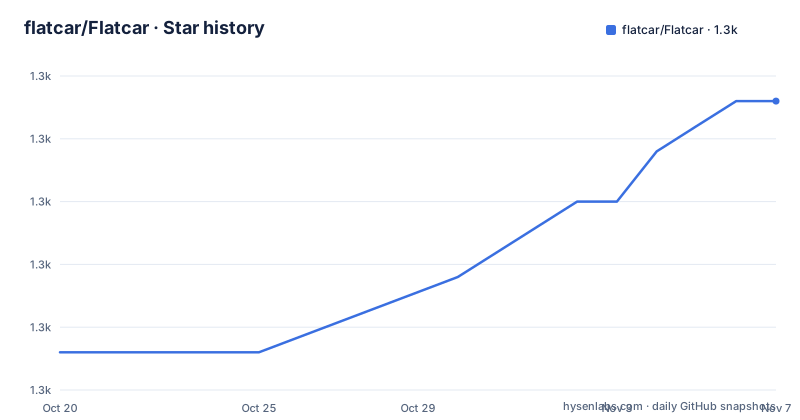
- flatcar/Flatcar1,299 ★ · +10
| Repository | 2026-10-20 | 2026-11-07 |
|---|---|---|
| flatcar/Flatcar | 1.3k | 1.3k |
10 Stars in the last 18 days, measured from the daily GitHub snapshot. Compare with other projects
Editorial analysis
A community hub, not the operating system
The repository description says it plainly: this is the Flatcar project repository for issue tracking, project documentation and similar purposes.
That makes this repository a map rather than a machine. The top level tree is filled with documents and process files, which is the clearest evidence of what it is for: `ADOPTERS.md`, `adding-new-packages.md`, `governance.md`, `interop-matrix.md`, `proposals/`, `RELEASES.md`, `SECURITY.md`, `ONBOARDING.md`, `MAINTAINERS.md`, `EMERITUS_MAINTAINERS.md`, `CODEOWNERS`, `CODE_OF_CONDUCT.md` and `CONTRIBUTING.md`, alongside `CIS/`, `attic/` and the GitHub workflow directory.
There is no build system, no source tree and no package manifest here. The primary language field is even recorded as unknown, because there is no meaningful source code to summarise. The repository has no GitHub releases, which is consistent with that role, and the last push was on 2026-10-05, so it is a living project directory rather than an archive.
For a reader deciding whether to run Flatcar, the practical value of this repository is that it is where the release process, the governance rules and the compatibility statements are written down, and where a central issue tracker is declared.
No package manager and a read-only root filesystem
Flatcar Container Linux is described as a fully open source, minimal-footprint, secure by default and always up-to-date Linux distribution for running containers at scale. Two design decisions define it, and both are stated in the README.
The first is that Flatcar ships only the essentials needed to run containers, with no package manager at all, no `apt` and no `yum`, and therefore no configuration drift. The second is that the root filesystem is read-only, which the README presents as minimizing attack surfaces.
The consequence for an operator is that you cannot install things the usual way. Instead you declare the state you want at boot time through Ignition, and the OS applies it atomically. Updates then happen automatically in the background and take effect on the next reboot, with no manual patching.
That model is not right for every workload. If your workflow depends on installing packages at runtime, or on editing system files in place, the immutability is a constraint rather than a feature. The README positions the audience as teams running container workloads in Kubernetes or Docker, in cloud or on-premise environments, where security, reproducibility and low maintenance overhead are the priorities.
Ignition provisioning and the update channel
Ignition is the mechanism that replaces the package manager, and the README describes the flow in one sentence: you declare the desired state at boot, the OS applies it atomically, and updates are applied automatically in the background and take effect on the next reboot.
The documentation entry point is the Getting Started page, which the README says covers Ignition, local testing with QEMU, automatic updates and cloud providers. That list tells you the shape of a first deployment: get a local VM running under QEMU before you touch a cloud provider, so that you can see the provisioning happen without a cloud bill attached.
Updates are worth thinking about separately, because an image-based system changes the operational model. A node does not patch itself in place and reboot when you tell it to. It downloads an update in the background and the running system keeps serving until the next reboot, at which point the new filesystem is in place. Whether that suits you depends on how you schedule reboots and how you handle the window where different nodes are on different versions.
The community talks listed in the README point the same way, with sessions covering Ignition provisioning, automatic updates via Nebraska, and sysext extensions. Sysext extensions in particular are the mechanism for adding software to an image-based system without rebuilding the base image, which is how a read-only, package-manager-free distribution stays useful.
The interop matrix, CIS benchmarks and the release process
Three of the repository's linked documents answer the questions an adopter actually has, and they are listed in the README's resource table.
The interoperability matrix, `interop-matrix.md`, is the one to read first. It states which combinations of components are tested together, so a container runtime, a orchestrator and a Flatcar release can be checked against each other before you commit to a version combination. Without it you are guessing at which pairing is supported.
The CIS reports under `CIS/` relate to Centre for Internet Security benchmarks, which are a set of hardening checks for Linux systems. A container-focused immutable OS is a natural candidate for such a checklist, and shipping the reports tells you how the distribution scores against it rather than leaving you to guess.
The release process, and the LTS channel in particular, are documented in `RELEASES.md` and the Release Process section of the README's table of contents. Current release listings live at flatcar.org/releases, not in the repository, which is the normal pattern for a project where the artifacts are images rather than a source tarball.
The tree also carries `proposals/`, `ADOPTERS.md`, and `adding-new-packages.md`, which is the practical companion to the no-package-manager model: it describes how software gets added to the image when it is not in the base.
Governance, maintainers and where to file things
The repository carries a full governance surface, which is a signal about how the project is run.
`governance.md` states the rules, `MAINTAINERS.md` lists the current maintainers and `EMERITUS_MAINTAINERS.md` records those who have stepped back, a practice that keeps the decision-making body small and documented. `ONBOARDING.md` is the path for someone joining the project, `CODEOWNERS` maps files to owners for review, and `CODE_OF_CONDUCT.md` sets the conduct rules. `SECURITY.md` is where vulnerability reports go, which is a file worth checking before you run anything in production.
Issues have a single destination. The README asks that issues for any Flatcar repository be filed in the central Flatcar issue tracker at github.com/flatcar/Flatcar/issues, rather than in the repository of whichever component you happened to notice the problem in. That is a deliberate choice to keep the queue in one place, and it means a bug report filed against the wrong repository will land in the right one anyway.
The project also points to a Discord, a Slack channel in the Kubernetes workspace, and a set of social accounts, and the community calendar includes community meetings, office hours and developer syncs. The project has been accepted into the CNCF, which the first of the listed talks covers in detail along with governance and roadmap.
The Apache-2.0 licence and what is not here
The repository is licensed under Apache-2.0, with the licence text in the `LICENSE` file at the top level.
It is worth being explicit about the negative space, since that is where confusion comes from. This repository does not contain the Linux kernel, the SDK, the container runtime configuration for your platform, or the images themselves. It does not tell you how to install Flatcar, because the README routes that to the documentation site at flatcar.org rather than to a script in the tree. There are no GitHub releases, so no version tag on this repository corresponds to a Flatcar release.
That last point has a practical consequence. If you are pinning a Flatcar version for a deployment, you pin an image channel or a release listed at flatcar.org/releases, not a commit in this repository. And if you want to know whether a given combination is supported, the interop matrix and the release notes, not the git history here, are the sources of truth.
So the correct way to use this repository is as a directory. It tells you where the documentation, the release channels, the security process and the governance live, and it points at the talks and the code of conduct for the people running the project. Everything you would actually install comes from somewhere else.
Editorial conclusion
flatcar/Flatcar is worth reading if you are evaluating Flatcar Container Linux, because it is the map of the project: the documentation entry points, the release channels, the governance model and the security policy, in one place. It is not the operating system, so cloning it gives you no kernel, no SDK and nothing to run, and it publishes no GitHub releases, so it will never show up as a version you can pin. Before deploying Flatcar, read the Getting Started page on flatcar.org, check interop-matrix.md for the container runtimes in scope, and follow the project rather than this repository for the actual image channels.
Frequently asked questions
What is the flatcar/Flatcar repository?
It is the Flatcar project repository for issue tracking, project documentation and similar purposes, rather than the operating system source. The tree is mostly governance and process files such as governance.md, RELEASES.md, SECURITY.md, MAINTAINERS.md and interop-matrix.md.
Does Flatcar have a package manager?
No. Flatcar ships only the essentials needed to run containers, with no package manager such as apt or yum, and its root filesystem is read-only. You declare the state you want at boot time through Ignition and the OS applies it atomically.
How do Flatcar updates work?
Updates happen automatically in the background and take effect on the next reboot, with no manual patching required. The release process and the LTS channel are described in RELEASES.md and the release process section, and current releases are listed at flatcar.org/releases.
Where should I file a bug for Flatcar?
The README asks that issues for any Flatcar repository be filed in the central Flatcar issue tracker at github.com/flatcar/Flatcar/issues, rather than in the repository of the specific component.
How do I check which Flatcar versions work with my setup?
The repository links an interoperability matrix at interop-matrix.md that states which component combinations are tested together, and CIS reports under the CIS directory for hardening benchmark results. The documentation site is at flatcar.org.
Official sources
Add this badge to your README
If you maintain this project, the badge below links readers to this analysis and shows its maintenance status from the daily GitHub snapshot. Paste the markdown into your README; add ?metric=license or ?metric=stars to the image URL for a different field.

[](https://hysenlabs.com/projects/flatcar-flatcar)Star history chart for your README
[](https://hysenlabs.com/projects/flatcar-flatcar)Was this useful?