YGOPro: a Lua-scripted Yu-Gi-Oh! rules engine with a sample GUI
A script engine for "yu-gi-oh!" and sample gui
At a glance
- What is it?
- YGOPro is a C++ script engine for the Yu-Gi-Oh card game that reads rules from Lua scripts and card data from .cdb databases. Its bundled GUI is labeled a sample in the project description, and ocgcore is a separate submodule for teams that want only the rules layer.
- Who is it for?
- YGOPro suits developers who need a working Yu-Gi-Oh! rules engine without writing card logic from scratch. Card rules live in Lua scripts, and the command-line flags let launchers open specific modes and select decks without user interaction: the mode flag must come last, with -n, -h, -p and -w placed before it.
- Can I use it commercially?
- Yes, with conditions. GPL-2.0 is a copyleft licence: if you distribute software that includes it, you must release that software's source code under the same licence. Running it internally without distributing it does not trigger that obligation.
- Is it still maintained?
- Yes. The repository last received commits 2 days ago.
- What is it written in?
- Mainly C++, according to GitHub's language statistics.
Answers come from the project's GitHub data, last synced on October 23, 2026, and from our analysis. They are not legal advice.
Star history
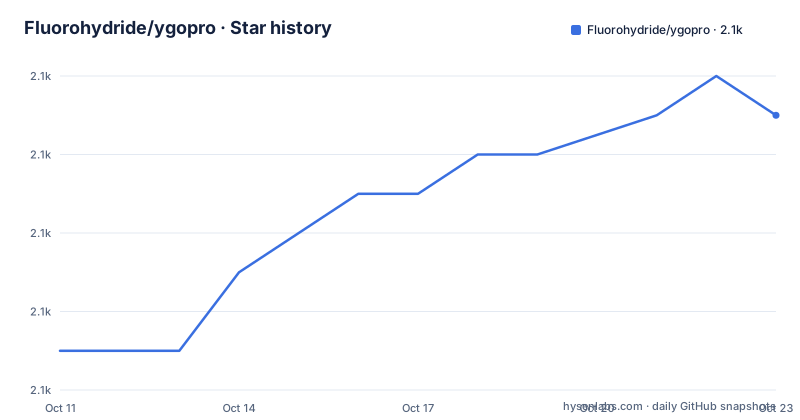
- Fluorohydride/ygopro2,067 ★ · +6
| Repository | 2026-10-11 | 2026-10-23 |
|---|---|---|
| Fluorohydride/ygopro | 2.1k | 2.1k |
6 Stars in the last 12 days, measured from the daily GitHub snapshot. Compare with other projects
Editorial analysis
Card rules in Lua scripts, card data in .cdb files, and a GUI the README labels as provisional
YGOPro divides its content into three independently managed layers. Card rules are written in Lua and stored in the script/ directory as individual .lua files, one per card effect, so each card's behavior can be updated without touching the compiled C++ binary. Card databases use the .cdb format, loaded at startup or added through the expansions/ directory. Graphics and card images live in separate directories: pics/ holds .jpg card images sized at 177x254 pixels, and textures/ holds other image files.
Describing the GUI as a 'sample' in the project's one-sentence description is not a disclaimer: it communicates the architecture. gframe/ contains the interface code, and it is meant to be replaced by anyone building a finished client. ocgcore, tracked as a submodule in .gitmodules, is the engine component that handles rule evaluation, and it can be targeted directly without pulling in the gframe/ interface code. Projects that want a working rules engine without a bundled interface treat gframe/ as a reference and ocgcore as the actual dependency.
Deck files use the .ydk extension and live in deck/. Replay recordings of completed duels use the .yrp extension and are stored in replay/.
Four launch modes, three LAN parameters and a flag-ordering rule that silently drops misplaced options
YGOPro accepts eleven command-line options. Five of them select a launch mode: -d opens the deck editor, -c creates a LAN host with default settings, -j joins an existing host, -r loads a replay file and -s opens a puzzle in single mode. These five mode flags must be placed last in the argument list, because any argument placed after one of them is ignored without a warning. Batch scripts and launchers that place the mode flag in the middle of an argument list will find that subsequent flags have no effect.
Joining a LAN game combines three parameter flags before the -j mode flag: -h sets the host address (the README gives 192.168.0.2 as the example), -p sets the port (7911 in the example) and -w sets the password (abc in the example). Creating a host uses -c in place of -j, and the same -h, -p and -w parameters apply.
Two flags adjust session behavior. Adding -k before the mode flag prevents the engine from exiting when the duel or editing session ends, which is the option the README calls out for launcher use. Combining -d with -j changes what -d does: it selects a deck for the duel rather than opening it for editing, which is the only flag in the set with two different behaviors depending on context.
Timing keys map to three pacing modes; function keys expose opponent zones without leaving the board view
During a duel, three keyboard keys manage how the engine advances through game states: A pauses at every timing step, S skips every timing step and D pauses only at available timings. A and S are the two extremes, and D is the selective middle path that stops when a player decision is available but not otherwise.
Holding S through a complex turn advances the duel at maximum speed, but it also passes through any timing windows where a response might be legal. A player who needs to monitor every phase uses A instead. D is the practical option for a duel where most phases are automatic but some require attention.
ESC minimizes the window rather than closing it. R corrects a font rendering issue that the README names without further detail.
Function keys F1 through F4 open popup views for your grave, banished zone, extra deck and Xyz materials in that order. F5 through F8 show the same four zones for the opponent. A player who wants to check both graveyards can press F1 and then F5 in sequence without leaving the main board view, since the function key views overlay without ending the duel state.
Blue text encodes face-down status in zone views but encodes controller mismatch in Xyz material views
Card display uses two color systems layered independently. Background color tracks card ownership: white indicates your cards and grey indicates the opponent's. Text color is a second encoding layer, but it carries a different property depending on which popup window is open, which creates a color that means two things depending on context.
In zone popup views for deck, extra deck and banished zone, black text marks a face-up card and blue marks a face-down one. In the Xyz material popup, that same blue indicates a different state: the owner of the Xyz material is different from its current controller. Black in the Xyz view marks the default state where owner and controller are the same.
A player who learned 'blue means face-down' from the zone views will read blue on an Xyz material incorrectly. The README documents the two meanings in separate subsections, grouping them under different headers rather than noting the shared color. Reading both sections before relying on the color coding is the only way to build a correct mental model, because the display provides no label indicating which interpretation applies.
Zone numbers count left to right on the main row and bottom to top on stacks and piles
Integer identifiers map each board position to a number used in Lua scripts and replay files. Monster Zone positions run 1 through 5 from left to right. Spell and Trap Zone positions run 1 through 5 from left to right in parallel below the monster row. Field Zone is assigned the number 6. Pendulum Zone uses 0 and 1 from the left, starting at 0 rather than 1, which differs from every other main zone.
All other zones use a bottom-to-top scheme, numbering entries 1 through n from the bottom. Graveyard, banished zone, extra deck and Xyz materials all count this way.
Lua scripts that target a specific zone by index must use the correct zone identifier and counting direction. A card effect that targets the third entry in a stack counts from the bottom, so the third Xyz material from the top is not entry 3 but entry n-2. A script author who conflates the left-to-right counting of the main row with the bottom-to-top counting of the stacks will address the wrong entry without any runtime error identifying the mistake. Knowing which zones use which direction requires reading the Sequence section in the README.
Deck search understands three prefix modes, and archetype matching depends on script data rather than name
All numeric text boxes in the deck editor accept five comparison operators: >, =, <, >= and <=, which filter by card attributes. Name searches work in three modes that differ by prefix character. Entering text with no prefix searches both card name and card text together. A dollar sign prefix restricts the search to card names only. An at sign prefix searches by archetype.
Archetype search contains a limitation the README documents explicitly in a parenthetical note: a card whose name contains an archetype word is not automatically classified under that archetype. The note attributes this to translation: because of how card names are translated between regions, the name can include the archetype word without the database marking the card with that archetype in the script data. Searching @foo returns only cards the database has explicitly marked as that archetype, regardless of whether the card name includes the word.
This matters for any build that imports a database from a different localization of the card game, where translation differences can leave archetype tags inconsistent with the name text. A deck built in that setup using @foo may silently exclude cards that belong to the archetype by rule but whose database entry lacks the archetype marker.
Premake5 builds the project; the ocgcore submodule is the engine-only alternative to the full gframe setup
Building YGOPro from source uses premake5 as the build system. premake5.lua sits at the repository root, and a premake/ directory holds its configuration. The repository also contains .gitmodules tracking at least the ocgcore submodule, which must be resolved before premake5 can compile the project correctly. No build steps are written out in the README, so working out the correct premake5 invocation requires reading premake5.lua directly.
For projects that want only the rules engine, targeting ocgcore from .gitmodules is the narrower path. gframe/ holds the sample interface code, and a project that does not need any display layer can bypass it by depending on ocgcore directly. This separation is the design the README signals when it calls the GUI a sample: the interface and the engine have different module boundaries, and projects are expected to replace gframe/ rather than extend it.
The repository was last pushed on 2026-10-06 under a GPL-2.0 license. A Chinese-language wiki page is linked at the top of the README as the primary extended documentation source.
Editorial conclusion
YGOPro suits developers who need a working Yu-Gi-Oh! rules engine without writing card logic from scratch. Card rules live in Lua scripts, and the command-line flags let launchers open specific modes and select decks without user interaction: the mode flag must come last, with -n, -h, -p and -w placed before it. Anyone building a full client should treat the gframe/ code as a reference implementation rather than a finished product, since the README explicitly describes it as a sample. Building from source starts with premake5.lua and requires resolving the ocgcore entry in .gitmodules.
Frequently asked questions
Does YGOPro support multiplayer?
LAN multiplayer is supported. Use -c to create a host with default settings and -j to join one. The -h, -p and -w flags set the host address, port and password for a LAN connection.
What file format does YGOPro use for decks?
Decks are stored as .ydk files in the deck/ directory. When loading a deck from the command line with -d, the filename should not include the .ydk extension.
How do I add a custom card database to YGOPro?
Place any .cdb file in the expansions/ directory and it loads automatically at startup. Alternatively, pass -e on the command line to load a specific .cdb file as an extra database.
Does YGOPro save game replays?
Replays are saved as .yrp files in the replay/ directory. Load a saved replay with -r followed by the filename including its .yrp extension.
What keyboard shortcut shows the opponent's graveyard in YGOPro?
F5 opens a popup view of the opponent's graveyard. F1 through F4 show your own grave, banished zone, extra deck and Xyz materials. F5 through F8 show the same four zones for the opponent.
Official sources
Add this badge to your README
If you maintain this project, the badge below links readers to this analysis and shows its maintenance status from the daily GitHub snapshot. Paste the markdown into your README; add ?metric=license or ?metric=stars to the image URL for a different field.

[](https://hysenlabs.com/projects/fluorohydride-ygopro)Star history chart for your README
[](https://hysenlabs.com/projects/fluorohydride-ygopro)Was this useful?