flutter/packages: the first-party Flutter package monorepo
A collection of useful packages maintained by the Flutter team
At a glance
- What is it?
- flutter/packages is the companion repository to the Flutter SDK and holds the source for packages developed by the core Flutter team. It is a source tree, not a product: you adopt individual packages from pub.dev, and you file bugs in the main flutter repo.
- Who is it for?
- Adopt the individual packages from pub.dev if you need a first-party camera, cross_file or animations implementation, and accept that the release cadence is tied to the Flutter team rather than to you. Do not clone flutter/packages expecting a supported product surface, and do not send your own package there: the README states the repo is only intended for packages developed by the core Flutter team.
- Can I use it commercially?
- Yes. BSD-3-Clause is a permissive licence: you can use, modify and sell software built on it, as long as you keep its copyright and licence notices.
- Is it still maintained?
- Yes. The repository last received commits 2 days ago.
- What is it written in?
- Mainly Dart, according to GitHub's language statistics.
Answers come from the project's GitHub data, last synced on November 15, 2026, and from our analysis. They are not legal advice.
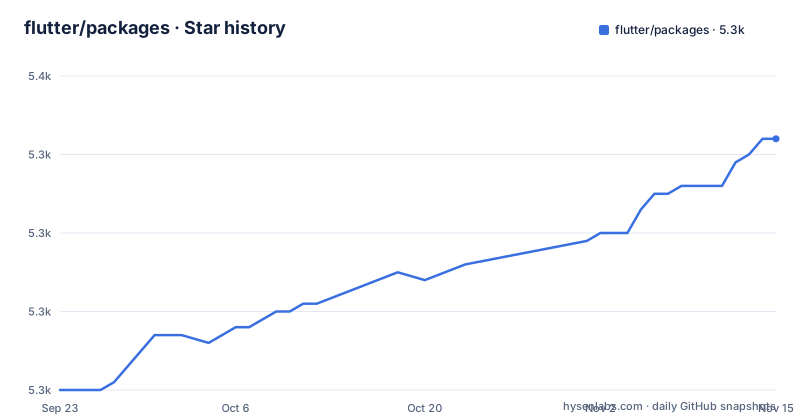
Star history
- flutter/packages5,342 ★ · +32
| Repository | 2026-09-23 | 2026-11-15 |
|---|---|---|
| flutter/packages | 5.3k | 5.3k |
32 Stars in the last 53 days, measured from the daily GitHub snapshot. Compare with other projects
Editorial analysis
What flutter/packages is, and who it is actually for
The README is explicit that this repository is a companion to the main flutter repo and contains the source code for Flutter's first-party packages, meaning packages developed by the core Flutter team. That framing answers the audience question before any code does. The primary reader is someone working inside the Flutter ecosystem who needs the source of a package the Flutter team ships, whether to read the implementation, to send a patch, or to check what a pub.dev release actually contains.
The secondary reader is a package author looking for a model. The contributing section points to the documentation for developing packages and says you can store your package source in any GitHub repository. That sentence is doing real work: it tells you this repo is not a publishing venue for the community. If your goal is to get a package in front of Flutter users, the README sends you to pub.dev, not here.
The package table in the README lists the hosted packages with links into the packages and third_party directories. Entries include animations, camera, cross_file, cupertino_icons, cupertino_ui, espresso and extension_google_sign_in_as_googleapis_auth. The table also carries pub points, usage and issue badges per package, which is the closest thing to a status board the repository offers.
How the repository is laid out and where issues actually go
The top level mixes package source with tooling. There is packages/ for the first-party packages, third_party/ for packages such as cupertino_icons, script/ for repository scripts, and configuration files including .ci.yaml, analysis_options.yaml, .repo_tool_config.yaml, CONTRIBUTING.md, AGENTS.md and SUGGESTED_REVIEWERS.md. The presence of .agents/ and .gemini/ directories alongside AGENTS.md indicates agent-oriented configuration lives in the tree as well.
One structural detail matters more than the rest. The README states that issues, bugs and feature requests should be filed in the main flutter repo, and that issues pertaining to this repository are labeled package. So the issue tracker you would expect to find here does not exist as a separate destination. Bug reports, feature requests and triage all happen upstream, filtered by a label. For a contributor this changes the workflow: you do not open an issue next to the code, you open it in a different repository and hope the label routing works.
Pull requests, by contrast, do target this repository, and the README points to CONTRIBUTING.md before you send one. The split is deliberate but it does put a gap between the code and its discussion.
Installing a first-party package and using it
You do not install the repository. The README says the packages are also available on pub, and the package table links each one to its pub.dev page. So the install path is the normal Dart dependency path against pub.dev.
Add the dependency to your pubspec.yaml. The README's table names the packages, so the name below comes straight from it.
yaml dependencies: flutter: sdk: flutter cross_file:
Then resolve it from the command line. The repository does not document a special install command, because there is none: pub handles it.
bash flutter pub get
After that the package is importable in Dart code the same way as any other pub dependency, and the package's own README inside packages/ is the place to look for its API. If you want the source rather than the published artifact, clone the repository and look under packages/ for the directory matching the package name in the table.
If you intend to modify a package locally, the README's contribution guide is the entry point rather than any install instruction, and the CI configuration at .ci.yaml governs how changes are validated.
The camera package shows the platform-boundary cost
camera is the clearest example of what first-party status buys and what it costs. A camera implementation has to talk to platform APIs on each supported platform, which means the Dart surface you depend on sits on top of native code that the Flutter team maintains in this repository. That is the argument for using it: the native layer and the Dart layer move together under one owner.
The cost is that platform behaviour is not uniform, and the README's package table shows pub, points, usage, issue and pull request badges rather than platform support. The badges in the package table point at pub.dev for points and usage, which means the repository itself is not the place where you learn whether camera works on your target platform. You have to go to the package page and its own documentation.
That is a real limitation of using this repository as an evaluation surface. It is a source tree with a package index, not a compatibility reference.
Where flutter/packages is the wrong choice
If you are choosing a package for a production app, this repository is the wrong first stop. The README documents where the code lives and where to file issues. Those are different questions from the ones an adoption decision turns on.
It is also the wrong place for community packages, by design. The README states plainly that the present repo is only intended for packages developed by the core Flutter team, and that you can store your package source in any GitHub repository. If you arrived here because you want your package hosted alongside the official ones, the answer is no, and the README says so before you open a pull request.
There is a third case: if you need a fix on your own schedule. Because issues are routed to the main flutter repo under the package label, and because releases are cut by the Flutter team, your timeline is not the deciding factor. A package you can patch and publish yourself gives you control this repository does not offer.
A real alternative: publish and depend on pub.dev directly
The alternative is not a competing repository, it is the pub.dev model the README itself points to. Instead of depending on a first-party package because it lives in flutter/packages, you depend on whichever package on pub.dev solves the problem, first-party or not, and you evaluate it on its own package page.
The difference in approach is ownership. A package in this repository is maintained by the core Flutter team, which means its release cadence and its platform support follow the team's priorities. A package published by an independent author is maintained by that author, which means the cadence follows theirs and the support boundary is whatever they document. Neither is automatically better. What changes is who you are waiting on when something breaks.
The README supports this reading. It tells contributors they can host package source anywhere and publish to the pub repository, and it points readers at pub.dev for the packages hosted here. The repository is a source location; pub.dev is the distribution channel for both first-party and community packages.
Maintenance, licensing and what an upgrade actually costs
The repository is not archived, and the last push was on 2026-11-02. The most recent GitHub release is pigeon-v29.0.4 on 2026-09-25.
The licence is BSD-3-Clause, stated at the repository level. That is a permissive licence, which matters if you are vendoring or modifying first-party package code rather than depending on it from pub.dev. It does not remove the obligation to keep the copyright notice and licence text with redistributed source, and it does not tell you anything about the licence of any individual package's dependencies. Check the LICENSE file and the package's own metadata rather than assuming the repository-level licence covers everything downstream. This is a description of the repository licence, not legal advice.
The upgrade cost is structural rather than documented. Because issues are filed in the main flutter repo under the package label, and because the packages are distributed through pub.dev, your upgrade path runs through pub and your Flutter SDK version, not through anything this repository tells you.
Editorial conclusion
Adopt the individual packages from pub.dev if you need a first-party camera, cross_file or animations implementation, and accept that the release cadence is tied to the Flutter team rather than to you. Do not clone flutter/packages expecting a supported product surface, and do not send your own package there: the README states the repo is only intended for packages developed by the core Flutter team. Before depending on any of them, verify the package page on pub.dev and check whether your issue belongs in the main flutter repo under the package label, because that is where the README directs bug reports.
Frequently asked questions
What is flutter/packages?
It is the companion repository to the main flutter repo, containing the source code for Flutter's first-party packages, meaning packages developed by the core Flutter team. The README points readers to the packages directory for the full list.
How do I install a package from flutter/packages?
You install the published package from pub.dev rather than the repository itself. The README states the packages are also available on pub, and each row of the package table links to its pub.dev page.
Where do I report a bug in a package from flutter/packages?
The README asks you to file issues, bugs and feature requests in the main flutter repo, where issues pertaining to this repository are labeled package. Pull requests, by contrast, go to this repository.
Can I contribute my own package to flutter/packages?
No. The README says the present repo is only intended for packages developed by the core Flutter team, and that you can store your package source in any GitHub repository and publish it to pub.dev.
What licence does flutter/packages use?
The repository is under BSD-3-Clause. That is the repository-level licence, and the repository carries a LICENSE file.
Official sources
Add this badge to your README
If you maintain this project, the badge below links readers to this analysis and shows its maintenance status from the daily GitHub snapshot. Paste the markdown into your README; add ?metric=license or ?metric=stars to the image URL for a different field.

[](https://hysenlabs.com/projects/flutter-packages)Star history chart for your README
[](https://hysenlabs.com/projects/flutter-packages)Was this useful?