FDFullscreenPopGesture: A Zero-Config Fullscreen Back Swipe for iOS Navigation Controllers
GitHub describes it as A UINavigationController's category to enable fullscreen pop gesture with iOS7+ system style.. The repository metadata lists Objective-C as its primary language. The metadata lists the MIT license. This article stays within the project description and details documented in the GitHub repository README.
At a glance
- What is it?
- This Objective-C category adds the iOS 7 style fullscreen pop gesture to any UINavigationController via AOP, with no setup beyond adding two files. It is a mature, MIT-licensed drop-in, but it has clear limitations around scroll views and navigation bar appearance that you should verify before adopting.
- Who is it for?
- Adopt FDFullscreenPopGesture if you need a quick, no-configuration fullscreen back swipe on iOS 7 and later and are comfortable with AOP-style swizzling. Avoid it if your app relies heavily on scroll views with horizontal panning, or if you need per-view-controller navigation bar hiding without the extra property.
- Can I use it commercially?
- Yes. MIT is a permissive licence: you can use, modify and sell software built on it, as long as you keep its copyright and licence notices.
- Is it still maintained?
- Probably not. The repository last received commits 64 months ago, on July 8, 2021.
- What is it written in?
- Mainly Objective-C, according to GitHub's language statistics.
Answers come from the project's GitHub data, last synced on October 21, 2026, and from our analysis. They are not legal advice.
Star history
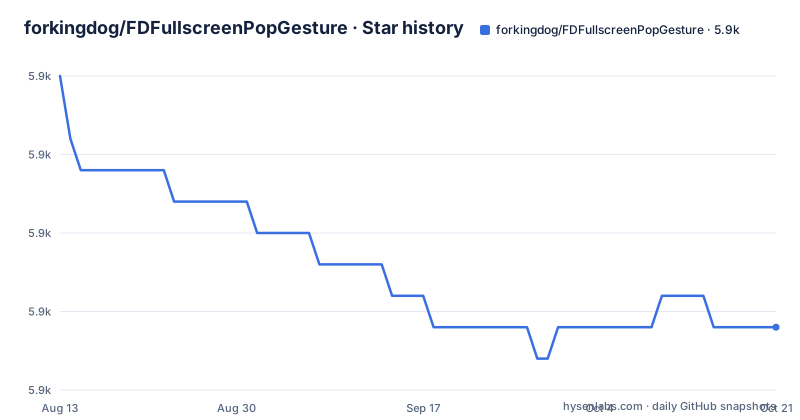
- forkingdog/FDFullscreenPopGesture5,872 ★ · -8
| Repository | 2026-08-13 | 2026-10-21 |
|---|---|---|
| forkingdog/FDFullscreenPopGesture | 5.9k | 5.9k |
-8 Stars in the last 69 days, measured from the daily GitHub snapshot. Compare with other projects
Editorial analysis
The Problem: iOS's Edge-Only Back Swipe
Since iOS 7, UINavigationController has provided an interactive pop gesture, but it only works when the user swipes from the left edge of the screen. Many apps want the fullscreen swipe that Android users expect. FDFullscreenPopGesture solves that by replacing the default edge gesture with a fullscreen pan gesture recognizer attached to the navigation controller's view. The README credits the idea to a Chinese blog post by @J_雨, which is a rare case of a project explicitly acknowledging its intellectual debt. The target audience is any iOS developer using UINavigationController who wants the system-style fullscreen back swipe without writing custom gesture handling for each view controller.
How It Works: AOP and Swizzling
The project is a category on UINavigationController, and it uses AOP (aspect-oriented programming) to inject behavior. The README says you just add two files and no setup is needed; all navigation controllers automatically get the fullscreen pop gesture. This is achieved by swizzling methods in the navigation controller's lifecycle, likely in the `load` or `initialize` method, though the exact mechanism is not detailed in the README. The key point is that it replaces the default interactivePopGestureRecognizer's delegate and adds a new fullscreen gesture recognizer. The category also provides two public properties: `fd_fullscreenPopGestureRecognizer` on the navigation controller, and `fd_interactivePopDisabled` on any view controller. This design means the gesture can be disabled per navigation controller or per view controller, which is a clean API.
Installation and First Run
Installation is straightforward via CocoaPods. The README gives the exact podspec line: `pod 'FDFullscreenPopGesture', '1.1'`. If you prefer not to use CocoaPods, you can copy the two source files into your project, since the README says 'just add 2 files'. There is no configuration step. After adding the files, every navigation controller in your app will have the fullscreen pop gesture enabled by default. To disable it for a specific navigation controller, you set `navigationController.fd_fullscreenPopGestureRecognizer.enabled = NO;`. For a specific view controller, you set `viewController.fd_interactivePopDisabled = YES;` in its `viewDidLoad` or before it is pushed. This is a rare case where a library's default behavior is 'on', which is convenient but also means you must be aware of the gesture taking over in all your screens.
Navigation Bar Appearance: A Hidden Feature
The README describes a feature that is not immediately obvious from the project name: view controller based navigation bar appearance. When using the fullscreen gesture to push or pop, the navigation bar transition is handled properly, even when one view controller has a bar and the other does not. The README lists three cases: bar to no bar, no bar to bar, and no bar to no bar. The optimization is enabled by default, and it replaces the need to call `setNavigationBarHidden:animated:` on the navigation controller. Instead, each view controller sets `self.fd_prefersNavigationBarHidden` to YES or NO in its `viewDidLoad`. This property defaults to NO, meaning the bar is shown by default. This is a significant convenience for apps that hide the bar on some screens, but it is also a potential source of confusion because it changes the standard API. The README notes a typo ('opmiziation'), which is a minor editorial issue but does not affect functionality.
The ScrollView Conflict and Its Workaround
A known limitation is that the fullscreen pop gesture can conflict with scroll views, particularly when the user swipes horizontally. The README explicitly addresses this: if you have a view controller with a scrollView (or subclass), you must customize the scroll view's `gestureRecognizer:shouldRecognizeSimultaneouslyWithGestureRecognizer:` method. The provided code checks if the scroll view's contentOffset.x is less than or equal to 0, and if the other gesture recognizer's delegate is of class `_FDFullscreenPopGestureRecognizerDelegate`, it returns YES. This is a fragile approach because it relies on a private class name, which could break if the library's internal implementation changes. The workaround is not automatic; every scroll view that needs the pop gesture must implement this delegate method. This is a genuine maintenance cost, as you have to remember to add this code to each scroll view subclass. If you forget, the gesture may not work or may block scrolling.
Alternatives and the Trade-off
The most direct alternative is to implement your own fullscreen pop gesture by subclassing UINavigationController and overriding `interactivePopGestureRecognizer` with a custom UIPanGestureRecognizer. This gives you full control and avoids the AOP magic, but it requires more code and you must handle the navigation bar transition yourself. Another alternative is to use a third-party library like `FDFullscreenPopGesture`'s cousin, `JZNavigationExtension`, which offers similar functionality but with a different API (it uses a category on UINavigationController but with different property names and a more explicit configuration). The key difference is that FDFullscreenPopGesture is truly zero-config, while JZNavigationExtension requires you to set properties on each navigation controller. The trade-off is between convenience and control. If you need to customize the gesture behavior per screen, the manual approach is better. If you want a quick win, FDFullscreenPopGesture is hard to beat.
Maintenance and License Considerations
The project is MIT-licensed, which means you can use it in commercial projects with attribution. The README does not mention any maintenance history, and the repository has no recent releases, so it is likely a stable but dormant project. The last push is unknown, which is a red flag for long-term support. The code is small (just two files), so the risk is low, but you should review the source for any iOS 13+ changes, particularly around the navigation bar appearance and gesture recognizer APIs. The README states it requires iOS 7.0, which is ancient, but the code may still work on modern iOS versions. However, Apple has changed navigation bar behavior over the years, so the bar transition feature might not be perfect on iOS 15+. Before adopting, inspect the swizzled methods and test on your target iOS versions. The scroll view workaround is a specific point to verify, as it relies on a private class name.
Editorial conclusion
Adopt FDFullscreenPopGesture if you need a quick, no-configuration fullscreen back swipe on iOS 7 and later and are comfortable with AOP-style swizzling. Avoid it if your app relies heavily on scroll views with horizontal panning, or if you need per-view-controller navigation bar hiding without the extra property. Before integrating, verify that the gesture recognizer's simultaneous recognition behavior fits your scroll view hierarchy, and confirm that the navigation bar appearance transitions work as expected in your push/pop flows. The project is stable and MIT-licensed, but it has not seen recent activity, so check the source for any iOS 13+ compatibility issues.
Frequently asked questions
How do I add the fullscreen pop gesture to a UINavigationController with FDFullscreenPopGesture?
Add the two source files and no setup is needed: every navigation controller gets the gesture automatically, because the category is applied through aspect oriented programming. To turn it off, set navigationController.fd_fullscreenPopGestureRecognizer.enabled = NO for a whole navigation controller, or viewController.fd_interactivePopDisabled = YES for a single view controller.
What is the minimum iOS version for FDFullscreenPopGesture?
At least iOS 7.0. The gesture it restores is described as the iOS 7 system style fullscreen pop gesture, so the library exists to recover that interaction on an application running on a much newer system.
How do I use the pop gesture in a view controller with a scroll view?
You have to subclass the scroll view and overload the simultaneous gesture recognition delegate method, returning YES when the content offset x is at or below zero and the other recognizer's delegate is a kind of the class returned by NSClassFromString for the private delegate name. Since that class name is private to UIKit, the comparison silently fails if the system ever renames it.
Does FDFullscreenPopGesture still need the setNavigationBarHidden method?
The readme says you no longer need to call the navigation controller's setNavigationBarHidden:animated: method. The category handles the bar transition across the with bar to without bar, without bar to with bar, and without bar to without bar cases, and you set the view controller's fd_prefersNavigationBarHidden property instead, which defaults to NO.
How is FDFullscreenPopGesture installed and what version does it ship?
Through CocoaPods, with pod 'FDFullscreenPopGesture', '1.1', which is an exact pin rather than a range. The release notes list only 1.1, covering view controller based navigation bar appearance and transition, and 1.0, covering the fullscreen pop gesture itself, and the repository has no GitHub releases to compare against.
Official sources
Add this badge to your README
If you maintain this project, the badge below links readers to this analysis and shows its maintenance status from the daily GitHub snapshot. Paste the markdown into your README; add ?metric=license or ?metric=stars to the image URL for a different field.

[](https://hysenlabs.com/projects/forkingdog-fdfullscreenpopgesture)Star history chart for your README
[](https://hysenlabs.com/projects/forkingdog-fdfullscreenpopgesture)