former: a Laravel style form builder that emits Bootstrap markup
A powerful form builder, for Laravel and other frameworks (stand-alone too)
At a glance
- What is it?
- Former is a PHP form builder for Laravel and other frameworks, and its approach is a fluent chain that produces HTML matching Bootstrap or Foundation, repopulates fields after a validation error and renders the error text next to the field that caused it. The API is short and readable, and it leans on a magic rule where any method that does not exist becomes an HTML attribute.
- Who is it for?
- Adopt former if you build Laravel applications whose forms are mostly Bootstrap or Foundation markup and you want the error repopulation and the error placement handled in one place. Do not adopt it if your forms need arbitrary markup, since the fluent API covers the common field types and nothing else, and do not ship it into an organisation that needs a stated licence without checking, because the repository does not carry a licence file.
- Can I use it commercially?
- Not without permission. GitHub finds no licence file in the repository, and without a licence all rights are reserved by default: you may read the code but not reuse it. Check the README, or ask the authors, before using it.
- Is it still maintained?
- Activity is slowing. The repository last received commits 7 months ago.
- What is it written in?
- Mainly PHP, according to GitHub's language statistics.
Answers come from the project's GitHub data, last synced on November 6, 2026, and from our analysis. They are not legal advice.
Star history
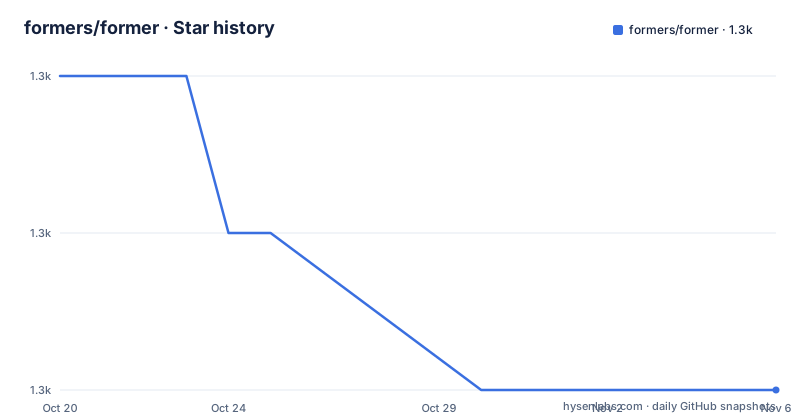
- formers/former1,329 ★ · -2
| Repository | 2026-10-20 | 2026-11-06 |
|---|---|---|
| formers/former | 1.3k | 1.3k |
-2 Stars in the last 17 days, measured from the daily GitHub snapshot. Compare with other projects
Editorial analysis
A fluent chain that writes framework specific markup
Former is described in its own README as a Laravelish way to create and format forms, and the repository description calls it a powerful form builder, for Laravel and other frameworks, stand-alone too.
The mechanism is a chain of calls that opens a form, adds fields, and closes it, with the framework selected up front:
Former::framework('TwitterBootstrap3');

Former::horizontal_open()
  ->id('MyForm')
  ->rules(['name' => 'required'])
  ->method('GET');

  Former::xlarge_text('name') # Bootstrap sizing
    ->class('myclass') # arbitrary attribute support
    ->label('Full name')
    ->value('Joseph')
    ->required() # HTML5 validation
    ->help('Please enter your full name');

  Former::textarea('comments')
    ->rows(10)
    ->columns(20)
    ->autofocus();

  Former::actions()
    ->large_primary_submit('Submit') # Combine Bootstrap directives like "lg and btn-primary"
    ->large_inverse_reset('Reset');

Former::close();
Two things in that snippet are worth naming. The framework is chosen once with a string, and the field methods carry the framework vocabulary with them, so xlarge_text is a Bootstrap sizing variant and large_primary_submit combines Bootstrap directives like lg and btn-primary into a single call.
The second is the error story, which is stated in the README as a first class feature rather than a convenience. Former outputs form elements in HTML compatible with your favourite CSS framework, with Bootstrap and Foundation currently supported, and it handles repopulation after validation errors, including automatically rendering error text with affected fields. In a Laravel application that means the field a user got wrong comes back filled in and labelled with the message from the validator, without the view having to re-render each old value by hand.
The package is on Packagist as anahkiasen/former, and the documentation lives in the project wiki, with the README explicitly inviting readers to consult it for the extent of what Former does.
Any method that does not exist becomes an attribute
The rule that makes the API short is stated plainly in the README. Every time you call a method that does not actually exist, Former assumes you are trying to set an attribute and creates it magically.
That is why the example can write ->rows(10) and ->columns(20) on a textarea without those being named methods. It is also the same reason a field can carry ->class('myclass') and ->help('...') without every HTML attribute having a bespoke method.
The dash handling follows from the same rule. If you want to set attributes that contain dashes, you replace them with underscores, so ->data_foo('bar') equals data-foo="bar". And if you need an attribute that actually contains an underscore, the fallback method setAttribute('data_foo', 'bar') is there to use instead.
The benefit is obvious. You can set any attribute on any field without the library having to anticipate it, and the library grows new named methods only for the things that carry meaning, like a label, a value, a help text or a required flag.
The cost is equally obvious and worth stating before you adopt it. A misspelled method does not fail, it becomes an attribute. If you write ->requried() instead of ->required(), you get a form with a requried attribute and no validation flag, and the library has no way to tell you. The same applies to a named method that takes different arguments than you expect, since the fallback accepts whatever it is given. It is a fluent API that trades compile time errors for a shorter surface, and the debugging story for a typo is that the attribute simply appears in the output and nothing else happens.
rules, horizontal_open and the actions block
A few of the methods in the example carry more weight than the rest, and they are worth looking at individually.
horizontal_open opens a form with a class that makes the fields lay out horizontally, and it is a chain like any other, so id, rules and method are all set on it. The rules method takes an array, in the example ['name' => 'required'], which is a validation rule map in the shape Laravel's validator already understands.
The field methods cover the common input types and, as the comment on xlarge_text notes, carry Bootstrap sizing with them. Text fields, textareas, and then an actions block for the submit and reset buttons, where large_primary_submit and large_inverse_reset are the framework specific names.
The value in this shape is that the entire form reads as a single expression of intent, and the framework details are expressed in the vocabulary of the framework rather than in raw class attributes. A reader who knows Bootstrap can predict the output without running anything.
What it does not cover is anything the library has not modelled. There is no indication in the README of support for a rich text editor, a file input with a custom layout, a multi select with a template, a repeater of fields, or a widget that renders a related model. For a form made of inputs, labels, help text and buttons, the API is complete. For a form with a field that behaves unusually, you are back to raw HTML inside the chain, which is the point at which a form builder stops helping.
Installing with Composer and publishing the configuration
Installation is two steps, and the second one is easy to miss.
composer require anahkiasen/formerThen the configuration files are published with artisan:
php artisan vendor:publish --provider="Former\FormerServiceProvider"That second command is what makes the framework selection and the styling settings configurable rather than hard coded, and it is a Laravel specific step. The README notes that the package is not Laravel only, since the description says it works for other frameworks and stand-alone too, but the documented installation path here is the Laravel one, and the configuration publishing is done through artisan.
The package name is worth a second look. The repository is formers/former, and the Packagist badge points at anahkiasen/former, and that is the name you require with Composer. The author field in the earlier versions of the project is why the two differ, but the practical point is that composer require anahkiasen/former is the command that resolves the package this repository builds.
The repository layout is small and conventional for a PHP package. There is a composer.json, a phpunit.xml, a src/ directory, a tests/ directory, a CHANGELOG.md and a CONTRIBUTING.md, with the GitHub workflows in .github/.
The Laravel 5.4 instructions date the documentation
The installation section has a subsection for what it calls the App.php config for Laravel 5.4 and below, and it is worth reading as a signal rather than as instructions you will follow.
For those versions you must modify config/app.php. In the providers array you add Former\FormerServiceProvider::class, and then in the aliases array in the same file you add the facade:
Former\FormerServiceProvider::class'Former' => 'Former\Facades\Former',That manual registration is the shape Laravel used before automatic package discovery. The fact that the README still documents it means the project supports older Laravel releases alongside newer ones, and that the primary installation path, the composer require plus artisan vendor:publish pair, assumes a Laravel version with automatic discovery and without the config/app.php edits.
The repository does not state a minimum Laravel or PHP version, which is a gap for an evaluator. The rules method taking an array that mirrors Laravel's validator syntax, the use of a facade, and the artisan publishing command all point at Laravel, but the exact supported range is not written down, and the wiki is where that would be.
On the release side, the tags are 5.1.0 from 2025-03-11, 5.1.1 from 2025-07-18 and 5.2.0 from 2026-04-12. The last push to the repository was on 2026-04-12 as well, and the project is not archived. There is a CHANGELOG.md at the root, so the history between the tags is recorded there.
The licence is the item that needs a decision rather than a note. The licence field in the repository's own metadata is unknown, and there is no licence file in the tree, so the terms are not stated in the place you would normally find them.
Hand written markup versus a form builder
The alternative to Former is to write the HTML yourself, and for a small form that is a serious option rather than a formality.
The difference in approach is where the responsibility sits. A hand written form is a template with literal markup, and the two things Former automates become your work. The first is repopulation, which in a framework with an old input helper or a session flash means echoing the submitted value into each field. The second is error placement, which means deciding, per field, whether the message goes next to the label, above the input, as a tooltip or in a summary at the top.
Former moves both of those into the library, and adds framework compatibility, so the same form definition produces Bootstrap markup or Foundation markup depending on one string. The gain is largest in an application with a lot of forms and a consistent framework, and in a Laravel application with validation rules, where the error message and the field are already linked in the validator and the library can put the two together.
The cost is the abstraction itself. You give up the ability to emit exactly the markup you want, because the output is decided by the framework string and the named methods, and you gain a dependency whose behaviour on an unknown method is to create an attribute rather than to fail. A form with a bespoke layout, or one that needs a control the library does not model, ends up mixing generated markup with raw HTML.
The deciding question is narrow and practical: does the form fit the set of field types the library models? If it does, the builder saves more than it costs. If the form is the unusual one on the page, hand written markup is the clearer choice.
Editorial conclusion
Adopt former if you build Laravel applications whose forms are mostly Bootstrap or Foundation markup and you want the error repopulation and the error placement handled in one place. Do not adopt it if your forms need arbitrary markup, since the fluent API covers the common field types and nothing else, and do not ship it into an organisation that needs a stated licence without checking, because the repository does not carry a licence file. Verify first that the framework string you pass matches the CSS framework you actually load, that the package you require, anahkiasen/former, is the one this repository publishes, and that your Laravel version does not need the legacy provider and alias registration described for 5.4 and below.
Frequently asked questions
How do I install the former form builder?
Require the package with Composer using composer require anahkiasen/former, then publish the configuration files with php artisan vendor:publish --provider="Former\FormerServiceProvider". The repository is formers/former but the Packagist package name is anahkiasen/former.
How does former handle validation errors and repopulating fields?
The README states that Former handles repopulation after validation errors, including automatically rendering error text with affected fields, and that it outputs form elements in HTML compatible with Bootstrap or Foundation.
How do I set an arbitrary HTML attribute with former?
Every method that does not exist is treated as an attribute setter, so you can call ->rows(10) or ->class('myclass'). Dashes become underscores, so ->data_foo('bar') equals data-foo="bar", and the fallback setAttribute('data_foo', 'bar') is available for attributes that genuinely contain an underscore.
What licence is former released under?
The licence field in the repository's own metadata is unknown, and there is no licence file in the top level entries of the tree, so the terms are not stated where you would normally find them. Check the project wiki and Packagist before using it in a product.
Official sources
Add this badge to your README
If you maintain this project, the badge below links readers to this analysis and shows its maintenance status from the daily GitHub snapshot. Paste the markdown into your README; add ?metric=license or ?metric=stars to the image URL for a different field.

[](https://hysenlabs.com/projects/formers-former)Star history chart for your README
[](https://hysenlabs.com/projects/formers-former)Was this useful?