FOSSA CLI dependency analysis, setup, and limits
Fast, portable and reliable dependency analysis for any codebase. Supports license & vulnerability scanning for large monoliths. Language-agnostic; integrates with 20+ build systems.
At a glance
- What is it?
- FOSSA CLI detects dependencies across multiple languages and build systems, then sends analysis results to FOSSA for license, vulnerability, and attribution reporting. Its usefulness depends on a working project build and access to a FOSSA API key.
- Who is it for?
- FOSSA CLI is appropriate for developers and engineering teams that need one dependency-analysis command across heterogeneous repositories and want reports delivered through FOSSA. It is a poor fit for fully offline analysis, repositories whose build metadata cannot expose dependencies, or teams unable to accept the repository's custom licensing terms.
- Can I use it commercially?
- Check first. The repository uses a licence we do not classify automatically, so read its LICENSE file before any commercial use.
- Is it still maintained?
- Yes. The repository received new commits within the last day.
- What is it written in?
- Mainly Haskell, according to GitHub's language statistics.
Answers come from the project's GitHub data, last synced on October 23, 2026, and from our analysis. They are not legal advice.
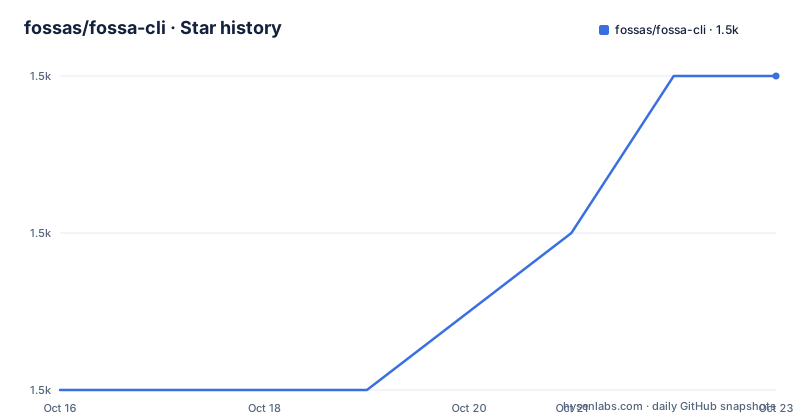
Star history
- fossas/fossa-cli1,526 ★ · +2
| Repository | 2026-10-16 | 2026-10-23 |
|---|---|---|
| fossas/fossa-cli | 1.5k | 1.5k |
2 Stars in the last 7 days, measured from the daily GitHub snapshot. Compare with other projects
Editorial analysis
What FOSSA CLI solves in multi-language repositories
FOSSA CLI addresses dependency inventory across codebases that do not share one language or package manager. The README describes it as a zero-configuration polyglot dependency analysis tool that can inspect a codebase or build and automatically detect dependencies. Its intended users are developers and engineering teams that need a consistent analysis entry point across repositories built with different tools. The repository metadata identifies 20-plus build-system integrations, although the README does not enumerate them in its main text.
The analysis is broader than license file collection. According to the README, FOSSA CLI integrates with FOSSA to support dependency analysis, license scanning, vulnerability scanning, attribution report generation, and other reporting functions. The executable is therefore the detection and submission layer, while `app.fossa.com` stores the uploaded analysis and presents its report. The README does not claim that the CLI alone provides a complete local vulnerability database or a standalone report viewer.
That division matters when selecting FOSSA CLI. Teams looking for a local software composition analysis engine may expect results to remain on the build host. The documented workflow instead requires `FOSSA_API_KEY` and uploads an analysis to the FOSSA web application. For organizations with strict data-handling requirements, that service dependency needs separate review. The README does not document an offline mode, so offline operation cannot be inferred from the repository description's use of the word "portable."
Detection flow from source tree to FOSSA report
The documented flow begins with `fossa analyze` in a project directory. The command identifies the project and revision, detects the relevant dependencies, and uploads the analysis through the configured FOSSA account. The example output includes a project name, a Git revision, branch information, and a FOSSA report URL. In the example, the revision is `09ca72e398bb32747b27c0f43731678fa42c3c26` and the branch is reported as detached HEAD.
FOSSA CLI prefers integrating with the project's build tool when a working build is available. The README says this direct integration lets it identify dependencies rather than infer them from source code. If the build cannot run, it attempts to infer available results from source. That fallback is explicitly described as less reliable than using the build metadata, although the README does not specify detection confidence, exit codes, or behavior for every unsupported build.
Based on the repository layout, the product is not a small script despite its CLI form. The root `spectrometer.cabal`, `src/`, and `test/` directories reflect the Haskell implementation, while `Cargo.toml`, `.cargo/`, and `extlib/` show a Rust Cargo workspace containing several members. The `Makefile` builds the native components in sequence through `cargo build --release` and `cabal build fossa`. This mixed implementation matters for maintainers who need to account for two native toolchains rather than a single package manager.
Installing FOSSA CLI and running the first analysis
On macOS or 64-bit Linux, the README provides a shell installer that downloads the latest GitHub release. It may be necessary to put the downloaded executable on `$PATH`; the installer prints the installed path, and `install-latest.sh` accepts `-b` for selecting the installation directory.
curl -H 'Cache-Control: no-cache' https://raw.githubusercontent.com/fossas/fossa-cli/master/install-latest.sh | bashFor macOS, Homebrew is another documented route. The following block updates Homebrew and installs the `fossa` cask. The README states that its CLI version is updated to the latest version every three hours.
brew update
brew install --cask fossa
After installation, the binary should be named `fossa` and available on `$PATH`. A FOSSA API key is required by the documented workflow. Export the key in the current shell, navigate to the repository root, and run the analysis from there.
export FOSSA_API_KEY=XXXX
cd $MY_PROJECT_DIR
fossa analyze
The placeholder `XXXX` stands for the API key obtained from the FOSSA web application. The command output should identify the selected project and revision and print a `View FOSSA Report:` URL. The URL in the README is not reusable for another repository because it contains the example project's identity and commit. Preserve the environment required by the project's native build tool as well, since the README says a working build gives FOSSA CLI its best results.
Windows users can install through Scoop with the command below. The README also provides a PowerShell script, but it does not explain the script's verification or installation controls in the documented excerpt.
scoop install fossaBuild coverage and the working-build constraint
Automatic dependency analysis is FOSSA CLI's strongest documented feature because it targets many build tools and languages through one command. The repository's supported-language reference is identified as the authoritative list, but that list is not included in the README excerpt. This review therefore does not claim support for any specific language beyond the general multi-language behavior the project states.
The main operational constraint is visible in the getting-started guidance: best results require a directory with a working project build. Source inference remains possible, but the README explicitly presents direct build-tool integration as the preferred path. For a repository with private registries, generated manifests, monorepo-specific build steps, or credentials held outside the CLI process, that requirement can make the workflow harder than the "zero-configuration" description suggests. The README does not document automatic installation or execution of arbitrary project build commands.
Vendored dependencies, container scanning, and system dependency detection have limited support and are described as works in progress. A team whose immediate priority is a complete inventory of an image's operating-system packages should not treat this release as proof of full container coverage. Likewise, a monorepo may need a trial in each relevant build context because the README does not specify recursive workspace behavior in its main documentation.
There is no benchmark, performance claim, support matrix, or accuracy threshold in the README. Download totals and repository activity do not establish detection quality. The most defensible adoption check is a project-specific comparison between dependencies produced by FOSSA CLI and dependencies known to be required by the build.
FOSSA CLI versus native build-tool inventory
A real alternative is to use the native package manager or build tool directly. A repository's existing package manager can expose its dependency graph or installed package metadata without a separate hosted reporting service. The exact native commands are not documented in this repository excerpt, so naming one here would invent project-specific guidance. The architectural difference is still clear.
Native inventory keeps dependency resolution close to the build system and avoids requiring results to be uploaded to FOSSA. It also avoids FOSSA CLI's account and API-key dependency. Its drawback for a polyglot organization is fragmentation: each repository may require a different command, output parser, and reporting path. FOSSA CLI instead offers one visible command, `fossa analyze`, while leaving build-specific detection to its analysis strategies.
The two approaches are not exact substitutes for every requirement. Native tools may expose unresolved or transitive dependencies more directly, whereas FOSSA CLI packages detection and reporting around FOSSA's analysis service. Native inventory also does not automatically provide the license, vulnerability, and attribution reports listed for FOSSA. Conversely, the README does not state that FOSSA CLI replaces lockfile-level package manager operations such as installation, updates, or local dependency resolution. It is an analysis layer rather than a package manager.
Release cadence, native builds, and licensing boundaries
The repository is not archived, and its last push was on 2026-10-16. Releases include `v3.20.1` on 2026-10-07, `v3.20.0` on 2026-09-30, and `v3.19.3` on 2026-09-24. These dates show recent release activity. They do not establish the upgrade burden for a particular FOSSA CLI user.
Contributors working from source face a concrete maintenance burden. The `Makefile` defines GHC `9.8.4` and uses the `ghcr.io/fossas/haskell-dev-tools:9.8.4` image for development tools. The `build-cli` target depends on `build-cargo`, then runs `cabal build fossa`. Tests are divided into `test-cargo` and `test-cabal`, while integration tests run through Cabal. Changes may therefore involve Haskell, Rust, native dependency builds, and integration fixtures.
The release binaries are positioned as portable downloads, but building the project yourself has different prerequisites. The Makefile does not state that every contributor can reproduce a release using one generic local toolchain. The containerized development-tool target addresses some setup, but it still establishes a specific GHC-based environment.
The repository declares a custom license that GitHub cannot classify, and directs readers to `LICENSE`. Since the license file's terms are not reproduced here, this review cannot state whether modification, redistribution, internal use, or commercial deployment carries particular conditions. That is a licensing boundary, not a conclusion that the license is permissive or restrictive. Any adoption decision should read `LICENSE` directly and route unresolved obligations through the organization's normal licensing review.
Practical adoption checks for fossas/fossa-cli
Start with a repository whose expected dependency list can be established independently. Run `fossa analyze` with the project's normal build prerequisites available, then compare the uploaded FOSSA report with the manifest or build-tool inventory. This checks the README's central claim about build integration without treating the report as self-validating.
Next, identify the scan boundary. If the project depends on vendored code, container layers, or system packages, do not assume those categories are complete because the README calls their support limited and in progress. Test each relevant category explicitly. Also decide whether uploading project and dependency data to `app.fossa.com` fits the repository's handling requirements.
Source builds should be evaluated separately from binary installation. If the goal is only to invoke analysis, the documented installer avoids requiring contributors to understand the Cabal and Cargo structure. If maintaining or patching fossas/fossa-cli is part of the plan, budget for both native toolchains, the GHC `9.8.4` development environment, Cargo workspace members, and the project's tests.
The final check is licensing. Read `LICENSE` and `attribution.md`, rather than relying on repository topic labels, before distributing a modified binary or embedding the tool in a commercial process. Those files are the project-specific sources for permitted use and attribution obligations, and their actual contents must govern the decision.
Editorial conclusion
FOSSA CLI is appropriate for developers and engineering teams that need one dependency-analysis command across heterogeneous repositories and want reports delivered through FOSSA. It is a poor fit for fully offline analysis, repositories whose build metadata cannot expose dependencies, or teams unable to accept the repository's custom licensing terms. Before adoption, verify the exact license in `LICENSE`, test detection in the target repository with its native build tool available, and confirm that vendored dependencies, containers, or system packages fall within the needed coverage. The current implementation should be judged as a mixed Haskell and Rust codebase, not as a generic dependency parser.
Frequently asked questions
How do I install FOSSA CLI on macOS or Linux?
The README provides `install-latest.sh` for macOS and 64-bit Linux. It also documents Homebrew installation for macOS, and says the downloaded executable may need to be added to `$PATH`.
What is required to run the first FOSSA CLI analysis?
The documented workflow requires a FOSSA API key and a project directory containing the codebase. Run `fossa analyze` there, with the project's working build available for the best dependency detection.
Does FOSSA CLI support vendored dependencies, containers, and system packages?
The README says support is limited for vendored dependency detection, container scanning, and system dependency detection. It describes these features as works in progress.
Official sources
Add this badge to your README
If you maintain this project, the badge below links readers to this analysis and shows its maintenance status from the daily GitHub snapshot. Paste the markdown into your README; add ?metric=license or ?metric=stars to the image URL for a different field.

[](https://hysenlabs.com/projects/fossas-fossa-cli)Star history chart for your README
[](https://hysenlabs.com/projects/fossas-fossa-cli)Was this useful?