FrankerFaceZ: a Twitch enhancement suite you build and debug yourself
The Twitch Enhancement Suite. Get custom emotes and tons of new features you'll never want to go without.
At a glance
- What is it?
- FrankerFaceZ is a browser extension and user script for Twitch that adds custom emotes and a set of chat and video features, built with webpack and Vue. It suits viewers who want the extra features and developers who want to patch them, and it offers no packaged download in the repository, only a build pipeline.
- Who is it for?
- Adopt FrankerFaceZ if you want a Twitch page that does more than the stock player, and you are either comfortable running a browser build from a checkout or willing to build it once and load the result. Do not adopt it if you want a hosted add-on with a support channel, or if you cannot run node.js, since the repository publishes no tagged releases and the only documented path is a local build.
- Can I use it commercially?
- Check first. The repository uses a licence we do not classify automatically, so read its LICENSE file before any commercial use.
- Is it still maintained?
- Yes. The repository received new commits within the last day.
- What is it written in?
- Mainly JavaScript, according to GitHub's language statistics.
Answers come from the project's GitHub data, last synced on November 7, 2026, and from our analysis. They are not legal advice.
Star history
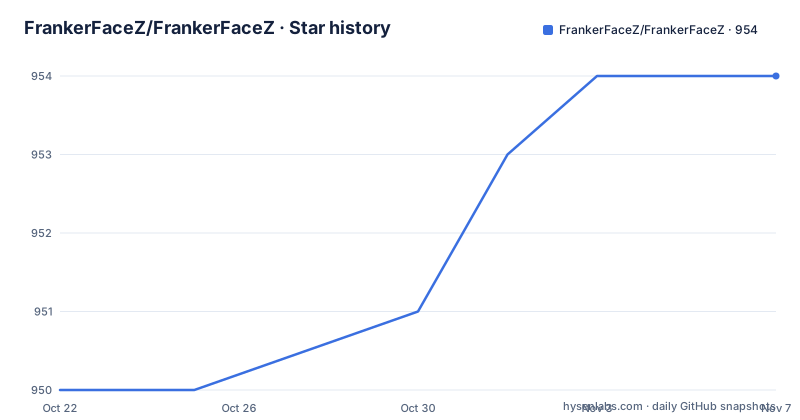
- FrankerFaceZ/FrankerFaceZ954 ★ · +4
| Repository | 2026-10-22 | 2026-11-07 |
|---|---|---|
| FrankerFaceZ/FrankerFaceZ | 950 | 954 |
4 Stars in the last 16 days, measured from the daily GitHub snapshot. Compare with other projects
Editorial analysis
A Twitch enhancement suite, not a Twitch client
FrankerFaceZ describes itself as the Twitch enhancement suite, a set of additions to the Twitch experience rather than a replacement for it. The repository description mentions custom emotes and a collection of features, and the package manifest gives the same summary in one line: a Twitch enhancement suite.
The distinction matters for what kind of user this is for. It is not a streaming client, not a bot, and not a chat client. It layers onto the page you already have, and the code structure backs that up: the top level of the repository holds a src directory, a styles directory, a res directory of resources, a separate socketserver directory, a webpack configuration, a typedoc configuration, a TypeScript configuration and a jsconfig, so there is a user interface, a style layer, static resources and a socket server component alongside the main source.
The version number in the package manifest is 4.82.0, and the manifest is marked private, which fits a project that publishes its own extension through a separate Extension repository rather than as an npm library. The build badge at the top of the README points at a build workflow for the main client, and a second badge points at a build workflow for the extension in a separate repository, so the browser extension is built from its own tree while this repository carries the shared and user script side.
Two build targets: the webpack bundle and the extension build
The package manifest defines the build surface, and the important part is the environment flag that switches targets. The base dev and prod commands run webpack with NODE_ENV set through cross-env, and the extension variants add a second variable, FFZ_EXTENSION, set to true.
"dev:ext": "cross-env NODE_ENV=development FFZ_EXTENSION=true webpack serve",
"build:ext": "cross-env NODE_ENV=production FFZ_EXTENSION=true webpack build",
"build:prod": "cross-env NODE_ENV=production webpack build",
So the same source tree can be served as a plain web client or built as a browser extension, and the difference is one environment variable handed to webpack. The build script is not a single command but a chain: build runs build:prod, and the extension variant sits beside it. There is also a build:dev variant that sets NODE_ENV to development for a production-mode webpack run, a build:stats variant that emits webpack statistics as JSON to stats.json, and a clean script that removes the dist directory with rimraf.
Type definitions have their own path. The build:types script runs the TypeScript compiler in declaration-only mode into a typedist directory and then calls a script named bin/build_types, and a separate build:docs script runs typedoc with the options in typedoc.json. The repository also has typedoc.json and a types directory at the top level, so the project treats its public API as something worth documenting.
One more dependency is worth naming. The manifest includes the CycloneDX webpack plugin, which generates a software bill of materials for the build output. For a project injected into a page full of third party code, that is a deliberate choice rather than boilerplate.
The local development server on port 8000 falls back to the CDN
Development is served locally. The README states that FrankerFaceZ comes with a local development server that listens on port 8000, and that it serves local development copies of files while falling back to the CDN when a local copy of a file is not present. That fallback is the detail that makes the workflow pleasant: you can work on one file locally without having to rebuild every asset the page pulls from the CDN.
The catch is stated just below. The local development server uses webpack-dev-server internally, which self-signs a certificate for hosting content over HTTPS, and the README says you need to ensure your browser accepts a self-signed certificate for localhost. On a browser that shows a full page interstitial on an untrusted certificate, that is a first run obstacle worth knowing about before you start debugging something else.
The commands to get there are short. The README says to install node.js and pnpm, then run pnpm install within the FrankerFaceZ directory, and it names pnpm as the package manager the project uses. The manifest scripts confirm the shape: pnpm start runs pnpm dev, which is the webpack serve command.
pnpm install
pnpm start
The manifest also contains a dev:prod variant that serves with NODE_ENV set to production, which is the mode to use when you want the served bundle to behave like a production build while still hot reloading.
Debug mode is a localStorage flag, and it needs the user-script build
Turning on debug behaviour is a one line action in the browser console, and it is worth understanding what it actually does and does not do. The README instructs you to set a local storage variable named ffzDebugMode to true on Twitch.
localStorage.ffzDebugMode = true;The context matters. The README says the user-script version of FrankerFaceZ is designed to make it easy to load from the local development server, and asks you to switch to the user-script version for development purposes. So the debug flag belongs to the user-script path, not to the extension build. The extension has its own build and its own repository, and the flag is the switch for the other mode.
The value is a plain string assignment on the localStorage object of the Twitch origin, so it lives in the browser profile rather than in the project. It persists until it is cleared, which cuts both ways: a developer does not have to set it after every reload, and a developer does not always remember it is still on when a strange message appears in the console.
The local development server, the user-script build and this flag are the three pieces the README expects you to have in place before you change a line of source. Everything else in the development section is about tooling around the code rather than about how the extension behaves for a viewer.
The icon font is edited in Fontello, not in the repository
Custom emotes and icons are a visual core of the project, and the pipeline for producing them runs through an external service. The font command maps to a fontello-cli invocation with the project configuration file, and the README says this creates a new Fontello session if one does not already exist and then opens the default browser to Fontello so you can edit the font.
The round trip has two modes. If the development server is running under pnpm start, changes made in Fontello can be saved automatically by clicking Fontello's Export button. Otherwise, pnpm font:save downloads the changes from the session. In the manifest, font:save chains the fontello-cli save call to a font:update step that runs a script named bin/update_fonts, so the downloaded font is not left sitting in a working directory; it is pushed into the project.
The repository root holds fontello.client.json and fontello.config.json, which are the two halves of that arrangement, one for the client side session and one for the project side. This is a design choice with a clear trade-off. Fontello gives a browser based editor that most designers already know, and it removes the need to keep a font editing toolchain in the repository, but it also puts a build step behind a network service and an account, and it means the icon font cannot be edited fully offline.
Tabs, newlines and ESLint over three languages
The editor section of the README is short and prescriptive, and it is the kind of detail that decides whether a pull request merges cleanly. Your editor must be configured to use tabs rather than spaces for indentation, and lines must end with a newline character rather than a carriage return and newline. The README recommends configuring linting support as well.
The Visual Studio Code instructions specify an ESLint extension and a workspace settings block that lists the languages to validate.
{
	"eslint.validate": [
		"javascript",
		"javascriptreact",
		"vue"
	]
}
That list is also a small description of the codebase. JavaScript and JSX are the base, and Vue is validated too, which matches a webpack build that bundles a single page application with component files. The repository confirms it with a.eslintrc.js configuration at the top level, an.editorconfig, a jsconfig.json and a tsconfig.json.
The manifest gives the lint command its own script, running eslint over the JavaScript, JSX and Vue files in src, so the same check the editor performs is available as a command. The difference between the two is speed of feedback, not scope.
The tabs and newline rules are not a matter of taste here. With generated assets and a large styles directory, a mixed set of line endings and indentation styles is exactly the kind of thing that produces noisy diffs.
No tagged releases, an active tree, and a licence file to read first
The repository has no GitHub releases at all, which is unusual enough to call out plainly. There is no versioned artefact to download from the releases page, and the version 4.82.0 lives in the package manifest rather than in a tag. The last push to the repository was on 2026-10-19, and the repository is not archived, so the tree is being worked on, but a user without a checkout has no official download path documented in the README.
That is the practical difference between this and a browser add-on with a store listing. Installation here is a build. You clone, you run pnpm install, you build or serve, and you load the result. The README documents the development path in detail, and points at a separate Extension repository for the browser extension side, with its own build workflow badge.
The licence needs a second look, because the two sources do not match. The repository listing classifies the licence as a custom one that GitHub cannot classify, pointing at the LICENSE file, while the README states plainly that the project is licensed under the Apache License, Version 2.0, with copyright dated 2024 Dan Salvato LLC, and the package manifest records the same Apache-2.0 identifier. Read the LICENSE file in the repository root before you redistribute anything, and note that Apache 2.0 carries an explicit patent grant and a notice obligation, so a derived or redistributed build has to carry the required notices.
For a project with a live user base, a fast moving Twitch page and no tagged releases, the upgrade path is a git pull and a rebuild, not a version bump. That has a cost, and it is worth planning for before you invest in a setup around it.
Editorial conclusion
Adopt FrankerFaceZ if you want a Twitch page that does more than the stock player, and you are either comfortable running a browser build from a checkout or willing to build it once and load the result. Do not adopt it if you want a hosted add-on with a support channel, or if you cannot run node.js, since the repository publishes no tagged releases and the only documented path is a local build. Verify first that the licence file in the repository root matches the Apache 2.0 terms the README states, then run pnpm install and pnpm start, load the user-script build, and set localStorage.ffzDebugMode to true before you judge whether the features are worth the maintenance.
Frequently asked questions
How do I build FrankerFaceZ from source?
Install node.js and pnpm, then run pnpm install inside the FrankerFaceZ directory. The manifest defines pnpm build as the production webpack build, and pnpm start runs the local development server.
What port does the FrankerFaceZ development server use?
The README states that the local development server listens on port 8000 and serves local development copies of files, falling back to the CDN when a local copy is not present. It uses webpack-dev-server internally, which self-signs a certificate for HTTPS on localhost.
How do I turn on debug mode in FrankerFaceZ?
Set the local storage variable ffzDebugMode to true from the browser console on Twitch, using localStorage.ffzDebugMode = true. The README asks you to use the user-script version of the project for development, since it is designed to load from the local development server.
How are FrankerFaceZ custom emotes and icons edited?
The pnpm font command runs fontello-cli with the project configuration, creates a Fontello session if needed and opens it in your browser. With pnpm start running, changes save automatically from Fontello's Export button, otherwise pnpm font:save downloads them and updates the project fonts.
What licence is FrankerFaceZ under?
The README states Apache License, Version 2.0, with copyright 2024 Dan Salvato LLC, and the package manifest records the Apache-2.0 identifier. The repository listing, however, classifies the licence as a custom one that GitHub cannot classify, so read the LICENSE file in the repository root before redistributing.
Does FrankerFaceZ publish tagged releases?
The repository has no GitHub releases. The version 4.82.0 appears in the package manifest, and the last push to the repository was on 2026-10-19, so an update path is a git pull and a rebuild rather than a version bump.
Official sources
Add this badge to your README
If you maintain this project, the badge below links readers to this analysis and shows its maintenance status from the daily GitHub snapshot. Paste the markdown into your README; add ?metric=license or ?metric=stars to the image URL for a different field.

[](https://hysenlabs.com/projects/frankerfacez-frankerfacez)Star history chart for your README
[](https://hysenlabs.com/projects/frankerfacez-frankerfacez)Was this useful?