Claude Scholar: a skill library that turns Claude Code into a research workflow
Semi-automated research assistant for academic research and software development. Supports Claude Code, Codex CLI, Kimi Code CLI, and OpenCode across ideation, coding, experiments, writing, and publication.
At a glance
- What is it?
- Galaxy-Dawn/claude-scholar is an MIT-licensed Python repository of agent skills, contracts and branch-specific instruction sets for literature review, experiments, writing and publication. The core judgement: it is a workflow convention, not a runtime, and its value depends entirely on whether you accept its file layout and evidence rules.
- Who is it for?
- Adopt it if you already run Claude Code or one of the other supported CLIs and you want a written convention for where paper notes, claims and figures live. Do not adopt it if you want a standalone tool that works without an agent CLI, or if you cannot accept its Obsidian and Sources/Papers directory conventions.
- Can I use it commercially?
- Yes. MIT is a permissive licence: you can use, modify and sell software built on it, as long as you keep its copyright and licence notices.
- Is it still maintained?
- Yes. The repository last received commits 27 days ago.
- What is it written in?
- Mainly Python, according to GitHub's language statistics.
Answers come from the project's GitHub data, last synced on November 15, 2026, and from our analysis. They are not legal advice.
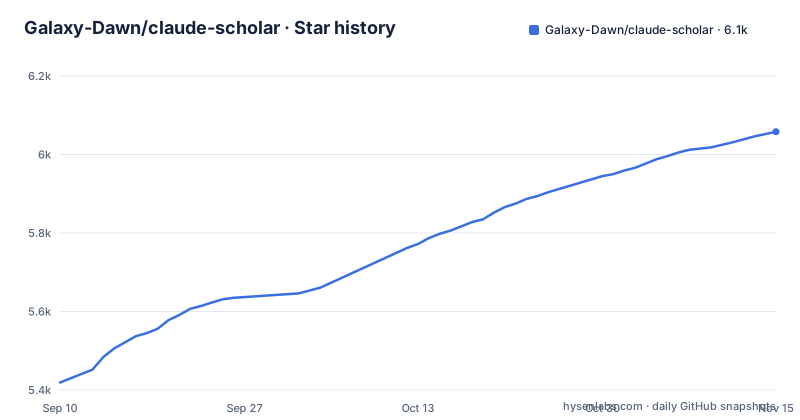
Star history
- Galaxy-Dawn/claude-scholar6,058 ★ · +639
| Repository | 2026-09-10 | 2026-11-15 |
|---|---|---|
| Galaxy-Dawn/claude-scholar | 5.4k | 6.1k |
639 Stars in the last 66 days, measured from the daily GitHub snapshot. Compare with other projects
Editorial analysis
The problem is not generation, it is where the artifacts go
An agent CLI will happily draft a paragraph, run a script and summarise a PDF. What it will not do on its own is remember that a claim came from a specific paper, that the claim is still provisional, and that the figure in section 4 was produced by a script under a particular commit. Claude Scholar targets that gap. The README frames it as a semi-automated research assistant for academic research and software development, aimed at computer science and AI researchers, and the changelog entries make the intent clearer than the tagline does: a shared research-contract.md for Evidence Records, claim strength and Claim Promotion Gates, with ideation, Zotero ingestion, literature synthesis, results reporting, writing and rebuttal workflows all connected to that contract.
The audience is narrow in a useful way. If your output is a paper or a benchmark report and your inputs are arXiv PDFs, Zotero entries and your own experiment logs, the repository's structure maps onto your work. If you write software and never produce a citation, most of the skill set is dead weight. The 2026-05-14 note about making expression-skill the conclusion-first discipline for reporting, planning and file operations suggests the maintainer treats written communication as the binding constraint across all of those stages, not just the final draft.
Skills, contracts and branches: the actual layout
The repository is a collection of skills, each with its own README or SKILL.md, plus shared contracts and per-platform instruction files. The named skills are expression-skill, planning-with-files, nature-writing, nature-polishing, nature-response, nature-data, publication-chart-skill and daily-paper-generator. The nature-* group covers journal writing: drafting and argument construction, polishing against what the changelog calls the latest upstream article-pattern release, response letters, and data handling. publication-chart-skill wraps two separate Python packages, pubfig for publication-grade scientific figures and pubtab for tables and Excel to LaTeX workflows, and the changelog is explicit that this wrapping exists so figure and table work has a handoff route rather than being mixed into general analysis or prose skills.
Two mechanisms are worth separating. planning-with-files is described as the default on-disk planning and progress-tracking workflow for complex tasks, so state lives in files rather than in a conversation that will be truncated. The research contract is a different kind of object: it defines Evidence Records and Claim Promotion Gates, and the 2026-05-13 entry says project paper notes live under Sources/Papers, with promoted claims moving into Knowledge or Writing. That is a promotion pipeline with a gate, and it implies a claim can fail the gate and stay where it is. The branch structure is the third mechanism. main is the Claude Code workflow. Codex CLI, Kimi Code CLI and OpenCode each get their own branch, so the instruction files and skill wiring are not shared across platforms.
The branch split is the first thing to get right
The README carries a branch note stating that main is the Claude Code workflow and directing Codex CLI users to the codex branch, Kimi Code CLI users to the kimi branch, and OpenCode users to the opencode branch. This is the single most common way to start badly. Cloning main and pointing a Codex CLI session at it gives you instruction files written for a different agent.
The cost of this design is duplication. Four branches means four copies of overlapping skill content, and a fix applied on main does not reach the others unless it is ported. The changelog gives some evidence of how that plays out: the Kimi branch arrived on 2026-06-03 with support from the Kimi team, roughly three months after v1.0.0, and the news entries for April and May describe changes on the Claude Code line without mentioning parallel work on the other three. Check the last commit date on each branch before you commit to one, and treat the branch you pick as the project you are adopting, not the repository as a whole.
Getting it running: what the material actually specifies
The 2026-04-22 changelog entry describes a safer install lifecycle with install-state based uninstall support, which means the installer records what it wrote so it can be reversed. Before running anything, look for that install-state file and the uninstall entry point in the repository, because that is what tells you which paths the tool touches.
The configuration surface is file-based rather than flag-based. The 2026-04-22 entry says large always-on CLAUDE.md and AGENTS.md files were replaced with compact core instructions and the default agent set was pruned to the retained core agents. So the files to read and edit are CLAUDE.md at the repository root and the agents directory. Project binding is described in the 2026-04-24 entry as repo-local project binding metadata kept as a runtime layer, separate from the Obsidian vault. That entry also says the older overlapping memory skills were consolidated into four focused skills, which means any tutorial or blog post written before late April 2026 will reference skill names that no longer exist.
The one workflow with a described selection shape is daily-paper-generator: the changelog says it was generalised to broader topics with arXiv and bioRxiv support and a fixed Top 10 to Top 3 to Top 1 selection flow. That is a narrowing funnel, and it tells you the tool expects volume in and a single item out.
Where it breaks: the contract is only as strong as the agent following it
Claim Promotion Gates and Evidence Records are conventions encoded in a markdown contract. The enforcement is the agent reading research-contract.md and choosing to comply. In a long session, or after a context reset, that compliance is exactly the thing that degrades first. If your reason for adopting this is auditability of claims, you are adopting a discipline, not a guarantee.
The second limitation is coupling. The workflow assumes an Obsidian vault, a Sources/Papers directory, and a Knowledge or Writing destination. The 2026-04-24 entry describes rebuilding project knowledge management into a vault-first workflow and making project navigation human-first instead of a machine registry dump. Vault-first means the vault is the substrate. If your group stores notes in a shared wiki, or if you work across repositories with different conventions, you are either adopting Obsidian or maintaining a translation layer the repository does not provide.
Third, this is the wrong tool for a solo author who wants one command that produces a paper. It is a set of skills that a CLI agent invokes, and the quality of the output tracks the model and the session, not the repository. I have not run it, so I cannot tell you how the nature-writing drafts compare to a plain prompt.
Compared with a general-purpose agent setup
The real alternative is not another research assistant. It is a plain Claude Code or Codex CLI installation with your own CLAUDE.md and a handful of scripts. That setup is genuinely lighter: no branch to pick, no vault convention, no install-state file, no four-way duplication. You write the rules you want and you can change them mid-project without checking whether a skill README contradicts you.
The difference in approach is that a general setup has no opinion about evidence. You can ask an agent to draft a related-work section and it will produce fluent prose with citations that may or may not resolve. Claude Scholar's contribution is the opposite instinct: notes land in Sources/Papers, a claim stays unpromoted until it passes a gate, and only then does it move into Knowledge or Writing. That gate is the product. If you do not want a gate, the repository is overhead. If you do, building one yourself means writing the contract, the directory rules and the promotion logic, which is the work this repository has already done in markdown.
The narrower comparison is with the pubfig and pubtab packages that publication-chart-skill wraps. Those are separate Python packages under the same author, and they are usable without the skill layer. If figure and table production is your only pain point, installing those two directly avoids the branch question entirely.
Maintenance, licence and what to verify
The licence is MIT, which permits commercial and academic use, modification and redistribution provided the copyright notice and permission notice are retained. That is the whole of the grant; I am not giving legal advice, and if you redistribute a modified copy inside a company or a lab, have someone confirm the notice is preserved in the files you ship.
Maintenance cost is dominated by the branch structure. Four branches, each with its own instruction files and skill wiring, means an upgrade is a per-branch decision. The release history supports reading the changelog before upgrading: v1.0.0 landed on 2026-02-25, and between mid-April and early June 2026 the entries describe replaced instruction files, pruned agents, consolidated memory skills, a new contract, a new branch and two new wrapped packages. An upgrade across that window is not a version bump, it is a migration. The install-state based uninstall added on 2026-04-22 is your rollback path, so verify it exists before you upgrade rather than after.
What to verify first, concretely: which branch matches your CLI, the last commit date on that branch, whether an install-state file is written and where, and whether the four consolidated memory skills cover what the pre-April skills did for your workflow. The repository also carries sponsor placements for APIMart and Kimi in the README, and the Kimi branch arrived with stated support from the Kimi team. That does not change the code, but it does mean the README is partly a commercial surface, and you should read the skill READMEs rather than the top-level page when you want to know what a skill does.
Editorial conclusion
Adopt it if you already run Claude Code or one of the other supported CLIs and you want a written convention for where paper notes, claims and figures live. Do not adopt it if you want a standalone tool that works without an agent CLI, or if you cannot accept its Obsidian and Sources/Papers directory conventions. Before installing, read the README on the branch that matches your CLI: main for Claude Code, otherwise codex, kimi or opencode, and check the uninstall path added in the 2026-04-22 changelog entry so you know what the installer writes to disk.
Frequently asked questions
What is claude-scholar?
A semi-automated research assistant for academic research and software development, aimed at computer science and AI researchers. It is packaged as a set of skills, agents, hooks and commands rather than an installable library, covering literature review, coding, experiments, reporting, writing and project knowledge management.
How do you use claude-scholar with a CLI other than Claude Code?
You switch branches. main is the Claude Code workflow, Codex CLI users follow the codex branch, Kimi Code CLI users the kimi branch and OpenCode users the opencode branch. After that, read CLAUDE.md, settings.json.template and the MCP_SETUP or OBSIDIAN_SETUP guides for your language.
Does claude-scholar work with Codex CLI and OpenCode from the same checkout?
No. Each supported CLI has its own branch, and main carries only the Claude Code workflow. The editions are maintained separately, so a shared checkout across CLIs is not something the repository supports.
What does research-contract.md change in the claude-scholar workflow?
It defines Evidence Records, claim strength and Claim Promotion Gates, and the research ideation, Zotero ingestion, literature synthesis, reporting, writing and rebuttal workflows all follow it. Project paper notes live under Sources/Papers, and only promoted claims move into Knowledge or Writing.
How does claude-scholar choose which papers to read?
The daily-paper-generator skill was generalized to broader topics with arXiv and bioRxiv support, and it uses a fixed Top 10 to Top 3 to Top 1 selection flow. Separately, the docs name zotero_add_items_by_identifier as the default Zotero paper-import path.
Official sources
Add this badge to your README
If you maintain this project, the badge below links readers to this analysis and shows its maintenance status from the daily GitHub snapshot. Paste the markdown into your README; add ?metric=license or ?metric=stars to the image URL for a different field.

[](https://hysenlabs.com/projects/galaxy-dawn-claude-scholar)Star history chart for your README
[](https://hysenlabs.com/projects/galaxy-dawn-claude-scholar)Was this useful?