Galaxy: a web platform where the analysis runs on the server, not on your laptop
Data intensive science for everyone.
At a glance
- What is it?
- Galaxy is an open, web based platform for accessible, reproducible and transparent computational research, and a single shell script starts it on localhost:8080. The default branch is dev, the packaging is enormous, and the tooling ecosystem comes from the Tool Shed rather than from pip.
- Who is it for?
- Galaxy suits a research group that wants analyses to be runnable by people who do not write code, reproducible from a shared server, and shareable as workflow links, and that is comfortable running a Python application with a large dependency tree.
- Can I use it commercially?
- Check first. The repository uses a licence we do not classify automatically, so read its LICENSE file before any commercial use.
- Is it still maintained?
- Yes. The repository received new commits within the last day.
- What is it written in?
- Mainly Python, according to GitHub's language statistics.
Answers come from the project's GitHub data, last synced on November 7, 2026, and from our analysis. They are not legal advice.
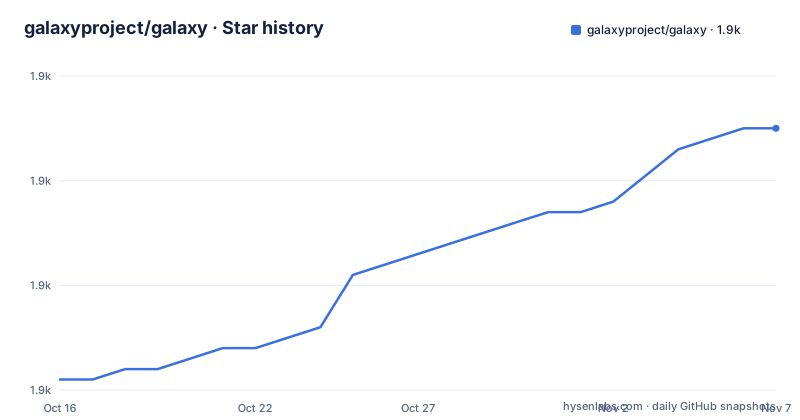
Star history
- galaxyproject/galaxy1,895 ★ · +24
| Repository | 2026-10-16 | 2026-11-07 |
|---|---|---|
| galaxyproject/galaxy | 1.9k | 1.9k |
24 Stars in the last 22 days, measured from the daily GitHub snapshot. Compare with other projects
Editorial analysis
What Galaxy is: an accessible, reproducible and transparent research platform
The project description in the packaging manifest is the crispest statement of what Galaxy is: an open, web based platform for accessible, reproducible and transparent computational research. Three words carry the design. Accessible means a researcher interacts with a web interface and uploads data rather than provisioning a compute environment, which is what makes the platform usable by people in wet lab roles. Reproducible means a history of a run and the workflow that produced it are stored on the server and can be re-run, which is what a paper's methods section depends on. Transparent means the intermediate data and the parameters are visible and shareable, not hidden inside a shell script on someone's laptop. The topic list and the package name, galaxy-workspace, point at the same thing. Galaxy is not a library you import and it is not a pipeline definition format you commit to a repository, it is a server you deploy and a place where analyses live.
Getting it running: one script, one port
The quickstart in the README is deliberately short, which is unusual for a project of this size. Galaxy requires Python 3.10 or higher, and you check your version with python -V. Then you start Galaxy with sh run.sh, and once startup completes you view it in your browser at localhost:8080. That is the whole local development path in the README, and the detail that tells you the most is that there is no pip install step in the documentation. The dependencies come from the checked in requirements.txt, and there are separate scripts for the database, manage_db.sh, for the Tool Shed database, manage_tool_shed_db.sh, and for the Tool Shed itself, run_tool_shed.sh. A rolling_restart.sh and a cron/ directory indicate that the deployment model is a long lived server process, not a one shot job.
$ python -V
Python 3.10.12

$ sh run.sh
The dependency tree is enormous, and the comments explain why
The requirements.txt is autogenerated by uv, from the command uv export --locked --no-annotate --no-hashes --no-dev, and the pinned list runs to hundreds of lines covering the scientific Python stack, web frameworks, cloud SDKs and workflow engines. The pyproject.toml explains a good deal of it through its inline comments, and those comments are the interesting part. celery is held at 5.4.0 or above with a note about not downgrading it because that upgrades typing-extensions. cwl-utils is constrained to exclude 0.44, because that version configures root logging on import, with a link to the upstream pull request. cwltool is pinned to a specific build with the comment that it saves time and is the minimum needed by the cwl-1.0 branch. docutils excludes two specific versions. gunicorn excludes 25.1.0 with a link to a discussion. This is what a project with a decade of dependency archaeology looks like, and each constraint records a bug that was expensive to find.
Tools come from the Tool Shed, and their dependencies are a separate job
The Tools section explains how analysis tools arrive. Tools can be either installed from the Tool Shed or added manually, with a tutorial for adding a tool from the Tool Shed. Then comes the sentence that catches people out. Not all dependencies for the tools provided in the tool_conf.xml.sample are included, and to install them you visit Manage dependencies in the admin interface. So the tool itself is the easy half. Getting the software each tool calls, whether that is a specific version of samtools or a bioinformatics package from a language specific package manager, is a separate step taken through the admin interface. The tool dependency resolution is the operational centre of a Galaxy deployment, and the tools/ directory at the repository root holds the tools that ship with the project, alongside a tool-data/ directory for their reference data.
CWL support is treated as a conformance target, with a test matrix
The Makefile shows the extent to which the Common Workflow Language is a first class citizen. There is a CWL_TARGETS variable listing conformance test files for CWL versions 1.0, 1.1 and 1.2, along with the corresponding API test modules, and those targets are presumably wired into the test suite. The dependencies confirm it, with cwltool and cwl-utils both present alongside gxformat2 for the Galaxy flavour of CWL and the edam-ontology for the metadata vocabulary. So Galaxy can consume a CWL workflow and can export one, and it is tested against the upstream conformance suites for three versions of the language. For a research group that wants the workflow to be portable to another workflow engine, that is the property that makes Galaxy a reasonable place to author in the first place, and it is also the reason the dependency pins are as specific as they are.
The client is a separate build with its own toolchain
Galaxy is not only a Python application. There is a client/ directory at the top level with its own package manager, a tsconfig.json at the root, and a Makefile section that handles the client build with pnpm and a frozen lockfile. The Makefile also sets NODE_OPTIONS to cap the maximum heap size at 4096, with a comment explaining that this is for compatibility with smaller machines, and it defines GALAXY_PLUGIN_BUILD_FAIL_ON_ERROR defaulting to 0, meaning the build does not fail on a plugin error unless you set it to 1. There is a static/ directory for the built assets and a packages/ directory. So the front end is a modern JavaScript build with a plugin system, and the fact that the client is built with a lockfile and a plugin error policy suggests a large deployment with many installed plugins rather than a small single user instance.
Release cycle, branches and how the pieces fit the deployment model
The default branch is dev, and the Makefile carries a RELEASE_CURR of 27.0 and a RELEASE_UPSTREAM of upstream, which is the pattern of a project that keeps a development branch and cuts a release from it. The published releases are v26.0.1 on 2026-06-05, v26.1.0 on 2026-08-02 and v26.1.1 on 2026-08-04, and the last push to the repository was on 2026-10-19, so the branch is well ahead of the last tag. The documentation badges point at docs.galaxyproject.org/en/master, while the release documentation is linked separately, and the distinction matters because master docs describe code that is not what a stable release runs. The repository layout also shows the operational surface: a database/ directory, a config/ directory, a hooks/ directory, a cron/ directory, a contrib/ directory, a scripts/ directory, a doc/ directory, a test/ directory and a test-data/ directory, plus a.k8s_ci.Dockerfile and a.gitpod.yml for cloud development environments.
Licence, community and the shape of the project
The licence file is LICENSE.txt, and the licence field in the packaging manifest points at that file rather than at a named licence identifier, which is why the repository is listed with a custom licence that GitHub cannot classify. The copyright is held by Galaxy Contributors and the maintainers are the Galaxy Committers mailing list. Community support runs through the Galaxy Community Hub on galaxyproject.org, Galaxy Help at help.galaxyproject.org, a Gitter lobby and an IRC channel on freenode, and the training material is at training.galaxyproject.org with tutorials on using Galaxy, performing scientific analyses with it, developing Galaxy and its tools, and administering a Galaxy server. The size of that training surface is itself the honest indicator of what Galaxy costs to adopt: not the install, but the operation.
Editorial conclusion
Galaxy suits a research group that wants analyses to be runnable by people who do not write code, reproducible from a shared server, and shareable as workflow links, and that is comfortable running a Python application with a large dependency tree. It is the wrong choice for a workload that is a single script on a single machine, because the server, the database and the job runner are overhead you would not otherwise pay, and a poor fit for a group that needs version control over its analysis code, since Galaxy stores histories and workflows in its own database rather than in a repository. Before adopting it, read the release documentation for your version rather than the master docs, check the Python version requirement of 3.10 or higher, and plan the dependency work early, because the README notes that not all dependencies for the tools in tool_conf.xml.sample are included and must be installed through the admin interface.
Frequently asked questions
How do I start Galaxy locally?
Galaxy requires Python 3.10 or higher, then you run sh run.sh from the project root. Once startup completes you open http://localhost:8080 in your browser. The full installation details are on getgalaxy.org and the documentation is at docs.galaxyproject.org.
How are analysis tools installed in Galaxy?
Tools can be installed from the Tool Shed or added manually, with a tutorial provided for adding a tool from the Tool Shed. The README also notes that not all dependencies for the tools in tool_conf.xml.sample are included, and that they must be installed through Manage dependencies in the admin interface.
What does Galaxy support from the Common Workflow Language?
The Makefile lists conformance test targets for CWL versions 1.0, 1.1 and 1.2 together with their API test modules, and the dependencies include cwltool, cwl-utils and gxformat2. The tools directory and the tool-data directory hold the tools that ship with the project and their reference data.
What license does Galaxy use?
The license is in the LICENSE.txt file at the repository root, and the packaging manifest points its license field at that file rather than naming an SPDX identifier. Copyright is held by Galaxy Contributors, with the Galaxy Committers mailing list as the maintainer contact.
How is the Galaxy client built?
The client is a separate JavaScript build in the client/ directory, using pnpm with a frozen lockfile, with a tsconfig.json at the repository root. The Makefile sets NODE_OPTIONS to a maximum heap size of 4096 for compatibility with smaller machines, and a plugin build error policy that defaults to not failing the build.
Official sources
Add this badge to your README
If you maintain this project, the badge below links readers to this analysis and shows its maintenance status from the daily GitHub snapshot. Paste the markdown into your README; add ?metric=license or ?metric=stars to the image URL for a different field.

[](https://hysenlabs.com/projects/galaxyproject-galaxy)Star history chart for your README
[](https://hysenlabs.com/projects/galaxyproject-galaxy)Was this useful?