unity-builder turns a Unity project into a GitHub Actions build
Build Unity projects for different platforms
At a glance
- What is it?
- The GameCI unity-builder action runs a Unity build on a CI runner for each target platform, and its v6 release is described as a thin wrapper around game-ci/cli. Three release lines are in flight at once, which tells you more about how Unity version churn hits CI than any feature list would.
- Who is it for?
- unity-builder is worth adopting if you ship a Unity project and want every platform build to happen on a pull request, because the action exists for exactly that and the v6 line reduces it to a wrapper over a command line tool.
- Can I use it commercially?
- Yes. MIT is a permissive licence: you can use, modify and sell software built on it, as long as you keep its copyright and licence notices.
- Is it still maintained?
- Yes. The repository last received commits 14 days ago.
- What is it written in?
- Mainly TypeScript, according to GitHub's language statistics.
Answers come from the project's GitHub data, last synced on November 7, 2026, and from our analysis. They are not legal advice.
Star history
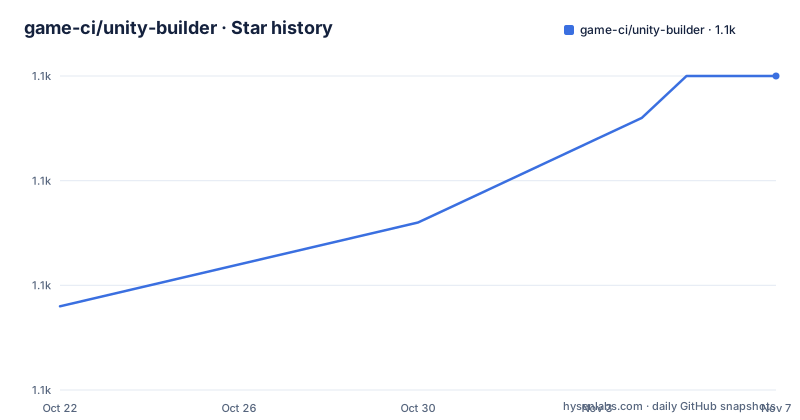
- game-ci/unity-builder1,115 ★ · +11
| Repository | 2026-10-22 | 2026-11-07 |
|---|---|---|
| game-ci/unity-builder | 1.1k | 1.1k |
11 Stars in the last 16 days, measured from the daily GitHub snapshot. Compare with other projects
Editorial analysis
One action, several platforms, and no Unity on your laptop
unity-builder is a GitHub Action to build Unity projects for different platforms, and it is part of the GameCI open source project. The project states in a line at the top of the readme that it is not affiliated with Unity Technologies, which is a sensible thing for a community tool to say given that it drives somebody else's editor in continuous integration.
The problem it addresses is specific. A Unity build is not a compile, it is the editor running a build pipeline with your project settings, your scenes and your assets, and on a developer machine that means a licensed editor, a specific version, and a machine that matches the target platform. A team shipping to several platforms ends up with several build machines, and the person who maintains them is usually one person.
The action removes the editor from the developer's machine and puts it on a CI runner. The badges at the top of the readme show the project's own test builds on three operating systems, Ubuntu, Windows and MacOS, which is the shape of the coverage you would expect: the action is exercised against the runners that GitHub provides for each target.
The audience is game teams who already use GitHub Actions and already use Unity, and who want a pull request to fail when the project does not build for Windows. The documentation lives on the GameCI site, at game.ci/docs/github/builder, and the readme is a pointer to it rather than a manual. There is a related actions repository, unity-actions, for the other GameCI actions, and a Discord community linked from the readme.
The project also says it is free for everyone forever, and that it can be supported through OpenCollective, which is the funding model for a piece of infrastructure that sits in everyone's build path.
The action ships a bundled dist directory
The repository layout tells you how a TypeScript GitHub Action is put together, and the answer is not a compile step in your workflow.
The package is named unity-builder, the entry point in the package metadata is dist/index.js, and there is a dist directory at the top of the repository. That is the standard arrangement for a JavaScript action: the compiled bundle is committed to the repository, because GitHub Actions does not run your build step before it runs your action. The runner takes the files as they are in the repository, so the bundle that ships is the one in your checkout, and a stale dist is a real and common failure.
The build script in the package metadata shows how that bundle is produced:
yarn && tsc && ncc build lib --source-map --license licenses.txtThree things are happening there. The dependencies are installed with yarn, TypeScript compiles the sources, and then ncc bundles the output into a single file with a source map and a licences file, which is the step that makes the action self contained on the runner.
The runtime dependencies are the GitHub Actions toolkit and nothing else. The package lists @actions/cache, @actions/core, @actions/exec and @actions/tool-cache. That is a small and reassuring dependency list for something that runs on your repository with your secrets: the action talks to the runner through the official toolkit, and the tool-cache is how it obtains and stores the Unity editor itself, which is the expensive artefact in any Unity CI setup.
The Node requirement is declared as node >=18.x in the engines field, so the action needs a runner whose Node version is at least that, and a workflow that pins an older runner image is a thing to check before you adopt it.
Three release lines, and the Unity 6.6 shared memory fix
The release list is short and each entry is informative.
v5.0.1 and v4.8.2 were both published on 2026-09-01, and both carry the same note, a fix for Unity 6.6+ builds failing on shared memory. Then v6.0.0 was published on 2026-09-10, described as a thin wrapper around game-ci/cli.
Two separate major lines were therefore patched for the same problem on the same day. That is not a repository with a single current version and a stale tag, it is a repository that maintains more than one supported line, which is the right call for a build tool, because a team is often pinned to a version of the action for reasons of its own, and because the fix had to reach the line people were actually on rather than only the newest one.
The shared memory failure is worth reading twice, because it is a class of problem rather than a one off bug. Unity 6.6 and later changed something about how the editor shares memory between processes, and a build that used to work on a runner started failing. Nothing about the project changed. The runner image, the editor version and the host kernel all move underneath you, and the action is the layer that has to absorb it.
The v6.0.0 note says the release is a thin wrapper around game-ci/cli, and that is a different kind of change. Rather than adding features to the action, the action's job becomes to invoke a command line tool, and the behaviour of the build lives in that tool. For a user this usually means the action and the tool can be pinned separately, and it means the action's own code becomes small enough that the interesting decisions are made elsewhere.
One inconsistency to keep in mind when you read the version numbers. The package metadata still declares the version as 3.0.0 while the published releases are at 4.8.2, 5.0.1 and 6.0.0, so the version field in package.json is not the version you get when you reference the action.
The v6 line is a wrapper, which changes where you look for behaviour
The v6.0.0 release note is short, but it is the most important sentence in the release list for anyone deciding which line to take.
A thin wrapper around a command line tool means the action's own code is mostly plumbing: read the action inputs, resolve the Unity editor, run the command, hand back the artefacts. The logic that decides what to build, with which settings, for which target, lives in the CLI instead. That has two consequences.
The first is that the behaviour you depend on may be in the CLI rather than in the action, so when you debug a failing build you need to know which of the two you are looking at. The second is that the two are versioned independently, so pinning the action does not pin the behaviour, and pinning the behaviour does not pin the action. If your pipeline needs to be reproducible, that is a decision to make deliberately rather than by accident.
It also changes where new capability arrives. When a build target or a Unity feature is added, the question is whether the change lands in the CLI and the action picks it up, or lands in the action itself. Given that the action is now thin, the first is the likely path, which means the action's release cadence and the CLI's release cadence are no longer the same thing.
For teams that are still on v4 or v5, the backported shared memory fix is the reason to move to the newest patch of their line rather than to jump to v6, because the jump also changes where the behaviour lives.
oxlint, oxfmt, vitest and a committed test project
The tooling in the repository is a good indicator of what the maintainers actually spend their time on, and it is not the Unity side of the problem.
Linting is oxlint and formatting is oxfmt, with configuration files for both at the root, .oxlintrc.json and .oxfmtrc.json. The package scripts are lint for oxlint with a report of unused disable directives, format for oxfmt with write, and format:check for the same tool in check mode. Lint staging is configured in the package metadata so that staged source files are linted and formatted before a commit, and workflow files are checked with actionlint, which is the detail that catches a broken pipeline before it reaches the runner.
Tests run with vitest, in three flavours: test runs the husky check and then vitest run, test:ci runs vitest run directly, and coverage runs vitest run with coverage, with a separate coverage package for the Istanbul provider. The configuration lives in vitest.config.mts, and there is a codecov.yml at the root alongside the codecov badge in the readme, so coverage is tracked rather than hoped for.
There is also a test-project directory at the top of the repository, which is the piece that makes the other pieces meaningful. An action that builds Unity projects has to be tested against a real Unity project, and that is what the test project is, exercised by the Ubuntu, Windows and macOS build workflows in the readme badges.
The build has two type checking paths, typecheck with tsc and typecheck:tsgo with tsgo, the native preview compiler. The dev dependencies pin TypeScript at 4.7.4, which is old, and a native preview compiler alongside it, which is not a combination you would choose today without a reason. There is a mise.toml for tool versions, husky for the git hooks with an ensure-husky script, and a community-plugins.yml at the root for the plugins the community has built around it.
Where this approach stops working
There are limits, and they are mostly limits of the approach rather than of the code.
The first is licensing and the editor itself. The action obtains a Unity editor on the runner through the tool cache, and running Unity in continuous integration involves an activation step with a licence or a serial number, and on hosted runners that means putting a credential in your repository secrets. That is a normal but real operational responsibility, and it is a decision about where your licence lives.
The second is the editor version. The action downloads an editor through the tool cache, and a project pinned to a version it cannot obtain does not build. Teams on an unusual Unity version, or a version too old for the action to support, are outside what the action can do for them.
The third is artefacts. The action builds your project, and what happens next is your problem. Signing, notarising, uploading to a store, and versioning the artefact are not described in the readme, and they are exactly the steps where a Unity release pipeline usually lives or dies. If your pipeline is really a release pipeline, this is the part you will be writing yourself, and the build being fast does not make the rest free.
The fourth is the newest line itself. v6.0.0 is a thin wrapper, published on 2026-09-10, and the bug fix for Unity 6.6 had to be backported to two older lines in the days before it. A major version that is a wrapper around a different tool is a bet that the tool is stable. If your team values predictability, the maintained v5 line with the shared memory fix is the conservative choice, and the readme does not document a migration path between the lines.
Editorial conclusion
unity-builder is worth adopting if you ship a Unity project and want every platform build to happen on a pull request, because the action exists for exactly that and the v6 line reduces it to a wrapper over a command line tool. It is the wrong choice if you need a signed, store ready artefact pipeline with notarisation, if your project needs a specific Unity editor version that the action cannot obtain, or if you would rather keep your build system out of GitHub Actions entirely. Before you adopt it, read the builder documentation at game.ci/docs/github/builder, decide whether to take the v6 line or the maintained v5 line, and note that v5.0.1 and v4.8.2 were both published on 2026-09-01 to fix Unity 6.6+ builds failing on shared memory while v6.0.0 followed on 2026-09-10.
Frequently asked questions
What is the unity-builder GitHub Action?
It is a GitHub Action to build Unity projects for different platforms, part of the GameCI open source project and not affiliated with Unity Technologies. The project tests itself with build workflows on Ubuntu, Windows and macOS runners, and the documentation is on the GameCI site at game.ci/docs/github/builder.
Which version of unity-builder should I use?
The release list shows v5.0.1 and v4.8.2 published on 2026-09-01 with a fix for Unity 6.6+ builds failing on shared memory, and v6.0.0 published on 2026-09-10 as a thin wrapper around game-ci/cli. Teams on an older line can take the backported fix, while v6 moves the build behaviour into the command line tool.
How is the unity-builder action built and tested?
The build script is yarn && tsc && ncc build lib --source-map --license licenses.txt, which compiles the TypeScript and bundles it with ncc into the committed dist directory that the runner executes. Tests run with vitest, linting uses oxlint and formatting uses oxfmt, workflow files are checked with actionlint, and a test-project directory in the repository provides a real Unity project to build against.
What Node version does unity-builder need?
The package metadata declares node >=18.x in its engines field, so the action needs a GitHub Actions runner with a Node version of at least 18. The runtime dependencies are limited to the GitHub Actions toolkit packages @actions/cache, @actions/core, @actions/exec and @actions/tool-cache.
What licence is unity-builder released under?
MIT, as the readme and the LICENSE file at the repository root state, and the project notes that this includes all contributions from the community. GameCI states that it is free for everyone forever and can be supported through OpenCollective.
Official sources
Add this badge to your README
If you maintain this project, the badge below links readers to this analysis and shows its maintenance status from the daily GitHub snapshot. Paste the markdown into your README; add ?metric=license or ?metric=stars to the image URL for a different field.

[](https://hysenlabs.com/projects/game-ci-unity-builder)Star history chart for your README
[](https://hysenlabs.com/projects/game-ci-unity-builder)Was this useful?