coc.nvim: the Node.js extension host that makes Vim behave like VS Code
Nodejs extension host for vim & neovim, load extensions like VSCode and host language servers.
At a glance
- What is it?
- coc.nvim runs language servers and VS Code style extensions inside a Node service attached to Vim or Neovim. The architecture buys VS Code parity and charges you a runtime, a process and a version number stuck at 0.0.x.
- Who is it for?
- coc.nvim is the right choice when you want the extension ecosystem rather than just the protocol, and the wrong choice when startup time, process count or a single version number for your whole config are things you care about. The README is thin by design and routes installation to cocnvim.com, so start at the install page and read the example Vim and Neovim configurations rather than the README.
- Can I use it commercially?
- Yes. MIT is a permissive licence: you can use, modify and sell software built on it, as long as you keep its copyright and licence notices.
- Is it still maintained?
- Yes. The repository last received commits 2 days ago.
- What is it written in?
- Mainly TypeScript, according to GitHub's language statistics.
Answers come from the project's GitHub data, last synced on October 23, 2026, and from our analysis. They are not legal advice.
Star history
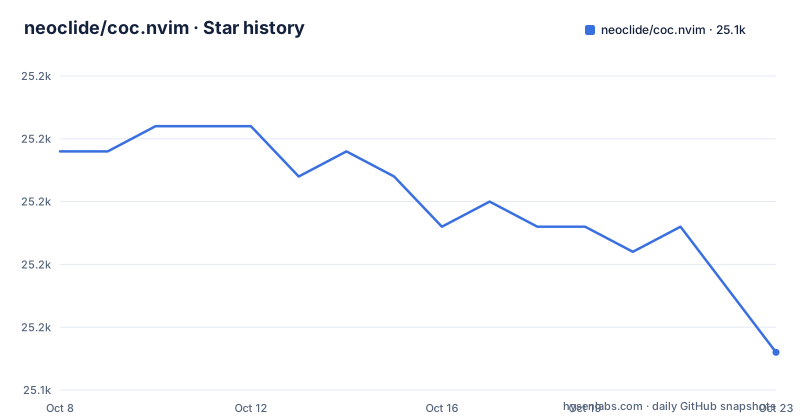
- neoclide/coc.nvim25,149 ★ · -8
| Repository | 2026-10-08 | 2026-10-23 |
|---|---|---|
| neoclide/coc.nvim | 25.2k | 25.1k |
-8 Stars in the last 15 days, measured from the daily GitHub snapshot. Compare with other projects
Editorial analysis
A Node service bolted onto the editor rather than inside it
The description calls coc.nvim a Nodejs extension host for vim and neovim, and the README calls it an IntelliSense engine that brings VS Code-like completion, diagnostics, navigation, refactoring and extension support to both editors through a Node.js service. That last clause is the design in one sentence. This is not a native plugin that reimplements completion. It is an out-of-process service speaking the editor's RPC protocol, and Vim or Neovim is the thin client.
The repository layout backs that reading. `src/` holds the TypeScript service, `autoload/` and `plugin/` hold the Vim side, `lua/` holds a Lua layer, `doc/` holds the Vim help files, `bin/` holds executables, and `data/` holds what ships with the plugin. There is an `esbuild.js` bundler, `tsconfig.json` alongside `tsconfig.test.json`, and separate `scripts/` and `typings/` directories. `AGENTS.md` at the root is a newer addition than the sponsorship wall in the README, and it is a better signal of how work happens in the repository today.
The cost of that architecture is concrete. You are running a Node process alongside your editor, and the manifest declares `"type": "commonjs"` with an engines requirement of node >=24.12.0, which is a recent Node floor. Anything that makes your editor feel slow, or anything that prevents Node from starting cleanly on your machine, lands on this project.
What package.json reveals about the modern toolchain
The manifest is more informative than the README here, and a few entries stand out. The dev dependencies put the project on oxlint rather than eslint, `oxlint-tsgolint` 7.0.2001, Prettier config files, esbuild 0.28.2 and TypeScript 6.0.3. Runtime dependencies include `@chemzqm/neovim` 6.4.0 for the client side, `vscode-languageserver` 10.1.1, `follow-redirects`, `decompress-response`, `fast-diff`, `debounce` and `cli-table`.
The scripts are a good map of the development loop:
"build": "node esbuild.js",
"watch": "node esbuild.js --watch",
"lint:typecheck": "tsc -p tsconfig.json",
"test": "node scripts/test/cli.mjs",
"test:unit": "node scripts/test/cli.mjs --unit"
Coverage runs with `node --enable-source-maps scripts/test/cli.mjs -j 4 --coverage`, so the test suite is parallelised and source-mapped. The lint script is unusual in a good way: `oxlint . && nvim --headless -u NONE -c 'helptags doc' -c 'q'`, which type-checks the help tags by launching a headless Neovim rather than trusting the doc directory to stay consistent.
There is also a second executable in `bin`: `coc-mcp` maps to `bin/coc-mcp.js`. A Model Context Protocol entry point sitting in a Vim IntelliSense plugin tells you where part of the audience now sits, and it is worth checking whether it is the integration you want before you configure the LSP side.
Release history stopped in 2022 while development kept moving
This is the most useful thing to know before you adopt coc.nvim, and it is a genuine inconsistency in the repository's own signals. The most recent GitHub Release is v0.0.82, published 2022-07-31. The last push to the repository was 2026-09-19, and `package.json` still declares version 0.0.82. So the repository is receiving commits, the manifest has not been renumbered, and the release page has been quiet for roughly four years.
Both facts are true at once and the practical reading is that releases are not the distribution channel for current work here. Rather than assume the project is abandoned on the strength of the release list, or assume it is current on the strength of the push date, check what the plugin manager actually installs. For a Vim plugin that is the decisive artefact.
The three published releases are still worth reading, because they document the migration costs of the architecture. v0.0.82 was a breaking change that replaced Vim's built-in popup menu with a custom one, raising the floor to nvim >= 0.4.0 and vim >= 8.1.1719, and it removed a batch of `suggest.*` options. v0.0.81 added LSP 3.16 support, including semantic tokens, call hierarchy, linked editing and file operation events, plus tree view, outline, notifications, InputBox and QuickPick. v0.0.80 raised the floor for float window features to coc.nvim >= 0.4.0 or vim >= 8.2.0750 and added borders, titles, scrollbars and buttons.
Where the README stops and cocnvim.com takes over
The README's contribution to your setup is three sentences and one link. coc.nvim is an IntelliSense engine for Vim and Neovim, it brings VS Code-like features through a Node.js service, and installation instructions plus example Vim and Neovim configurations live at cocnvim.com/install. Everything else in the README is badges, an OpenCollective sponsor wall of several dozen entries, and a link back to the same site.
That is a legitimate division of labour for a project with documentation this size. coc.nvim has accumulated a large help corpus in `doc/`, and the release notes reference specific help topics by name: `:h coc-completion`, `:h coc-semantic-highlights`, `:h coc-tree`, `:h coc-notification`, and actions such as `:CocAction('showOutline')` or `:CocAction('showIncomingCalls')`. Those topics are the real manual, and they live in your editor after installation rather than on a website.
The consequence for anyone evaluating the project is that the marketing line and the actual configuration surface are far apart. Getting a good result from coc.nvim is a configuration exercise: choosing extensions, setting the Node path, deciding how completion behaves, and wiring diagnostics to the signs and colors you want. None of that is in the README, and all of it is in the help files and the example configurations linked from the install page.
The licensing is the easy part. MIT, stated in the badge, in `LICENSE.md` at the root and in the manifest.
What coc.nvim costs against native LSP clients
Neovim 0.10 and later ship built-in LSP support, and several mature plugins wrap the Language Server Protocol for Vim without a Node process at all. The honest comparison is not about features, because coc.nvim wins on extension count by a distance. It is about what you give up.
You give up startup speed. A Node service plus any number of extension bundles is real time before completion works, and that shows up in every editor launch. You give up a single dependency to reason about: the extension host, the extensions, the language servers and the Node runtime version all interact, and a failure can surface as a mystery rather than a stack trace. You also give up a clean mental model, because VS Code extensions assume VS Code APIs and coc.nvim implements a compatibility layer rather than the whole thing.
What you get in return is the extension ecosystem. If a capability already exists as a coc.nvim extension, writing it yourself or configuring a native client is likely the wrong use of an evening. That is the case the project exists to serve, and the `coc-tree`, notifications, QuickPick and semantic token features in the v0.0.81 notes are exactly the capabilities that are tedious to rebuild.
The migration history in those release notes is the underrated argument here. Each version that raised the Vim or Neovim floor moved the project toward the newer editor, which is where the built-in LSP support lives. A plugin whose price of entry has been rising for years is telling you something about where it fits now.
Editorial conclusion
coc.nvim is the right choice when you want the extension ecosystem rather than just the protocol, and the wrong choice when startup time, process count or a single version number for your whole config are things you care about. The README is thin by design and routes installation to cocnvim.com, so start at the install page and read the example Vim and Neovim configurations rather than the README. Two facts should shape your expectation before you install anything: the manifest still declares version 0.0.82 with node >=24.12.0, and GitHub Releases have not been published since 2022-07-31 even though the last push was 2026-09-19. Judge the project's current state from `AGENTS.md`, `src/` and recent commits, not from the release list.
Frequently asked questions
How do I install coc.nvim?
The README routes installation to cocnvim.com/install, which carries the steps and example Vim and Neovim configurations. What the repository itself tells you is that a Node.js service is required, and `package.json` declares an engines requirement of node >=24.12.0.
Do I need Node.js installed to use coc.nvim?
Yes. The README describes coc.nvim as bringing VS Code-like features through a Node.js service, so the extension host runs out of process. The manifest requires node >=24.12.0, which is a newer floor than many editors assume.
Is coc.nvim still being developed?
Commits are landing but releases are not being published. The last push was on 2026-09-19, while the most recent GitHub Release is v0.0.82 from 2022-07-31 and the manifest still carries version 0.0.82. Check what your plugin manager installs rather than relying on the release list.
How does coc.nvim compare with Neovim's built-in LSP support?
Neovim's built-in client avoids the Node process entirely, which keeps startup fast and the dependency graph small. coc.nvim exists to give you the VS Code extension ecosystem: tree view, notifications, QuickPick, refactoring and semantic tokens are features you would otherwise assemble yourself.
Official sources
Add this badge to your README
If you maintain this project, the badge below links readers to this analysis and shows its maintenance status from the daily GitHub snapshot. Paste the markdown into your README; add ?metric=license or ?metric=stars to the image URL for a different field.

[](https://hysenlabs.com/projects/neoclide-coc-nvim)Star history chart for your README
[](https://hysenlabs.com/projects/neoclide-coc-nvim)Was this useful?