GATEOverflow/GO-PDFs: Scripted Book Generation
PDFs made from GATE Overflow site
At a glance
- What is it?
- GO-PDFs packages MLCFlow scripts for turning authorized Q2A-derived HTML into downloadable GATE Overflow PDFs. It fits the publisher's release workflow, but private source files and an unknown license limit general adoption.
- Who is it for?
- Adopt GO-PDFs when you operate the GATE Overflow publishing process and can access the required HTML artifacts. Do not treat it as a general website-to-PDF application or assume that public repository access is enough to regenerate its books.
- Can I use it commercially?
- Not without permission. GitHub finds no licence file in the repository, and without a licence all rights are reserved by default: you may read the code but not reuse it. Check the README, or ask the authors, before using it.
- Is it still maintained?
- Yes. The repository last received commits 3 days ago.
- What is it written in?
- Mainly Python, according to GitHub's language statistics.
Answers come from the project's GitHub data, last synced on November 7, 2026, and from our analysis. They are not legal advice.
Star history
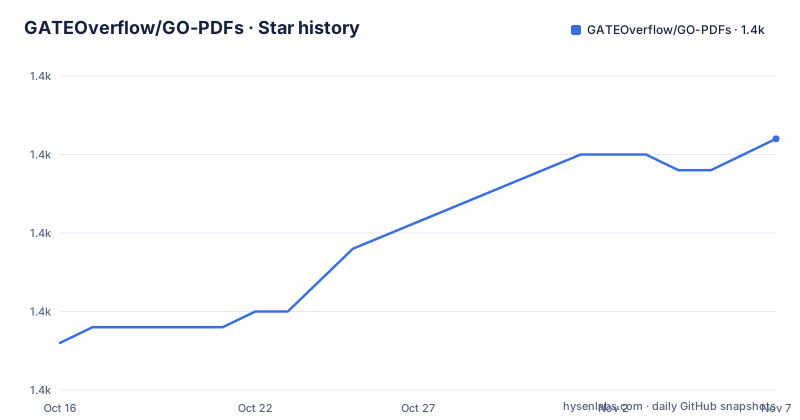
- GATEOverflow/GO-PDFs1,426 ★ · +13
| Repository | 2026-10-16 | 2026-11-07 |
|---|---|---|
| GATEOverflow/GO-PDFs | 1.4k | 1.4k |
13 Stars in the last 22 days, measured from the daily GitHub snapshot. Compare with other projects
Editorial analysis
What GO-PDFs solves for GATE Overflow
GO-PDFs solves a document packaging and release problem for GATE Overflow. The project does not author the study content. It converts HTML derived from the GATE Overflow website into PDF books published through GitHub Releases. The README links separate releases for GATE CSE, TIFR CSE, UGC NET CSE, ISRO CSE, NIELIT Scientist A, B, C and D CSE, Aptitude Overflow, and GATE ME.
The intended users are GATE Overflow maintainers and authorized publishing operators. They need repeatable recipes for producing books and multi-volume documents from existing site content. A reader looking only for a finished book can use the release links, but that reader does not need the generation scripts. Someone reproducing the publications needs more: access to the source HTML, MLCFlow, the repository-specific recipes, and the rendering dependencies used by those recipes.
That boundary is important. The repository is both a source-code archive and an operational publishing tool. Its top-level files include `meta.yaml`, `requirements.txt`, and a `script/` directory. Those files indicate automation organized for MLCFlow, not a conventional Python library with a documented API. The README does not describe a reusable command for arbitrary HTML or a Python function that an application can import.
For evaluation purposes, the strongest case for adoption is internal publishing work that already follows the GATE Overflow HTML and MLCFlow model. The case is weaker for a general document-conversion service, since the documented recipes encode specific books, volumes, and output conventions rather than offering a documented extension interface for new users.
How the GO-PDFs rendering chain works
The documented rendering chain starts with content held by the GATE Overflow site, which runs on Q2A. The project relies on the `q2a-book` plugin to convert Q2A content into PDF-oriented HTML. It then uses wkhtmltopdf, an open source HTML rendering tool, to produce the PDF.
MLCFlow coordinates those steps. The README calls GO-PDFs a host for MLCFlow scripts used for PDF generation. Based on the repository layout, a generation run moves through a target-specific recipe under `script/`. The expected output also names a separate `script/get-wkhtmltopdf` directory, indicating that acquisition or caching of the renderer is represented as an MLCFlow step.
For the documented GATE CSE volume 1 target, the command accepts `book_filter6.html` as input. Its logged dependency chain includes `mlcr make,pdf,from-html,_go-cse,_vol1`, followed by `mlcr get,wkhtmltopdf,_with-qt`. The expansion then calls a `run.sh` script under `script/make-pdf-from-html`. This is a useful clue about the architecture: MLCFlow resolves a publication target, obtains the renderer dependency, and invokes a repository script rather than treating PDF creation as one opaque command.
The wkhtmltopdf command shown in the README configures JavaScript delay, margins, header spacing, a document title, table-of-contents behavior, zoom, local-file access, and load-error handling. It writes the result to a path under `/home/ubuntu/go_books/pdfs/`. Those settings matter because they are part of the generated document's pagination and navigation. However, the README does not explain how each setting is tuned for every title, nor does it document the transformation that creates `book_filter6.html` from the live Q2A database.
Installing the documented generation dependencies
The quickest documented installation step installs the MLCFlow script client package:
pip install mlc-scriptsThe README points readers to the MLCFlow installation documentation for the broader installation process. The repository's `requirements.txt` contains two dependencies:
mlcflow
mlc-scripts
A Python environment installed from this file should include both package names. The README does not state a Python version, operating-system matrix, or complete system dependency list. It also does not show a virtual-environment command, container image, or lock file. As a result, the repository offers a clear package entry point but not a fully pinned reproduction environment.
wkhtmltopdf is named as the rendering tool, and the MLCFlow log references a Qt-enabled target named `_with-qt`. The README does not provide a separate operating-system installation command for wkhtmltopdf, so readers should not infer that installing the two Python packages completes every native dependency. MLCFlow's documentation is the named source for the wider MLCFlow setup.
After installation, the basic check is whether the `mlcr` command is available. The next repository operation uses:
mlc pull repo gateoverflow@go-pdfsThis command pulls the GO-PDFs recipe collection into the MLCFlow workspace. The repository does not document a conventional clone-and-run path for an end user, and it does not identify an entry point through `python`. Its operational unit is the MLCFlow target.
Running the first GATE CSE volume build
The README supplies a concrete three-command sequence. It pulls the repository, downloads `book_filter6.html` from the UGC NET release location, and passes that file to the GATE CSE volume 1 recipe.
mlc pull repo gateoverflow@go-pdfsThe download and generation commands are shown together:
mlcr download,file --url=https://github.com/GATEOverflow/GO-PDFs/releases/download/ugcnet/book_filter6.html
mlcr make,go,pdf,_go-cse,_vol1 --input=book_filter6.html
The download command retrieves an existing release artifact from GitHub. The generation command names both the book family and volume through `_go-cse,_vol1`. During a successful invocation, MLCFlow should log the recipe, its nested conversion and renderer steps, the repository working directory, and the final wkhtmltopdf operation. The expected output ends this excerpt while reporting `Loading pages (1/6)`, so it does not show the complete success message or final file verification.
The README also lists other invocation forms:
mlcr make,go,pdf,_go-cse,_vol2mlcr make,go,pdf,_go-emmlcr make,go,pdf,_go-daThese commands cover GATE CSE volume 2, Engineering Mathematics, and DA. The absence of `--input` in these examples suggests that those targets have other configured inputs or defaults, but the README does not explain where those files come from. Readers should not invent a file path or assume that any local HTML file is valid.
The README explicitly notes that the commands are private to GATE Overflow because they require access to its HTML files. A successful package installation therefore does not guarantee a successful book build. Source authorization and artifact availability are part of the actual use case.
Release targets, maintenance, and licensing
Completed PDFs are distributed through GitHub Releases. The README's release list covers examination-specific and subject-specific publications rather than a single universal output. Recent release names include `gateme-2027`, `gateee-2027`, and `gateece-2027`, published on 2026-10-15, 2026-10-15, and 2026-10-08 respectively.
The repository is not archived, and the last push was on 2026-10-15. Those are maintenance facts, not evidence that every target or operating system works correctly. The release activity does show that publication targets are being updated for the 2027 cycle. The README does not document release automation, PDF checksums, signature verification, or a rollback procedure.
Licensing needs separate attention. The repository license is unknown. The README does not provide a license identifier, and neither `meta.yaml` nor `requirements.txt` is described as a licensing file. Anyone modifying the scripts or redistributing generated or derived material should resolve the applicable rights with the repository owner. Without an explicit license, the repository's open hosting does not itself grant broad reuse rights.
Upgrade cost is tied to changes in MLCFlow, wkhtmltopdf, Q2A content, and publication-specific recipes. The repository does not include a compatibility matrix or changelog beyond individual releases. The two Python dependencies are unversioned in `requirements.txt`, so reproducing an old build may require identifying the environment used when that release was produced.
Limits of GO-PDFs and the direct wkhtmltopdf alternative
The main limitation is not rendering quality. It is access and specificity. The documented workflow depends on HTML files available only to GATE Overflow, and it organizes output around fixed publication targets. The README does not document a public conversion API, a command for arbitrary URLs, or a complete procedure for registering a new book.
There is also a mismatch between the example input and target. `book_filter6.html` is downloaded from the `ugcnet` release URL but passed to `_go-cse,_vol1`. Without repository comments or additional documentation, that relationship is difficult for an outside operator to generalize. It should be treated as a known MLCFlow example, not as a template for substituting any HTML file.
A direct wkhtmltopdf workflow is the real alternative. Its approach is to invoke the renderer on an HTML input and configure output options directly, without GO-PDFs volume naming, MLCFlow orchestration, or GATE Overflow release packaging. That makes it simpler for a single local document. GO-PDFs is preferable when the operator needs the repository's existing recipes and output conventions for authorized GATE Overflow books.
This boundary excludes GO-PDFs from several common use cases. It is not documented as a searchable site mirror, a crawler, a general batch-processing library, or a web service. It should not replace a browser's print function for an isolated page unless the extra MLCFlow setup has a clear reason.
The failure modes follow from that design. Missing HTML access, a mismatched target, an unavailable native renderer, or an undocumented configuration path can stop the run. The README's `--load-error-handling ignore` option also means some loading errors are ignored by wkhtmltopdf, so operators should inspect the resulting pages rather than treating process startup as sufficient validation.
Editorial conclusion
Adopt GO-PDFs when you operate the GATE Overflow publishing process and can access the required HTML artifacts. Do not treat it as a general website-to-PDF application or assume that public repository access is enough to regenerate its books. Verify source-file access, the selected publication target, and the missing license before using or redistributing generated documents. With the last push recorded on 2026-10-15, the repository is current enough to inspect, but its narrow workflow and private inputs remain decisive constraints.
Frequently asked questions
What is GATEOverflow/GO-PDFs used for?
It is an MLCFlow automation repository for generating PDFs from HTML associated with the GATE Overflow website. The README identifies Q2A, the `q2a-book` plugin, and wkhtmltopdf as parts of the publishing chain.
Can I generate a GATE Overflow PDF without private HTML files?
No complete public workflow is documented. The README says the commands require access to HTML files from GATE Overflow, while GitHub Releases provide links to completed PDFs.
Which command generates GATE CSE volume 1?
The documented command is `mlcr make,go,pdf,_go-cse,_vol1 --input=book_filter6.html`. The example downloads `book_filter6.html` before invoking that MLCFlow recipe.
Official sources
Add this badge to your README
If you maintain this project, the badge below links readers to this analysis and shows its maintenance status from the daily GitHub snapshot. Paste the markdown into your README; add ?metric=license or ?metric=stars to the image URL for a different field.

[](https://hysenlabs.com/projects/gateoverflow-go-pdfs)Star history chart for your README
[](https://hysenlabs.com/projects/gateoverflow-go-pdfs)Was this useful?