GDScript Online: A Browser-Based GDScript Playground for Quick Tests
Try out GDScript without installing Godot
At a glance
- What is it?
- GDScript Online runs GDScript in the browser without a Godot install. It is a minimal editor for quick tests, not a full engine replacement.
- Who is it for?
- Adopt GDScript Online if you need a zero-install way to run small GDScript snippets on a machine where you cannot download executables, such as a locked-down work PC. Do not use it if you need the full Godot editor, scene editing, or debugging tools; the official Godot Web Editor is the better fit.
- Can I use it commercially?
- Yes. MIT is a permissive licence: you can use, modify and sell software built on it, as long as you keep its copyright and licence notices.
- Is it still maintained?
- Yes. The repository last received commits 53 days ago.
- What is it written in?
- Mainly GDScript, according to GitHub's language statistics.
Answers come from the project's GitHub data, last synced on October 4, 2026, and from our analysis. They are not legal advice.
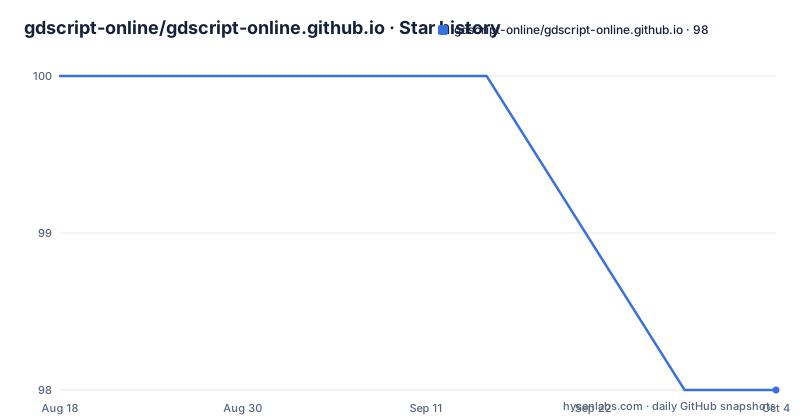
Star history
- gdscript-online/gdscript-online.github.io98 ★ · -2
| Repository | 2026-08-18 | 2026-10-04 |
|---|---|---|
| gdscript-online/gdscript-online.github.io | 100 | 98 |
-2 Stars in the last 47 days, measured from the daily GitHub snapshot. Compare with other projects
Editorial analysis
The Problem It Solves: GDScript Without the Install
GDScript Online addresses a narrow but real problem. You want to test a GDScript snippet, but you are on a computer where you cannot run downloaded executables. That situation is common on corporate machines, school labs, or locked-down terminals. Installing Godot is not an option. The project gives you a web page that runs GDScript directly in the browser. It is not a full editor and it does not pretend to be one. The README is explicit: it is a minimal script editor for quick testing. The target user is someone who needs to validate a loop, check a syntax quirk, or try a small function without leaving the browser.
How It Works: A Web Runtime, Not a Port of the Editor
The repository is a static site hosted on GitHub Pages. The homepage points to gdscript-online.github.io, and the code is written in GDScript itself. That means the runtime is compiled to WebAssembly or JavaScript, likely via Godot's export tools, though the README does not specify the exact build pipeline. What is clear is the architecture: you open a page, you get a script editor, and the code runs in your browser. There is no server-side execution mentioned. The data flow is simple: type code, run it, see output. The project also maintains two separate entry points, one for Godot 4.x and one for Godot 3.x. This split matters because GDScript changed between major versions, so a script written for 4.x may not parse in 3.x. The two URLs let you pick the language dialect you are targeting.
Getting It Running: Open a URL, No Build Required
There is no installation step for users. You go to the homepage and start typing. The README gives two direct links: https://gdscript-online.github.io/ for Godot 4.x, and https://gdscript-online.github.io/3.x/ for Godot 3.x. That is the entire setup. If you want to run the project yourself, you would clone the repository and serve the static files, but the README does not document that process. The lack of build instructions is a gap. For a user, the value is instant access. For a developer who wants to contribute or self-host, you have to infer the build steps from the repository layout, which is not ideal. The project's own description says it aims to start up quickly and require few resources, and that is consistent with a static site approach.
Limitations: Minimal Editor, No Scene or Debugger
The most important limitation is the scope. This is not the Godot editor in a browser. There is no scene tree, no 2D or 3D viewport, no inspector, and no debugger. You cannot build a game here. The README explicitly warns users who want the full editor to use the official Godot Engine Web Editor. Another limitation is the version split. If you write code for Godot 4.x, it will not run on the 3.x page, and vice versa. That is a real constraint if you are testing code that must run on a specific version. The project also has no recent releases listed, so there is no clear release cadence. If you hit a bug, you cannot check a changelog or download a stable tarball. You have to rely on the live site, which may change without notice.
The Alternative: Godot Engine Web Editor
The README points to the official Godot Engine Web Editor at https://editor.godotengine.org/. That is the direct alternative. The difference is in approach. GDScript Online is a lightweight runtime that strips everything down to a script box. The Godot Web Editor is a full port of the editor, including the scene system, asset management, and a debugger. It is heavier and slower to load, but it gives you the real development environment. If you need to test a script in isolation, GDScript Online is faster and simpler. If you need to see how a script interacts with nodes or scenes, you have to use the full editor. The trade-off is clear: speed and simplicity versus completeness and fidelity.
Maintenance and License: MIT, But No Release History
The repository is licensed under the MIT license, with the JetBrains Mono font under the SIL OFL 1.1. That is permissive for both use and modification. The copyright line shows Hugo Locurcio and contributors, with the project dating back to 2019. However, the metadata shows no recent releases and an unknown last push date. That is a red flag for maintenance. There is no release history to track, no changelog, and no indication of active development. For a user, this is acceptable because the site is live and works. For a developer who wants to fork it, you inherit a codebase with no versioned snapshots. You should check the commit history on the repository before relying on it for anything long-term. The MIT license gives you freedom, but it also means you are on your own if the project stops being updated.
Editorial conclusion
Adopt GDScript Online if you need a zero-install way to run small GDScript snippets on a machine where you cannot download executables, such as a locked-down work PC. Do not use it if you need the full Godot editor, scene editing, or debugging tools; the official Godot Web Editor is the better fit. Before relying on it, verify that your target Godot version is covered (4.x or 3.x) and that the minimal feature set meets your needs. The project is MIT licensed, so you can fork it, but expect to maintain any changes yourself since there are no recent releases to track.
Frequently asked questions
What is GDScript Online and who is it for?
An online GDScript runtime environment for playing around with GDScript without installing Godot. The stated case is a PC on which you cannot run executables downloaded from the web, so the whole tool is delivered as a URL you open in a browser.
Is GDScript Online a full Godot editor in the browser?
No. It describes itself as only a minimal script editor for quick testing purposes, aiming to start up quickly and require few resources. For the full editor in a browser it directs you to the official Godot Engine Web Editor.
Which Godot version does GDScript Online support?
Two deployments. The root URL at gdscript-online.github.io is Godot 4.x and is marked recommended, and a separate deployment under /3.x/ covers Godot 3.x.
How do I install or run GDScript Online myself?
There is no install command. It is a hosted page, and the repository holds three scripts (main_window.gd, run_button.gd, script_editor.gd), a main.tscn scene, project.godot and export_presets.cfg, with no published releases or version tags.
What licence applies to GDScript Online and its font?
Files in the repository are MIT licensed unless otherwise specified, with copyright held by Hugo Locurcio and contributors from 2019. The JetBrains Mono font bundled in fonts/ is licensed separately under the SIL Open Font Licence 1.1.
Official sources
Add this badge to your README
If you maintain this project, the badge below links readers to this analysis and shows its maintenance status from the daily GitHub snapshot. Paste the markdown into your README; add ?metric=license or ?metric=stars to the image URL for a different field.

[](https://hysenlabs.com/projects/gdscript-online-gdscript-online-github-io)Star history chart for your README
[](https://hysenlabs.com/projects/gdscript-online-gdscript-online-github-io)