Camelot (camelot-py) review: extracting tables from PDFs with five parsers
A Python library to extract tabular data from PDFs
At a glance
- What is it?
- Camelot is a Python library that turns tables in text-based PDFs into pandas DataFrames. It ships five parsers, a CLI and a bundled pdfium backend, and the README is explicit that scanned pages need an optional extra.
- Who is it for?
- Adopt camelot-py when your PDFs are text-based and you need a DataFrame plus a parsing report you can filter on, and pick the parser per document class rather than trusting flavor="auto" everywhere. Skip it for image-only scans unless you accept the torch dependency that comes with pip install "camelot-py[ml,ocr]", and skip it if you need a service with a REST API, since the project ships a Python library and a CLI only.
- Can I use it commercially?
- Yes. MIT is a permissive licence: you can use, modify and sell software built on it, as long as you keep its copyright and licence notices.
- Is it still maintained?
- Yes. The repository last received commits 3 days ago.
- What is it written in?
- Mainly Python, according to GitHub's language statistics.
Answers come from the project's GitHub data, last synced on November 24, 2026, and from our analysis. They are not legal advice.
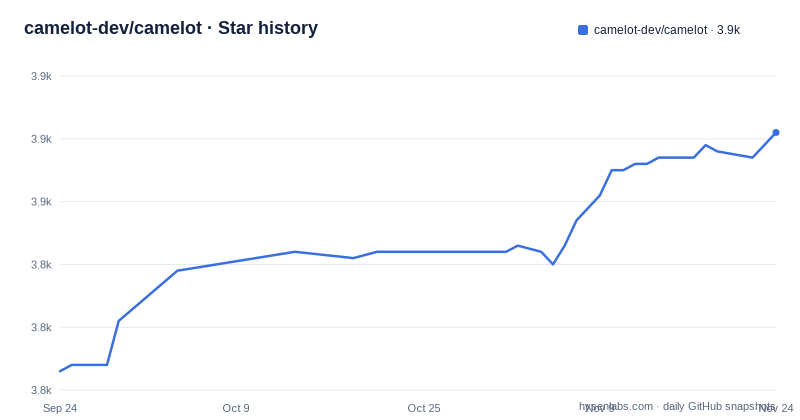
Star history
- camelot-dev/camelot3,861 ★ · +38
| Repository | 2026-09-24 | 2026-11-24 |
|---|---|---|
| camelot-dev/camelot | 3.8k | 3.9k |
38 Stars in the last 61 days, measured from the daily GitHub snapshot. Compare with other projects
Editorial analysis
What camelot-py solves, and who ends up using it
PDF stores glyph positions, not rows and columns. A table that looks like a grid on screen is a pile of text runs with coordinates, and the lines around the cells may be vector graphics, may be raster pixels, or may not exist at all. Camelot's job is to reconstruct the grid from whatever evidence the page carries and hand back a pandas DataFrame.
The README frames the library around five parsers and a pandas output, with exports to CSV, JSON, Excel, HTML, Markdown and SQLite. That shape tells you who it is for: data engineers and analysts who already work in Python, receive PDFs from a counterparty, and want the numbers in a DataFrame without writing their own geometry code. The CLI exists for the same people when they would rather not open an interpreter.
The project is not archived and the last push was on 2026-09-19. Version 2.0.0 was released on 2026-06-04, following a 2.0.0rc1 on 2026-05-25 and a 1.0.9 in 2025. The pyproject.toml declares Development Status 5 - Production/Stable and requires Python 3.10 or newer.
How the parsers decide where a table is
The mechanism differs per flavor, and the README's parser table is the clearest statement of the split. lattice is the default and targets ruled tables: it detects the grid from the ruled lines, and with engine="combined" it unions the PDF's native vector ruled lines with OpenCV detection so faintly ruled tables are still found. stream works on whitespace between text runs. network and hybrid use text alignment. ml is the optional neural path, a Table Transformer model that reads structure from the page image.
The data flow after detection is uniform. read_pdf returns a TableList; each entry is a table object with a .df attribute holding the DataFrame, plus to_csv, to_json, to_excel, to_html, to_markdown and to_sqlite methods, and an export method on the list itself that takes an f argument plus compress. Each table also carries parsing_report, which the README shows as a dict with accuracy, whitespace, order and page. TableList.filter(...) is the documented way to drop noise using those metrics, and stack_contiguous() stitches continuations across pages.
Two design decisions are worth naming. Bundling pypdfium2 as the default backend means the light install needs no system libraries, which removes the poppler dependency that older Camelot deployments had to manage. Making the neural parser an extra rather than the default keeps torch out of the core install, at the cost of a second class of behaviour that only appears once you opt in.
Installing camelot-py and reading a first table
The package name on PyPI is camelot-py, not camelot. The README's quickstart imports it as camelot after installation. The default install pulls the bundled pdfium backend with no system dependencies.
pip install camelot-pyWith that in place, the README's opening example reads a PDF and prints the list of tables found. The example PDF is foo.pdf, which the repository keeps under docs/_static/pdf.
import camelot
tables = camelot.read_pdf('foo.pdf')
tables
# <TableList n=1>
The result is a TableList. Indexing it gives a table object whose .df attribute is the pandas DataFrame, and whose parsing_report tells you how clean the extraction was. The README's sample output for foo.pdf reports accuracy 99.02, whitespace 12.24, order 1, page 1, and a shape of (7, 7).
tables[0].parsing_report
tables[0].df
tables.export('foo.csv', f='csv', compress=True)
For a borderless table, switch flavor. The README's parser table points borderless, whitespace-separated tables at network or stream, and hard borderless tables at ml. The CLI mirrors the same choice: the README gives camelot lattice file.pdf as an example invocation, so the flavor name is the subcommand.
pip install "camelot-py[ml]"
camelot lattice file.pdf
Where the heuristic parsers give up
The README states the constraint plainly: the built-in parsers need a text-based PDF. It borrows Tabula's test, which is that if you can click and drag to select text in your table in a PDF viewer, the PDF is text-based. That is a good rule because it fails in the direction you would expect. A scan of a printed invoice has no text layer, so lattice, stream, network and hybrid have nothing to align or rule-detect.
The escape hatch is the neural backend with OCR: pip install "camelot-py[ml,ocr]" and then camelot.read_pdf(..., flavor="ml"), where the model reads structure from the page image and OCR supplies the text. That is a real capability, but it changes the deployment profile. The pyproject.toml comment says the ml extra pulls torch and is imported lazily so the core install and other flavors never load it, and it pins transformers below version 5 because v5 strict-validates configs and rejects the TATR checkpoint. A pin like that is a maintenance signal: when transformers 5 becomes the default resolution for other packages in your environment, you will be resolving against it.
The second failure mode is quieter. A PDF can be text-based and still defeat the heuristics: a borderless table with ragged columns, or a page where the ruled lines are so faint that neither the vector layer nor OpenCV recovers them. parsing_report is the instrument here. Accuracy below what you can tolerate means the table needs a different flavor, an explicit table area or column separators, not more retries. If your PDFs are image-only and you do not want a torch dependency in the image, Camelot is the wrong tool and you should be looking at an OCR-first pipeline instead.
Camelot against Tabula, and where the extra parsers matter
The README itself points at Tabula for the text-based test, which makes the comparison fair to draw. Tabula is the long-standing alternative for pulling tables out of PDFs, and the difference in approach is visible in the parser list. Tabula's Java implementation exposes a small set of extraction modes through a desktop app and a server; Camelot exposes five named parsers inside a Python process and returns pandas objects directly.
That matters most for borderless tables. stream and network are the fast, dependency-free options, and the README positions ml above them for quality on hard borderless tables. A tool with one borderless mode leaves you tuning its parameters; Camelot asks you to choose the mode first and then tune. The cost is that you now own a decision per document class, and picking wrong shows up as a bad parsing_report rather than an error.
The other difference is the output contract. Camelot hands back a DataFrame with export methods and a quality dict attached to each table, which fits a Python data pipeline. If your integration point is an HTTP service or a non-Python stack, the CLI is the only interface Camelot offers, and you would be shelling out to it.
Maintenance, upgrades and the MIT licence
The last push to the repository was on 2026-09-19, four days before this review, and the repository is not archived. The 2.0.0 release landed on 2026-06-04, so the current major line is recent. The repository carries a CHANGELOG.md, a noxfile.py, a uv.lock, pre-commit configuration and a bench directory, which is the tooling you want to see if you are going to pin a version and upgrade deliberately.
Upgrade cost concentrates in the optional extras rather than the core. The core dependency list is click, numpy, openpyxl, pandas, tabulate, opencv-python-headless, pypdfium2, pillow and playa-pdf, all with lower bounds and no upper pins, so a fresh install tracks current releases of those libraries. The ml extra is the opposite: torch at 2.0 or above, and transformers held below 5 by an explicit constraint. If you use flavor="ml" in production, that upper bound is the thing to watch, because it can conflict with other packages in the same environment.
The licence is MIT, declared in pyproject.toml and shipped as a LICENSE file at the repository root. MIT is permissive and imposes no copyleft obligation on your own code. That is a statement about the licence text, not legal advice; if you redistribute Camelot inside a product, read the LICENSE file and your own counsel's guidance.
Editorial conclusion
Adopt camelot-py when your PDFs are text-based and you need a DataFrame plus a parsing report you can filter on, and pick the parser per document class rather than trusting flavor="auto" everywhere. Skip it for image-only scans unless you accept the torch dependency that comes with pip install "camelot-py[ml,ocr]", and skip it if you need a service with a REST API, since the project ships a Python library and a CLI only. Before committing, run the three parsers over a sample of your own PDFs and compare the accuracy and whitespace fields in parsing_report, then check whether stack_contiguous() actually joins your multi-page tables or produces a header row you have to fix.
Frequently asked questions
How do I install camelot-py in Python?
The package is published as camelot-py, so the install command is pip install camelot-py. The default install uses the bundled pdfium backend and needs no system dependencies. For the neural parser add the ml extra, and for scanned PDFs add ocr as well.
How do I use camelot-py to read a table from a PDF?
Import camelot, call camelot.read_pdf with the file path, and index the returned TableList. The table's .df attribute is a pandas DataFrame, and parsing_report gives accuracy, whitespace, order and page for that table.
Does camelot-py work on scanned PDFs?
Not with the built-in parsers, which need a text-based PDF. The README says to install pip install "camelot-py[ml,ocr]" and call camelot.read_pdf with flavor="ml", where the model reads structure from the page image and OCR supplies the text.
Which camelot-py parser should I choose for a borderless table?
The README's parser table points borderless, whitespace-separated tables at flavor="network" or "stream", and hard borderless tables at flavor="ml". The ml option requires the separate ml extra and pulls torch.
What does camelot-py return for each table it finds?
read_pdf returns a TableList. Each entry has a .df pandas DataFrame, a parsing_report dict, and to_csv, to_json, to_excel, to_html, to_markdown and to_sqlite methods. The list itself has an export method taking an f argument.
What licence does camelot-py use?
The project is MIT licensed, declared in pyproject.toml and shipped as a LICENSE file at the repository root. That is the licence text only and not legal advice for your redistribution case.
Official sources
Add this badge to your README
If you maintain this project, the badge below links readers to this analysis and shows its maintenance status from the daily GitHub snapshot. Paste the markdown into your README; add ?metric=license or ?metric=stars to the image URL for a different field.

[](https://hysenlabs.com/projects/camelot-dev-camelot)Star history chart for your README
[](https://hysenlabs.com/projects/camelot-dev-camelot)Was this useful?