Mochi 1 by Genmo: a 10B open video model that wants an 80GB-class GPU
The best OSS video generation models, created by Genmo
At a glance
- What is it?
- Mochi 1 is Genmo's Apache 2.0 text-to-video checkpoint with a Gradio UI, a CLI, a Python pipeline and a LoRA trainer. This page covers the uv install, weights, the roughly 60GB single-GPU footprint and what the model cannot yet do.
- Who is it for?
- Use genmoai/mochi if you have an H100 or an A100 80GB class card and want an Apache 2.0 video model you can script and fine-tune with LoRA. Skip it if you only have a consumer GPU or need animation or output above 480p, and confirm GPU inference on your own hardware first.
- Can I use it commercially?
- Yes. Apache-2.0 is a permissive licence: you can use, modify and sell software built on it, as long as you keep its copyright and licence notices.
- Is it still maintained?
- Yes. The repository last received commits 32 days ago.
- What is it written in?
- Mainly Python, according to GitHub's language statistics.
Answers come from the project's GitHub data, last synced on November 23, 2026, and from our analysis. They are not legal advice.
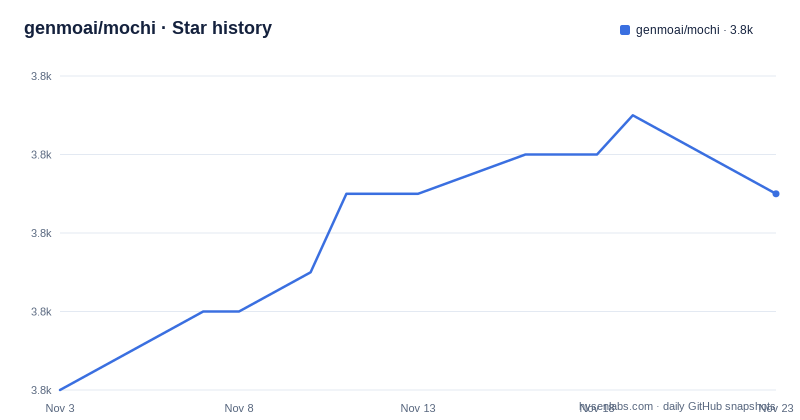
Star history
- genmoai/mochi3,767 ★ · +5
| Repository | 2026-11-03 | 2026-11-23 |
|---|---|---|
| genmoai/mochi | 3.8k | 3.8k |
5 Stars in the last 20 days, measured from the daily GitHub snapshot. Compare with other projects
Editorial analysis
The install is uv sync, and a plain pip install skips the Pillow override
The repository is a uv project named genmo, version 0.1.0, with requires-python set to 3.11 or newer. The install sequence is:
git clone https://github.com/genmoai/mochi
cd mochi
pip install uv
uv venv --python 3.11 .venv
source .venv/bin/activate
uv sync --locked
The reason for insisting on uv is a dependency conflict. MoviePy and Gradio cap Pillow below the release that carries the security fixes, so pyproject.toml carries an override-dependencies entry of pillow>=13.0.0,<14 under [tool.uv]. That override only applies through uv. The comment at the top of requirements.txt says to use uv sync --locked, and the README states that a plain pip install -r requirements.txt does not apply the override. If you run pip against requirements.txt anyway, expect the Pillow resolution to differ from the one the lock file was built around.
The pins are tight in places: transformers is fixed at ==5.20.2, gradio is held to >=6.30.0,<7, and torch needs 2.14.1 or newer. FFMPEG is a separate system install, needed to turn the outputs into videos.
Flash attention is an extra that must build without isolation
Flash attention is optional. It lives in the flash extra of pyproject.toml as flash-attn>=2.8.3.post2, and the README gives this command for it:
uv sync --locked --extra flash --no-build-isolationThe --no-build-isolation flag means the flash-attn build sees the packages already installed in your environment instead of a clean sandbox, so torch has to be present before this step. The README does not say which GPUs or CUDA versions flash-attn builds against, and it does not describe what happens to speed or memory if you skip it. A second extra named torchvision repeats torchvision and av pins, which the README never mentions.
Weights are a separate multi-source download
Nothing in the repository ships model weights. The README names four ways to get the DiT and the VAE decoder. The script route is:
python3 ./scripts/download_weights.py weights/You can also download from the Hugging Face page genmo/mochi-1-preview, fetch the zip at weights.genmo.dev/weights.zip, or use the magnet link the README gives, which points to a folder named weights. The API example loads weights/dit.safetensors and weights/decoder.safetensors, and the T5-XXL text encoder comes in through T5ModelFactory. Plan disk space and bandwidth before you start, because the README gives no total download size.
A single GPU needs about 60GB of VRAM, so most desktop cards are out
This is the hardest constraint. The README says the repository runs on multiple GPUs by splitting the model across cards, or on one GPU, but a single GPU needs approximately 60GB of VRAM, and it recommends at least one H100. The practical consequence is that a 24GB or 48GB card will not run the model through this code path, and the README gives no figure for any smaller configuration.
The README points elsewhere for small cards: ComfyUI can optimize Mochi to run on less than 20GB of VRAM, and the news section records consumer-GPU support in ComfyUI from November 5, 2024. The README states plainly that this repository prioritizes flexibility over memory efficiency. If your hardware is below the H100 class, that route is the one the authors point to, and it sits outside this repository.
The Gradio UI and CLI both default to CPU offload in the documented commands
Two entry points are documented, and both are shown with --model_dir and --cpu_offload:
python3 ./demos/gradio_ui.py --model_dir weights/ --cpu_offloadpython3 ./demos/cli.py --model_dir weights/ --cpu_offloadA LoRA in safetensors format can be attached to either one with --lora_path <path/to/my_mochi_lora.safetensors>. For code, the genmo.mochi_preview.pipelines module exposes MochiSingleGPUPipeline, DitModelFactory, DecoderModelFactory, T5ModelFactory and linear_quadratic_schedule. The README example builds the pipeline with model_dtype bf16, cpu_offload=True and decode_type tiled_spatial, then calls it with height=480 and width=848. The snippet in the README cuts off mid-call, so the full argument list is in demos/api_example.py, not on the page.
AsymmDiT spends parameters on pixels, not on text
The model is a 10 billion parameter diffusion transformer trained from scratch. In AsymmDiT, text and visual tokens go through joint multi-modal self-attention with separate MLP layers per modality, as in Stable Diffusion 3. The visual stream has nearly four times as many parameters as the text stream because of a larger hidden dimension, and non-square QKV and output projections reconcile the two widths. The stated payoff is lower inference memory.
The listed specs are 48 layers, 24 heads, a visual dimension of 3072, a text dimension of 1536, 44520 visual tokens and 256 text tokens. Prompts go through a single T5-XXL encoder rather than several language models. The companion AsymmVAE has 362M parameters, compresses 8x8 spatially and 6x in time to a 12-channel latent, and shrinks video 128x overall.
LoRA training needs an 80GB card, and the output stays at 480p
The bundled trainer, documented in demos/fine_tuner/README.md, builds LoRA fine-tunes on your own videos and, per the README, runs on one H100 or A100 80GB GPU. That rules out fine-tuning on smaller cards, with no alternate recipe given. The News section dates the LoRA feature to November 26, 2024.
The Limitations section lists three known problems. The initial release generates at 480p. Extreme motion can produce minor warping and distortion. The model is tuned for photorealistic styles and does not perform well on animated content. If your project needs cartoon or anime output, or 720p and above, this checkpoint is not the fit; the README only says the authors expect the community to fine-tune it for other styles. The Safety section adds that the model reflects biases in its training data and that organizations should add their own safeguards before commercial deployment.
The recent security refresh validated CPU helpers, not GPU inference
The last push to the repository was on October 6, 2026, and there are no GitHub releases to pin to. The README carries a note that the security refresh validates CPU media helpers and dependency resolution, and that GPU inference and fine-tuning need qualification before deployment. In other words, the newly pinned versions of torch, transformers and gradio were checked for resolving and for media handling, but nobody has signed off that the full generation path still produces the same output on them. Run a test generation on your own hardware before you rely on the pins in production.
Editorial conclusion
Use genmoai/mochi if you have an H100 or an A100 80GB class card and want an Apache 2.0 video model you can script and fine-tune with LoRA. Skip it if you only have a consumer GPU or need animation or output above 480p, and confirm GPU inference on your own hardware first.
Frequently asked questions
How do I install Mochi 1?
Clone genmoai/mochi, create a Python 3.11 virtual environment with uv venv, then run uv sync --locked. Install FFMPEG separately and download the weights with scripts/download_weights.py.
How do I use Mochi after installing it?
Start the Gradio UI with python3 ./demos/gradio_ui.py --model_dir weights/ --cpu_offload, or generate from the command line with python3 ./demos/cli.py --model_dir weights/ --cpu_offload. The weights must already be downloaded.
How do I install Mochi with pip instead of uv?
A plain pip install -r requirements.txt does not apply the Pillow 13 override that MoviePy and Gradio need, so the README tells you to use the uv project install with uv sync --locked.
Official sources
Add this badge to your README
If you maintain this project, the badge below links readers to this analysis and shows its maintenance status from the daily GitHub snapshot. Paste the markdown into your README; add ?metric=license or ?metric=stars to the image URL for a different field.

[](https://hysenlabs.com/projects/genmoai-mochi)Star history chart for your README
[](https://hysenlabs.com/projects/genmoai-mochi)Was this useful?