react-reader: putting an ePub reader inside a React app
An ePub-reader for React, powered by Epub.js
At a glance
- What is it?
- react-reader is a React wrapper around the Epub.js library that renders a book in an iframe, with props for location tracking, table of contents, styling and right to left reading. It suits teams who need an embedded reader rather than a native reading app.
- Who is it for?
- react-reader is a good fit for a product that needs a book reader embedded in a web application, that already works in TypeScript, and that is willing to accept the limits of a browser renderer such as no whole-book page count. It is the wrong choice for a native mobile reading app, for a catalogue where per-book page numbers matter, and for a reader that must handle a wide range of poorly formed files without extra work.
- Can I use it commercially?
- Yes. Apache-2.0 is a permissive licence: you can use, modify and sell software built on it, as long as you keep its copyright and licence notices.
- Is it still maintained?
- Yes. The repository last received commits 160 days ago.
- What is it written in?
- Mainly TypeScript, according to GitHub's language statistics.
Answers come from the project's GitHub data, last synced on November 7, 2026, and from our analysis. They are not legal advice.
Star history
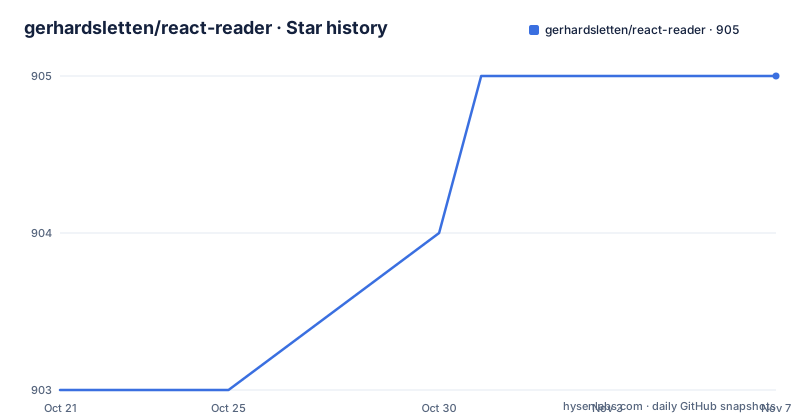
- gerhardsletten/react-reader905 ★ · +2
| Repository | 2026-10-21 | 2026-11-07 |
|---|---|---|
| gerhardsletten/react-reader | 903 | 905 |
2 Stars in the last 17 days, measured from the daily GitHub snapshot. Compare with other projects
Editorial analysis
A wrapper around an iframe based reader
The mechanism is simple and worth stating first, because it explains every limitation that follows. React Reader is a React wrapper for epub.js, which is described as an iframe based epub reader that can run in the browser, in Cordova and in other web based environments. The rendering happens inside an iframe, and the content inside that frame is laid out with CSS columns to produce the paged view. React Reader adds the React side of that: props for state, styling and callbacks, and a component you can drop into a layout. Two components are exposed. ReactReader is the full reader, and EpubView is described as just the iframe view from EpubJS, for the case where you would like to build the reader yourself. That split is the most useful thing about the API, because a team that needs a custom chrome around the book, a settings panel, a search field or a sync indicator can use EpubView directly and keep the frame handling, rather than fighting the wrapper's own layout. The demo application is served at react-reader.metabits.no.
import React, { useState } from 'react'
import { ReactReader } from 'react-reader'

export const App = () => {
  const [location, setLocation] = useState<string | number>(0)
  return (
    <div style={{ height: '100vh' }}>
      <ReactReader
        url="https://react-reader.metabits.no/files/alice.epub"
        location={location}
        locationChanged={(epubcfi: string) => setLocation(epubcfi)}
      />
    </div>
  )
}
Three things are required: a url, a location, and a height
The minimum viable usage is documented in three bullet points, and each one corresponds to a support question you will hit. You need a url pointing to the epub file. You need a location, meaning a position inside the book, and a locationChanged function to store the change. And you need to set a height for the container. That last one is not cosmetic. The iframe renders the current chapter and the pager is driven by the size of the viewport, so a container with no height produces a reader with no room, and the example uses a full viewport height to make the point. The location mechanism is the interesting part, because the value you pass in and the value you get back are not page numbers but an epub canonical fragment identifier, an epubcfi. The locationChanged callback receives that identifier every time the page changes and also when it first renders, so the very first callback is the place to persist an initial position rather than assume the callback only fires on navigation. Persisting a string like that and feeding it back in is what makes resume-where-you-left-off work, and there is a worked example in the source under Persist.tsx that uses local storage state.
import React from 'react'
import { ReactReader } from 'react-reader'

const App = () => {
  return (
    <div style={{ height: '100vh' }}>
      <ReactReader
        url="/my-epub-service"
        epubInitOptions={{
          openAs: 'epub',
        }}
      />
    </div>
  )
}
Props split into the wrapper's own and the ones EpubView accepts
The prop list is documented in two groups, and the split tells you where the boundary sits. The ReactReader-specific props are title, a string shown above the reading canvas, showToc, a boolean for the table of contents and the navigation document, readerStyles to override the default styles, and epubViewStyles to override the styles for the inner EpubView. Then there is swipeable, and its documentation carries an explicit warning: enabling it disables interacting with the Epub.js iframe content, such as selection. That is a direct trade between gesture handling and text selection, and it is the kind of warning that only appears when the library has been used in a real product. The props passed through to the inner EpubView cover the file url, the loadingView element, the location, the locationChanged and tocChanged callbacks, and two escape hatches for Epub.js itself: epubInitOptions for custom properties to the epub init function, and epubOptions for custom properties to the rendition. There is also getRendition, which hands you the Epub.js rendition object once the file has been rendered, and isRTL for right to left reading direction. The presence of two separate style props is the detail that makes theming practical rather than painful.
The url has to be fetchable, and cross origin files need cors
There is a deployment constraint here that catches people out, and it is stated in the url prop description. Epub.js fetches the file over http, so it needs to be publicly available, and if the file is on another domain you have to add cors for it. This is not a component bug, it is how the underlying reader works, and it means an epub served from a private origin, behind a session cookie, or from a URL that requires an authorization header will simply not load. If your books live in object storage behind a signed url, that works because the url is public in the sense that matters, but if they live behind an authenticated endpoint the reader needs a different strategy. Related to this is the recipe for handling missing mime types on the server: Epub.js tries to parse the epub file you pass, and if the server sends the wrong mime type, or the file does not contain a .epub extension, you can force the behaviour through the epubInitOptions prop by setting openAs to epub, as in the second example above. The same prop can carry other init settings, which is the general escape hatch for a server that does not behave the way the reader expects.
Scrolled rendering needs the right manager and flow pairing
The documentation is blunt about a trap here: things will look weird if you use the wrong manager and flow combination. The quick reference is two enums, and the values are paired deliberately. For the manager, the default setting is used when the flow is set to auto or paginated, and the continuous manager renders content off screen and is used when the flow is set to scrolled. For the flow, the default is auto, which follows the OPF settings and defaults to paginated, while paginated is left to right paginated rendering that pairs better with the default manager, and scrolled is scrolled viewing that works best with the continuous manager. A book whose own settings ask for one mode will therefore be rendered differently depending on the manager you pick, which is the kind of mismatch that produces an apparently broken reader on one title and a fine one on the next. These options are passed to Epub.js through the epubOptions prop, and the worked example for a scrolled view lives in the source under Scroll.tsx. The same chapter-by-chapter rendering model is also why the paging example can show a page number for the current chapter but not for the book as a whole.
No whole-book page count, because only the current chapter is rendered
The limitations section is the most honest part of the documentation, and it opens with the consequence of the iframe design. Epub.js renders the current chapter and then displays the current page through CSS columns, and it needs to render the current chapter before it knows how many pages it will have in the current viewport. The consequence follows directly: it cannot tell you which page of the whole book you are on, and you cannot get a total page count for the whole book. For a reading app that shows progress as a percentage of the book, or that offers a jump to page 300, that is a structural limitation rather than a bug, and no amount of configuration around this component will change it. A second limitation is stated without hedging: performance for a web based epub reader will not be the same as native readers. The third is about format support, and it is nuanced: Epub.js supports the epub 2 standard, and most epub 3 features should work since it is based on regular html tags, but there can be more issues with those. The documentation also warns that the epub standard is basically a zip of html files and there is a range in quality, with most publishers producing reasonable files but some older books containing errors that make rendering fail.
Malformed files can be patched by overriding DOMParser
The last limitation has a workaround, and it is the sort of workaround that tells you how deep the library lets you go. If you have problems with files that are not valid epub, the tip is to override the built in DOMParser and modify the markup string passed to its parseFromString function. The example in the documentation fixes an invalid title tag in an old epub, a self-closing title element, which would render as a blank page if left alone. The mechanism is straightforward once you know it exists: the reader asks the browser to parse each chapter, and by swapping the parser object you get a chance to rewrite the markup before it is parsed. This is not a general repair tool, and the documentation presents it as a tip rather than a feature, but it means a single broken chapter does not have to mean an unreadable book. The same chapter of the documentation also notes that a future version of the library may include multiple parsing modes to work around the style tag restriction more sensibly, which is a signal that the current behaviour in that one area is considered unfinished.
An ESM package built with Vite, published without releases
The build and packaging details are worth a short look if you are integrating it into an existing toolchain. The package is react-reader at version 2.0.15, declared as type module, with the entry points pointing at a UMD build and an ES build in the dist directory and types at dist/index.d.ts, and the exports map gives separate import and require conditions so both module systems resolve correctly. Only the dist directory is published. The build runs rimraf to clean, then tsc against a production tsconfig, then vite build with a library config, and there are separate configurations for the demo app and for a Vercel deployment, with vercel.json and a build-vercel script to match. The runtime dependencies are deliberately few: epubjs at ^0.3.93 and react-swipeable at ^7.0.2, with the swipe library explaining the swipeable prop and its warning. Testing runs jest with experimental vm modules enabled. The repository is written in TypeScript and the component is now fully written in TypeScript, so your editor should give you type information for all props. On licensing, the licence field on the repository says Apache-2.0 while the package metadata says ISC, and the repository publishes no GitHub releases, with the last push on 2026-06-01.
Editorial conclusion
react-reader is a good fit for a product that needs a book reader embedded in a web application, that already works in TypeScript, and that is willing to accept the limits of a browser renderer such as no whole-book page count. It is the wrong choice for a native mobile reading app, for a catalogue where per-book page numbers matter, and for a reader that must handle a wide range of poorly formed files without extra work. Before adopting it, read the limitations section rather than the demo, because the epub 3 and malformed file caveats are where projects get surprised. The licence field on the repository says Apache-2.0 while the package metadata in package.json says ISC, so settle that before you vendor it, and note that the repository publishes no GitHub releases and the last push was on 2026-06-01.
Frequently asked questions
How do I install and use react-reader?
Install it with npm i react-reader, then render the ReactReader component with a url pointing to the epub file, a location value, a locationChanged callback and a container with a height set. The documentation also exposes EpubView, which is just the iframe view from EpubJS, for teams that want to build their own reader chrome.
Why does my epub not load in react-reader?
Epub.js fetches the file over http, so the file has to be publicly available, and if it is on another domain you need to add cors for it. If the server sends the wrong mime type, or the file does not end in .epub, you can force the parsing behaviour with the epubInitOptions prop and openAs set to epub.
Can react-reader tell me the current page number of the whole book?
No. Because Epub.js only renders the current chapter before it knows how many pages that chapter has, it cannot report the page position in the whole book or the total page count for the book. The documentation notes that a page number for the current chapter can be obtained instead.
How do I make a scrolled epub view with react-reader?
Pass the Epub.js options through the epubOptions prop, pairing the continuous manager with the scrolled flow. The documentation warns that using the wrong manager and flow combination will make things look wrong, and the default flow follows the OPF settings and defaults to paginated.
How do I save and restore reading progress with react-reader?
Keep the location in component state backed by local storage, and pass it back to the location prop. The locationChanged callback receives the epub canonical fragment identifier every time the page changes and also on first render, so that first callback is where the initial position should be persisted.
Official sources
Add this badge to your README
If you maintain this project, the badge below links readers to this analysis and shows its maintenance status from the daily GitHub snapshot. Paste the markdown into your README; add ?metric=license or ?metric=stars to the image URL for a different field.

[](https://hysenlabs.com/projects/gerhardsletten-react-reader)Star history chart for your README
[](https://hysenlabs.com/projects/gerhardsletten-react-reader)Was this useful?