llama.vim: local FIM completion inside Vim, wired to a llama.cpp server
Vim plugin for LLM-assisted code/text completion
At a glance
- What is it?
- llama.vim is a Vim Script plugin that sends fill-in-the-middle and instruction requests to a self-hosted llama.cpp server. It is a thin client, not a model: the quality of what you get depends on the server, the model, and the VRAM you can spare.
- Who is it for?
- Adopt llama.vim if you already run or are willing to run a llama.cpp server and want completions that never leave your network, and if you accept that the plugin is a client whose behaviour is set by the server's model choice. Do not adopt it if you want a completion engine that installs and runs without a separate inference process, or if your Vim setup is actually Neovim and you would rather use a Lua-native plugin.
- Can I use it commercially?
- Yes. MIT is a permissive licence: you can use, modify and sell software built on it, as long as you keep its copyright and licence notices.
- Is it still maintained?
- Yes. The repository last received commits 46 days ago.
- What is it written in?
- Mainly Vim Script, according to GitHub's language statistics.
Answers come from the project's GitHub data, last synced on November 13, 2026, and from our analysis. They are not legal advice.
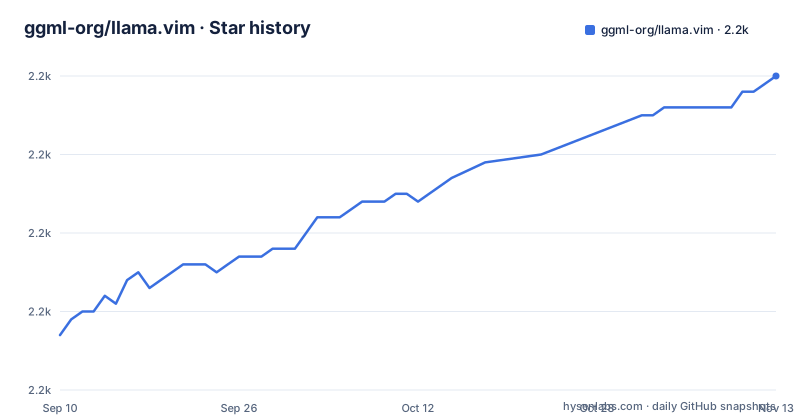
Star history
- ggml-org/llama.vim2,200 ★ · +33
| Repository | 2026-09-10 | 2026-11-13 |
|---|---|---|
| ggml-org/llama.vim | 2.2k | 2.2k |
33 Stars in the last 64 days, measured from the daily GitHub snapshot. Compare with other projects
Editorial analysis
The gap llama.vim fills: completions without a hosted service
Cloud completion assistants send your buffer contents to someone else's machine. llama.vim exists to avoid that. It is a Vim plugin that talks to a llama.cpp server instance you run yourself, at the endpoints named by g:llama_config.endpoint_fim and g:llama_config.endpoint_inst. The README is explicit that the plugin requires such a server to be running; without one, there is nothing to complete against. The audience is therefore narrow and identifiable: Vim users who already have local inference hardware, or who can reach a machine that does, and who want suggestions generated from their own code rather than from a shared remote model. The plugin's own framing is modest. It describes itself as a way to get "high-quality and performant local FIM completions, even on consumer-grade hardware", and the implementation-notes section of the README points at the llama.cpp side for how that is achieved. That division matters: llama.vim is the editor integration, and the interesting engineering largely lives in the server and in the context-reuse work it links to.
Two request types and how the plugin decides what to send
The plugin supports two distinct interactions. The first is fill-in-the-middle completion, which runs automatically as the cursor moves in Insert mode when auto_fim is left enabled. The second is instruction-based editing, triggered by a keymap (the default given in the README is <leader>lli), where you describe an edit rather than accept a continuation. Both are HTTP requests to a llama.cpp server, and the two request types can be aimed at different endpoints and different models through model_fim and model_inst. The context sent with a request is not just the current buffer. The README describes a ring buffer of chunks drawn from open and edited files plus yanked text, and the example screenshot spells out what the info line reports: current context in tokens against a maximum, the number of chunks held in the ring, how many have been evicted, and how many are queued. In that example the ring holds 30 chunks out of 64, one chunk had been evicted in the session, and the request itself computed 260 new prompt tokens while generating 24. That distinction between the whole context and the newly computed prompt tokens is the mechanism the README points to when it claims support for very large contexts on low-end hardware through smart context reuse: the server keeps prior prompt state and only processes the delta. The plugin's job is to maintain the ring and hand over the right slices; the reuse itself is a llama.cpp feature, not a plugin trick.
Installation is a plugin line plus a server you start yourself
The plugin half is short. With vim-plug it is a single Plug 'ggml-org/llama.vim' entry. With Vundle you clone the repository into ~/.vim/bundle and add Plugin 'llama.vim' inside the vundle#begin() block. With lazy.nvim it is a spec table containing the repository. The longer half is llama.cpp. On macOS the README gives brew install llama.cpp; on Windows, winget install llama.cpp; elsewhere you build from source or take a binary from the llama.cpp releases page. Then you start the server with a flag chosen by VRAM: --fim-qwen-30b-default above 64GB, --fim-qwen-7b-default above 16GB, --fim-qwen-3b-default below 16GB, and --fim-qwen-1.5b-default below 8GB. Configuration happens through the g:llama_config dictionary, and the README shows three equivalent styles: a full dictionary literal assigned before the plugin loads, direct member assignment such as let g:llama_config.show_info = v:false, and an init function under lazy.nvim that sets vim.g.llama_config. Keymaps for both modes are individually overridable, including keymap_fim_trigger, keymap_fim_accept_full, keymap_fim_accept_line, keymap_fim_accept_word, and the instruction set covering trigger, rerun, continue, accept and cancel. The README states that :help llama_config and the file autoload/llama.vim carry the full option list, which is where you should look rather than treating the examples as complete.
Profiles let you move between machines, but not between models
One documented feature deserves attention because it has a sharp edge. The profiles dictionary maps names to base URLs, for example spark to http://192.168.0.66:8080 and gmktec to http://192.168.0.65:8080, with profile selecting the active one. :LlamaProfile lists them, :LlamaProfile spark switches both FIM and instruction requests to that host, the choice is persisted, and :LlamaProfileReset restores whatever .vimrc configured. Command-line completion works on profile names. The limitation is stated plainly in the README: profiles only specify host servers, not the models used, which remain governed by model_fim and model_inst. The suggested workaround is naming discipline. If you set model_fim to something like fim_model and model_inst to something like inst_model, and then give each server an alias for those names in its configuration (the README shows alias = inst_model,pi in a server section), the client-side config becomes independent of which machine is active. That is a workable arrangement, but it pushes correctness onto server-side alias configuration that the plugin cannot verify. If an alias is missing on one host, switching profiles silently changes what you are talking to.
What the plugin does not do for you
The most important limitation is structural. llama.vim has no model of its own and no fallback. If no llama.cpp server is reachable at the configured endpoint, the completion path has nothing to call. There is no bundled inference and no CPU-only default that starts on install. You start llama-server, you keep it running, and you accept the memory cost. The VRAM tiers in the README make the trade-off explicit: a 1.5B model below 8GB, a 3B model below 16GB, and so on up to a 30B model above 64GB. Completion quality tracks that ladder, so the plugin's usefulness on a laptop with integrated graphics is bounded by which rung you can afford. A second constraint is model compatibility. The README states the plugin requires FIM-compatible models and links a Hugging Face collection rather than a general model list, which means a chat-tuned model that has not been trained for fill-in-the-middle is not a drop-in substitute for the FIM path. The plugin is also Vim Script and Vim-focused. The lazy.nvim example configures the same global variables rather than using a Lua API. If your editor is Neovim and you want a native plugin, this is not aimed at you.
Comparing the approach with an editor-native completion stack
The natural alternative for a Vim or Neovim user is a completion plugin that runs the model inside the editor process or manages a backend for you, rather than requiring a separately administered HTTP server. The difference is where the operational burden sits. With llama.vim, the boundary is an HTTP endpoint, which buys you real flexibility: the model can run on a different machine on your network, as the profiles example shows, and one server can serve several editors. That same boundary is the cost. You are responsible for starting llama-server, picking the flag that matches your VRAM, keeping the process alive, and configuring aliases so that profile switching does not change the model underneath you. An editor-managed stack hides those steps but typically gives you less control over which model runs and where. The honest summary is that llama.vim is the lower-level option: fewer moving parts inside the editor, more moving parts outside it. Which is better depends on whether you already run local inference for other reasons. If you do, the marginal cost of this plugin is one line in your plugin manager and a dictionary of settings.
Maintenance, licence, and what to verify before adopting
The plugin is MIT-licensed, which permits commercial and private use with the usual requirement to preserve the licence notice; that is a statement about the licence text, not legal advice, and the binding terms are in the repository's LICENSE file. Maintenance signals are a v0.1.0 release tagged in August 2026, a last push in September 2026, and an active CI badge. A 0.1.0 version number is worth reading literally: the option surface is documented primarily through :help llama_config and autoload/llama.vim rather than through a stable public specification, so a configuration that works today may need revisiting after an upgrade. Upgrading also has a second dimension that most plugins do not have, because the plugin and the server version together determine behaviour. The context-reuse behaviour the README highlights comes from llama.cpp, so a server upgrade can change latency and context accounting without any change to the plugin. Before you adopt, verify three things on your own setup: that a llama-server started with the flag for your VRAM tier responds at the endpoint you configured, that the info line reports context and chunk counts that look sane for your project size, and that your chosen model is FIM-compatible rather than merely available. If the info line shows chunks being evicted steadily, the ring is too small for the way you work and the reuse advantage is being spent on churn.
Editorial conclusion
Adopt llama.vim if you already run or are willing to run a llama.cpp server and want completions that never leave your network, and if you accept that the plugin is a client whose behaviour is set by the server's model choice. Do not adopt it if you want a completion engine that installs and runs without a separate inference process, or if your Vim setup is actually Neovim and you would rather use a Lua-native plugin. Before committing, start a llama-server with the flag matching your VRAM, point g:llama_config.endpoint_fim at it, and check what the info line reports for context usage and latency on your own hardware.
Frequently asked questions
What is ggml-org/llama.vim?
It is an MIT-licensed Vim plugin for local fill-in-the-middle completion served by a model server you run yourself. The plugin provides a suggestion as you move the cursor in insert mode, accepts a whole suggestion or just its first line, offers instruction-based editing through a key mapping, lets you cap generation time and the scope of nearby context, keeps a ring buffer of chunks from open and edited files plus yanked text, and displays statistics for each request.
What does llama.vim need in order to run?
A running llama.cpp server, reachable at the two endpoint settings the plugin reads from a single autoload source file, one for completion requests and one for instruction requests. The page does not state the addresses; it links the two lines of that file where the defaults live. The server itself installs with one package manager command on macOS and Windows, and by building from source or taking a binary elsewhere.
How do I switch llama.cpp servers in llama.vim?
Define named profiles mapping short names to server addresses, set which profile is active, then use the profile command to switch, which redirects both completion and instruction requests. The selection persists and a reset command restores the configuration from your file. Note that this changes hosts only: the models are configured separately, and the page's workaround is to keep consistent model names across servers or use server-side aliases.
How do I change llama.vim's keybindings?
Through the configuration dictionary, with separate sets for the two request types. The completion set has four entries covering the trigger, accepting the full suggestion, accepting one line and accepting one word; the instruction set has six covering the trigger, re-running, continuing, accepting and cancelling. All of them default to leader-based mappings plus the tab and escape keys.
Does llama.vim work with large contexts on small machines?
The feature list claims very large contexts even on modest hardware, attributing it to smart context reuse and linking an upstream change rather than a measurement on the page. The annotated example gives the numbers instead: on an older laptop processor with the smallest model, a request used about fifteen thousand of a thirty-two-thousand-token maximum with thirty chunks in a sixty-four-slot ring buffer, and took just over a second after one keystroke.
Official sources
Add this badge to your README
If you maintain this project, the badge below links readers to this analysis and shows its maintenance status from the daily GitHub snapshot. Paste the markdown into your README; add ?metric=license or ?metric=stars to the image URL for a different field.

[](https://hysenlabs.com/projects/ggml-org-llama-vim)Star history chart for your README
[](https://hysenlabs.com/projects/ggml-org-llama-vim)Was this useful?