whisper.cpp: A C/C++ Whisper Port That Runs Offline on Nearly Anything
whisper.cpp is a dependency-free C/C++ port of OpenAI's Whisper speech-recognition model, optimized for Apple Silicon and supporting CPU-only inference on many platforms.
At a glance
- What is it?
- whisper.cpp brings OpenAI's Whisper speech recognition to plain C/C++ with no runtime dependencies, targeting Apple Silicon, x86, POWER, and even NPUs. The quick-start CLI uses 16-bit WAV input and ggml-format models; an optional FFmpeg-enabled build supports additional audio formats.
- Who is it for?
- Adopt whisper.cpp if you need offline, on-device speech recognition on Apple Silicon, embedded Linux, or WebAssembly, and you can use ggml-format models. The quick-start path uses WAV; the project also documents an FFmpeg-enabled build for broader audio decoding.
- Can I use it commercially?
- Yes. MIT is a permissive licence: you can use, modify and sell software built on it, as long as you keep its copyright and licence notices.
- Is it still maintained?
- Yes. The repository last received commits 1 day ago.
- What is it written in?
- Mainly C++, according to GitHub's language statistics.
Answers come from the project's GitHub data, last synced on November 13, 2026, and from our analysis. They are not legal advice.
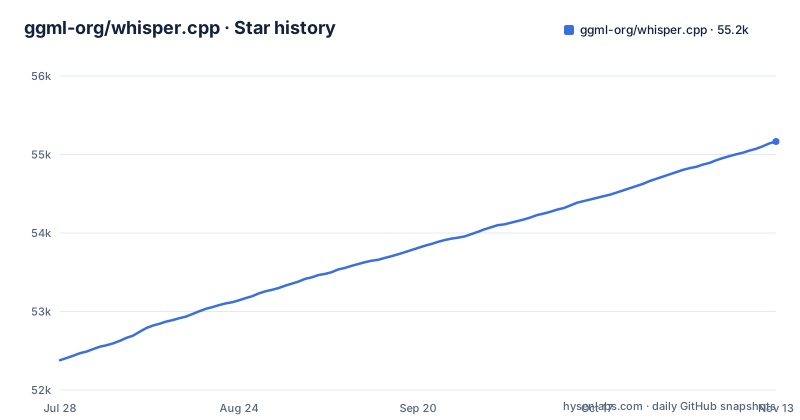
Star history
- ggml-org/whisper.cpp55,166 ★ · +2,787
| Repository | 2026-07-28 | 2026-11-13 |
|---|---|---|
| ggml-org/whisper.cpp | 52.4k | 55.2k |
2,787 Stars in the last 108 days, measured from the daily GitHub snapshot. Compare with other projects
Editorial analysis
What whisper.cpp solves and who it is for
whisper.cpp is a from-scratch C/C++ implementation of OpenAI's Whisper automatic speech recognition model. The problem it solves is that the original Python implementation is heavy, requires a Python runtime and PyTorch, and is awkward to embed in mobile apps or edge devices. This port removes those dependencies: the README claims a plain C/C++ implementation without dependencies, with the entire high-level model logic in whisper.h and whisper.cpp. The target user is an engineer who wants speech-to-text on an iPhone, a Raspberry Pi, a browser via WebAssembly, or a server with no Python stack. The project also supports Apple Silicon as a first-class citizen, with ARM NEON, Accelerate, Metal, and Core ML paths. That makes it a natural fit for macOS and iOS apps that need offline transcription.
The architecture: ggml underneath, a thin C API on top
The design is two layers. On top sits whisper.h and whisper.cpp, which the README calls the entire high-level implementation of the model. Below that is the ggml machine learning library, which handles tensor operations and hardware backends. The README lists CPU, Metal, Vulkan, ROCm and OpenVINO among the supported backends. The C-style API in whisper.h is the integration point for bindings; the repository lists Java, iOS, Android, and WebAssembly bindings, so the API is stable enough to wrap. The model itself is not the original PyTorch checkpoint. It must be converted to a custom ggml format, which is a concrete constraint: you cannot point whisper.cpp at an official OpenAI model file. The conversion step is part of the workflow, and the download script fetchs pre-converted models.
Getting it running: clone, download a model, build, transcribe
The quick start is straightforward. Clone the repository, then download a converted model with a shell script: sh ./models/download-ggml-model.sh base.en. Then build with CMake: cmake -B build and cmake --build build -j --config Release. The resulting binary is ./build/bin/whisper-cli, and you transcribe a file with -f samples/jfk.wav. There is also a make base.en target that downloads the model and runs inference on all WAV samples in the samples folder. The README is explicit about a limitation: the CLI currently runs only with 16-bit WAV files. You must convert audio first, and the given example uses ffmpeg: ffmpeg -i input.mp3 -ar 16000 -ac 1 -c:a pcm_s16le output.wav. The quick-start note describes the basic path; the README also documents building examples with `WHISPER_COMMON_FFMPEG` for broader decoding, including an Opus transcription example. Test the formats needed with your chosen build. For a quick demo, make base.en is the fastest path, but for production you will need to handle audio conversion in your pipeline.
Quantization and memory: the trade-off you must measure
The project supports integer quantization of ggml models. The README gives a concrete example: ./build/bin/quantize models/ggml-base.en.bin models/ggml-base.en-q5_0.bin q5_0, then run whisper-cli with the -m flag to use the quantized file. Quantized models use less disk and memory, and on some hardware they process faster. The quantization section shown does not quantify accuracy loss. You cannot assume Q5_0 is as accurate as the original; you must test on your own audio. The memory table lists disk and RAM for each model: tiny uses about 273 MB, base about 388 MB, small about 852 MB, medium about 2.1 GB, and large about 3.9 GB. Those are the numbers to check against your target device. The README also lists zero memory allocations at runtime, but the memory table is the better guide to peak requirements.
Hardware backends: Apple Silicon is the star, but the list is long
The README lists a broad set of backends: ARM NEON, Accelerate, Metal, Core ML, AVX for x86, VSX for POWER, Vulkan, NVIDIA GPU, AMD ROCm, AMD Ryzen AI NPU, OpenVINO, Ascend NPU, and Moore Threads GPU. That is an unusual spread. Apple Silicon gets special attention: on-device GPU inference via Metal, and Core ML can run the encoder on the Apple Neural Engine, with the README claiming more than x3 speed-up over CPU-only. The POWER VSX section is specific: on Linux on POWER9/10, with a BLAS package installed, you build with cmake -B build -DGGML_BLAS=1, and the README says it can transcribe faster than realtime on an underclocked Raptor Talos II. For NVIDIA, AMD, and the NPUs, the README links to dedicated sections of its own for those setup steps. The practical takeaway is that whisper.cpp is not a single binary; it is a family of builds, and you must pick the backend that matches your hardware. That is both a strength and a maintenance burden.
Core ML support: a concrete path to faster Apple Silicon inference
The Core ML path is the most documented backend beyond CPU. The idea is to run the encoder on the Apple Neural Engine via Core ML, which the README says can be more than x3 faster than CPU-only execution. The setup requires Python: pip install ane_transformers, openai-whisper, and coremltools. You also need Xcode command-line tools (xcode-select --install). The README recommends Python 3.11 and macOS Sonoma or newer, because older macOS versions might have issues with transcription hallucination. That last point is a warning about model behavior, not just build issues. The workflow is to generate a Core ML model from the original Whisper, then use it with whisper.cpp. This adds a Python dependency to the build process, even though the runtime is dependency-free. If you are on Apple Silicon and need speed, this is the path to take, but it is not a one-command setup.
Limitations and failure modes you should know before adopting
Input format depends on the build: the quick-start describes 16-bit WAV, while an optional FFmpeg-enabled build supports broader decoding. Check the exact formats and dependencies of the binary you deploy, and convert inputs when necessary. The second limitation is the model format: you must use ggml-converted models, not the official OpenAI checkpoints. That adds a conversion or download step and ties you to the project's model repository. The README also mentions that older macOS versions might experience transcription hallucination with Core ML, which is a quality risk. The memory table shows large needs about 3.9 GB RAM. The project is not a drop-in replacement for the Python Whisper; it is a reimplementation with its own quirks.
Alternatives and how they differ
The obvious alternative is OpenAI's original Whisper Python package. That runs on PyTorch, accepts any audio format that ffmpeg can read, and gives you the full model with no conversion step. The trade-off is a heavy runtime: you need Python, PyTorch, and a GPU if you want reasonable speed. whisper.cpp trades that convenience for a dependency-free binary that runs on embedded devices and browsers. Another alternative is faster-whisper, a CTranslate2-based reimplementation that is also faster than the original and supports integer quantization, but it still requires a Python or C++ runtime and does not target mobile or WebAssembly as directly. The key difference in approach is that whisper.cpp is built on ggml, a custom tensor library designed for portability, while faster-whisper uses CTranslate2, which is tuned for transformer inference on CPU and GPU. If your goal is a mobile app or a Raspberry Pi, whisper.cpp is the better fit; if you are on a server with Python already, faster-whisper might be easier to integrate.
Maintenance and licensing
The repository is under the MIT license, which is permissive and allows commercial use with attribution. The project is actively maintained: the last push was 2026-10-30, and the latest releases are v1.9.5 and b5454 on 2026-10-06. The release cadence is frequent, which is good for bug fixes but also means you should track upstream changes. The dependency on ggml is a maintenance consideration: ggml is a separate project, and whisper.cpp's behavior can change when ggml updates its backend code. Upgrading whisper.cpp may require re-testing on all your target backends, especially if you use Vulkan or ROCm, because those paths are hardware-specific. The build system is CMake, which is standard, so plan to read release notes. The Core ML generation step depends on Python packages, which adds a maintenance burden if you need to regenerate models. Overall, the license is friendly, and the maintenance activity is high, but the multi-backend complexity means you should not adopt it without a CI setup that builds for your specific platforms.
Editorial conclusion
Adopt whisper.cpp if you need offline, on-device speech recognition on Apple Silicon, embedded Linux, or WebAssembly, and you can use ggml-format models. The quick-start path uses WAV; the project also documents an FFmpeg-enabled build for broader audio decoding. A Python-native workflow may be a better fit if C/C++ integration is not useful to you. Before committing, verify that your target platform has a supported backend (Metal, Vulkan, ROCm, OpenVINO, etc.) and that the model you plan to use fits your memory budget; the README's memory table shows large requiring about 3.9 GB RAM. Also confirm that the quantized model accuracy is acceptable for your use case, since the README's quantization example uses Q5_0.
Frequently asked questions
What is Whisper in C++?
It is the `whisper.cpp` port of OpenAI's Whisper automatic speech recognition model, written in plain C/C++ without dependencies. The high-level model implementation is contained in `whisper.h` and `whisper.cpp`, and the rest belongs to the `ggml` library.
How to use Whisper cpp?
Clone the repository, download a model in `ggml` format with `sh ./models/download-ggml-model.sh base.en`, build with `cmake -B build` and `cmake --build build -j --config Release`, then run `./build/bin/whisper-cli -f samples/jfk.wav`. Detailed options are listed by `./build/bin/whisper-cli -h`.
Can Whisper.cpp perform real-time transcription?
The README reports faster than realtime transcription on POWER9 and POWER10 on Linux with the `GGML_BLAS` build option and a BLAS package installed, and more than x3 faster than CPU-only execution for the encoder on Apple Silicon through Core ML.
how to install whisper.cpp
The install is a cmake build rather than a package: `cmake -B build` followed by `cmake --build build -j --config Release`, which produces the example binaries under `./build/bin/`. A model download is a separate step, and `make base.en` runs the download, the build and the sample transcription in one target.
what is whisper.cpp used for
Offline, on-device speech recognition, including an offline voice assistant built on the `examples/command` example, and embedding through the C-style API on iOS, Android, Java, WebAssembly, Windows, Raspberry Pi and Docker.
Official sources
Where this project is recommended
Add this badge to your README
If you maintain this project, the badge below links readers to this analysis and shows its maintenance status from the daily GitHub snapshot. Paste the markdown into your README; add ?metric=license or ?metric=stars to the image URL for a different field.

[](https://hysenlabs.com/projects/ggml-org-whisper-cpp)Star history chart for your README
[](https://hysenlabs.com/projects/ggml-org-whisper-cpp)Was this useful?