Open WebUI: every dependency is ==, the container runs as root, and the tag is main
Open WebUI is a self-hosted AI interface that runs entirely offline, supporting Ollama and OpenAI-compatible APIs with a built-in inference engine for RAG.
At a glance
- What is it?
- Open WebUI is a self-hosted chat interface for Ollama and OpenAI compatible APIs, with a large surface of plugins, retrieval, calendar and automation features. What the repository files show is a project that pins every Python dependency exactly, ships a compose file whose image tag defaults to a moving branch, and defaults to running as root with an empty secret.
- Who is it for?
- Adopt Open WebUI when you want one interface over local models and hosted APIs, with retrieval, model evaluation and group permissions in one place, and when your team will own the deployment. Do not adopt it expecting a fixed dependency tree, an isolated agent sandbox or a licence identifier your scanner can resolve, since the pins are exact, non-root containers are marked untested, and the metadata reports no recognised licence name.
- Can I use it commercially?
- Check first. The repository uses a licence we do not classify automatically, so read its LICENSE file before any commercial use.
- Is it still maintained?
- Yes. The repository received new commits within the last day.
- What is it written in?
- Mainly Python, according to GitHub's language statistics.
Answers come from the project's GitHub data, last synced on November 13, 2026, and from our analysis. They are not legal advice.
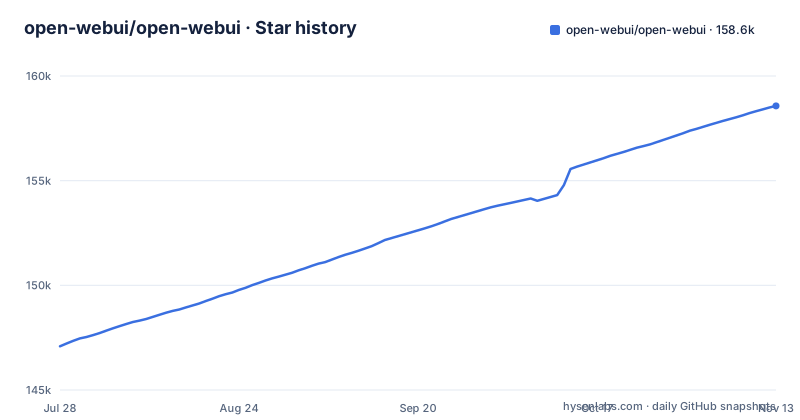
Star history
- open-webui/open-webui158,573 ★ · +11,485
| Repository | 2026-07-28 | 2026-11-13 |
|---|---|---|
| open-webui/open-webui | 147.1k | 158.6k |
11,485 Stars in the last 108 days, measured from the daily GitHub snapshot. Compare with other projects
Editorial analysis
The compose file tracks main, and WEBUI_SECRET_KEY is empty
The default compose file is where a first deployment actually happens, and two of its values deserve attention before anything else. The image reference is ghcr.io/open-webui/open-webui:${WEBUI_DOCKER_TAG-main}, so with no environment file the tag is a moving branch rather than a release such as v0.12.5. The Ollama service beside it is tagged ${OLLAMA_DOCKER_TAG-latest} and carries pull_policy: always, so the two services in one file have different update policies and the application one follows its branch. The relevant part of the file looks like this.
  open-webui:
    build:
      context: .
      dockerfile: Dockerfile
    image: ghcr.io/open-webui/open-webui:${WEBUI_DOCKER_TAG-main}
    container_name: open-webui
    volumes:
      - open-webui:/app/backend/data
    depends_on:
      - ollama
    ports:
      - ${OPEN_WEBUI_PORT-3000}:8080
    environment:
      - 'OLLAMA_BASE_URL=http://ollama:11434'
      - 'WEBUI_SECRET_KEY='
WEBUI_SECRET_KEY is set to an empty string, with no default behind it, and the container port is 8080 mapped to 3000 on the host. All state lives in one named volume mounted at /app/backend/data.
Every Python dependency is pinned with ==, and two carry warnings
The backend manifest is a wall of exact pins: fastapi==0.136.3, uvicorn[standard]==0.54.0, pydantic==2.13.4, sqlalchemy[asyncio]==2.0.50, alembic==1.18.4, psycopg[binary]==3.3.4, redis==8.0.1, mcp==2.3.0, openai==2.29.0, anthropic==0.86.0, chromadb==1.5.9, langchain-core==1.4.8 and boto3==1.42.62 among others, with a uv.lock at the top level. No version ranges means a security update is a rebuild of the image rather than a version bump, which is a defensible choice for a self-hosted stack and a real cost for a platform team. Two pins carry the project's own record of upstream breakage, and they are worth reading before you touch either.
"aiohttp==3.14.5", # do not update to 3.13.3 - brokenaiodns==3.6.1 is held back because 4.x pulls pycares 5, c-ares 1.34.6, which breaks DNS on some hosts, with the new resolver left opt-in through AIOHTTP_CLIENT_ASYNC_DNS_RESOLVER. A third line is commented out, valkey-glide-sync, marked as a manual install if VECTOR_DB=valkey, so that vector backend needs a manual install.
The image runs as root and says non-root is untested
The build arguments decide what the container is allowed to do, and the defaults are permissive. USE_CUDA, USE_OLLAMA, USE_SLIM and USE_PERMISSION_HARDENING all default to false, and the identity arguments are the part to look at.
# Override at your own risk - non-root configurations are untested
ARG UID=0
ARG GID=0
So the process starts as uid 0 unless you pass build arguments, and the comment is a warning rather than an invitation. The README also describes Agentic Execution with Open Terminal, a separate project linked from the README that gives agents a terminal and a filesystem. Permission hardening is off by default behind its own USE_PERMISSION_HARDENING flag. Two more build details: the frontend stage is node:22-alpine3.20 and it installs with npm ci --force, which suppresses the dependency conflict check at build time, and USE_CUDA_VER defaults to cu128 while the comment above it still names cu121 as the tested default for CUDA 12.
Changing the embedding model invalidates the document library
One build argument is effectively permanent, and the Dockerfile says so in capitals. USE_EMBEDDING_MODEL defaults to sentence-transformers/all-MiniLM-L6-v2, and the note warns that if you change the embedding model and vice versa you cannot use RAG Chat with your previous documents loaded in the interface, because everything has to be re-embedded. The surrounding lines are the rest of the model surface: USE_RERANKING_MODEL is empty by default, USE_AUXILIARY_EMBEDDING_MODEL is TaylorAI/bge-micro-v2, and USE_TIKTOKEN_ENCODING_NAME is cl100k_base, with a pointer to the Hugging Face model list for alternatives. The same comment offers intfloat/multilingual-e5-large at about 2.5GB or e5-base at about 1.5GB for better performance and multilingual support. So the practical order of operations is to choose the embedding model before the first document is loaded, and accept the disk and re-embedding cost before you need it.
Two databases, nine vector stores, one volume for all state
Storage is where the deployment shape gets decided. The documented choices are SQLite with optional encryption or PostgreSQL for relational data, local files or S3, Google Cloud Storage or Azure Blob Storage for documents, and a list of nine vector databases: ChromaDB, PGVector, Qdrant, Milvus, Elasticsearch, OpenSearch, Pinecone, S3Vector and Oracle 23ai. Retrieval on top of that is backed by extraction engines including Tika, Docling, Document Intelligence, Mistral OCR, PaddleOCR-vl and external loaders, with hybrid search combining BM25 and vector, reranking, and a full-context mode, and documents pulled in with the # command. Multi-worker deployments need Redis, which the project describes as Redis-backed session management with WebSocket support behind load balancers. The point of tension is the default compose file: one named volume holds /app/backend/data, so the SQLite path, the uploads and the vector index all share one mount, and moving to PostgreSQL or to a hosted vector store is a migration rather than a configuration change.
vitest runs with --passWithNoTests, so green is not the same as covered
The frontend manifest is worth reading as a quality signal. The test script is vitest --passWithNoTests, which means the frontend test command exits successfully when it finds no tests at all, so a green job in your pipeline proves nothing about coverage. The real frontend gate is check, which runs svelte-kit sync and then svelte-check with the project tsconfig. Linting is a chain of three tools, eslint with --fix, svelte-check again, and pylint against backend/, while formatting is split between prettier for the JavaScript, TypeScript, Svelte, CSS, Markdown, HTML and JSON, and ruff format for the Python. Cypress is present for end to end work. One more thing to know before you build: both dev and build begin with pyodide:fetch, a Node script that prepares Pyodide, so the browser side of the application depends on that step succeeding, and the application is a SvelteKit project with both adapter-auto and adapter-static available.
The feature list mixes open source tiers, and the licence has no name
The README sells a long feature list, and one entry in it is labelled Enterprise. Terminals, described as per-user isolated environments with resource limits and automatic lifecycle management, is labelled Enterprise. A separate feature named Enterprise Authentication and Provisioning covers LDAP and Active Directory, SSO through trusted headers and OAuth, and SCIM 2.0 for Okta, Azure AD and Google Workspace. The README also carries a tip pointing at an Enterprise Plan and a sales team. That matters for the agent story in particular, because the isolated per-user Terminals is the item labelled Enterprise, while Open Terminal is a separate open-webui repository without that label. The licensing picture is equally untidy: the top level carries LICENSE, LICENSE_HISTORY and LICENSE_NOTICE plus a contributor license agreement, and the repository metadata resolves to no recognised licence name, so an automated scan reports something your legal reading has to settle. The code itself is clearly active, with v0.12.5 released on 2026-10-29 and the last push on 2026-11-01.
Web browsing on a model's behalf is an SSRF decision, not a feature
One feature deserves an engineer's scepticism before deployment rather than after. The project describes pulling websites into a chat with the # command followed by a URL, and also letting the model fetch pages on its own when it decides it needs them. Combined with a feature list that includes dozens of web search providers, from SearXNG and Google PSE through Brave Search, Kagi, Mojeek, Tavily, Perplexity, Firecrawl, Bing, Exa and Azure AI Search, the instance becomes an HTTP client that a language model can aim at any address you can reach. On a laptop that is a convenience. On a network with internal services, cloud metadata endpoints or a link-local address range, the same feature is a server side request forgery channel. If the model is allowed to browse, restrict outbound traffic at the network layer, because the interface will not do it for you.
Editorial conclusion
Adopt Open WebUI when you want one interface over local models and hosted APIs, with retrieval, model evaluation and group permissions in one place, and when your team will own the deployment. Do not adopt it expecting a fixed dependency tree, an isolated agent sandbox or a licence identifier your scanner can resolve, since the pins are exact, non-root containers are marked untested, and the metadata reports no recognised licence name. Before the first production deploy, set WEBUI_SECRET_KEY, replace the WEBUI_DOCKER_TAG default of main with the release tag you tested, such as v0.12.5, and decide your embedding model now, because changing it later invalidates every document you have loaded.
Frequently asked questions
Is OpenWebUI free?
The repository is published with a LICENSE file plus LICENSE_HISTORY and LICENSE_NOTICE, and its metadata does not resolve to a standard licence name, so automated tools cannot classify it. The README also advertises an Enterprise Plan and links a sales team, and the Terminals feature is labelled Enterprise.
Is Open web UI fully open source?
Most of the interface is in the repository, including the RBAC and user groups, the plugin system for Filters, Actions, Pipes, Tools and Skills, MCP and OpenAPI tool servers, and local retrieval. The README labels Terminals, for per-user isolated environments, as Enterprise, and it points to an Enterprise Plan; it also lists Enterprise Authentication and Provisioning for LDAP, SSO and SCIM 2.0 among its features.
how to install open-webui
The project lists four routes: pip, uv, Docker, or Kubernetes with kubectl, kustomize or helm, and it publishes :ollama and :cuda tagged images for container deployments. The compose file it ships starts two services, an ollama container and open-webui, publishes host port 3000 to container port 8080, and points the interface at OLLAMA_BASE_URL=http://ollama:11434.
how to use open webui with ollama
The compose file runs Ollama as a second service with its own volume at /root/.ollama, and the interface reaches it through OLLAMA_BASE_URL=http://ollama:11434, with the open-webui service declaring a dependency on it. You can also point the API URL at any OpenAI compatible endpoint, which the README names as LMStudio, GroqCloud, Mistral, OpenRouter and vLLM among others.
how to access open webui from another computer
The compose file publishes the container's port 8080 on the host as ${OPEN_WEBUI_PORT-3000}, so changing that variable is how you move it off the default. Note the limits it documents: the offline access of the Progressive Web App is described for localhost, and the file adds host.docker.internal:host-gateway so the container can reach services on the host machine.
Official sources
Where this project is recommended
Where developers are discussing it
Posts on Hacker News, dev.to and Lobsters that link to this repository, found by our scan of those communities. 1 in the last 30 days; newest first.
- I Ran AI Offline for 7 Days. Was It Worth It?dev.to · Oct 30, 2026 · 3 points · 0 comments
Add this badge to your README
If you maintain this project, the badge below links readers to this analysis and shows its maintenance status from the daily GitHub snapshot. Paste the markdown into your README; add ?metric=license or ?metric=stars to the image URL for a different field.

[](https://hysenlabs.com/projects/open-webui-open-webui)Star history chart for your README
[](https://hysenlabs.com/projects/open-webui-open-webui)Community discussions
Was this useful?