ONNX Runtime: A Cross-Platform Inference and Training Accelerator with a Plugin Architecture
ONNX Runtime: cross-platform, high performance ML inferencing and training accelerator
At a glance
- What is it?
- Microsoft's ONNX Runtime is a C++ inference and training accelerator that runs ONNX models across CPUs, GPUs, and specialized hardware. This review covers its mechanism, setup, plugin EPs, limitations, and alternatives.
- Who is it for?
- Adopt ONNX Runtime if you need a single inference engine that spans multiple hardware targets and frameworks, especially if you already export models to ONNX. Do not adopt it if your models cannot be converted to ONNX or if you require a pure Python-only dependency with no native binaries.
- Can I use it commercially?
- Yes. MIT is a permissive licence: you can use, modify and sell software built on it, as long as you keep its copyright and licence notices.
- Is it still maintained?
- Yes. The repository received new commits within the last day.
- What is it written in?
- Mainly C++, according to GitHub's language statistics.
Answers come from the project's GitHub data, last synced on November 14, 2026, and from our analysis. They are not legal advice.
Star history
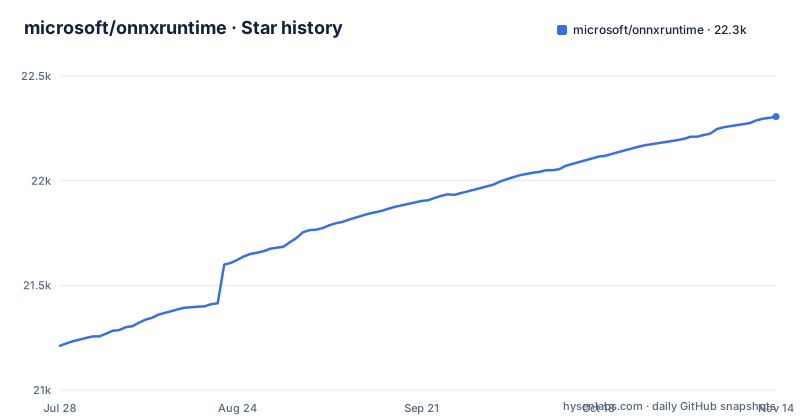
- microsoft/onnxruntime22,306 ★ · +1,095
| Repository | 2026-07-28 | 2026-11-14 |
|---|---|---|
| microsoft/onnxruntime | 21.2k | 22.3k |
1,095 Stars in the last 109 days, measured from the daily GitHub snapshot. Compare with other projects
Editorial analysis
What ONNX Runtime Solves and Who It Serves
ONNX Runtime addresses the problem of running trained machine learning models efficiently across different hardware and operating systems without rewriting the inference code for each target. The README positions it as a cross-platform accelerator for both inference and training, supporting models from PyTorch, TensorFlow/Keras, and classical libraries like scikit-learn, LightGBM, and XGBoost. The target audience is broad: application developers who need low-latency inference in production, and data scientists who want to accelerate transformer training on multi-node NVIDIA GPUs with a one-line addition to existing PyTorch scripts. It is not a framework for training new models from scratch; it is a runtime that consumes ONNX-format models and optimizes their execution.
The Mechanism: Graph Optimizations and Hardware Accelerators
The core mechanism, as described in the README, is two-fold. First, ONNX Runtime applies graph optimizations and transforms to the ONNX model before execution. These optimizations can fuse operations, eliminate redundant computations, and restructure the graph for better memory access patterns. Second, it leverages hardware accelerators where applicable, using Execution Providers (EPs) to offload compute to GPUs, NPUs, or other specialized devices. The existence of plugin EP repositories, such as the QNN plugin for Qualcomm hardware and the newer CUDA and WebGPU plugins, shows that hardware support can be added through plugin EPs. The training side uses the same graph-based approach but extends it to compute gradients and update weights, with a focus on distributed multi-node GPU training for transformers.
Getting It Running: From Pip to Plugin EPs
The README points to the official documentation for installation, but the repository layout and release history give concrete signals. The README does not list explicit install commands. A typical setup would involve installing the onnxruntime package, loading an ONNX model, and selecting an Execution Provider. For specialized hardware, you would install a plugin EP separately; the releases list plugin-ep-webgpu/v0.5.0 with its own version number, and the repository has plugin-ep-cuda/ and plugin-ep-webgpu/ directories, indicating that plugin EPs are versioned independently from the core runtime. To use training, you add one line to an existing PyTorch training script, as the README states, but the README does not give the exact line.
The Plugin EP Approach: Flexibility with a Cost
The recent releases of plugin-ep-webgpu and plugin-ep-cuda suggest a shift toward a modular architecture where hardware support is decoupled from the core runtime. This is a sensible design: it allows the core to remain lean and lets hardware vendors maintain their own EPs. However, it introduces a real cost. Users must now track the compatibility between the core ONNX Runtime version and the plugin EP version. A plugin built for one core release may not work with the next, and the release cadence is not synchronized, as seen by WebGPU plugin v0.5.0 releasing on the same day as v1.30.1 but with its own versioning. This fragmentation means that a production deployment must pin both the core and each plugin version, and verify that the plugin supports the specific operators used by the model. The README does not provide a compatibility matrix, so this is a gap you need to close yourself.
Limitations and Failure Modes
One limitation is the dependency on the ONNX format. If your model uses custom operators or framework-specific features that cannot be exported to ONNX, ONNX Runtime cannot run it. The README claims support for PyTorch and TensorFlow, but that support is contingent on successful export, which can be a manual and error-prone process. Another failure mode is operator coverage: not every ONNX operator is implemented on every EP. A model that runs fine on the CPU EP may fail on a GPU or plugin EP because a required operator is not implemented. The README does not disclose the operator coverage per EP, so you must check the documentation. Telemetry is another concern. The README states that the project may collect usage data and send it to Microsoft. This is a potential issue for organizations with strict data privacy policies. You can review the privacy statement for details.
Alternatives: OpenVINO and TensorRT
A real alternative is Intel's OpenVINO, which also accelerates inference across CPU, GPU, and VPU, but it is optimized primarily for Intel hardware. OpenVINO uses its own Intermediate Representation (IR) format, not ONNX, though it can convert ONNX models. The difference in approach is that OpenVINO is a compiler that performs hardware-specific optimizations at model conversion time, while ONNX Runtime is a runtime that applies graph optimizations at load time. Another alternative is NVIDIA's TensorRT, which targets only NVIDIA GPUs. TensorRT requires building an engine from the model, which is a compilation step that can take minutes, whereas ONNX Runtime loads ONNX models directly and selects an EP at runtime. TensorRT locks you into that vendor. ONNX Runtime's advantage is the breadth of EPs, including the new plugin system, but that breadth comes with the integration complexity described above.
Maintenance, Upgrades, and License
The project is under active maintenance, with v1.31.1 released on 2026-10-26, v1.30.1 on 2026-10-29, and plugin-ep-webgpu/v0.5.0 the same day. The README points to a roadmap for upcoming releases, which is a practical tool for planning upgrades. However, the fast release cadence means you will need to track updates regularly, especially for security fixes and new operator support. The MIT license is permissive, allowing commercial use, modification, and redistribution with minimal restrictions. The telemetry clause is a non-license concern but a legal one: you must decide whether to disable data collection. The repository is not archived and the default branch is main, so contributions are expected. The contribution guidelines are referenced, which suggests a structured process for submitting patches. For a production user, the main cost is not the license but the ongoing effort to test new versions and plugin combinations.
Editorial conclusion
Adopt ONNX Runtime if you need a single inference engine that spans multiple hardware targets and frameworks, especially if you already export models to ONNX. Do not adopt it if your models cannot be converted to ONNX or if you require a pure Python-only dependency with no native binaries. Before committing, verify that your target hardware has a supported Execution Provider or plugin EP, and check the telemetry settings in the privacy statement to ensure they meet your data governance requirements. The plugin EP approach, as seen in the WebGPU and CUDA plugins, is the direction to evaluate first.
Frequently asked questions
What is the use of onnxruntime?
It is a cross-platform inference and training machine-learning accelerator that runs models exported from PyTorch, TensorFlow/Keras, scikit-learn, LightGBM and XGBoost, using hardware accelerators where applicable alongside graph optimizations and transforms.
What is the difference between ONNX and ONNX Runtime?
The README defines ONNX Runtime only, as the inference and training accelerator. It does not define the ONNX model format itself or draw the boundary between the model definition and the engine that executes it.
How can I use ONNX Runtime in Python?
Python packaging lives in setup.py and pyproject.toml, which uses the setuptools.build_meta backend, and the declared runtime dependencies are flatbuffers, numpy >= 1.21.6, packaging and protobuf>=4.25.8. The listed sample folders are samples/cxx/ and samples/nodejs/, so no Python sample file appears among them.
how to install onnxruntime-gpu
No install command for a GPU package appears in the README. The build script pairs the wheel_name_suffix value gpu with a cuda_version argument, but the repository does not list accepted CUDA versions or name the package index that serves the build.
how to install onnxruntime on jetson
No Jetson-specific instructions or build script appear at the repository root. Usage documentation is routed to onnxruntime.ai/docs, and the only platform-named build files in the root are build.sh, build.bat and build_arm64x.bat.
Official sources
Add this badge to your README
If you maintain this project, the badge below links readers to this analysis and shows its maintenance status from the daily GitHub snapshot. Paste the markdown into your README; add ?metric=license or ?metric=stars to the image URL for a different field.

[](https://hysenlabs.com/projects/microsoft-onnxruntime)Star history chart for your README
[](https://hysenlabs.com/projects/microsoft-onnxruntime)Was this useful?