n8n Playbook: A Korean-Language Workflow Library for n8n Learners
n8n-playbook: cheastsheet, examples
At a glance
- What is it?
- This repository bundles practice workflows from a Korean n8n book with real-world automation use cases, cheatsheets, and onboarding guides. It is a reference library, not a tool, and its value depends on how closely your needs match its examples.
- Who is it for?
- Adopt this repository if you are a Korean-speaking n8n beginner or intermediate user who wants concrete, copy-paste workflow examples tied to a specific book, especially if you already use Google services, Slack, or KAMIS data. Do not use it as a production template library: the workflows are educational, not guaranteed current, and the repository has no license, so reuse is legally unclear.
- Can I use it commercially?
- Not without permission. GitHub finds no licence file in the repository, and without a licence all rights are reserved by default: you may read the code but not reuse it. Check the README, or ask the authors, before using it.
- Is it still maintained?
- Yes. The repository last received commits 35 days ago.
- What is it written in?
- Mainly Python, according to GitHub's language statistics.
Answers come from the project's GitHub data, last synced on October 4, 2026, and from our analysis. They are not legal advice.
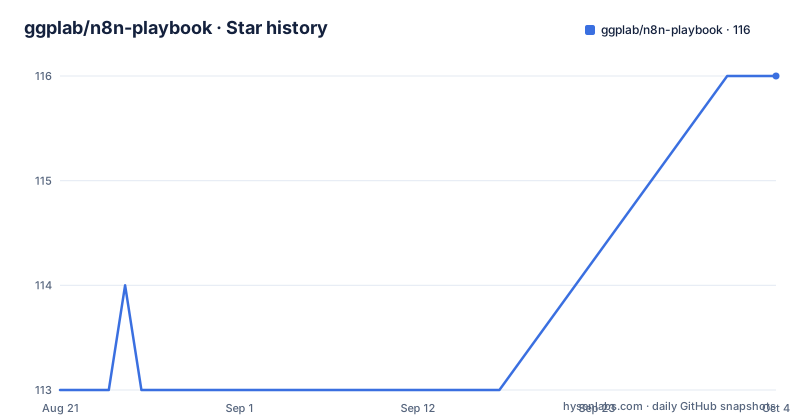
Star history
- ggplab/n8n-playbook116 ★ · +3
| Repository | 2026-08-21 | 2026-10-04 |
|---|---|---|
| ggplab/n8n-playbook | 113 | 116 |
3 Stars in the last 44 days, measured from the daily GitHub snapshot. Compare with other projects
Editorial analysis
What This Repository Actually Is
This is a curated set of examples, not a comprehensive platform. The value lies in the breadth of services integrated: Google, Slack, Notion, KakaoTalk, and various APIs. For a beginner, seeing how these nodes connect is more instructive than reading abstract documentation. For an experienced user, the examples may serve as a checklist of common patterns. However, the repository does not provide any runtime or execution environment; you must have your own n8n instance to use these workflows. The README does not specify which n8n version the workflows target, which is a significant gap given n8n's frequent updates.
The Book-Chapter Workflows: A Guided Path
The first section, labeled 01-hanbit-n8n-guidebook, maps directly to chapters 2 through 7 of the book. Each chapter has a specific learning objective: chapter 2 is a Google News RSS feed that sends email via Gmail, chapter 3 uses OpenWeatherMap to send Discord alerts, chapter 4 builds an AI agent for agricultural product prices using KAMIS and Google Gemini, chapter 5 does speech-to-text with AssemblyAI, chapter 6 handles OCR with Upstage, and chapter 7 creates an AI investment report sent by email. This progression is sensible: it starts with simple triggers and actions, then introduces AI nodes and external APIs. The README gives no further detail on node configurations or error handling, so a user must open each workflow file to see the logic. The book itself likely provides the context, but the repository alone is not self-contained. For a self-learner without the book, these workflows are still usable as references, but the lack of comments or explanations in the README makes them harder to follow.
Real-World Use Cases: Beyond the Book
The use cases folder, 02-usecases, contains 13 workflows that are not tied to the book. These are more varied: Slack attendance tracking with Google Sheets, meeting summarization with Notion and Slack, email classification with Gmail and Calendar, a reservation notification system with a web app and DB, Seoul public bicycle inventory with KakaoTalk, automatic expense tracking from SMS, intelligent file organization with AI, stock portfolio reports, OCR text extraction, new employee onboarding, Google Sheets version management, and a weather-based outfit chatbot. This is a strong collection for demonstrating n8n's range. The inclusion of KakaoTalk is notable because it is a Korean-specific service, making this repository particularly useful for Korean users who want to integrate with local platforms. The README does not explain the data flow for any of these use cases, so the user must inspect each workflow file. Some use cases, like the web app and DB for reservations, imply a more complex architecture, but the README gives no details on how to set up the external components.
Cheatsheet and Onboarding: The Practical Extras
The repository includes a cheatsheet for data pipelines, available in Korean and English as PDF and PNG files, which summarizes key n8n nodes. This is a useful quick reference for beginners. The onboarding guide covers Microsoft 365 connection, including Entra app registration and verification, and a broader guide that includes community node installation and credential/API basics. These are practical, hands-on resources that complement the workflows. The onboarding guide is particularly valuable because connecting Microsoft 365 to n8n is a common pain point, and the guide appears to walk through the entire process. However, the README does not provide a preview of the cheatsheet content or the onboarding steps, so the user must download the files to see if they are helpful. The quality of these guides is unknown from the README alone, but the topic selection is sensible.
Installation and Usage: What You Need to Do
The README does not provide any installation commands or setup instructions beyond linking to folders. To use these workflows, you must have an n8n instance running, either self-hosted or cloud. You would then import the workflow JSON files from the respective folders into n8n. The README does not specify whether the workflows are exported as JSON or as text, but n8n's standard import is a JSON file. You also need to set up credentials for each service: Gmail, Google Sheets, Slack, Discord, OpenWeatherMap, KAMIS, AssemblyAI, Upstage, and others. The onboarding guide likely covers credential setup, but the README itself does not. There are no commands to run, no Python scripts, and no configuration files to edit. The repository is purely a collection of artifacts. This is a barrier for absolute beginners who might expect a one-click setup, but it is typical for n8n workflow repositories.
Limitations and Failure Modes
The most obvious limitation is the lack of a license. The README lists 'License: (unknown)', which means you cannot legally reuse the workflows without permission from the authors. This is a serious issue for any commercial adoption. Another limitation is the absence of version information. n8n nodes change over time; a workflow built for an older n8n version may not import cleanly or may break due to deprecated nodes. The README does not state which n8n version was used, and the last push date is unknown, so the workflows could be stale. The examples rely on external APIs like KAMIS, OpenWeatherMap, and AssemblyAI, which have rate limits, authentication requirements, and potential cost. A user who copies a workflow without understanding these dependencies will hit failures. The use cases that involve a web app and DB, like the reservation system, are not self-contained; they require additional infrastructure that the README does not describe. Finally, the repository is entirely in Korean, which limits its accessibility to non-Korean speakers, despite the cheatsheet being bilingual.
Alternatives and How They Differ
The main alternative is n8n's official documentation and community nodes, which provide up-to-date, maintained examples for every node. The difference is that the official docs are comprehensive but abstract; they show individual node configurations but not complete, end-to-end workflows. The n8n Playbook provides entire workflows, which are more instructive for learning how to combine nodes. Another alternative is the n8n community forum and the n8n.io workflow templates, which offer a large library of user-submitted workflows. Those templates are often more current and cover a wider range of services, but they lack the coherent, book-structured progression that this repository offers. For Korean users, this repository has a unique advantage: it includes KakaoTalk integration and KAMIS data, which are rarely covered in English-language resources. The trade-off is that the official templates are more likely to be maintained and have clearer licensing.
Maintenance and Upgrade Cost
The repository's maintenance status is unclear. The last push date is unknown, and there are no recent releases listed. This suggests that the workflows may not be actively updated. For a user who adopts these workflows, the upgrade cost is real: every time n8n updates its node APIs, the workflows may need adjustments. The README does not mention any versioning strategy or compatibility notes. The book publication date is 2026-04-25, which is in the future relative to the current date, so the workflows are likely fresh, but the repository could still lag behind n8n's release cycle. The lack of a license also complicates maintenance: if you fork the repository, you cannot legally redistribute your changes without the authors' consent. This is a significant cost for any team considering using these workflows as a base for their own automations.
Editorial conclusion
Adopt this repository if you are a Korean-speaking n8n beginner or intermediate user who wants concrete, copy-paste workflow examples tied to a specific book, especially if you already use Google services, Slack, or KAMIS data. Do not use it as a production template library: the workflows are educational, not guaranteed current, and the repository has no license, so reuse is legally unclear. Before relying on any workflow, verify the n8n node versions, API credentials, and service endpoints, because n8n changes frequently and the last push date is unknown. If you need production-grade automation, build from n8n's official documentation and community nodes instead.
Frequently asked questions
What is in the n8n-playbook repository?
Five resources: chapter lab files for a Hanbit Media book, thirteen numbered use-case workflows, a data pipeline cheatsheet in PDF and PNG, a no-code onboarding guide, and a 26-page summary PDF. All of the material is in Korean.
Which services do the n8n-playbook workflows use?
Google News RSS, Gmail, Google Sheets, Google Drive, Google Calendar, OpenWeatherMap, Discord, Slack, Notion, KakaoTalk, Upstage OCR, AssemblyAI, Google Gemini, the KAMIS agricultural price API, and Korean public data portal APIs. Each needs its own credentials.
Can I use the n8n workflows if I do not read Korean?
The three workflows built on Korean public services, which are the KAMIS price API, Seoul public bicycle inventory and the public data portal stock prices, are tied to those services. The Slack, Google Sheets, Gmail, Drive and Notion based workflows are portable to any account.
How do the n8n-playbook onboarding guides help with credentials?
One page walks through connecting Microsoft 365 to n8n, covering Outlook, Teams and OneDrive from Entra app registration to verification, and the wider guide covers installing community nodes plus the basics of credentials and APIs. Both are aimed at users who click through screens rather than write code.
What is the difference between the cheatsheet and the summary PDF?
The cheatsheet is a one-page scan of the core data pipeline nodes, in Korean and English, as PDF and PNG. The summary is a 26-page booklet covering the whole platform including JSON syntax, expressions, LLM input and output, credentials, self-hosting and troubleshooting, and is meant to be opened first when you are blocked.
Can I reuse the n8n-playbook workflows in my own project?
No grant is stated. The repository has no licence file and no licence identifier, and the material accompanies a commercial book from Hanbit Media published on 2026-04-25, so ask the authors before republishing or using it commercially.
Official sources
Add this badge to your README
If you maintain this project, the badge below links readers to this analysis and shows its maintenance status from the daily GitHub snapshot. Paste the markdown into your README; add ?metric=license or ?metric=stars to the image URL for a different field.

[](https://hysenlabs.com/projects/ggplab-n8n-playbook)Star history chart for your README
[](https://hysenlabs.com/projects/ggplab-n8n-playbook)Was this useful?