Pixel It pixelates through a canvas with a chainable API and a hand-picked palette
Create pixel art from an image
At a glance
- What is it?
- Pixel It is a small JavaScript library that draws an image to a canvas at a reduced scale and optionally maps its colours to a palette you supply. It ships as two files in dist, one ES6 and one minified through babel for ES5, and the order of the calls matters.
- Who is it for?
- Adopt Pixel It when you want pixel art in the browser from a photo you already have, and when a fixed palette is acceptable. Do not adopt it when you need automatic palette extraction, dithering or a Node-side pipeline, because none of those are documented.
- Can I use it commercially?
- Yes. MIT is a permissive licence: you can use, modify and sell software built on it, as long as you keep its copyright and licence notices.
- Is it still maintained?
- Yes. The repository last received commits 4 days ago.
- What is it written in?
- Mainly JavaScript, according to GitHub's language statistics.
Answers come from the project's GitHub data, last synced on November 7, 2026, and from our analysis. They are not legal advice.
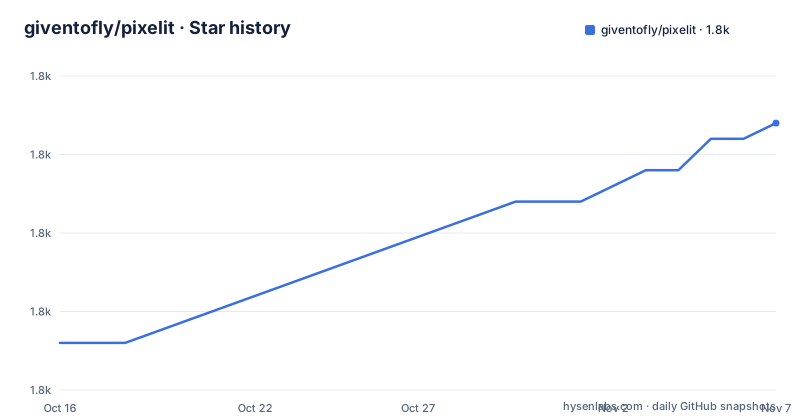
Star history
- giventofly/pixelit1,787 ★ · +14
| Repository | 2026-10-16 | 2026-11-07 |
|---|---|---|
| giventofly/pixelit | 1.8k | 1.8k |
14 Stars in the last 22 days, measured from the daily GitHub snapshot. Compare with other projects
Editorial analysis
Two files in dist, and the choice is a browser support decision
The library has no build step for consumers. The dist directory holds the two files you need: pixelit.js, described as a JavaScript ES6 file, and pixelitmin.js, minified and parsed through babeljs.io for ES5.
That pair is the packaging decision in this project. The ES6 build is for modern browsers and the minified ES5 build is for older ones, and the choice is yours rather than the library's. There is no module entry point declared for a bundler, which is why the documented usage is a script tag with a constructor called pixelit rather than an import.
The package.json reflects the same shape. It contains devDependencies only, with no name, no version and no main field. The dev toolchain is gulp 4 with gulp-babel, gulp-rename and gulp-uglify-es, plus babel core and preset-env, so the build is a gulp task rather than a package published to a registry.
The consequence for adoption is that you copy a file. There is no version resolution, no semver range to track, and no upgrade path through your package manager. If you want a newer version you replace the file and re-test, which is why pinning matters more here than usual.
The call order is part of the API, not a style choice
The quick start is an image, a canvas, a script tag and two calls.
<img src="sky.jpg" id="pixelitimg" alt="">
<canvas id="pixelitcanvas"></canvas>
<script src="pixelit.js"></script>
<script>
  const px = new pixelit();
  px.draw().pixelate();
</script>
With no configuration, the object looks for document.getElementById("pixelitimg") as the source and document.getElementById("pixelitcanvas") as the destination, and the scale defaults to 8 within a documented range of 0 to 50.
The order is enforced by the documentation. convertGrayscale(), convertPalette() and pixelate() are all marked apply only after.draw is called, and pixelate additionally draws to the canvas from the image source. draw() itself is the step that puts the image on the canvas and resizes if a maximum height or width is reached.
The methods are chainable, and the example in the README chains all three stages in one expression: px.draw().pixelate().convertPalette(). getpalette() is the exception and the API table marks it as not chainable, since it returns a value rather than continuing the chain.
Palette mapping is the whole visual difference, and it needs two colours
The palette is an array of RGB triples, each channel from 0 to 255, and it is what turns a scaled-down photo into something that reads as pixel art rather than as a blurry thumbnail.
const mypalette = [
  [26,28,44],[93,39,93],[177, 62, 83],[239, 125, 87],[255, 205, 117],
  [167, 240, 112],[56, 183, 100],[37, 113, 121],[41, 54, 111],[59, 93, 201],
  [65, 166, 246],[115, 239, 247],[244, 244, 244],[148, 176, 194],[86, 108, 134],[51, 60, 87]
];
const px = new pixelit({ from: document.getElementById('pixelitimg'), palette: mypalette });
px.draw().pixelate().convertPalette();
The documented constraint is that convertPalette needs at least two colours to work properly, and the default palette has a two-colour minimum for the same reason. One colour produces a two-tone image that is technically correct and visually flat.
There is no automatic palette extraction anywhere in the API. setPalette takes the array you give it, so deriving a palette from your brand tokens or from an existing sprite sheet is your work. The live test page added in a 2025 update accepts an uploaded palette in formats such as hex and csv, which is a convenience for choosing one by hand rather than a feature of the library itself.
Grayscale is separate: convertGrayscale() converts the image to greyscale and, like the palette conversion, applies only after draw().
Resizing has one detail that catches people out. setMaxWidth and setMaxHeight only take effect when resizeImage() is applied, and max height overrides max width.
setDrawFrom and setDrawTo are why this is more than a demo
The constructor options are from, to, scale, palette, maxHeight and maxWidth, and each has a default. The two element setters, setDrawFrom(elem) and setDrawTo(elem), do the same job after construction, and setFromImgSource(src) changes the source image without touching the element.
That set of four is what separates this from a fixed demo. You can create the object before the image element exists and point it later, you can retarget the canvas, and you can swap the source image in a gallery without rebuilding the object. The 2025 fix list mentions updating the context when changing the canvas, which is the bug that makes retargeting actually work, since a canvas keeps its drawing state.
Other methods in the API table: hideFromImg() hides the source image element and is applied on object creation, draw() resizes if the maximum dimensions are reached, saveImage() saves or downloads the current image, and getpalette() returns the palette in use.
The same update that fixed the canvas context also brought null-safety, chainable returns, clamped resize, use of the natural size, preservation of the user scale and a corrected scale range of 0 to 50. The scale range correction is the one to note: if you were passing a value above 50 against an older build, the behaviour differs from the current file.
Where Pixel It is not the right tool
The first boundary is image quality versus intent. This tool scales an image down and lets you reduce its colours. It does not add the deliberate line work, selective outlines or hand-placed highlights that make pixel art read as pixel art, and the README's own examples are labelled as the result of processing a photograph rather than as pixel art in the authored sense.
The second is the absence of features you would want for a generated asset pipeline. No dithering is documented, no palette extraction, no nearest-neighbour versus averaging choice, no export to a sprite sheet with frame slicing, and no Node or server-side entry point. Everything documented runs in a browser against an existing img element.
The alternative approaches differ in what they give you. A server-side image library gives you batch processing and a consistent result across users, which matters if the same asset has to appear in a product, a print and an email. A hand-authored pixel editor gives you control the tool cannot approach, at a cost per image. Doing it yourself with a canvas and getImageData is the same approach as this library written inline, and for one image on one page it is not worth a dependency.
On maintenance, the tagged releases stop at 1.2.1 from 2022, while the changelog records substantive fixes through 2025 and the last push to the repository was on 2026-05-09. So the project is being worked on but is not cutting releases, which reinforces the point about copying the dist file: there is no version to upgrade to. The licence is MIT.
Editorial conclusion
Adopt Pixel It when you want pixel art in the browser from a photo you already have, and when a fixed palette is acceptable. Do not adopt it when you need automatic palette extraction, dithering or a Node-side pipeline, because none of those are documented. Before shipping the minified file to older browsers, note it is transpiled to ES5 while the ES6 build targets modern engines, and pin the dist file rather than a version range since releases stopped at 1.2.1 in 2022.
Frequently asked questions
How do I use Pixel It to make pixel art from an image?
Add an img element and a canvas with the ids pixelitimg and pixelitcanvas, load pixelit.js, then call new pixelit().draw().pixelate(). The palette step, convertPalette(), is what maps colours, and it must come after draw().
Which Pixel It file should I load?
pixelit.js is the ES6 build for modern browsers and pixelitmin.js is the minified file transpiled through babel for ES5. Both sit in the dist directory and are loaded with a script tag.
How many colours does a Pixel It palette need?
At least two for convertPalette() to work properly, and the default palette carries the same two-colour minimum. The palette is an array of RGB triples with each channel from 0 to 255.
Why is my max width and max height setting ignored?
setMaxWidth and setMaxHeight only take effect when resizeImage() is applied, and max height overrides max width when both are set. draw() also resizes if a maximum is reached.
Official sources
Add this badge to your README
If you maintain this project, the badge below links readers to this analysis and shows its maintenance status from the daily GitHub snapshot. Paste the markdown into your README; add ?metric=license or ?metric=stars to the image URL for a different field.

[](https://hysenlabs.com/projects/giventofly-pixelit)Star history chart for your README
[](https://hysenlabs.com/projects/giventofly-pixelit)Was this useful?