Delve, the Go debugger: reading the repository before you install it
Delve is a debugger for the Go programming language.
At a glance
- What is it?
- Delve is a debugger for Go with a small, opinionated core: one module, a CLI, a debug adapter and a large vendor tree. Here is what the repository itself says about how it fits together.
- Who is it for?
- Delve is easy to underestimate from its README, which is little more than a statement of intent and a documentation index. The substance is in the layout and the changelog: a `cmd/` entry point, a `pkg/proc` core, a `service/` layer split between terminal and DAP front ends, and a dependency list that reveals hardware watchpoint support, a debug adapter library and a Starlark interpreter.
- Can I use it commercially?
- Yes. MIT is a permissive licence: you can use, modify and sell software built on it, as long as you keep its copyright and licence notices.
- Is it still maintained?
- Yes. The repository last received commits 2 days ago.
- What is it written in?
- Mainly Go, according to GitHub's language statistics.
Answers come from the project's GitHub data, last synced on October 23, 2026, and from our analysis. They are not legal advice.
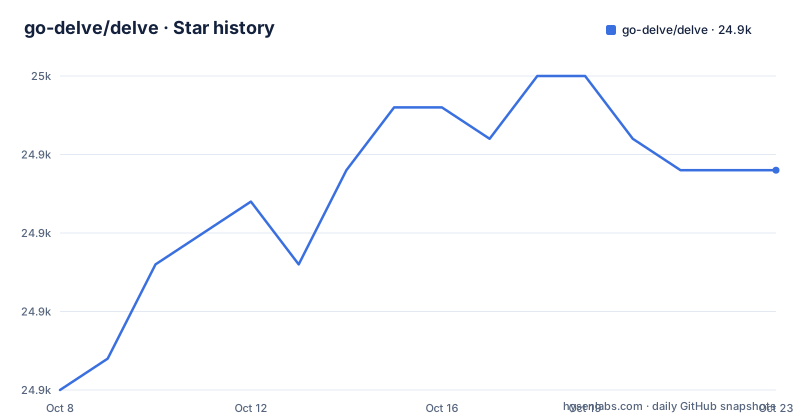
Star history
- go-delve/delve24,947 ★ · +7
| Repository | 2026-10-08 | 2026-10-23 |
|---|---|---|
| go-delve/delve | 24.9k | 24.9k |
7 Stars in the last 15 days, measured from the daily GitHub snapshot. Compare with other projects
Editorial analysis
What the README commits to, and what it leaves out
Delve describes itself in one line as a debugger for the Go programming language, and then sets the goal as a simple, full featured debugging tool. The README is short by design. There is no command reference, no configuration file walkthrough and no list of supported operating systems in it. Everything beyond the project description is a table of contents: installation, a getting started guide for the command line client, the command line option reference, plugins and editor integrations, a frequently asked questions page, and the contributing section.
One line in the README sets the tone for everything else in the repository, and it is worth reading twice because it is the design brief in plain words: chances are if you are using a debugger, things are not going your way, and with that in mind Delve should stay out of your way as much as possible. That is why the command set stays small, why the tool is invoked with a subcommand rather than a mode flag, and why the project spends as much care on its terminal UX as on its breakpoint machinery.
There is also a routing rule stated at the top of the file. The GitHub issue tracker is for bugs only. Feature proposals and broader discussion belong on the developer mailing list, which the README links as a Google Group. With 85 open issues against roughly 24,900 stars and 2,200 forks, the tracker stays close to a defect queue rather than a wish list, and that is by design rather than by accident.
For the repository's own account of its health, the README badges point at a TeamCity build status for the aggregator build, a Plumber score, and a Go Reference link to the package documentation on pkg.go.dev.
How cmd, pkg and service split the work
The tree shows three top level source directories and one very large dependency directory. `cmd/` holds the command entry points, `pkg/` holds the library internals, and `service/` holds the parts that face the user, which is where the two front ends live. Alongside them sit `vendor/` for the pinned dependency tree, `_fixtures/` for test data, `_scripts/` for build helpers written in Go rather than shell, `assets/` for images and icons, and `Documentation/` for everything a reader is expected to consult.
The `service/` split is the interesting part, because it explains why the same debugger can sit behind a terminal or behind an editor. One front end is the terminal client, the interactive prompt most people meet first. The other speaks the Debug Adapter Protocol, which is the wire format editors use to drive a debugger: breakpoints, stack frames, variable inspection and the rest travel as protocol messages rather than as keystrokes. The DAP side is a separate service, not a mode of the terminal one, and the release notes show it being worked on independently, for example the change that made variable load limits configurable so that a large structure does not flood the editor with values.
The `_fixtures/` and `_scripts/` directories with leading underscores are Go conventions for test data and helper tooling that the tool itself never imports. Reading them as part of the product is a common mistake; they tell you how the project is verified, not what it ships.
What the dependency list says about the implementation
`go.mod` is the most informative file in the repository for a reader trying to work out what Delve actually does, because the dependency graph names the hard problems the project has solved. The module is declared at `github.com/go-delve/delve` and requires Go 1.25.0, which sets the floor for the toolchain.
Four dependencies stand out. `golang.org/x/arch` provides the disassembly layer, and a recent release note records an update to it, which is the kind of change that follows Go toolchain releases. `github.com/cilium/ebpf` shows up for hardware watchpoint support on Linux, because kernel watchpoints are programmed through eBPF and there is no userspace syscall for them. `github.com/google/go-dap` is the protocol implementation behind the debug adapter front end. `go.starlark.net` brings in a Starlark interpreter, which is what makes the plugin system in the documentation possible.
The rest of the list is ordinary plumbing for a command line program: `spf13/cobra` and `spf13/pflag` for subcommands and flags, `mattn/go-colorable` and `mattn/go-isatty` for terminals that may or may not handle color, `go-delve/liner` for line editing, `creack/pty` for allocating pseudo terminals so the debuggee believes it is talking to a real terminal, `derekparker/trie` for command name completion, and the `golang.org/x` modules for syscalls, architecture, text and telemetry.
The test-oriented dependencies are just as revealing. `cosiner/argv` and `golang.org/x/sync` appear as indirect requirements along with the Markdown and terminal width libraries, which is consistent with a test suite that spawns real debuggee processes and coordinates them across platforms.
Following the Makefile to a working dlv on your path
The Makefile is the shortest path to a local build, and its shape tells you that the real logic lives in a Go program rather than in the recipes. Each target delegates to a script under `_scripts/`, with a default goal of `test` so that a bare `make` runs the suite rather than building a binary.
build: $(GO_SRC)
	@go run _scripts/make.go build

install: $(GO_SRC)
	@go run _scripts/make.go install

test: vet
	@go run _scripts/make.go test -v
Every target depends on `$(GO_SRC)`, which is computed by a shell `find` over the tree that excludes `_fixtures`, `vendor`, `_scripts` and `localtests` while selecting `*.go`. That exclusion list is worth reading on its own, because it explains why the test data does not trigger rebuilds and why the vendored tree does not either.
The `test` target depends on `vet`, and the vet recipe runs under a build tag for a Linux ppc64le target and filters the package list to exclude the native package. There is a separate `check-cert` target for certificate checks, a `vendor` target for refreshing the dependency tree, and two eBPF targets, `build-ebpf-image` and `build-ebpf-object`, that invoke shell scripts under `pkg/proc/internal/ebpf/build` to produce the watchpoint object files. Those two targets exist because the eBPF program has to be compiled for the kernel, not cross compiled for userspace, which is the same story the dependency list tells from a different angle.
If you would rather not run the project's build script, the `Documentation/installation` page in the tree covers the alternatives, including installing with the Go toolchain directly.
Reading three releases as a record of platform work
The three most recent releases, v1.27.0 on 2026-06-24, v1.27.1 on 2026-08-03 and v1.27.2 on 2026-09-09, read less like a feature roadmap and more like a compatibility ledger. That is exactly what a debugger does when the language underneath it moves.
Go 1.27 compatibility dominates the v1.27.1 notes. There is a fix for C frame attribution on noreturn calls during stack unwinding, fixes for range over function stepping tests on 1.27 for arm64, a general Go 1.27 compatibility entry alongside Windows on arm64 test fixes, and a clean up of the stepping tests. A separate note builds a goreleaser change that ignores the unsupported Windows on arm64 architecture. In plain terms: the language added language, and a debugger that has to attribute stack frames correctly cannot simply ignore it.
The protocol side of v1.27.1 is worth reading if you use an editor rather than the terminal client. The adapter now sends an InvalidatedEvent after SetVariable and after WriteMemory, the debugger panic on follow exec process exit was fixed, and variable load limits became configurable.
The v1.27.2 notes shift toward supply chain and CI hygiene. GitHub Actions are pinned to commit SHAs with declared workflow permissions, a Plumber workflow security check was added, an eval fuzzer setup was added and run in CI, a defer of a pointer cast to a syscall invoking function avoids the cast when the function is not a syscall target, memory cache objects are no longer nested, and the release workflow now fails early when a release has already been published. Pinning actions by SHA and making interrupted draft uploads rerunnable are unglamorous entries that matter more than most feature notes, because they are what keeps a debugger that executes arbitrary local binaries trustworthy.
Where to look when something does not work
The documentation layout in the tree is organized around the two ways people use the tool. `Documentation/cli/` holds the command line client material, starting with a getting started guide, alongside a README for the terminal client itself. `Documentation/usage/` holds the generated option reference for the `dlv` command, which is the page to consult when a flag is not doing what you expected.
Editor integration has its own page, `Documentation/EditorIntegration.md`, plus `Documentation/faq.md` for the questions that arrive repeatedly enough to deserve a maintained answer. Under `Documentation/api/` there is generated API documentation and a separate `ClientHowto.md` for people writing their own client against the debugger's RPC layer, which is the route to take if you are building a frontend the project does not ship. Internal documentation sits under `Documentation/internal`, and `CONTRIBUTING.md` is the entry point for the contributor workflow, with a separate AI usage policy document that spells out what is expected of generated contributions.
The root file list also explains where the project keeps its own workflow instructions. `AGENTS.md` and `CLAUDE.md` sit alongside `CONTRIBUTING.md`, which is a sign that agent-assisted contributions are part of the intended process rather than an accident. `CHANGELOG.md` gives the running log, `.goreleaser.yaml` configures release builds, `.teamcity/` holds the continuous integration definition behind the badge in the README, and `.gitattributes` handles line ending behavior for a repository that ships platform specific eBPF objects.
The practical order of operations is straightforward: confirm the model support question by checking the platform documentation, verify the build path with `make install`, and if a command misbehaves, read the generated option reference before filing, since the tracker is reserved for defects.
Editorial conclusion
Delve is easy to underestimate from its README, which is little more than a statement of intent and a documentation index. The substance is in the layout and the changelog: a `cmd/` entry point, a `pkg/proc` core, a `service/` layer split between terminal and DAP front ends, and a dependency list that reveals hardware watchpoint support, a debug adapter library and a Starlark interpreter. Install it with `make install` when you want `dlv` on your path, or with `go install` when you would rather not run the project's build script, and read the version notes before pinning, because the recent entries are mostly about Go version compatibility and platform edge cases rather than new commands.
Frequently asked questions
How do you install the Delve Go debugger?
The repository's Makefile delegates to a Go helper script: `make build` produces a binary and `make install` puts it on your path, both running `_scripts/make.go`. The installation page at `Documentation/installation` covers the alternatives, and the Go toolchain can install the module directly since `go.mod` declares the module path as `github.com/go-delve/delve`.
What Go version does Delve require?
The `go.mod` file declares `go 1.25.0` as the language version. Recent release notes are largely about compatibility with the following toolchain, including fixes for C frame attribution on noreturn calls and range over function stepping on Go 1.27 for arm64, so staying close to current Go releases is the safer path.
Does Delve support editor integration?
Yes, through the Debug Adapter Protocol. The `service/` directory contains the DAP front end alongside the terminal client, the dependency list includes `github.com/google/go-dap` for the protocol, and the tree carries `Documentation/EditorIntegration.md`. Recent changes include sending an InvalidatedEvent after SetVariable and making variable load limits configurable.
How does Delve implement hardware watchpoints on Linux?
Through eBPF, which is why `github.com/cilium/ebpf` appears in the dependencies. Kernel watchpoints cannot be programmed with an ordinary syscall, so the project ships a separate eBPF program, with Makefile targets `build-ebpf-image` and `build-ebpf-object` that invoke the shell scripts under `pkg/proc/internal/ebpf/build` to build it.
Can I use Delve as a library inside my own Go tool?
That is what `Documentation/api` is for. Alongside the generated API documentation there is a `ClientHowto.md` page describing how to write a Delve client against the debugger's RPC interface. The terminal client and the debug adapter front end are both built on it, which makes them the two worked examples of the approach.
Where should I report a Delve problem?
The README is explicit that the GitHub issue tracker is for bugs only, and that feature proposals and discussion belong on the developer mailing list linked at the top of the README. Documentation questions usually have answers in `Documentation/faq.md`, and command flags are covered by the generated reference in `Documentation/usage/dlv.md`.
Official sources
Add this badge to your README
If you maintain this project, the badge below links readers to this analysis and shows its maintenance status from the daily GitHub snapshot. Paste the markdown into your README; add ?metric=license or ?metric=stars to the image URL for a different field.

[](https://hysenlabs.com/projects/go-delve-delve)Star history chart for your README
[](https://hysenlabs.com/projects/go-delve-delve)Was this useful?