Google ADK: A Code-First Agent Framework That Treats Agents Like Software
An open-source, code-first toolkit for building, evaluating, and deploying sophisticated AI agents with flexibility and control.
At a glance
- What is it?
- Google's Agent Development Kit (ADK) is a code-first, multi-language toolkit for building, evaluating, and deploying AI agents. It favors software engineering practices over visual builders, but its tight Google ecosystem focus may limit portability.
- Who is it for?
- Adopt ADK if you are a developer who wants to define agents as code, integrate with Google Cloud services like Cloud Run or GKE, and prefer a framework that supports Python, TypeScript, Go, Java, and Kotlin. Skip it if you need a visual builder, a non-Google deployment target, or a framework that abstracts away orchestration details.
- Can I use it commercially?
- Yes. Apache-2.0 is a permissive licence: you can use, modify and sell software built on it, as long as you keep its copyright and licence notices.
- Is it still maintained?
- Yes. The repository last received commits 2 days ago.
- What is it written in?
- Mainly Shell, according to GitHub's language statistics.
Answers come from the project's GitHub data, last synced on November 15, 2026, and from our analysis. They are not legal advice.
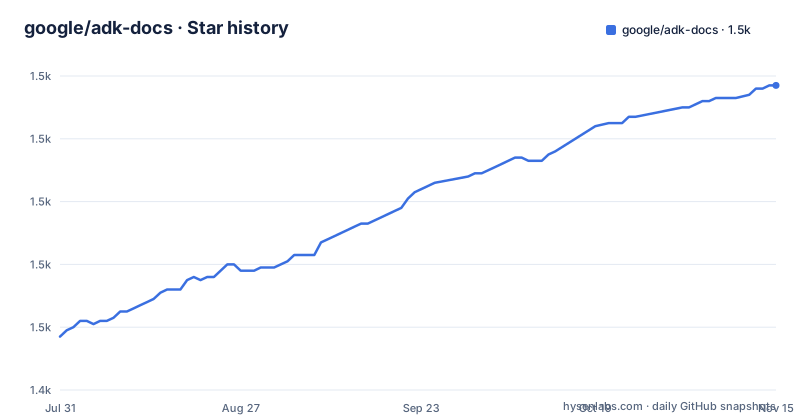
Star history
- google/adk-docs1,537 ★ · +80
| Repository | 2026-07-31 | 2026-11-15 |
|---|---|---|
| google/adk-docs | 1.5k | 1.5k |
80 Stars in the last 107 days, measured from the daily GitHub snapshot. Compare with other projects
Editorial analysis
The Problem: Agent Development Is Still Not Software Development
Most AI agent frameworks force you into a visual canvas or a low-code DSL. That approach breaks down when agents grow beyond a demo. You need versioning, testability, and the ability to compose agents like functions. Google's Agent Development Kit (ADK) addresses this by being code-first. You define agent logic, tools, and orchestration directly in code. The README states that ADK was designed to make agent development feel more like software development. That is a specific promise: treat agents as code, not as configuration. The target user is a developer who already lives in a code editor and wants the same workflow for agents that they have for web services. If you are that person, ADK is aimed squarely at you.
How ADK Works: Modular Hierarchies and Code-First Orchestration
The documentation describes a modular multi-agent system. You compose specialized agents into flexible hierarchies. That means you can have a top-level agent that delegates to sub-agents, each with its own tools and model. The orchestration logic is written in code, not hidden in a graph editor. The framework provides a rich tool ecosystem: pre-built tools, custom functions, OpenAPI specs, and integration with existing tools. The key architectural claim is that ADK is model-agnostic and deployment-agnostic, though it is optimized for Gemini and the Google ecosystem. That optimization likely means tighter integration with Google Cloud services and maybe faster paths to deployment on Cloud Run or GKE. The actual data flow is not detailed in the README, but the code-first nature implies that you write Python or TypeScript classes or functions that define the agent's behavior, and the framework handles the runtime loop.
Getting Started: Five Languages, One Toolkit
The README lists five languages: Python, TypeScript, Go, Java, and Kotlin. Each has a dedicated getting-started guide on adk.dev. The Python package is on PyPI as google-adk, and there is an npm package @google/adk. For Go, the module is google.golang.org/adk/v2. Java and Kotlin are on Maven Central under com.google.adk. To start, you would install the package for your language, then follow the guide. For example, in Python you would run pip install google-adk. The exact commands are not in the README, so you must check the language-specific guide. The framework also provides an llms.txt file and an llms-full.txt file on adk.dev. These are structured indexes of the documentation, designed for AI code editors. That is a practical touch: you can point your AI assistant at these files to get context-aware help while coding.
Deployment and Observability: Built for Google Cloud
ADK includes tracing and monitoring as built-in features. That means you can debug and optimize agent workflows without bolting on a separate observability tool. The README says you can easily containerize and deploy agents on Cloud Run or GKE. There is also an Agent Runtime for scaling. This is a strong selling point if you are already on Google Cloud. The deployment story is not generic, despite the claim of being deployment-agnostic. The examples are all Google-specific. If you are on AWS or Azure, you will need to figure out containerization yourself. The framework does not mention any built-in support for other clouds. That is a limitation to consider before adopting.
A Real Limitation: Google Ecosystem Lock-In
The README is explicit: ADK is optimized for Gemini and the Google ecosystem. That is not a minor detail. It means the best-supported models are Gemini, and the deployment targets are Google Cloud services. While the framework claims model-agnosticism, the tight integration with Google's tooling suggests that non-Google models will work but may not get the same level of polish or performance. For example, tracing might be deeply integrated with Google Cloud's observability stack. If you are building an agent that must run on a non-Google cloud or use a non-Google model as the primary driver, ADK may be the wrong tool. The code-first approach also means you need to be comfortable with writing code for orchestration; there is no visual flow builder mentioned. That is a trade-off: flexibility and control come at the cost of a steeper learning curve for non-developers.
Alternative: LangChain and the Visual Builder Approach
A direct alternative is LangChain, which also supports multiple models and languages, but its approach differs in two ways. First, LangChain is more model-agnostic in practice, with a huge catalog of integrations for various providers. Second, LangChain has LangGraph, which offers a graph-based orchestration model that can be more visual and declarative. ADK's code-first hierarchy is more like writing a program, while LangGraph is more like designing a state machine. If you prefer a visual or graph-based approach, LangChain might be a better fit. If you want to stay within Google's ecosystem and want a framework that feels like writing regular software, ADK is the stronger candidate. The choice depends on whether you value ecosystem integration or provider neutrality.
Licensing and Maintenance: Apache-2.0 and Active Development
ADK is licensed under Apache 2.0. That is a permissive license, which means you can use it commercially without worrying about copyleft restrictions. The repository is not archived, and the default branch is main. The README does not mention release cadence or version numbers, so you cannot judge maintenance from this material. However, the presence of a v2 module for Go suggests that the API has evolved, which implies breaking changes may occur. When adopting, you should check the changelog and version compatibility for your language. The documentation is extensive, and the llms.txt file is a nice touch for AI-assisted coding, but you should verify that the docs are up to date with the latest release. GitHub reported a push on 7 November 2026 when checked that day; review the commit history before committing to a long-term project.
Editorial conclusion
Adopt ADK if you are a developer who wants to define agents as code, integrate with Google Cloud services like Cloud Run or GKE, and prefer a framework that supports Python, TypeScript, Go, Java, and Kotlin. Skip it if you need a visual builder, a non-Google deployment target, or a framework that abstracts away orchestration details. Before adopting, verify the maturity of the agent runtime and the stability of the multi-language APIs, especially if you plan to use languages beyond Python. The documentation is the primary source of truth; check the specific language guides on adk.dev to confirm the exact setup and configuration steps for your chosen stack.
Frequently asked questions
What does ADK stand for?
Agent Development Kit. The README spells the name out in its first heading, and the framework it documents is published as google-adk on PyPI, @google/adk on npm, google.golang.org/adk/v2 for Go, and as com.google.adk/google-adk plus com.google.adk/google-adk-kotlin-core on Maven. The documentation for all of them is built from this repository.
What is Google ADK used for?
For building, evaluating and deploying AI agents, with a toolkit described as model-agnostic and deployment-agnostic while still being tuned for Gemini and the Google ecosystem. The code lives in the five published packages; this repository, licensed under Apache-2.0, holds the documentation site source and its build tooling.
Where can I find documentation for Google ADK?
At https://adk.dev, with the MkDocs source for that site in this repository under docs/ and mkdocs.yml. For AI coding tools the README points at https://adk.dev/llms.txt as a structured index of the documentation and https://adk.dev/llms-full.txt as the full reference, and links a guide on using both through MCP servers.
Official sources
Add this badge to your README
If you maintain this project, the badge below links readers to this analysis and shows its maintenance status from the daily GitHub snapshot. Paste the markdown into your README; add ?metric=license or ?metric=stars to the image URL for a different field.

[](https://hysenlabs.com/projects/google-adk-docs)Star history chart for your README
[](https://hysenlabs.com/projects/google-adk-docs)Was this useful?