prime-rl: the documented sync command does not install the environments
Project brief: Agentic RL Training at Scale. It is designed to be easy to use and hackable, yet capable of scaling to 1000+ GPUs.
At a glance
- What is it?
- An asynchronous reinforcement learning framework built to train mixture-of-experts models across thousands of GPUs, with training examples sized from one consumer card to four H100s. The basic sync command does not install the optional environments, and the guide documents how to include them, and installing it patches vLLM as a side effect.
- Who is it for?
- prime-rl is worth evaluating if you are already committed to asynchronous agentic reinforcement learning and have multi-node hardware, because the parallelism options and the environment integration are the substance of the project. Three things decide whether it works for you.
- Can I use it commercially?
- Yes. Apache-2.0 is a permissive licence: you can use, modify and sell software built on it, as long as you keep its copyright and licence notices.
- Is it still maintained?
- Yes. The repository received new commits within the last day.
- What is it written in?
- Mainly Python, according to GitHub's language statistics.
Answers come from the project's GitHub data, last synced on November 14, 2026, and from our analysis. They are not legal advice.
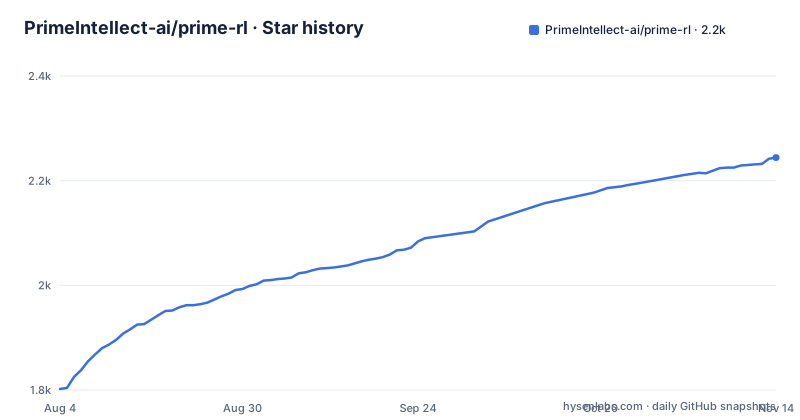
Star history
- PrimeIntellect-ai/prime-rl2,244 ★ · +442
| Repository | 2026-08-04 | 2026-11-14 |
|---|---|---|
| PrimeIntellect-ai/prime-rl | 1.8k | 2.2k |
442 Stars in the last 102 days, measured from the daily GitHub snapshot. Compare with other projects
Editorial analysis
The documented sync command does not install the environments
The installation guide tells you to install dependencies from the lock file with one command, and then tells you, in a note of its own, that this does not install the environments. Environments are opt-in members of the workspace rather than part of the core distribution, so the fix is either to add a flag that installs every package in the workspace, or to name the environment package explicitly alongside the main one. Both forms are given. The reason this is worth flagging rather than shrugging at is that every training example the project ships is an environment, so a reader who runs only the basic sync command may lack the desired environment. The same guide explicitly gives commands to install all workspace packages or a selected environment, so follow its note before running the relevant example.
Four dependencies are git submodules, and the one-line install reads from a branch
The quick setup is a single command that fetches an install script from the repository and pipes it into a shell. The script lives on the main branch rather than on a tag, so what you execute is whatever that branch currently holds, and a reader pinning a release of the framework gets an installer that does not correspond to it. The manual route underneath is more explicit and starts by initialising four git submodules by path:
git submodule update --init -- deps/verifiers deps/renderers deps/prime-envs deps/pydantic-configThose four are a verifiers checkout, a renderers checkout, an environment package and a configuration package. So four of the framework's own building blocks are commits inside this repository rather than released artifacts, which keeps them in lockstep with the code and removes the independent release cadence they would otherwise have. It also means the dependency graph is only as reproducible as the recorded submodule commits.
Installing it registers a plugin that patches vLLM when vLLM loads
The packaging metadata declares an entry point in the general plugins group that vLLM discovers, pointing at a function that applies shared patches. The mechanism is worth understanding before you install anything. vLLM looks for plugins in its own entry point group at startup, so this package is not calling into vLLM explicitly; it is registering itself to be invoked automatically the next time vLLM is imported in the same environment. That is a reasonable design for a framework that has to adjust inference behaviour to match the trainer, and it is also a shared-mutable-state decision. In a dedicated training container the effect is invisible. On a machine where vLLM already serves something else, the same import path now carries a dependency on this framework, whether or not the current process intends to train anything.
Python is pinned to one minor release and transformers to one exact version
The project metadata constrains the interpreter with a compatible-release clause on a single minor line, so 3.12 is accepted and the next minor is not, and the validation checklist opens by asking you to confirm the environment reports 3.12. Dependency ranges are mostly open floors, including recent minimums for the dataset library, the array library, the tokeniser library and the inference engine, and two first-party packages with their own extras. Exactly one dependency is pinned to an exact version, the transformer library at a single 5.x release, inside a list of roughly thirty ranged entries. Two more are pinned at development versions rather than releases, one on a pre-release of the environment framework and one on a pre-release of the renderer. So the file mixes exact, ranged and development pins, and only the transformer pin is exact, which is the opposite of what the surrounding entries would suggest.
The validation ladder asks for one GPU, then one, then two
The setup verification is five steps and the GPU requirement changes as it goes. The first two are free: confirm the interpreter version, then confirm the attention extension imports. The third runs the supervised fine-tuning trainer on a fake config and needs one GPU. The fourth starts the inference server on a small model and needs one GPU. The fifth runs the whole reinforcement learning stack, described as inference plus orchestrator plus trainer, on a toy reverse-text environment, and needs two. That progression is a sensible smoke test because it isolates each component before combining them, and it also sets the real floor for the framework, which is stated in the prerequisites: at least one NVIDIA GPU is required to use prime-rl at all. There is no CPU path described for a user, and the hardware they develop and test on is named explicitly, spanning three consumer card generations, three datacentre families and one newer platform.
Continuous integration runs CPU tests while the documentation requires a GPU
The badge row at the top of the page links three workflows: one for style, one for CPU tests and one for GPU tests. So the project does run a CPU-only test lane in continuous integration, which is normal and useful for catching import and logic errors without hardware. The documentation, meanwhile, says a user needs at least one NVIDIA GPU, and the fake-config supervised training check that exists specifically to let you validate a setup is still labelled as requiring a GPU. The two statements are not contradictory, since a test lane can use fixtures a user cannot, but the gap is worth naming for anyone budgeting: continuous integration passing tells you the code is healthy on a machine, not that a fresh checkout will run on yours.
The examples are sized in GPU counts and in hours
The training examples are organised by scale, which makes them usable as a hardware map as much as a tutorial path. The basic tier covers one to eight GPUs and is described as covering most use cases, including single-turn, multi-turn and tool calling, on toy environments and small models. Within it, the reverse-text example trains a sub-billion-parameter model on a single consumer GPU in a few minutes and is recommended as the starting point. The Wordle example trains a 1.7 billion parameter model on two to four high-end GPUs in a few hours and exists to exercise multi-turn training. The alphabet-sort example moves to a four billion parameter instruction-tuned model. Higher tiers live in separate advanced and extra directories, and one advanced example is described as a one-line scheduler deployment combining a specific frontier model in FP8, pipeline and data parallelism disaggregation, an external inference router and a KV cache offload engine.
The scale claim has no figure attached, and the prerequisites recommend the authors' own cloud
The overview claims the framework is capable of scaling to more than a thousand GPUs and being built to train mixture-of-experts models of a trillion parameters and above on that many GPUs, with a specified sharding strategy for training and a separate engine for inference, plus low-precision inference, pipeline and data disaggregation, and expert and context parallelism. No throughput, sample rate, time-to-train or scaling curve appears alongside those claims. A benchmarks directory exists at the top of the repository, so the measurements may well be published, but the page itself states intent rather than evidence. The same section also points readers without hardware to the authors' own platform, for everything from renting a single card for debugging to reserving a cluster of more than a thousand GPUs, which is a normal thing for an infrastructure project to offer and worth naming as a commercial interest when you weigh the recommendation.
Editorial conclusion
prime-rl is worth evaluating if you are already committed to asynchronous agentic reinforcement learning and have multi-node hardware, because the parallelism options and the environment integration are the substance of the project. Three things decide whether it works for you. Read the workspace note before you install, because the environments are opt-in members and the documented sync command skips them, so follow the documented all-packages or selected-package command when your training environment needs those workspace packages. Decide whether you want a package that registers a vLLM plugin, since that means vLLM is modified on load in any environment where both are installed, which is fine in a dedicated training container and unwelcome on a shared machine. And price the hardware honestly, since at least one NVIDIA GPU is required, the validation sequence needs two, the larger examples need four high-end cards, and the thousand-GPU claim on the page carries no attached measurement. The project also recommends its authors' own compute platform for anything from a single rented card to a reserved cluster, which is worth weighing as a commercial interest.
Frequently asked questions
What is prime rl?
prime-rl is a framework for large-scale reinforcement learning, described as easy to hack while scaling to more than a thousand GPUs. It is fully asynchronous for agentic training, uses one sharding strategy for training and vLLM for inference, covers supervised fine-tuning, RL and evals end to end, and supports both scheduler and Kubernetes multi-node deployment. It requires Python 3.12 and at least one NVIDIA GPU.
prime rl vs verl
This repository does not compare the two, and nothing on the page mentions the other framework. What prime-rl states about itself: it is built for fully asynchronous agentic RL, ships hand-optimised training code for selected large mixture-of-experts families with expert and context parallelism, and registers itself as a vLLM plugin.
How do I install prime-rl?
One command fetches an install script from the main branch and pipes it into a shell. The manual route clones the repository, initialises four named git submodules, installs uv, and then runs uv sync --all-extras. Note that the environments are opt-in workspace members, so that last command alone does not install them.
Do I need a GPU to use prime-rl?
Yes, at least one NVIDIA GPU. The project develops and tests on RTX 3090, 4090 and 5090 cards, A100, H100, H200 and B200. The validation sequence needs one GPU for the supervised training and inference checks, and two for the end-to-end RL stack. Continuous integration does run a CPU test lane, but that is not the same as a CPU path for a user.
Why are my prime-rl environments missing after uv sync --all-extras?
Because the environments are opt-in workspace members. The documentation states that this command does not install them, and gives two alternatives: add the flag that installs every package in the workspace, or name the environment package explicitly next to the main one.
What does installing prime-rl add to my Python environment?
Eight console commands, for RL, supervised training, inference, the trainer, the orchestrator, evaluation, an environment server and a dashboard. It also registers itself as a vLLM general plugin, so vLLM applies the framework's shared patches the next time it is imported in the same environment.
Official sources
Add this badge to your README
If you maintain this project, the badge below links readers to this analysis and shows its maintenance status from the daily GitHub snapshot. Paste the markdown into your README; add ?metric=license or ?metric=stars to the image URL for a different field.

[](https://hysenlabs.com/projects/primeintellect-ai-prime-rl)Star history chart for your README
[](https://hysenlabs.com/projects/primeintellect-ai-prime-rl)Was this useful?