ContextForge: A Federated Gateway for MCP, A2A, and REST APIs
An AI Gateway, registry, and proxy that sits in front of any MCP, A2A, or REST/gRPC APIs, exposing a unified endpoint with centralized discovery, guardrails and management. Optimizes Agent & Tool calling, and supports plugins.
At a glance
- What is it?
- IBM's ContextForge is an open source registry and proxy that unifies MCP, A2A, and REST/gRPC services behind a single endpoint. This review examines its architecture, setup, and practical trade-offs.
- Who is it for?
- ContextForge is for teams that manage many MCP servers or legacy REST/gRPC APIs and need a single governance and discovery point for AI agents. It is not for simple single-server setups where a direct MCP connection suffices, nor for environments that cannot support mandatory JWT and encryption secrets.
- Can I use it commercially?
- Yes. Apache-2.0 is a permissive licence: you can use, modify and sell software built on it, as long as you keep its copyright and licence notices.
- Is it still maintained?
- Yes. The repository received new commits within the last day.
- What is it written in?
- Mainly Python, according to GitHub's language statistics.
Answers come from the project's GitHub data, last synced on November 14, 2026, and from our analysis. They are not legal advice.
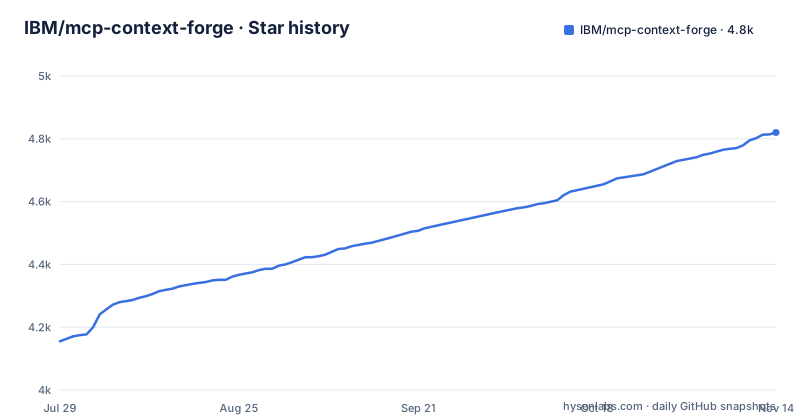
Star history
- IBM/mcp-context-forge4,820 ★ · +665
| Repository | 2026-07-29 | 2026-11-14 |
|---|---|---|
| IBM/mcp-context-forge | 4.2k | 4.8k |
665 Stars in the last 108 days, measured from the daily GitHub snapshot. Compare with other projects
Editorial analysis
The Problem: Scattered AI Endpoints and Protocol Sprawl
AI clients today face a mess of protocols. MCP servers speak one language, A2A agents another, and legacy REST or gRPC services speak yet another. Each backend has its own authentication, rate limits, and discovery mechanism. ContextForge addresses this by acting as a single gateway, registry, and proxy. It federates tools, agents, and APIs into one clean endpoint. The intended user is an engineering team running multiple AI services that need centralized governance, discovery, and observability. This is not a tool for a hobbyist running one MCP server. It targets production environments where managing access and monitoring across many endpoints becomes a real burden.
How It Works: Three Gateway Layers and a Registry
ContextForge is structured as three distinct gateway layers. The Tools Gateway handles MCP, REST, and gRPC-to-MCP translation, plus something called TOON compression. The Agent Gateway routes A2A protocol traffic and supports OpenAI-compatible and Anthropic agent routing. The API Gateway provides rate limiting, auth, retries, and reverse proxy for REST services. Above these sits a registry that manages prompts, resources, and tools. Prompts use Jinja2 templates with rollback and versioning. Resources use URI-based access with MIME detection and caching. Tools can be native or adapted, with input validation and concurrency controls. The gateway runs as a fully compliant MCP server, which means existing MCP clients can connect to it directly. For gRPC services, it uses server reflection for automatic service discovery and method introspection, so you do not need to manually define every method.
Getting Started: Required Secrets and Quick Start Commands
The README is explicit about one non-negotiable requirement: JWT_SECRET_KEY and AUTH_ENCRYPTION_SECRET must be set in every environment, including local development. The gateway will not start without them. The .env.example quickstart generates them with make init-secrets, or non-interactively with python3 -m mcpgateway.scripts.init_secrets --patch-env .env. You can install via PyPI as mcp-contextforge-gateway, or run it through Docker. There is also a VS Code dev container and a 5-minute setup guide linked in the issues. The documentation mentions uvx, Docker, Compose, or local dev as options. The key point is that configuration is not optional. You must provide these secrets before the first run, which is a security hardening decision but also a barrier to quick experimentation.
Observability and Admin UI: What You Get Out of the Box
ContextForge ships with an Admin UI built with HTMX 2.0.3 and Alpine.js. It provides real-time log viewing with filtering, search, and export. The UI supports airgapped deployment, which is a notable feature for environments with no internet access. Observability is handled through OpenTelemetry with OTLP protocol support. You can send traces to Phoenix, Jaeger, Zipkin, Tempo, DataDog, or New Relic. The documentation claims automatic instrumentation of tools, prompts, resources, and gateway operations. It also tracks LLM-specific metrics like token usage and costs. The README says there is zero overhead when tracing is disabled, which is a useful claim but one you should verify in your own environment. The vendor-agnostic approach means you are not locked into a specific tracing backend.
A Genuine Limitation: Mandatory Secrets and gRPC Reflection
The most obvious limitation is the hard requirement for JWT_SECRET_KEY and AUTH_ENCRYPTION_SECRET. This is a deliberate security choice, but it complicates local development and quick tests. If you lose these secrets or misconfigure them, the gateway simply will not start. Another limitation is the gRPC-to-MCP translation method. It relies on server reflection for automatic service discovery. This means your gRPC services must support the reflection protocol. If they do not, the reflection-based automatic discovery cannot be used for them. For teams with legacy gRPC services that lack reflection, this could be a significant integration barrier. The README also mentions protocol version selection for MCP, such as 2025-11-25.
Alternatives: Direct MCP Servers vs. Full Federation
The simplest alternative is to skip the gateway entirely and connect your AI client directly to each MCP server. This works when you have one or two servers and no need for centralized governance. The trade-off is that you lose unified discovery, rate limiting, and observability. Another alternative is to build your own proxy using a generic reverse proxy like NGINX or Envoy, combined with a custom registry. This gives you full control but requires you to implement MCP-specific features like tool adaptation and protocol translation yourself. ContextForge's advantage is that it provides these AI-specific features out of the box, including gRPC-to-MCP translation and A2A routing. The cost is the operational complexity of running another service with mandatory secrets and Redis for caching in multi-cluster setups.
Maintenance and Upgrade Considerations
The project shows a steady release cadence: v1.0.7-20260921 on 2026-09-21, v1.0.11 on 2026-09-28 and v1.1.0 on 2026-10-20. The v1.0.7-20260921 patch lists security dependency updates, and the last push was on 2026-11-02, which suggests active maintenance. The README mentions a deprecations page for runtime paths and migration guidance, so you should check that before upgrading. The project has 7,000+ tests, which is a positive signal for stability, but test counts alone do not guarantee bug-free behavior. The license is Apache-2.0, which allows commercial use with no copyleft obligations. The gateway is deployable via PyPI or Docker, and scales to multi-cluster Kubernetes with Redis-backed federation. The maintenance cost includes keeping up with the release cycle and understanding the deprecation notices. You should also plan for the operational overhead of managing the required secrets and Redis infrastructure.
Editorial conclusion
ContextForge is for teams that manage many MCP servers or legacy REST/gRPC APIs and need a single governance and discovery point for AI agents. It is not for simple single-server setups where a direct MCP connection suffices, nor for environments that cannot support mandatory JWT and encryption secrets. Before adopting, verify your protocol version needs, confirm the gRPC reflection requirements, and test the federated caching with Redis under your expected load. The project's active release cadence and 7,000+ tests suggest ongoing maintenance, but you must review the deprecation guide for any runtime paths you depend on.
Frequently asked questions
What is MCP context forge?
An open source registry and proxy that federates MCP servers, A2A servers and REST or gRPC APIs behind one endpoint, with centralized governance, discovery and observability. It runs as a fully compliant MCP server, supports HTTP, JSON-RPC, WebSocket, SSE and Streamable HTTP, and is published on PyPI as mcp-contextforge-gateway.
What features does ContextForge include?
A Python gateway with an admin interface, a plugin system of forty or more plugins, gRPC-to-MCP translation through server reflection, a REST-to-MCP adapter with automatic JSON Schema extraction, and OpenTelemetry tracing to backends including Phoenix, Jaeger and Zipkin. It deploys by pip or Docker and scales to multi-cluster setups with Redis-backed federation and caching.
mcp context forge alternative
The simplest alternative is to connect your AI client directly to each MCP server, which works for one or two servers but loses unified discovery, rate limiting and observability. For extending ContextForge itself, the README points to its own plugin system for additional transports, protocols and integrations, a roadmap page for upcoming features, and a deprecations page listing retired runtime paths with migration guidance.
Official sources
Where developers are discussing it
Posts on Hacker News, dev.to and Lobsters that link to this repository, found by our scan of those communities. 2 in the last 30 days; newest first.
- Top 7 Best Agent Gatewaysdev.to · Nov 9, 2026 · 21 points · 3 comments
- 5 Best MCP Gateways in 2026: Bifrost, IBM ContextForge, Obot, Docker and Microsoft Compareddev.to · Nov 2, 2026 · 5 points · 0 comments
Add this badge to your README
If you maintain this project, the badge below links readers to this analysis and shows its maintenance status from the daily GitHub snapshot. Paste the markdown into your README; add ?metric=license or ?metric=stars to the image URL for a different field.

[](https://hysenlabs.com/projects/ibm-mcp-context-forge)Star history chart for your README
[](https://hysenlabs.com/projects/ibm-mcp-context-forge)Was this useful?