google-genai: Google's Python SDK for the Gemini API and Agent Platform
Google Gen AI Python SDK provides an interface for developers to integrate Google's generative models into their Python applications.
At a glance
- What is it?
- The official Python client for Google's generative models supports both the Gemini Developer API and the Gemini Enterprise Agent Platform from one code path. Here is how it installs, how the client is wired, and why the next major version will change automatic function calling.
- Who is it for?
- Adopt google-genai if you are building on the Gemini Developer API or the Gemini Enterprise Agent Platform and want one client that covers both, and pin the version to < 3.0.0 as the README advises until you have migrated off the deprecated Live methods and the prompt/text/image arguments to generate_videos. Do not adopt it if you need a provider-neutral abstraction over several model vendors, because this SDK talks only to Google's APIs.
- Can I use it commercially?
- Yes. Apache-2.0 is a permissive licence: you can use, modify and sell software built on it, as long as you keep its copyright and licence notices.
- Is it still maintained?
- Yes. The repository last received commits 1 day ago.
- What is it written in?
- Mainly Python, according to GitHub's language statistics.
Answers come from the project's GitHub data, last synced on November 13, 2026, and from our analysis. They are not legal advice.
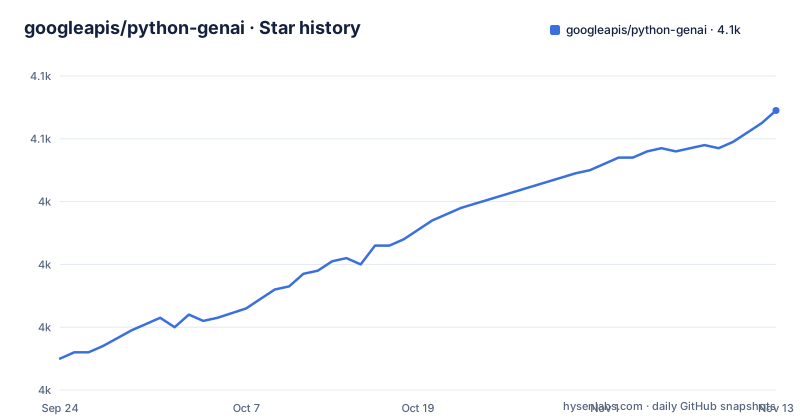
Star history
- googleapis/python-genai4,069 ★ · +79
| Repository | 2026-09-24 | 2026-11-13 |
|---|---|---|
| googleapis/python-genai | 4k | 4.1k |
79 Stars in the last 50 days, measured from the daily GitHub snapshot. Compare with other projects
Editorial analysis
What google-genai is for, and who should reach for it
google-genai is the Python client that Google publishes for its own generative model APIs. The README names two backends: the Gemini Developer API, aimed at developers who want an API key and a quick start, and the Gemini Enterprise Agent Platform, aimed at teams running inside Google Cloud with a project and a location. The SDK exposes both through the same genai.Client object, which is the main reason to pick it over a hand-rolled HTTP wrapper.
The audience is narrow and clear. You are writing Python 3.10 or newer (pyproject.toml sets requires-python = ">=3.10" and lists classifiers through 3.14), you have already decided to use Google's models, and you want typed request and response objects rather than raw JSON. If you are still comparing model vendors, this package will not help you compare them: it speaks to Google's endpoints only.
One detail worth noticing early is that the SDK defaults to the beta API endpoints, which the README explains exist "to support preview features in the APIs." That is a deliberate trade: you get newer capabilities first, and you inherit the churn that comes with them.
The client object, the two auth paths, and the types module
The architecture is a thin, typed layer over HTTP. Dependencies in pyproject.toml tell you what sits underneath: httpx for transport, pydantic for models, google-auth for credentials, tenacity for retries, websockets for the live streaming path, and anyio plus sniffio to bridge sync and async. There is no separate runtime or daemon; the client is a library object you construct and close.
Auth splits in two. For the Gemini Developer API you pass api_key, or you leave it out and let the client read GEMINI_API_KEY or GOOGLE_API_KEY from the environment. The README notes that if both variables are set, GOOGLE_API_KEY wins. For the Agent Platform you pass enterprise=True with project and location, or set GOOGLE_GENAI_USE_ENTERPRISE, GOOGLE_CLOUD_PROJECT and GOOGLE_CLOUD_LOCATION and construct genai.Client() with no arguments.
Every method accepts either Pydantic types from google.genai.types or plain dictionaries. The README shows the same call written both ways, once with types.Part.from_text(text=...) and once with {'text': ...}. That dual input is convenient for quick scripts, but it also means the type checker only helps you on the path where you actually use the types.
Resource cleanup is explicit. The README documents client.close() for the sync client, await aclient.aclose() for the async one, and context managers for both. The reason given is concrete: closing avoids the httpx "client has been closed" error, which the README links to issue #1763.
Installing google-genai and making a first real call
The README gives a single install command, with a uv variant for people who use that installer. Nothing else is required to get a client object running.
pip install google-genaiWith uv, the equivalent is:
uv pip install google-genaiNext, export a key. The README recommends setting only one of the two variables, since GOOGLE_API_KEY takes precedence when both are present.
export GEMINI_API_KEY='your-api-key'Now the imports and the client. The import path is google.genai, not the package name on PyPI.
from google import genai
from google.genai import types

client = genai.Client(api_key='GEMINI_API_KEY')
The README's own example passes the literal string 'GEMINI_API_KEY' as the key, which is a placeholder, not a lookup of the environment variable. If you have exported the variable, call genai.Client() with no arguments instead.
A first call looks like this. The model name below is the one the README uses.
response = client.models.generate_content(
    model='gemini-flash-latest',
    contents=types.Part.from_text(text='Why is the sky blue?')
)
You should get back a response object from the Gemini Developer API. If you prefer dictionaries, the README shows the same request with contents={'text': 'Why is the sky blue?'}. For the Agent Platform, swap the client for genai.Client(enterprise=True, project='your-project-id', location='global') and leave the rest of the call unchanged. Wrap the work in a with block if the process is long-lived; the README documents that the sync context manager closes the underlying client on exit.
Automatic function calling is moving, and that is the real migration risk
The most important thing in the README is not an example, it is the warning box. The SDK is changing automatic function calling (AFC) in the next major version. After that change, you will not be able to invoke AFC from direct calls to Models.generate_content or its stream and async variants; AFC moves to the Chats modules.
That is a breaking change for anyone who wired tool use into a single generate_content call. The README's migration table also lists removals beyond AFC: Live.send is replaced by send_client_content, send_realtime_input, or send_tool_response; Live.start_stream is replaced by receive and send_realtime_input; LiveConnectConfig.generation_config goes away in favor of setting fields on LiveConnectConfig directly; the prompt, text and image arguments to Models.generate_videos are replaced by a source argument; and GenerationConfigThinkingConfig becomes ThinkingConfig.
The README's own instruction is to pin the SDK version to < 3.0.0 to avoid unexpected updates. Treat that as a scheduling constraint rather than a suggestion. If you are on the live streaming API or on AFC through generate_content, the upgrade is a code change, not a version bump.
What the README does not document is a rollback path or a compatibility shim for the removed Live methods. If you need one, you will have to build it around the new methods yourself.
Where this SDK is the wrong tool
If your application has to talk to more than one model provider behind a single interface, google-genai is the wrong layer. It is a Google-specific client, and its abstractions (enterprise mode, project and location, the Gemini Developer API key flow) are shaped by Google's platform. A provider-neutral library is a different product with a different job.
There is a second case where the SDK adds friction rather than removing it: a synchronous, short-lived script that makes one call and exits. The close semantics, the context managers, and the httpx "client has been closed" error the README documents all exist because the client holds connections. For a one-shot script you still have to get the lifecycle right, and the README treats close() as something you must remember rather than something the library does for you.
The default to beta endpoints is a third trade-off. You get preview features, and you also accept that the surface you build on is the one most likely to move. The README states the default plainly; verify against the installed package that you can switch to stable endpoints before you depend on it.
Finally, the README is honest that LLM coding assistants often suggest outdated syntax for this SDK, which is why it points at separate Agent Skill repositories for the Gemini Developer API and for the Agent Platform. That is a signal about how fast the API surface moves, not a marketing line.
Alternatives and the actual difference in approach
The README itself names the closest alternative, though not as a competing SDK: the Agent Skills repositories. For the Gemini Developer API, google-gemini/gemini-skills; for the Gemini Enterprise Agent Platform, the gemini-api skill inside google/skills. These are not a replacement for the Python package. They are context you load into a coding assistant so it writes current google-genai syntax instead of patterns from its training data. If your problem is bad generated code, the skills address that problem directly; the SDK does not.
For the broader comparison, the honest statement is that this SDK's alternative is a different model provider's client library. The difference is not ergonomics, it is the endpoint behind the client: auth model, model names, streaming semantics and tool-calling behavior all come from the vendor. Choosing between them is choosing a platform, and google-genai is the entry point to Google's.
Within Google's own stack, the choice the SDK makes is to unify the Gemini Developer API and the Agent Platform behind one Client class rather than shipping two packages. That is the design decision that distinguishes it from a platform-specific client, and it is why the enterprise=True flag and the GOOGLE_GENAI_USE_ENTERPRISE variable exist at all.
Maintenance, version pinning and licence
The repository is not archived. The last push was on 2026-09-20, and releases have been landing roughly weekly: v2.22.0 on 2026-09-02, v2.23.0 on 2026-09-10, and v2.24.0 on 2026-09-16. pyproject.toml declares version 2.24.0, which matches the newest release. A cadence that tight is good for bug fixes and bad for anyone who does not pin.
Pin anyway, and pin below 3.0.0 as the README instructs. The dependency ranges in pyproject.toml are also worth reading before you freeze a lockfile: httpx is bounded to >=0.28.1, <1.0.0, pydantic to >=2.12.5, <3.0.0, and tenacity to >=8.2.3, <9.2.0. Those upper bounds are the maintainers' stated compatibility envelope.
Optional extras matter for cost. The local-tokenizer extra pulls sentencepiece, protobuf, pillow, torch, torchvision and transformers, which is a large install compared with the base package; the aiohttp extra adds aiohttp, and pyopenssl is available separately. Only install the extras you use.
The licence is Apache-2.0, declared both in pyproject.toml and as the LICENSE file at the repository root. That is a permissive licence with a patent grant, and it is the same licence Google uses across its client libraries. It does not grant you anything about the model APIs themselves, which are governed by separate terms; check those separately, since this article is not legal advice.
Editorial conclusion
Adopt google-genai if you are building on the Gemini Developer API or the Gemini Enterprise Agent Platform and want one client that covers both, and pin the version to < 3.0.0 as the README advises until you have migrated off the deprecated Live methods and the prompt/text/image arguments to generate_videos. Do not adopt it if you need a provider-neutral abstraction over several model vendors, because this SDK talks only to Google's APIs. Before you write production code, verify two things against the installed package rather than the README: which endpoint (beta or stable) your client actually hits, and whether your call path uses automatic function calling from Models.generate_content, since that is the behavior the next major version removes.
Frequently asked questions
How do I install google-genai in Python?
Run pip install google-genai, or uv pip install google-genai if you use uv. The package requires Python 3.10 or newer.
What is google-genai in Python?
It is Google's Python SDK for integrating Google's generative models into Python applications. The README states it supports the Gemini Developer API and the Gemini Enterprise Agent Platform.
What is the google-genai import path?
The README shows from google import genai, with types available as from google.genai import types. The PyPI package name and the import path are different.
Does google-genai work with the Gemini Enterprise Agent Platform?
Yes. The README shows genai.Client(enterprise=True, project='your-project-id', location='global'), or setting GOOGLE_GENAI_USE_ENTERPRISE, GOOGLE_CLOUD_PROJECT and GOOGLE_CLOUD_LOCATION and calling genai.Client() with no arguments.
Why does google-genai tell me to pin the version below 3.0.0?
The README warns that automatic function calling and several Live methods are changing in the next major version, and lists the removals in a migration table. It recommends pinning to < 3.0.0 to avoid unexpected updates.
How do I close a google-genai client?
The README documents client.close() for the sync client and await aclient.aclose() for the async client, or you can use the provided context managers. It states that closing avoids the httpx "client has been closed" error.
Official sources
Add this badge to your README
If you maintain this project, the badge below links readers to this analysis and shows its maintenance status from the daily GitHub snapshot. Paste the markdown into your README; add ?metric=license or ?metric=stars to the image URL for a different field.

[](https://hysenlabs.com/projects/googleapis-python-genai)Star history chart for your README
[](https://hysenlabs.com/projects/googleapis-python-genai)Was this useful?