google-gemini/gemini-skills: installing Gemini API skills in your coding assistant
Skills for the Gemini API, SDK and model/agent interactions
At a glance
- What is it?
- A four-skill library that teaches coding agents current Gemini API patterns. The install paths are the point; the content is what keeps them from writing stale SDK code.
- Who is it for?
- Adopt gemini-skills if you are building Gemini API, Live API or Omni Flash video apps and your coding assistant keeps emitting outdated SDK calls; the four skills target exactly that gap, and the README reports 87% correctness with Gemini 3 Flash and 96% with Gemini 3.1 Pro in the project's own evaluations.
- Can I use it commercially?
- Yes. Apache-2.0 is a permissive licence: you can use, modify and sell software built on it, as long as you keep its copyright and licence notices.
- Is it still maintained?
- Yes. The repository last received commits 3 days ago.
- What is it written in?
- Mainly Python, according to GitHub's language statistics.
Answers come from the project's GitHub data, last synced on November 15, 2026, and from our analysis. They are not legal advice.
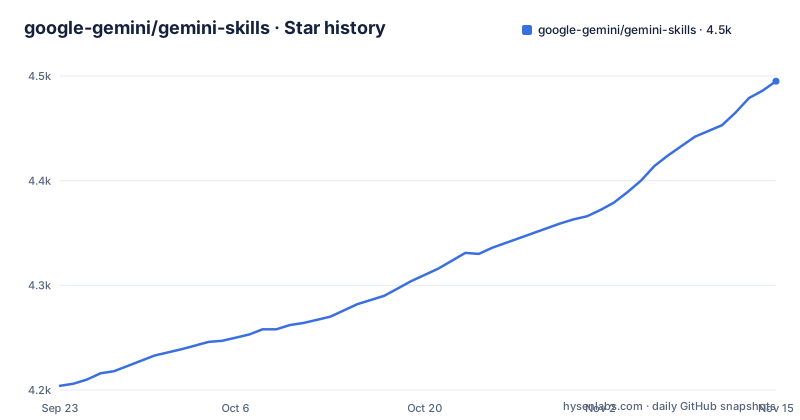
Star history
- google-gemini/gemini-skills4,495 ★ · +291
| Repository | 2026-09-23 | 2026-11-15 |
|---|---|---|
| google-gemini/gemini-skills | 4.2k | 4.5k |
291 Stars in the last 53 days, measured from the daily GitHub snapshot. Compare with other projects
Editorial analysis
The knowledge gap gemini-skills is built to close
Language models are trained at a fixed point in time. The README states the problem plainly: models do not know about themselves when they are trained, and they are not necessarily aware of subtle changes in best practices, such as thought circulation, or of SDK changes. For anyone writing Gemini API code with an assistant, that shows up as plausible-looking calls that no longer match the current SDK.
The repository addresses it with skills, which the README describes as a lightweight technique for adding relevant context to agents. This repo contains skills related to building apps powered by the Gemini API. It is aimed at developers who already use a coding assistant and want its Gemini API output to follow current practice, not at people looking for a runtime library to import.
Three skills, three different API surfaces
The repository ships four skills, and they are not variations on one theme. gemini-api-cli covers calling the Gemini API from the shell with the gemini-api CLI: text and media generation, file and YouTube analysis, transcription, Deep Research, Antigravity sandboxes, and --jq / --body scripting.
gemini-api-dev covers building apps with the Gemini API Interactions API. The README lists its scope: text generation, multi-turn chat, streaming, function calling, structured output, image generation, managed agents, Deep Research, deprecated model guardrails, and both Python and TypeScript SDKs. That is the broadest of the four and the one most application developers want.
gemini-live-api-dev targets real-time, bidirectional streaming apps. Its documented scope is WebSocket-based audio, video and text streaming, voice activity detection, native audio features, function calling and session management. The concerns here are different from request-response work: session lifetime and audio handling dominate.
gemini-omni-flash-api is narrower still. It is a generative AI video skill focused on Gemini Omni 1.1 Flash (gemini-omni-1.1-flash), covering video editing, image and video referenced generation, first and last frame transitions, and video extensions using the Interactions API. If you are not doing video work, this skill is dead weight in your context.
Installing gemini-skills with the Vercel skills CLI
The README documents several install paths. The Vercel skills CLI is the most direct for browsing before committing. Running the list command shows the available skills interactively, and the second command installs one by name.
# Interactively browse and install skills.
npx skills add google-gemini/gemini-skills --list

# Install a specific skill (e.g., gemini-api-dev).
npx skills add google-gemini/gemini-skills --skill gemini-api-dev
After the second command, you should have the gemini-api-dev skill available to your assistant. The README does not document where the files land on disk or how to remove a skill once installed.
Context7 offers an equivalent path with its own CLI. The syntax differs in that the repository is given as a path with a leading slash.
# Interactively browse and install skills.
npx ctx7 skills install /google-gemini/gemini-skills

# Install a specific skill (e.g., gemini-api-dev).
npx ctx7 skills install /google-gemini/gemini-skills gemini-api-dev
The README documents the same two-step pattern for both CLIs, so choosing between them comes down to which package manager you already use.
Plugin installs for Claude Code, Cursor, Codex and Antigravity
If your assistant has a plugin system, the README gives a native path for each. Claude Code registers the repository as a marketplace first, then installs the plugin from it.
# Register the marketplace
/plugin marketplace add google-gemini/gemini-skills

# Install the plugin
/plugin install gemini-skills@gemini-skills
Cursor uses a single editor command instead of a shell install. The README gives it as plain text, which suggests it is typed into the editor rather than a terminal.
/add-plugin google-gemini/gemini-skillsCodex follows the marketplace pattern with its own subcommands.
# Add the marketplace source
codex plugin marketplace add https://github.com/google-gemini/gemini-skills

# Install the plugin
codex plugin add gemini-skills@gemini-skills
Antigravity takes a different route. The README states the Gemini skills come bundled with Antigravity, found under Customizations, Build with Google Plugins. The AGY CLI can also install the repository directly.
# Install it directly
agy plugin install https://github.com/google-gemini/gemini-skills
The repository layout backs these paths up: there are .claude-plugin, .codex-plugin and .cursor-plugin directories at the top level alongside a plugin.json, so each assistant has a manifest to read.
Where gemini-skills is the wrong tool
The most concrete limitation is the Vertex AI move. The README marks it as important: the vertex-ai-api-dev skill has moved to skills/cloud/gemini-api in the google/skills repository. If your application talks to Gemini through Vertex AI, this repository no longer carries the skill you need, and installing gemini-api-dev will not fill that gap.
The second limitation is scope. These skills cover the Gemini API, the gemini-api CLI, the Live API and one video model. They contain nothing about other providers, and nothing about non-Gemini parts of your stack. An agent that loads gemini-api-dev still needs its other context for everything else.
The third is the disclaimer. The README states this is not an officially supported Google product, and that the project is not eligible for the Google Open Source Software Vulnerability Rewards Program. Teams that require vendor-backed support or a security bounty channel should weigh that before making the skills part of their workflow.
Finally, the README documents installation but not removal or rollback. There is no documented command to uninstall a skill or to pin a version, and the repository has no published GitHub releases. If you need reproducible skill versions across a team, the README does not show how to get them.
gemini-skills versus writing your own agent context
The alternative most teams actually weigh is not another skills repository. It is maintaining their own prompt files, examples or internal documentation that describe the current Gemini API surface. That approach gives you full control over wording and scope, and it can cover your own conventions alongside the API. The cost is that you own the upkeep, and API changes are exactly the thing the README says models miss.
gemini-skills takes the opposite position: the context is maintained upstream, in a repository with a defined structure, and you install it rather than write it. The trade is control for currency. You get the project's coverage of streaming, function calling, structured output and the rest, but you also get its scope decisions, including the Vertex AI move, whether or not they match your stack.
The README points to a middle option as well. It links to the Gemini API coding agents documentation for setting up your coding assistant with Gemini API MCP and Skills, which suggests skills and an MCP server are meant to be considered together rather than as competing choices.
Maintenance, licence and what the README does not cover
The repository is not archived, and the last push was on 2026-11-02. That is recent enough that the skills should reflect the current API surface, but the README does not state a release cadence or a versioning scheme, and the repository has no published GitHub releases. There is nothing to pin against.
The licence is Apache-2.0. That permits commercial use and modification, and it includes a patent grant. It also means redistribution must preserve the licence and notices. None of this is legal advice; check the LICENSE file in the repository for the actual terms before you ship anything derived from it.
Upgrade cost is the open question. Because the README documents install commands but not update or removal commands, the practical upgrade path is to re-run the install command for your assistant and see whether it replaces or duplicates what is already there. The README is silent on which behaviour to expect.
The README also does not document how the skills are structured internally, what a skill file contains, or how to write one of your own against the same format. If you want to extend the pattern rather than consume it, the linked agentskills.io site is the reference the README points to.
Editorial conclusion
Adopt gemini-skills if you are building Gemini API, Live API or Omni Flash video apps and your coding assistant keeps emitting outdated SDK calls; the four skills target exactly that gap, and the README reports 87% correctness with Gemini 3 Flash and 96% with Gemini 3.1 Pro in the project's own evaluations. Skip it if you work against the Vertex AI API: the README states the vertex-ai-api-dev skill has moved to skills/cloud/gemini-api in the google/skills repo, so the local gemini-api-dev skill is not a substitute. Before wiring it in, verify which plugin format your assistant reads (the repository ships .claude-plugin, .codex-plugin and .cursor-plugin directories plus a plugin.json) and confirm the skill files load, since the README documents install commands but not rollback or removal.
Frequently asked questions
What is gemini-skills?
It is a library of agent skills for the Gemini API, SDK and model interactions, maintained under google-gemini. The README describes skills as a lightweight technique for adding relevant context to agents, and this repository contains four of them for building apps powered by the Gemini API.
How do I install gemini-skills?
The README gives several paths. With the Vercel skills CLI you run npx skills add google-gemini/gemini-skills --skill gemini-api-dev, and there are equivalent commands for the Context7 CLI, Claude Code, Cursor, Codex and Antigravity.
How do I use gemini-skills in my coding assistant?
Install the skill through whichever path your assistant supports, such as the Claude Code marketplace or the Cursor /add-plugin command, then let the assistant load it as context when you work on Gemini API code. The README does not document the loading behaviour in detail.
How do I add gemini-skills to my project?
Use the install command for your assistant, for example npx skills add google-gemini/gemini-skills --skill gemini-api-dev, or register the repository as a plugin marketplace in Claude Code or Codex and install gemini-skills from it.
How do I set up gemini-skills?
Setup means installing the skill into your coding assistant rather than configuring a service. The README documents npx skills add for the Vercel CLI, npx ctx7 skills install for Context7, and plugin commands for Claude Code, Cursor, Codex and Antigravity.
Official sources
Add this badge to your README
If you maintain this project, the badge below links readers to this analysis and shows its maintenance status from the daily GitHub snapshot. Paste the markdown into your README; add ?metric=license or ?metric=stars to the image URL for a different field.

[](https://hysenlabs.com/projects/google-gemini-gemini-skills)Star history chart for your README
[](https://hysenlabs.com/projects/google-gemini-gemini-skills)Was this useful?