Skaffold: A Client-Side Pipeline for Kubernetes Development Loops
Easy and Repeatable Kubernetes Development. It can manage and keep Skaffold up-to-date while providing a more guided startup experience, along with providing and managing other common dependencies, and works with any kubernetes cluster.
At a glance
- What is it?
- Skaffold is a Go-based CLI that automates build, push, and deploy loops for Kubernetes apps, with no cluster-side component. It suits developers who want fast local iteration and GitOps-friendly output, but its opinionated pipeline may not fit every workflow.
- Who is it for?
- Adopt Skaffold if you want a client-side, declarative tool to automate the build-push-deploy loop for local and remote Kubernetes clusters, especially if you value portability and GitOps-ready manifests. Skip it if you need full control over every pipeline step or if your build tools are not supported by its pluggable architecture.
- Can I use it commercially?
- Yes. Apache-2.0 is a permissive licence: you can use, modify and sell software built on it, as long as you keep its copyright and licence notices.
- Is it still maintained?
- Yes. The repository last received commits 2 days ago.
- What is it written in?
- Mainly Go, according to GitHub's language statistics.
Answers come from the project's GitHub data, last synced on November 12, 2026, and from our analysis. They are not legal advice.
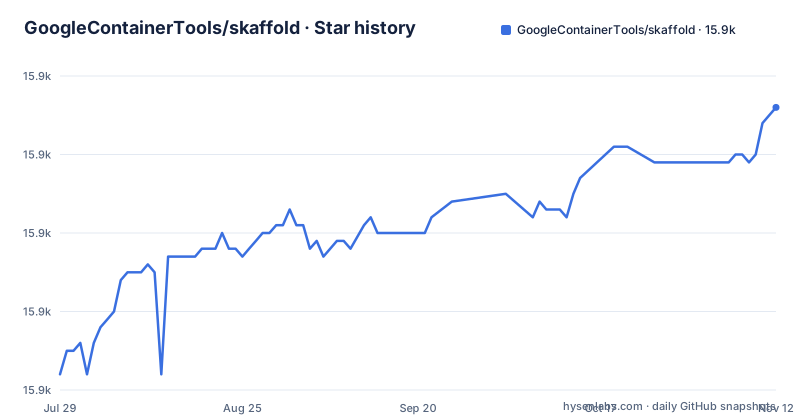
Star history
- GoogleContainerTools/skaffold15,906 ★ · +34
| Repository | 2026-07-29 | 2026-11-12 |
|---|---|---|
| GoogleContainerTools/skaffold | 15.9k | 15.9k |
34 Stars in the last 106 days, measured from the daily GitHub snapshot. Compare with other projects
Editorial analysis
The Problem Skaffold Aims to Solve
Developing applications for Kubernetes is repetitive. Every source change triggers a manual sequence: build an image, push it to a registry, update the deployment, and then watch logs and ports. Skaffold automates that sequence. The README frames it as a command line tool for continuous development. It detects changes in source code and handles the pipeline to build, push, and deploy automatically. The target user is a developer iterating on application code locally, then deploying to a local or remote Kubernetes cluster. It also aims to make projects portable: clone a repository and run skaffold run. That promise is central to its design. The tool is client-side only, which means no cluster-side component to install or maintain. For teams that want a repeatable development loop without managing a separate controller, that is the core value.
How Skaffold Works: The Pipeline and Its Phases
Skaffold's architecture is a pipeline with distinct phases: build, push, and deploy. The README describes it as an opinionated, minimal pipeline. When you run skaffold dev, it watches your source tree. When it detects a change, it rebuilds the affected images, pushes them if needed, and deploys the updated manifests to your cluster. The build phase is pluggable; you can bring your own tools, meaning Skaffold can integrate with different build tools like Docker, Bazel, or kaniko, depending on what you configure. The deploy phase similarly supports different deployment tools, such as kubectl or Helm, though the README does not enumerate them. After deployment, Skaffold aggregates logs from the deployed resources and forwards container ports to your local machine. That gives you continuous feedback without manually running kubectl logs or port-forward. The pipeline is client-side only, so all this orchestration happens on your machine, not inside the cluster. This design choice keeps the cluster clean but shifts the processing burden to your local environment.
Getting Started: Installation and Initial Configuration
The README points to the install page at https://skaffold.dev/docs/install/ and to the GitHub Releases page for specific versions. The current release is v2.25.0, published on 2026-09-16. You can install a specific version from the releases page, which is a common pattern for Go-based CLIs. After installation, the first step is typically to run skaffold init. The README says skaffold init discovers your files and generates its own config file. That config file is the declarative heart of the project. It defines the build and deploy configuration, including which images to build and which manifests to apply. The README does not show the config file syntax, but the command generates it for you. You then run skaffold dev for continuous development, or skaffold run for a one-off end-to-end pipeline. For CI/CD, you can use skaffold run end-to-end, or use individual phases. One phase, skaffold render, outputs hydrated Kubernetes manifests that can be used in GitOps workflows. This is a concrete command you can invoke in a pipeline to produce final manifests.
Portability and Environment Differences
Skaffold emphasizes project portability. The README claims it is the easiest way to share your project: git clone and skaffold run. That workflow works if the project includes a skaffold.yaml config file, which skaffold init generates. But real environments differ. Skaffold handles this with profiles, user level config, environment variables, and flags. Profiles let you define environment-specific overrides in the config. User level config holds preferences that are not project-specific. Environment variables and flags provide runtime adjustments. This is a layered approach: the project config defines the baseline, and profiles or user config adjust it for local development, staging, or production. The README does not detail the syntax, but the concept is clear. This context-awareness is what makes the tool portable across clusters and developers. Without it, you would need to edit the config file for each environment, which defeats the purpose. However, this also means you must learn the profile and config system to use it effectively, which adds a learning curve.
Limitations and When Skaffold Is the Wrong Tool
Skaffold is not a fit for every Kubernetes workflow. The README states it provides an opinionated, minimal pipeline. That opinionated design means Skaffold makes choices for you. If your build or deploy process does not fit its pluggable architecture, you will fight the tool. For example, if you use a custom build system that Skaffold does not support, you cannot simply plug it in without writing a custom integration. The README says it integrates with any build or deploy tool, but that claim is aspirational; in practice, the set of supported tools is finite. Another limitation is that Skaffold is client-side only. This keeps the cluster clean, but it means the tool must be installed on every developer machine, and the build and push operations run from that machine. For large projects with many images, this can be slow or resource-intensive. Also, the README does not mention how it handles multi-cluster or multi-team scenarios. If you need a server-side controller that runs in the cluster and manages deployments across a team, Skaffold is not that tool.
Alternatives: Comparing Approaches
The main alternative in the Kubernetes development space is a tool like Tilt or Garden, though the README does not name them. Skaffold itself is a client-side CLI with no cluster-side component. Another alternative is to use raw kubectl commands with a script or Makefile, which gives you full control but no automation or feedback. The key difference is the level of abstraction. Skaffold abstracts the pipeline into phases and provides commands like skaffold render for GitOps. If you need GitOps-ready manifests, Skaffold's render phase is a concrete advantage.
Maintenance, Licensing, and Upgrade Considerations
Skaffold is licensed under Apache-2.0, which is permissive and allows commercial use without restrictions on modification or redistribution, though you should consult a lawyer for specific implications. The project is actively maintained, with the latest release v2.25.0 on 2026-09-16 and previous releases in July and June of the same year. That cadence suggests regular updates. The README says Skaffold is generally available and production ready, and it points to a deprecation policy at https://skaffold.dev/docs/references/deprecation. This policy is important for upgrade cost. It describes how features mature and how they are deprecated. As a user, you need to track deprecations to avoid sudden breakage when upgrading. The README also mentions IDE integrations via Google Cloud Code extensions, which can manage and keep Skaffold up-to-date. That is a concrete way to reduce upgrade burden, but it adds a dependency on Google's tooling. Overall, the maintenance cost is moderate: you must update the CLI regularly and check the deprecation policy before major upgrades. The Apache-2.0 license is low-risk, but the deprecation policy requires attention.
Editorial conclusion
Adopt Skaffold if you want a client-side, declarative tool to automate the build-push-deploy loop for local and remote Kubernetes clusters, especially if you value portability and GitOps-ready manifests. Skip it if you need full control over every pipeline step or if your build tools are not supported by its pluggable architecture. Before adopting, verify that your build and deploy tools are covered by Skaffold's integrations, and check the deprecation policy at https://skaffold.dev/docs/references/deprecation to understand feature maturity and removal timelines. Skaffold is production-ready per the README, but that claim applies to the tool itself, not to every possible plugin combination.
Frequently asked questions
What is Skaffold used for?
Continuous development for Kubernetes applications. It detects changes in your source code and handles the build, push and deploy steps automatically, aggregates logs from deployed resources and forwards container ports to your local machine. It also provides building blocks for a CI/CD pipeline through individual Skaffold phases.
How do I install Skaffold?
The README carries no install command. It links an install page at skaffold.dev/docs/install/ and points to the GitHub Releases page for release information or to install a specific version. The project is Apache License 2.0, so the binaries are freely available.
Does Skaffold run on Windows?
Yes on amd64. The Makefile lists SUPPORTED_PLATFORMS as linux-amd64, darwin-amd64, windows-amd64.exe, linux-arm64 and darwin-arm64. Windows on ARM is not in that list, so the binary is not produced for it.
Is Skaffold free?
Yes, under the Apache License 2.0, with the source in this repository. The Support section also states that Skaffold is generally available and considered production ready, with feature maturity and deprecation details in a separate deprecation policy.
Do I use Skaffold instead of Helm?
The repository does not publish that comparison, but the examples directory is instructive: it contains helm-deployment, helm-deployment-dependencies and helm-remote-repo alongside custom, getting-started and docker-deploy. Those examples pair Skaffold with Helm rather than replacing it, with Skaffold deciding when to run the build and deploy steps.
Official sources
Add this badge to your README
If you maintain this project, the badge below links readers to this analysis and shows its maintenance status from the daily GitHub snapshot. Paste the markdown into your README; add ?metric=license or ?metric=stars to the image URL for a different field.

[](https://hysenlabs.com/projects/googlecontainertools-skaffold)Star history chart for your README
[](https://hysenlabs.com/projects/googlecontainertools-skaffold)Was this useful?