gPodder podcast management with GTK and command-line clients
The gPodder podcast client.
At a glance
- What is it?
- gPodder is an open source podcast client for subscribing to feeds, organizing media, and downloading episodes. Its GTK3 interface, CLI, portable profiles, extensions, and GPL-3.0 license target users who want local podcast management rather than a hosted listening service.
- Who is it for?
- gPodder fits users who want a local, extensible podcast client and can supply Python and GTK3 dependencies on Linux, macOS, or Windows. It is a poor fit for users seeking a browser-only service or a maintained mobile podcast app.
- Can I use it commercially?
- Yes, with conditions. GPL-3.0 is a copyleft licence: if you distribute software that includes it, you must release that software's source code under the same licence. Running it internally without distributing it does not trigger that obligation.
- Is it still maintained?
- Yes. The repository last received commits 4 days ago.
- What is it written in?
- Mainly Python, according to GitHub's language statistics.
Answers come from the project's GitHub data, last synced on November 7, 2026, and from our analysis. They are not legal advice.
Star history
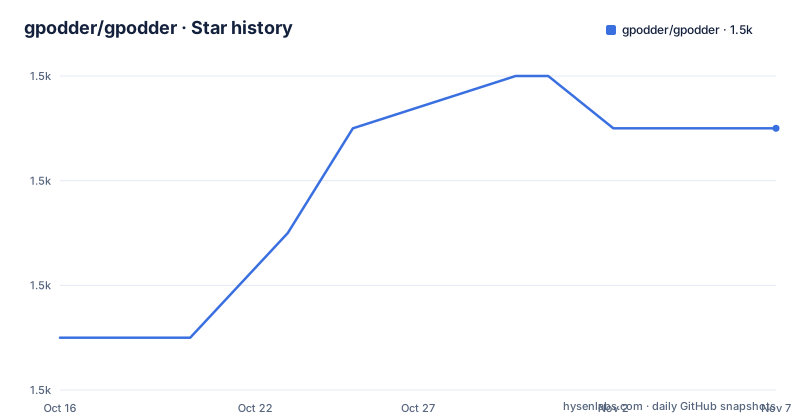
- gpodder/gpodder1,455 ★ · +4
| Repository | 2026-10-16 | 2026-11-07 |
|---|---|---|
| gpodder/gpodder | 1.5k | 1.5k |
4 Stars in the last 22 days, measured from the daily GitHub snapshot. Compare with other projects
Editorial analysis
gPodder's local podcast subscription and download model
gPodder addresses a specific problem: keeping podcast subscriptions and downloaded episodes on the user's own systems. It is a media aggregator and podcast client, not a podcast hosting service. The repository includes a GTK3 desktop UI and a command-line interface, so the intended audience includes people who want either a graphical subscription manager or a scriptable entry point.
The application is built around podcast feeds and media files. Its dependency on Podcastparser identifies feed parsing as part of the client stack, while `requests` supplies HTTP access for feed and media operations. The project also defines storage locations for a database and downloaded files. This local arrangement is useful for users who want podcast data under their own filesystem layout, and for devices such as USB disks or portable audio players.
gPodder is less suited to a workflow centered on browser streaming or a hosted account. The README does not identify a required cloud backend, and its documented data paths point to local persistence. That makes the architecture a practical fit for a personal Linux desktop or a source-based installation, but it also means the user must think about local storage, profile backup, and synchronization rather than assuming that server-side synchronization is automatic.
The project is distributed under GPL-3.0, with `setup.py` classifying it as GPLv3 or later. The repository contains `COPYING`, and the README points to the GNU General Public License. That license permits redistribution and modification under its terms, subject to the license conditions. This is a licensing fact, not legal advice, and downstream packagers should review the included license text for their distribution context.
GTK3, CLI, and feed-processing components
The repository exposes two documented entry points. `bin/gpodder` launches the Gtk+ user interface, while `bin/gpo` launches the command-line interface. The package metadata names gPodder's description as "Media aggregator and podcast client" and identifies Python as its implementation language. The source tree is under `src/gpodder`, with executable entry points under `bin`.
The runtime dependency list gives a partial view of the data flow. Podcastparser handles podcast feed parsing, `requests` handles network requests, and the local configuration and media paths determine where results are retained. On Linux, `dbus-python` is selected by the package metadata through the `platform_system=='Linux'` environment marker. The README also documents `tools/fake-dbus-module/` as a dummy, no-op alternative for macOS and Windows, which is relevant for non-Linux source runs that do not provide the same D-Bus integration.
The GTK3 interface has separate dependency requirements: PyGObject 3.22.0 or newer and GTK+3 3.16 or newer. The CLI does not appear in the README as requiring GTK3, although the repository's packaging and data files are designed to support multiple interfaces. That distinction matters when selecting an installation. A user who only needs command-line access can avoid assuming that the GTK stack is required, but the README does not provide a complete minimal CLI dependency procedure.
Extensions are loaded from `share/gpodder/extensions/` and from `$GPODDER_HOME/Extensions/`. Optional dependencies add Bluetooth sending, Windows size detection, native macOS integration, iPod synchronization, HTML show-note rendering, tagging, conversion, Sonos support, and YouTube support. These are modular additions rather than mandatory parts of the base podcast workflow. Their availability depends on the host platform and on whether the corresponding extension is installed.
Installing gPodder and launching the first interface
For a source checkout, the README provides direct launch commands. The first step is to install the dependencies documented for the chosen platform. The project requires Python 3.8 or newer, and the GTK3 UI additionally requires PyGObject 3.22.0 or newer and GTK+3 3.16 or newer. The README also points to the `Run from Git` documentation for dependency installation.
After the checkout and dependencies are present, run the GTK interface from the repository root. The reader should see the GTK podcast client window, assuming the required desktop libraries are installed.
bin/gpodderFor a command-line workflow, launch `bin/gpo` instead. This selects the documented CLI entry point and is useful when adding a subscription or building automation around the local client.
bin/gpoThe README does not provide a complete first-use sequence for adding a feed, selecting a download directory, or configuring synchronization. It does document installation with `make install`, which installs all UIs and translations by default. The following example restricts installation to the CLI and GTK UI with German and Dutch translations:
export LINGUAS="de nl"
export GPODDER_INSTALL_UIS="cli gtk"
make install
The installation process can also use `DESTDIR` and `PREFIX`. This example places the installation below `tmp/` while retaining `/usr/local/` as the prefix.
make install DESTDIR=tmp/ PREFIX=/usr/local/The test command is separate from installation. The repository documents `make unittest` for the test suite, which uses doctests and unittest-style tests according to the README.
Portable profiles and independent download storage
gPodder separates the location of its database and settings from the location of downloaded media. `GPODDER_HOME` sets the directory used for the database and downloaded files. `GPODDER_DOWNLOAD_DIR` changes only the download directory while leaving the database and settings in the default location. This separation gives users a way to keep podcast configuration on one filesystem and place large episode files on another.
For example, the following configuration stores the gPodder data directory on removable media:
export GPODDER_HOME=/media/usbdisk/gpodder-data/The next example keeps the database and settings under `~/.config/gpodder/` while storing downloads in `~/Podcasts/`:
export GPODDER_HOME=~/.config/gpodder/
export GPODDER_DOWNLOAD_DIR=~/Podcasts/
If `GPODDER_DOWNLOAD_DIR` is not set, the README states that `$GPODDER_HOME/Downloads/` is used when `GPODDER_HOME` is set. The project also documents default macOS paths under `$HOME/Library/Application Support/gPodder`, with downloads under the corresponding `download` directory. Those paths can be changed in `/Applications/gPodder.app/Contents/MacOSX/_launcher` by editing the launch environment, although the README primarily presents this as an OS X application configuration detail.
This design is useful for portable use, but it does not itself provide synchronization. The repository layout does not establish that two profiles will merge automatically, and the README does not document a conflict-resolution model for copying a database between devices. A removable profile also carries all of the consequences of removable storage, including access permissions, available capacity, and the need to remove the device before a later run.
Optional extensions, logging, and operational limits
The extension model makes gPodder useful beyond basic feed subscription, but optional features introduce platform-specific requirements. Bluetooth sending depends on `gnome-obex-send` or `bluetooth-sendto`. Windows size detection uses PyWin32. Native macOS support uses `ige-mac-integration`. iPod synchronization requires `libgpod`, and the README identifies version 0.8.3 as the tested version. HTML show notes can use `html5lib`, while WebKit2 GObject bindings are available for HTML rendering.
Media-related extensions have more demanding dependencies. The package metadata includes `ffmpeg` for audio conversion, concatenating videos, Rockbox conversion, video conversion, and YouTube support. Tagging uses `mutagen` and `pillow`. Sonos support uses `soco>=0.7`, and YouTube support uses `yt-dlp` together with `ffmpeg`. These are optional packages in `pyproject.toml`, so a base installation does not imply that conversion, metadata, device synchronization, or YouTube handling is available.
Logging is enabled by default. The README says gPodder writes logs to `$GPODDER_HOME/Logs/` and removes them after a certain amount of time. It documents `GPODDER_WRITE_LOGS=no` as the way to disable this behavior. That setting can be relevant for removable or shared storage, but disabling logs also removes a local diagnostic source. The README does not specify a retention interval or explain how logs should be collected for troubleshooting.
The main limitation is that gPodder is a desktop-oriented client with a broad native dependency surface. A missing GTK, PyGObject, D-Bus, ffmpeg, or device library may prevent a particular interface or extension from starting. The fake D-Bus module helps only with that specific integration point; it does not replace GTK or media tooling. The README does not identify a browser client or mobile application as part of this package.
Comparing gPodder with a hosted podcast workflow
A hosted podcast workflow differs in where subscriptions, playback state, and episode availability live. Such a service can provide account-based access across devices without requiring the user to install GTK3, Python packages, or local media tools. The gPodder README does not identify a hosted alternative or document one, so the relevant comparison is architectural rather than a product ranking.
gPodder keeps its database and downloaded files under filesystem locations selected through `GPODDER_HOME` and `GPODDER_DOWNLOAD_DIR`. It offers both `bin/gpodder` and `bin/gpo`, plus local extensions. That is a different approach from relying on a service to manage the user's podcast library. gPodder can fit a self-managed workstation, portable media setup, or command-line workflow, whereas a hosted workflow is more appropriate when browser access and centralized account data matter more than local control.
The trade-off is operational responsibility. gPodder requires the user to provision Python and native libraries, choose storage paths, manage removable media, and install optional converters. A hosted service moves more of that work to its operator, but the README cannot establish the reliability, pricing, privacy terms, or retention policy of such a service. The choice therefore depends on whether local control and CLI access outweigh the setup burden.
Maintenance status should also be considered from the repository record. gPodder is not archived, and the last push was on 2026-09-20. The most recent listed release is 3.11.5 from 2024-12-20, so repository activity and release history are separate signals here. The GPL-3.0 license and the optional dependency declarations make upgrade requirements inspectable, but the README does not document a formal upgrade compatibility policy.
Editorial conclusion
gPodder fits users who want a local, extensible podcast client and can supply Python and GTK3 dependencies on Linux, macOS, or Windows. It is a poor fit for users seeking a browser-only service or a maintained mobile podcast app. Verify Python, GTK3, D-Bus, storage, and optional media dependencies on the target system first, then confirm that `bin/gpodder` or `bin/gpo` launches with the intended `GPODDER_HOME`.
Frequently asked questions
How do I run gPodder from source?
Install the documented dependencies, then run `bin/gpodder` for the GTK UI or `bin/gpo` for the command-line interface. The README also documents `make install` for a system-wide installation.
Where does gPodder store its data and downloads?
`GPODDER_HOME` sets the database and data location, while `GPODDER_DOWNLOAD_DIR` independently sets the download directory. If the latter is unset and `GPODDER_HOME` is set, the README says downloads use `$GPODDER_HOME/Downloads/`.
What dependencies does the gPodder GTK3 interface need?
The README lists Python 3.8 or newer, PyGObject 3.22.0 or newer, and GTK+3 3.16 or newer for the GTK3 UI. The package metadata also lists feed, HTTP, client, and platform dependencies used by the project.
Official sources
Add this badge to your README
If you maintain this project, the badge below links readers to this analysis and shows its maintenance status from the daily GitHub snapshot. Paste the markdown into your README; add ?metric=license or ?metric=stars to the image URL for a different field.

[](https://hysenlabs.com/projects/gpodder-gpodder)Star history chart for your README
[](https://hysenlabs.com/projects/gpodder-gpodder)Was this useful?