qutebrowser: the Qt version matrix, the WebKit warning, and one part-time maintainer
A keyboard-driven, vim-like browser based on Python and Qt.
At a glance
- What is it?
- qutebrowser is a keyboard-driven browser written in Python on top of Qt, and its README is where the real decisions live: which Qt modules are mandatory, why QtWebKit is discouraged, which four libraries are optional and what each one switches on. This reads the dependency contract as written, including what it leaves unsaid.
- Who is it for?
- qutebrowser fits people who prefer keyboard-driven browsing. Installation options vary by platform, including prebuilt packages and source installs; check the platform guide and the project's support model before adopting it.
- Can I use it commercially?
- Yes, with conditions. GPL-3.0 is a copyleft licence: if you distribute software that includes it, you must release that software's source code under the same licence. Running it internally without distributing it does not trigger that obligation.
- Is it still maintained?
- Yes. The repository last received commits 4 days ago.
- What is it written in?
- Mainly Python, according to GitHub's language statistics.
Answers come from the project's GitHub data, last synced on November 14, 2026, and from our analysis. They are not legal advice.
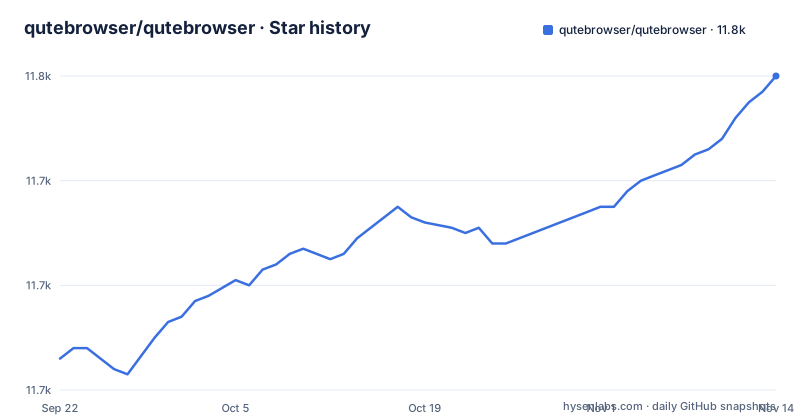
Star history
- qutebrowser/qutebrowser11,760 ★ · +54
| Repository | 2026-09-22 | 2026-11-14 |
|---|---|---|
| qutebrowser/qutebrowser | 11.7k | 11.8k |
54 Stars in the last 53 days, measured from the daily GitHub snapshot. Compare with other projects
Editorial analysis
The QtWebKit backend is offered and then told to stay off, for security reasons
Two rendering backends are listed. The default is QtWebEngine, and on Qt 5 that means 5.15.2 or newer; on Qt 6 the floor is lower, at 6.2.0. The alternative is QtWebKit at 5.212, and the README marks it as not recommended because of known security issues in QtWebKit, telling you to use the default QtWebEngine backend, which is based on Chromium, instead. It then quotes the QtWebKit releases page to make the point rather than assert it: the latest QtWebKit release is based on an old WebKit revision with known unpatched vulnerabilities, so use it carefully, avoid untrusted websites, and do not use it for transmission of sensitive data. Two consequences for anyone reading this before installing. First, the fallback is not a graceful degradation path, it is a warning, and a machine that can only offer QtWebKit should not be handed sensitive work through this browser. Second, the two backends are not interchangeable in features either: pygments highlighting for `:view-source` is described separately for QtWebKit versus the default backend, which means code paths differ by backend.
Requirements are a module matrix, so a partial Qt install fails in ways the README cannot enumerate
The baseline is Python 3.10 or newer plus Qt, either 6.2.0 or newer or 5.15.0 or newer, and then a module list rather than a single Qt package: QtCore or qtbase, QtQuick, which is part of qtbase or qtdeclarative in some distributions, QtSQL, also part of qtbase in some distributions, QtDBus, where a connection to DBus at runtime is optional, and QtOpenGL. PyQt must match the Qt generation: 6.2.2 or newer on Qt 6, or 5.15.0 or newer on Qt 5. jinja2 and PyYAML are listed as required, not optional. On macOS two more are required, pyobjc-core and pyobjc-framework-Cocoa. The parenthetical notes about which distributions bundle a module inside qtbase are the practical warning here. A Linux package built around qtbase alone may be missing QtQuick, which the README says may live in qtdeclarative. So whether your system qualifies is something you determine before the first launch, not after it.
Four optional libraries each switch a specific feature on or off
Four libraries are listed as optional, and each one is tied to a concrete behavior rather than a vague enhancement. `adblock` is for improved adblocking using ABP syntax. `pygments` powers syntax highlighting with `:view-source` on QtWebKit, and it is needed on the default QtWebEngine backend only when you pass the flag: `:view-source --pygments`. That distinction matters because it means highlighting on the modern backend is opt-in per invocation rather than automatic. `colorama` is a Windows-only item, present so log output is colored. `asciidoc` is needed to generate the documentation for the `:help` command, and the README scopes that to when you are using the git repository rather than a release, which implies a checkout without asciidoc has no generated help pages. Read together, the four entries say the same thing from four directions: the base install is deliberately small, and every feature people ask about arrives as a separately pinned package.
requirements.txt is generated by a script and leaves the macOS pins deliberately empty
The pinned dependency file states its own provenance in the first line: it is automatically generated by scripts/dev/recompile_requirements.py. The contents are worth reading as a record of what the project actually pulls in, because the two platform-specific entries are the interesting part:
adblock==0.6.0
colorama==0.4.6
Jinja2==3.1.6
MarkupSafe==3.0.3
packaging==26.3
Pygments==2.21.0
PyYAML==6.0.3
# Unpinned due to recompile_requirements.py limitations
pyobjc-core ; sys_platform=="darwin"
pyobjc-framework-Cocoa ; sys_platform=="darwin"
The trailing comment is a limitation stated in the file itself: on Darwin the pyobjc packages carry environment markers but no version pins. Two things follow. Anyone who hand-edits this file will lose the edit on the next regeneration, so the correct place to change a dependency is the project's own declarations. And there is no Qt or PyQt entry here at all, which lines up with the README treating Qt and PyQt as system-level prerequisites rather than things the project resolves for you. The build backend is equally thin, since the packaging configuration asks for setuptools 42 or newer and hands off to setup.py, and that script goes out of its way to read the magic constants out of qutebrowser/__init__.py with a regular expression and ast instead of importing the package.
Three of the four reporting channels are public, and security bugs have to be routed around them
Bug reporting is offered four ways, and the order matters if you are triaging a security problem. The built-in `:report` command and the automatic crash dialog come first. Then the GitHub issue tracker, which is public. Then a mail to the mailing list hosted at listi.jpberlin.de, at [email protected], which is also public. Only after those does the README name a private route for security bugs: mail [email protected], or, if GPG encryption is wanted, contact [email protected] with GPG ID 0x916EB0C8FD55A072. A fourth option is GitHub's private vulnerability reporting feature at the security advisories endpoint. The structure of the list is the point. Ordinary bugs are meant to go to the open trackers, so a reader who works top to bottom will land in a public issue with a security problem in it. Contributors are pointed at the contribution guidelines document for how the project wants patches shaped, and the help page is named as the place to find documentation pages and support channels in general.
The README contains no install command, only a releases page and an install document
There is nothing to copy here. The download section sends you to the GitHub releases page for available downloads and to the install document, referenced as the INSTALL file, for detailed instructions on how to get qutebrowser running on various platforms. That is the entire answer, and it means the install step is where the README stops and a separate document starts. The same shape shows up in the header, which says the file you are reading in plaintext or on PyPI is not the rendered version and points at the README.asciidoc in the main branch for that. So the packaging context matters too. The repository root carries qutebrowser.py, setup.py, a pyproject.toml, tox.ini, pytest.ini, a requirements.txt, a doc directory, a scripts directory, tests, and a www directory, which is the layout of a source tree with a generated documentation site rather than a single shipped application. Choosing qutebrowser means reading the platform section of the install document and reconciling it with whatever Qt modules your system already has, and the README itself will not tell you which of those combinations works.
One part-time maintainer is the stated reason donations exist, and that is also the answer on support
The README repeats a maintainer statement in two places, near the top and in the donation section. qutebrowser's primary maintainer, The-Compiler, is currently working part-time on qutebrowser, funded by donations, and the text says that to sustain this for a long time, help is needed. Money arrives through the GitHub Sponsors page, which supports one-time donations and custom amounts and is named the preferred method for currencies other than Euro or Swiss Francs, or through Liberapay, SEPA, and other methods listed in the file, with swag such as shirts and stickers handled case by case. So the answer to who fixes your bug is one person working part time. The same shape shows up in the release history. The default branch was last pushed on 2026-11-02, and the recent releases run v3.6.2 on 2025-11-27, v3.6.3 on 2025-11-30, and v3.7.0 on 2026-04-03, so a short patch burst followed by a four month gap before the next feature release. For a browser maintained part time, expect to be the escalation path for your own installation.
Editorial conclusion
qutebrowser fits people who prefer keyboard-driven browsing. Installation options vary by platform, including prebuilt packages and source installs; check the platform guide and the project's support model before adopting it. Before committing, check that your platform ships QtWebEngine rather than QtWebKit, install adblock and pygments if you want filtering and colored source view, and read the install document for your platform rather than expecting a command in the README.
Frequently asked questions
Is qutebrowser based on Python and Qt?
Yes. qutebrowser is a keyboard-focused browser with a minimal GUI, based on Python and Qt and free software licensed under the GPL. It requires Python 3.10 or newer, Qt either 6.2.0 or newer or 5.15.0 or newer, and a matching PyQt.
Is qutebrowser chromium based?
The default backend is QtWebEngine, which the README describes as based on Chromium. QtWebKit is offered as an alternative at 5.212 but is marked as not recommended because of known security issues, so the Chromium based engine is the path the project points you toward.
Does qutebrowser have Adblock?
Improved adblocking using ABP syntax comes from the optional adblock library, which is pinned at 0.6.0 in requirements.txt. Without that library installed, the ABP filter syntax support it provides is not there.
Is qutebrowser private?
The README says that qutebrowser is free software under the GPL with a minimal GUI, and that security bugs should go to [email protected] rather than the public issue tracker.
how to use qutebrowser
The commands the README names are `:report`, `:help`, `:view-source`, and `:view-source --pygments`, the screenshots show completion and hint behavior, and the help page is given as the place for documentation pages and support channels.
Is qutebrowser worth it?
That depends on whether a keyboard-driven minimal GUI fits how you already work, and on whether you can meet the dependency floor of Python 3.10, Qt 6.2.0 or 5.15.0, matching PyQt, and the required Qt modules. Also weigh that the primary maintainer works part-time funded by donations.
Official sources
Where developers are discussing it
Posts on Hacker News, dev.to and Lobsters that link to this repository, found by our scan of those communities. 1 in the last 30 days; newest first.
- Qutebrowser still trusts eMudhra: QtWebEngine does not check cert revocationHacker News · Oct 22, 2026 · 1 points · 1 comments
Add this badge to your README
If you maintain this project, the badge below links readers to this analysis and shows its maintenance status from the daily GitHub snapshot. Paste the markdown into your README; add ?metric=license or ?metric=stars to the image URL for a different field.

[](https://hysenlabs.com/projects/qutebrowser-qutebrowser)Star history chart for your README
[](https://hysenlabs.com/projects/qutebrowser-qutebrowser)Was this useful?