Weblate's self hosted localization stack: repository, packaging and setup gaps
Web based localization tool with tight version control integration.
At a glance
- What is it?
- Weblate is a web based localization tool with tight version control integration, whose setup steps are documented on a website rather than in its README, and whose packaging deliberately strips the settings module out of the wheel. This is what a self hosted install actually inherits.
- Who is it for?
- Adopt Weblate when translations can live in your own repository and you can run a Python service with a settings module you write yourself; the alternative is Hosted Weblate at weblate.org. Before committing, read https://docs.weblate.org/en/latest/admin/install.html, because the README gives no install command, and the wheel deliberately excludes weblate/settings.py.
- Can I use it commercially?
- Yes, with conditions. GPL-3.0 is a copyleft licence: if you distribute software that includes it, you must release that software's source code under the same licence. Running it internally without distributing it does not trigger that obligation.
- Is it still maintained?
- Yes. The repository received new commits within the last day.
- What is it written in?
- Mainly Python, according to GitHub's language statistics.
Answers come from the project's GitHub data, last synced on November 14, 2026, and from our analysis. They are not legal advice.
Star history
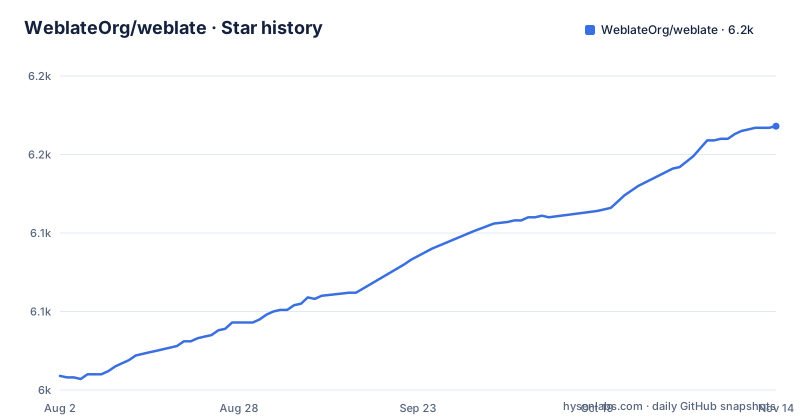
- WeblateOrg/weblate6,168 ★ · +159
| Repository | 2026-08-02 | 2026-11-14 |
|---|---|---|
| WeblateOrg/weblate | 6k | 6.2k |
159 Stars in the last 104 days, measured from the daily GitHub snapshot. Compare with other projects
Editorial analysis
The localization state lives in your repository
Weblate is a web based localization tool built around version control, and its own configuration is checked into the same tree as the code. The top level carries a `.weblate` entry, a `client` package, `ACCESSIBILITY.md`, `AGENTS.md` and `BACKERS.rst`. There is no separate service repository here, and that is the design point.
Two routes exist. Run it yourself, or hand the operation to Hosted Weblate at weblate.org. The choice matters more than any feature comparison, because the self hosted route is where you inherit configuration, upgrades and backups, while the hosted route moves that work to the vendor. Licensing is GPL-3.0-or-later with copyright held by Michal Cihar, so running your own instance is allowed under those terms and no licence file needs to be purchased.
Setup instructions live at a URL, not in the repository
There is no install command in the README. It points to https://docs.weblate.org/en/latest/admin/install.html for setup, and offers hosted Weblate as the other option. What a reader can verify on the repository itself is the shape of the project: `manage.py` at the root, `rundev.sh`, a `dev-docker` directory, `uv.lock`, and a `pyproject.toml` where nothing floats.
[build-system]
build-backend = "setuptools.build_meta"
requires = [
  "setuptools==84.2.1",
  "translate-toolkit==3.20.2"
]
The two build requirements are exact pins, setuptools 84.2.1 and translate-toolkit 3.20.2. So first use means reading that documentation page, then pointing a browser at a host you control. Bugs and feature requests go to https://github.com/WeblateOrg/weblate/issues, and accessibility problems have their own issue template with the project's target written out in `ACCESSIBILITY.md`.
setup.py removes settings.py from the built package
Packaging is not stock setuptools. `setup.py` defines a subclass of `build_py` whose `find_package_modules` returns a filtered list: any module named `weblate/settings.py` is dropped, and anything whose path component is `tests` is dropped with it. The wheel that ships therefore never carries the project's own settings file.
class WeblateBuildPy(build_py):
    def find_package_modules(
        self, package: str, package_dir: str
    ) -> list[tuple[str, str, str]]:
        """Filter settings.py from built module."""
The comment in the file states the intent plainly: filter settings.py out of the built module. For an operator that has a direct consequence. Your configuration module is yours to write: the built package does not include weblate/settings.py.
The build_mo step only recompiles a catalog that changed
Locale data lives under `weblate/locale/*/LC_MESSAGES/`. A custom `BuildMo` command globs that mask, and for each match it writes the sibling `.mo` only when the `.po` file is newer than the output, using `newer()` as the guard and `convertmo()` from translate-toolkit for the compile.
LOCALE_MASKS = [
    "weblate/locale/*/LC_MESSAGES/*.po",
]


class BuildMo(Command):
    description = "update MO files to match PO"
`WeblateBuild` then overrides the default build to insert that command, and a comment in the file records that build_mo has to come before build. A checkout with no touched catalogs compiles nothing at all. A `.po` file that is not newer than its `.mo` is skipped.
Every dependency group pins exact versions
The `dev` group is an umbrella that includes docs, lint, sbom, scripts, test and types, and every entry below it is pinned with `==`, so the toolchain is reproducible at a level that surprises people used to loose ranges.
test = [
  "coverage==7.17.0",
  "pytest-cov==7.1.0",
  "pytest-django==4.14.0",
  "pytest-github-actions-annotate-failures==0.4.2",
  "pytest-profiling==1.8.1",
  "pytest-xdist==3.8.0",
  "pytest==9.2.0",
  "responses==0.26.3",
  "selenium==4.52.0",
  "standardwebhooks==1.1.0"
]
The test group says what the suite does: browser driven runs through selenium, parallel workers through xdist, and webhook signature checks through standardwebhooks. The types group names celery-types and boto3-stubs, which is the clearest signal in the file that queued background work and object storage backends belong to the design. Docs pin Sphinx 8.2.3, schemas pin weblate-schemas 2026.14.
The repository answers no configuration questions
The README does not answer where the database credentials belong, which environment variables exist, or how to reverse a failed upgrade; it points to the documentation, which lives in the docs directory of the source code and at https://docs.weblate.org/. There is no sample settings file at the root. `dev-docker` is a development directory rather than a deployment recipe, and `security.yaml`, `SECURITY.md` and `codecov.yml` describe process, not configuration.
Accepted file formats are equally unstated here. The only format evidence in the tree is gettext, with `.po` sources compiled into `.mo` at build time. A reader hunting for a matrix of supported formats has to read the documentation, kept in the docs directory and at https://docs.weblate.org/.
Self hosting means owning the settings module and the upgrade path
Two structural facts make a self hosted install heavier than the hosted one. The build removes `weblate/settings.py` from the distribution, so the built package does not carry that settings file. Releases also move on a calendar scheme: weblate-2026.11 on 2026-11-02, weblate-2026.10.1 on 2026-10-09, weblate-2026.10 on 2026-10-01, with the repository not archived and the last push on 2026-11-02. Patch releases land inside the same month numbering, so pinning a tag does not freeze you.
The GPL-3.0-or-later licence covers the code you run. Professional support and cloud hosting are separate optional offerings, and the README routes both to https://weblate.org/hosting/. That is the practical line between hosting Weblate yourself and letting someone else operate it.
Fuzzing, license tracking and pre-commit gates around the app
The tooling around the application package is unusually explicit. `REUSE.toml` and `LICENSES/` pair with reuse 6.3.0 in the scripts group, so every file carries a licence identifier. The package-lint group names check-manifest, check-wheel-contents, pydistcheck, pyroma and twine, which check what actually ends up in the distribution. `.pre-commit-config.yaml` is driven by prek 0.5.9 alongside pylint 4.1.3 and mypy 2.4.1, with django-stubs and djangorestframework-stubs in the types group.
None of that answers the question an adopter asks first: how much capacity this needs. The README gives no sizing guidance, so throughput and storage have to be derived from your own language count and string volume.
Editorial conclusion
Adopt Weblate when translations can live in your own repository and you can run a Python service with a settings module you write yourself; the alternative is Hosted Weblate at weblate.org. Before committing, read https://docs.weblate.org/en/latest/admin/install.html, because the README gives no install command, and the wheel deliberately excludes weblate/settings.py.
Frequently asked questions
How to install Weblate
The README gives no command and points to https://docs.weblate.org/en/latest/admin/install.html for setup instructions. The alternative is to use Hosted Weblate at weblate.org instead of running the software yourself.
What is Weblate
It is a privacy respecting, open source localization platform with tight version control integration, written in Python and licensed GPL-3.0-or-later. You can run it on your own infrastructure or use the hosted offering.
What is Weblate used for
It is a web based localization tool: managing translation work for a project while that work stays tied to version control. Its own build compiles gettext catalogs from weblate/locale/*/LC_MESSAGES/*.po into .mo files.
What is Hosted Weblate
It is the hosted version of the platform at weblate.org, the alternative to running Weblate on your own infrastructure. The README also points to a hosting page for optional professional support and cloud hosting offerings.
Is Weblate free
The software is libre, GPL-3.0-or-later, so running it yourself carries no licence fee. Professional support and cloud hosting are separate optional offerings described at https://weblate.org/hosting/.
Official sources
Add this badge to your README
If you maintain this project, the badge below links readers to this analysis and shows its maintenance status from the daily GitHub snapshot. Paste the markdown into your README; add ?metric=license or ?metric=stars to the image URL for a different field.

[](https://hysenlabs.com/projects/weblateorg-weblate)Star history chart for your README
[](https://hysenlabs.com/projects/weblateorg-weblate)Was this useful?