Graphile Starter asks you to pin a point in time, not merge updates
Opinionated SaaS quick-start with pre-built user account and organization system for full-stack application development in React, Node.js, GraphQL and PostgreSQL. Powered by PostGraphile, TypeScript, Apollo Client, Graphile Worker, Graphile Migrate, GraphQL Code Generator, Ant Design and Next.js
At a glance
- What is it?
- Graphile Starter is an opinionated full stack SaaS quick start in React, Node.js, GraphQL and PostgreSQL, with a user registration system, organizations, session management and a Graphile Worker job queue already wired together. The README is unusually direct that it is not for beginners, not finished, and not meant to receive automated upstream merges.
- Who is it for?
- Adopt Graphile Starter if your team already knows Node, Express, PostgreSQL, PostGraphile and the Graphile tooling, and what you want is a working account, organization and session system to delete rather than write. Do not adopt it to learn any of those tools, since the README says explicitly that it is not intended as a first experience of them, and do not adopt it expecting to pull upstream fixes.
- Can I use it commercially?
- Check first. The repository uses a licence we do not classify automatically, so read its LICENSE file before any commercial use.
- Is it still maintained?
- Yes. The repository last received commits 29 days ago.
- What is it written in?
- Mainly TypeScript, according to GitHub's language statistics.
Answers come from the project's GitHub data, last synced on November 7, 2026, and from our analysis. They are not legal advice.
Star history
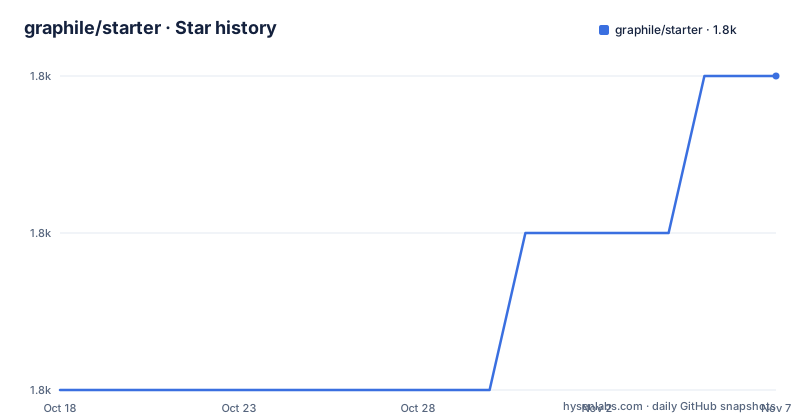
- graphile/starter1,833 ★ · +2
| Repository | 2026-10-18 | 2026-11-07 |
|---|---|---|
| graphile/starter | 1.8k | 1.8k |
2 Stars in the last 20 days, measured from the daily GitHub snapshot. Compare with other projects
Editorial analysis
The first warning is about your own experience level
The README has a heading that reads NOT FOR BEGINNERS, and it is there before any feature list.
The advice is not to build your own projects on top of this project until you are comfortable with the tools it uses, and the list is Node.js, Express, PostgreSQL, GraphQL, PostGraphile, Graphile Worker, Graphile Migrate, TypeScript, React, Apollo Client for React, GraphQL Code Generator, ESLint, Prettier, Jest and Cypress.
The framing is that this is an advanced project with deeply integrated tooling across the full stack. It is called Starter because it helps you start new projects with those technologies, tools and techniques already in place, and it says plainly that if you are not already familiar with these things you will probably find the project overwhelming, and that it is not intended to be your first experience of any of these tools.
There is a further pointer for people arriving specifically from PostGraphile: check the PostGraphile required knowledge page and especially the schema design tutorial before diving in. The README is upfront that this repository takes a slightly different approach to schema design than that tutorial, while still calling the tutorial valuable.
Point in time software, on purpose
This is the sentence that decides how you use the repository.
The README states that this software is not complete, free of software defects, or free of security issues, that it is not a finished solution but rather the seed of a solution which you should review, customize, fix and develop further. Then it says it is intended that you use a point in time version of this software, and that it is not intended that you can merge updates to this software into your own derivative in an automated fashion.
That is a deliberate design position rather than a hedge. A starter with account registration, organizations, session management and migrations is not a dependency you upgrade; it is a codebase you fork once, own completely, and then diverge from.
The security sentence is the one to sit with. The README itself says the software is not free of security issues, so shipping it without an audit of the authentication and session code is a decision you make, not one the project makes for you.
The intended uses it lists are going from conception to launch during a hack day, as the foundation for client projects at a web agency, to build a side project without spending time on boilerplate, or to build a SaaS project to fund other open source work.
The licence is MIT per the README's own words, described as simple and liberal. The repository metadata reports a custom licence, and there are two licence files at the root, LICENSE.md and GRAPHILE_STARTER_LICENSE.md, which is worth resolving before you ship a derivative commercially.
Yarn workspaces, a codegen step and four per package node_modules volumes
The repository is a Yarn workspaces monorepo and the root `package.json` shows how much of the workflow is orchestrated from the root.
Setup is a chain of four steps: `yarn`, then `setup:env auto`, then `setup:db`, then `setup:packages`, where the last one iterates workspaces with `yarn workspaces foreach --verbose --topological --exclude ROOT --exclude docker-helpers run setup`. The topological flag means a workspace's setup runs after its dependencies', which is why the command has to enumerate itself this way.
Tests have the same shape. `pretest` and `posttest` both fan out across workspaces, and `test` itself is `node scripts/test.js`, with `test:watch` passing a flag to the same script.
Linting is three things in one command: `tsc -b` for the TypeScript project build, `yarn prettier:all --check`, and `yarn eslint .`. ESLint runs over `.js,.jsx,.ts,.tsx,.graphql`, so GraphQL documents are linted as source files, and prettier formats `**/*.{js,jsx,ts,tsx,graphql,md}` using `.eslintignore` as its ignore path.
The dev command is the part to look at when something goes wrong locally. It runs codegen across workspaces, builds with `tsc -b`, and then launches four concurrent processes named TSC, WATCH, RUN and TEST with `concurrently --kill-others`, so killing one kills the group.
The Docker compose file explains why a container setup is effectively mandatory. Nine named volumes exist, one for the root `node_modules` and one each for `@app/client`, `@app/config`, `@app/db`, `@app/e2e`, `@app/graphql`, `@app/server` and `@app/worker`. Without them, a bind mount over the source directory hides the installed dependencies, which is a failure mode every Yarn monorepo in a container runs into. The compose file also mounts `/var/run/docker.sock` so docker and docker-compose can be run from inside the container, and maps four ports: 5678 for the server and 9678, 9876 and 9757 for Node `--inspect` debugging.
There are two server services, `server` with `SETUP_MODE: normal` and `dev` with `SETUP_MODE: dev`, both passing `USER_UID` so files created in the bind mount are not owned by root on Linux.
The Dockerfile is three lines and its base image is the decision
The whole Dockerfile is:
FROM node:16-bullseye

ARG USER_UID=${UID:-1000}
ARG SETUP_MODE=normal

COPY docker/setup.sh /setup.sh
RUN /setup.sh $SETUP_MODE
There is no `package.json` copy, no `yarn install` in the Dockerfile, no build step and no `CMD`. Everything is delegated to `docker/setup.sh`, which receives the setup mode as its single argument. There is also a separate `production.Dockerfile`, so the production image is a different file rather than a stage in this one.
The base image is the thing to notice. `node:16-bullseye` is Node 16 on Debian Bullseye, which is several major Node versions behind anything current. The README does not call this out, and there is no Node version check anywhere in the files quoted here.
The user handling is the other detail, and it is deliberate. The comment explains that the node image comes with a base non-root user which the Dockerfile gives sudo access, and that on Linux this user's GID and UID must match your local user to avoid permission problems with bind mounts, so you update USER_UID and USER_GID if yours is not 1000. That is the standard VS Code remote containers pattern, and the compose file passes `$UID` through as a build arg.
So the Docker story is: one image that installs the platform, and a compose file whose real work is the volume list. Read both before you change anything.
Four tenets, one live demo, and a database that gets wiped
The README states there are four tenets to Graphile Starter: speedy development, batteries included, type safety and best practice. The last one is truncated in the rendered text but the intent is clear.
The stack it assembles: Next.js for server side rendering and routing, Node.js and PostgreSQL on Express.js for the backend, PostGraphile in library mode to generate the GraphQL API from the database schema, Ant Design for the frontend, TypeScript throughout, and auto-generated GraphQL types and operations from graphql-code-generator. Apollo Client sits between the React frontend and that API.
The database is the GraphQL API.
Graphile Worker is described as an optimized job queue, and both Graphile Worker and Graphile Migrate are listed as tools you need to be familiar with.
The live demo at graphile-starter.herokuapp.com comes with two warnings. Emails are sent from Graphile Starter, so you are asked to enter only addresses you control. And every time the maintainers merge to master they ship a new version to Heroku and entirely wipe the database, so your data may not persist, with a delete account feature in the starter as the manual escape hatch.
That second warning is a small but good signal about the project's own posture: the demo is a demo, not a service.
Where PostGraphile alone, or your own account layer, fits instead
Review which parts of the SaaS scaffolding you actually need before adopting the starter. Most projects adopt this starter when the accounts and tenancy are the tedious part, and skip it when the API is the interesting part.
If you already have an authentication system, or if your identity comes from an external provider, the starter's registration and session layer becomes something to delete rather than extend. The README describes a full user registration system as included, which is the feature you are buying and also the feature most likely to be replaced.
Against building the frontend from nothing, the value is concentrated in the wiring nobody enjoys: Graphile Worker jobs, Graphile Migrate against a PostGraphile schema, codegen feeding both server and client types, and a test setup spanning granular tests and end to end tests with Cypress.
Against a lighter framework, the trade is the same one the README makes. You get a lot in place and you inherit the decisions. That is why it says to use a point in time version rather than merge updates, and why a team that has not used PostGraphile will spend more time understanding the schema design than they save on the boilerplate.
Editorial conclusion
Adopt Graphile Starter if your team already knows Node, Express, PostgreSQL, PostGraphile and the Graphile tooling, and what you want is a working account, organization and session system to delete rather than write. Do not adopt it to learn any of those tools, since the README says explicitly that it is not intended as a first experience of them, and do not adopt it expecting to pull upstream fixes. Verify first the runtime floor before anything else: the Dockerfile is built `FROM node:16-bullseye`, which is several major Node versions behind, so check whether PostGraphile and your target platform still run on it before planning around this base.
Frequently asked questions
What is Graphile Starter and who is it for?
An opinionated quick start for full stack applications in React, Node.js, GraphQL and PostgreSQL, with user accounts, organizations, session management and a job queue already wired. The README says it is not for beginners and not a first experience of any of the tools it uses.
Can I merge upstream updates into my Graphile Starter fork?
No, not automatically. The README states it is intended that you use a point in time version of the software and that merging updates into your derivative in an automated fashion is not the intended usage.
What Node version does Graphile Starter use?
The Dockerfile is built `FROM node:16-bullseye`. All installation work is delegated to `docker/setup.sh`, with a `production.Dockerfile` used for the production image.
What licence is Graphile Starter under?
The README describes it as available under the MIT license, though the repository metadata reports a custom licence and there are two licence files at the root, LICENSE.md and GRAPHILE_STARTER_LICENSE.md.
Why does the Graphile Starter docker-compose file define so many volumes?
There is one named volume for the root node_modules and separate named volumes for seven listed @app packages, because a bind mount can otherwise hide installed dependencies. The compose file also mounts the docker socket and maps ports 5678 for the server plus 9678, 9876 and 9757 for Node inspect.
Official sources
Add this badge to your README
If you maintain this project, the badge below links readers to this analysis and shows its maintenance status from the daily GitHub snapshot. Paste the markdown into your README; add ?metric=license or ?metric=stars to the image URL for a different field.

[](https://hysenlabs.com/projects/graphile-starter)Star history chart for your README
[](https://hysenlabs.com/projects/graphile-starter)Was this useful?