PerfectPixel Studio: AI sprite sheets with deterministic post-processing
AI-powered animation sprite studio — generate character sprite sheets with 8 directions and 100+ actions from a single text prompt (Wails + Go + React)
At a glance
- What is it?
- PerfectPixel Studio is a Wails desktop app that turns a text prompt into 8-direction pixel-art sprite sheets. Its pitch is not the image model but the Go pipeline that mattes, segments and quantizes whatever the model returns.
- Who is it for?
- PerfectPixel Studio suits solo developers and small 2D teams who need placeholder or prototype animation sets fast and are willing to inspect exported frames before shipping. It is the wrong tool if you need a deterministic, signed-off asset pipeline or if you cannot send character descriptions to Gemini, OpenRouter, fal.ai or BytePlus.
- Can I use it commercially?
- Yes. MIT is a permissive licence: you can use, modify and sell software built on it, as long as you keep its copyright and licence notices.
- Is it still maintained?
- Yes. The repository last received commits 156 days ago.
- What is it written in?
- Mainly Go, according to GitHub's language statistics.
Answers come from the project's GitHub data, last synced on November 25, 2026, and from our analysis. They are not legal advice.
Star history
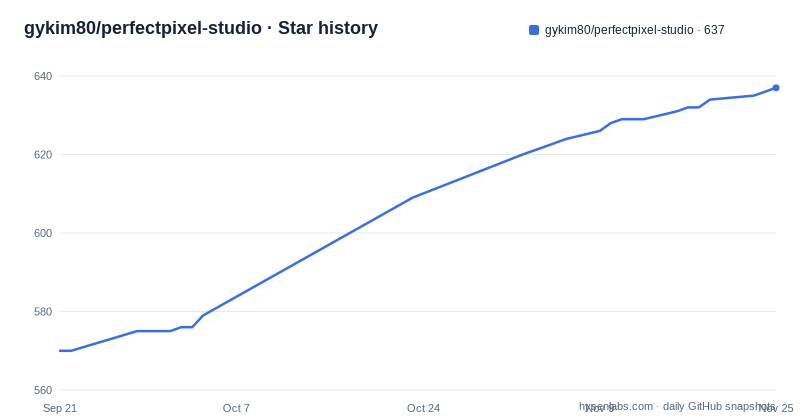
- gykim80/perfectpixel-studio637 ★ · +67
| Repository | 2026-09-21 | 2026-11-25 |
|---|---|---|
| gykim80/perfectpixel-studio | 570 | 637 |
67 Stars in the last 65 days, measured from the daily GitHub snapshot. Compare with other projects
Editorial analysis
What PerfectPixel Studio actually solves
The README frames the problem precisely: a 6-frame walk cycle must be exactly 6 frames, every frame must read as the same character, the background must be fully alpha-transparent, and the anchor must not jitter. Image models fail all four. Frame counts drift, poses bleed into each other, hair color shifts mid-strip, and a chroma-key background leaks onto the silhouette. PerfectPixel Studio's stated approach is to let the AI render and then enforce those constraints with a deterministic Go post-processing pipeline. The audience is game developers working in pixel art who need animation sets, not one-off illustrations. That distinction matters: a tool that produces a beautiful still is not solving this problem, and the README says so directly. The repository is a Wails v2 desktop application with a React 18 frontend and a Go 1.25 backend, licensed MIT.
The generate, matte, extract, inspect loop
One animation state runs a fixed sequence in the Go backend. A description, style and motion preset are assembled into a prompt. The AI returns a horizontal filmstrip. Background detection and matting run, then frame extraction segments the strip into cells, then an inspection step checks frame count, identity drift and motion presence. A pass goes to pixel quantization and finishes. A fail produces a corrective retry hint and regenerates, up to three times. Two details make this more than a retry loop. Every attempt is scored as `score = Found*100 - errors*10`, and the best candidate is kept, so three imperfect passes still return something rather than nothing. And the retry hint is measurement-driven: defects found during inspection become English correction instructions injected into the next prompt, such as telling the model that the previous result read as 7 poses when exactly 6 are required. That is a closed loop that converges on a named defect instead of resampling blindly.
YCbCr matting and why luma is discarded
The background removal is the most concrete engineering claim in the README. Rather than thresholding RGB, colors convert to YCbCr and the background is separated using only the chrominance components, discarding luma. The stated benefit is that shaded and bright magenta count as the same color, which also makes the step resistant to JPEG 4:2:0 subsampling, since that preserves luma and crushes chrominance. The key color is estimated as the mode of a CbCr histogram, not the mean, sampled from the four corners. Soft alpha uses a Hermite smoothstep for edge feathering, despill projects out only the key-direction color spill, and a 4-connectivity flood fill clears residual background while preserving isolated interior pixels so the character does not get holes. A fallback re-mattes with pure #FF00FF when opacity or magenta-residue metrics spike. The README reports a comparison on real pipeline output: a naive RGB threshold left 2,739px of magenta residue and an 8,164px pink halo, while the YCbCr path left 2px residue and 3,447px halo with the roughly 456K opaque character pixels preserved. Those are the project's own numbers, not an independent measurement.
Projection profiles and DP cuts for frame segmentation
Asking a model for a 6-frame filmstrip rarely yields six evenly spaced poses. Gaps are uneven and arms touch the neighbor. The README says PerfectPixel borrows OCR's projection-profile and optimal-cut technique. A vertical alpha projection makes inter-pose gutters appear as valleys; after smoothing, content runs are counted as the natural pose count. When two poses fuse and the valley vanishes, dynamic programming finds the globally optimal cuts, minimizing a cost that combines the projection value at each cut with a penalty for deviating from the ideal width. The README contrasts this with greedy and connected-component methods, which would merge two touching poses into one blob. This is the part of the design most likely to matter in practice, because it is where a plausible-looking strip becomes a usable frame sequence. The README excerpt does not describe what happens when the natural pose count and the requested count disagree after three passes, beyond returning the best-scoring candidate.
Installing and generating a first walk cycle
The repository is a Wails v2 project with a Go backend and a React frontend, so the practical path is to clone it and run the Wails dev command from the repository root. The README does not print an install command, so treat the following as the standard Wails v2 workflow for a project of this layout rather than a quoted instruction.
wails devBefore that, copy the environment example and fill in one provider key. The .env.example file lists the variables and notes that settings entered in the app take precedence over environment variables.
cp .env.example .envGEMINI_API_KEY=
OPENAI_API_KEY=
OPENROUTER_API_KEY=
FAL_KEY=
BYTEPLUS_API_KEY=Gemini is the default provider, and GOOGLE_API_KEY is recognized as a fallback. FAL_API_KEY and ARK_API_KEY are also accepted as fallbacks. Once the app is running, describe a character, pick a style such as pixel art or chibi, generate the base character, then pick a motion preset. The export step writes a sprite sheet plus manifest.json, Aseprite-compatible JSON, per-state GIF or APNG, and individual frame PNGs in one pass. Open the manifest in your engine's importer and check that the frame count matches the preset before wiring anything into an animation controller.
Where the pipeline is the wrong tool
The 8-direction feature is the clearest trade-off. Five directions are generated by AI and the three mirror directions are derived by horizontal mirroring, which the README prices at 37.5% lower generation cost. That is a real saving, and it is also a real constraint: a mirrored side view is not the same as a drawn side view for any character with an asymmetric design, a held weapon, or a light source baked into the shading. If your art direction depends on those details, the mirrored directions will read as wrong, and the tool gives you no drawing surface to fix them in. The second limitation is the model dependency. Every generation goes to Gemini, OpenRouter, fal.ai or BytePlus, so character descriptions and prompts leave your machine, and output quality tracks whatever model you point it at. The README's own sample animation is attributed to gemini-3-pro-image. There are no releases in the repository, so there is no packaged binary to download and no version to pin. The last push was on 2026-06-22.
How this differs from Aseprite and from raw image models
Aseprite is the obvious alternative and it solves a different half of the problem. It is a pixel-art editor: you draw the frames, and its value is precise manual control over every pixel and a mature export path. PerfectPixel Studio does not give you a drawing surface at all. It generates candidates and then applies signal processing to make them consistent. The difference in approach is where the human sits. In Aseprite the human is the source of consistency and the tool is the instrument. Here the model is the source and the Go pipeline is the constraint enforcer, with the human reduced to accepting or rejecting a generated state. If your bottleneck is drawing time for a large animation set, the second model helps. If your bottleneck is art direction, it does not, because there is no brush. Raw image-model prompting is the other comparison, and the README's argument against it is the matting and segmentation work: a model will not reliably return exactly six frames with a clean alpha channel and a stable anchor.
Maintenance, licence and what to verify before committing
The licence is MIT, which permits commercial use and modification, but this is not legal advice and the repository's LICENSE file is the authority. Because there are no releases, upgrading means pulling the main branch and rebuilding. The go.mod pins Wails v2.12.0, apng, and golang.org/x/image, so a Go 1.25 toolchain is required. Session state is persisted to disk and results are auto-archived according to the README, which means the upgrade cost includes whatever on-disk format the gallery uses. The last push was on 2026-06-22, so the project is not stale, but nothing in the repository indicates a release cadence you can plan around. Verify three things first: that wails build succeeds on your OS, that the provider you intend to use is one whose terms you accept for your character descriptions, and that the exported manifest.json matches what your engine's importer expects.
Editorial conclusion
PerfectPixel Studio suits solo developers and small 2D teams who need placeholder or prototype animation sets fast and are willing to inspect exported frames before shipping. It is the wrong tool if you need a deterministic, signed-off asset pipeline or if you cannot send character descriptions to Gemini, OpenRouter, fal.ai or BytePlus. Before adopting it, check whether the repository ships a build path you can run on your OS, confirm which provider keys you are willing to expose, and open an exported manifest.json against your engine's importer.
Frequently asked questions
Where can I download PerfectPixel Studio?
The repository has no releases, so there is no packaged download. It is a Wails v2 project with a Go 1.25 backend and a React 18 frontend, meant to be built and run from source.
Is PerfectPixel Studio free?
The code is MIT licensed, so there is no licence fee. Generation still costs money because every animation state is rendered by a paid provider such as Gemini, OpenRouter, fal.ai or BytePlus using your own API key.
Is PerfectPixel Studio good for pixel art sprite sheets?
The README argues the value is in the deterministic post-processing rather than the model output: YCbCr matting, projection-profile frame segmentation with dynamic-programming cuts, and shared-palette quantization. Whether that is good enough depends on your tolerance for inspecting generated frames before export.
Which AI providers can PerfectPixel Studio use?
The .env.example lists Gemini, OpenAI, OpenRouter, fal.ai and BytePlus. Gemini is the default, with GOOGLE_API_KEY, FAL_API_KEY and ARK_API_KEY recognized as fallbacks.
What happens if PerfectPixel Studio cannot generate the requested frame count?
The pipeline inspects each attempt, scores it as Found*100 minus errors*10, and keeps the best candidate. It retries up to three times with a correction hint injected into the prompt, then returns the best result so far rather than failing empty.
Official sources
Add this badge to your README
If you maintain this project, the badge below links readers to this analysis and shows its maintenance status from the daily GitHub snapshot. Paste the markdown into your README; add ?metric=license or ?metric=stars to the image URL for a different field.

[](https://hysenlabs.com/projects/gykim80-perfectpixel-studio)Star history chart for your README
[](https://hysenlabs.com/projects/gykim80-perfectpixel-studio)Was this useful?