Neon Vision Editor: A Native Swift Editor for Apple Platforms, With a Focus on Virtual Rendering
A native Swift editor for code and Markdown across macOS, iPadOS, iOS, and visionOS.
At a glance
- What is it?
- Neon Vision Editor is a Swift-based editor for code and Markdown across macOS, iPadOS, iOS, and visionOS. It prioritizes minimalism and native performance, but its virtual-editor architecture introduces specific trade-offs.
- Who is it for?
- Adopt Neon Vision Editor if you need a fast, native editor for Markdown, notes, and code across Apple devices, especially on Apple Silicon Macs and iPads with Apple Pencil. Avoid it if you require full IDE features like deep refactoring or a debugger stack, or if you depend on Intel Mac support, which the project has not tested.
- Can I use it commercially?
- Yes. Apache-2.0 is a permissive licence: you can use, modify and sell software built on it, as long as you keep its copyright and licence notices.
- Is it still maintained?
- Yes. The repository received new commits within the last day.
- What is it written in?
- Mainly Swift, according to GitHub's language statistics.
Answers come from the project's GitHub data, last synced on October 22, 2026, and from our analysis. They are not legal advice.
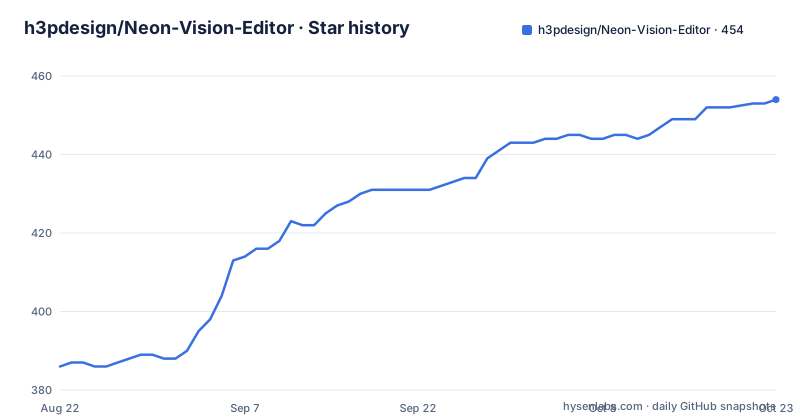
Star history
- h3pdesign/Neon-Vision-Editor453 ★ · +67
| Repository | 2026-08-22 | 2026-10-22 |
|---|---|---|
| h3pdesign/Neon-Vision-Editor | 386 | 453 |
67 Stars in the last 61 days, measured from the daily GitHub snapshot. Compare with other projects
Editorial analysis
What Neon Vision Editor Solves
Neon Vision Editor addresses a specific gap: a native, lightweight editor for code, Markdown, and notes that works consistently across macOS, iPhone, iPad, and Apple Vision Pro. The README positions it as "minimal by design," with quick edits, fast file access, and no IDE bloat. This targets users who find full IDEs too heavy for simple edits, such as editing scripts, config files, or Markdown documents. It is not aimed at teams needing deep refactoring tools or a built-in debugger, as the project's own table explicitly states it is "not for" full IDE workflows. The audience is individual developers, writers, or tinkerers who want a low-overhead editor that feels native on Apple platforms, with the convenience of App Store distribution and TestFlight for early access.
Virtual-Editor Rendering: The Core Mechanism
The editor's architecture revolves around a virtual-editor canvas, which means it does not render the entire document as a single continuous text view. Instead, it draws only the visible lines, a common technique for handling large files without excessive memory or CPU use. The v1.5.5 release notes reveal a specific detail: each virtual-editor line is drawn through an isolated Core Text boundary that derives coordinates from the canvas and restores inherited text state. This was introduced to prevent AppKit and Core Text from leaking text state between rows, which had caused mirrored or upside-down glyphs. The v1.5.4 release notes add another layer: the editor measures only a bounded, distributed sample of wrapped rows when calculating the virtual canvas scroll extent, rather than doing a full-document measurement. This keeps layout responsive, but it introduces a trade-off: the scroll extent is approximate until the document is fully loaded, and the README notes that exact row accounting is used for loaded documents, with immediate expansion when wrapping increases. This design is a deliberate balance between performance and accuracy, and it shows in the release history where bugs related to row access and text state were fixed.
Installation and Getting Started
You can get Neon Vision Editor through three channels. The GitHub Releases page offers direct notarized builds, which the README describes as the fastest stable updates. The App Store listing provides Apple-managed installs and updates, though availability varies by platform and review status. TestFlight is for early testing of upcoming changes. For a source build, the README gives a 60-second path: clone the repository, then run `xcodebuild -project "Neon Vision Editor.xcodeproj" -scheme "Neon Vision Editor" -destination 'platform=macOS,name=My Mac' build`. After that, you can open the project in Xcode and run it, using `Cmd+P` for Quick Open. The build command implies you need Xcode and a Mac, and the project targets macOS 26 (Tahoe) while being compatible with macOS Sequoia. Notably, the README states that Apple Silicon is tested, but Intel is not. This is a concrete constraint: if you are on an Intel Mac, you are on untested ground, and the project's own "not for" list includes "teams that require complete Intel Mac validation today."
Platform Support and the visionOS Angle
The editor's name and description emphasize visionOS, but the platform matrix in the README is sparse beyond the mention of macOS, iPhone, iPad, and Apple Vision Pro. The release notes for v1.5.5 mention keeping Markdown live-preview text at the exact resolved editor font size on every supported platform, which suggests cross-platform consistency is a priority. However, the App Store link is to the German store (`apps.apple.com/de/app/...`), which may indicate a regional focus or just a default link. The README also notes that App Store availability varies by platform, so not every platform may have the same release version at the same time. For visionOS specifically, the editor's virtual-canvas approach could be a fit for spatial computing, where rendering efficiency matters, but the documentation does not provide detailed visionOS-specific features beyond the name. This is a gap: if you are considering it for Apple Vision Pro, you may need to test it via TestFlight to see how it behaves in a spatial environment.
Apple Pencil Integration and Input Precision
A notable feature in v1.5.5 is Apple Pencil support on iPad, turning it into a precision editing input. The release notes describe Pencil-only hover and drag recognizers for caret preview and range selection, with side tap or squeeze undo that respects system shortcut preferences. This is a concrete mechanism: the editor uses separate recognizers for hover and drag, so the Pencil does not interfere with finger or trackpad input. The hover caret preview lets you see where the cursor will land before you touch the screen, which is useful for precise edits. The undo gesture via side tap or squeeze is a thoughtful addition, but it depends on system preferences, so users must configure their Pencil settings accordingly. This feature is a differentiator for iPad users, but it is not relevant on macOS or iPhone, so the value proposition varies by device.
Limitations and Wrong Use Cases
The README is candid about what Neon Vision Editor is not. It is not a full IDE, so you should not expect deep refactoring or a debugger stack. It is also not validated on Intel Macs, which is a real limitation if you are on older hardware. The virtual-editor design, while efficient, has had bugs related to row access after layout changes, as seen in v1.5.4 fixes. The release notes also mention "asynchronous release-test deadlines," which hints at a fast release cycle but also the possibility of regressions. A concrete failure mode: if you rely on exact scroll positioning in very large documents, the bounded sampling may cause the scroll extent to be slightly off until the document is fully loaded. This is a trade-off for responsiveness. For teams that need guaranteed cross-platform parity, the App Store review delays mean that GitHub releases may be ahead of the App Store version, which could lead to inconsistency across devices.
Alternatives and the Comparison
The most direct alternative is Apple's own Xcode, which is a full IDE but also offers a source editor for code. Xcode is free and deeply integrated with Apple's toolchain, but it is heavy and not designed for quick Markdown edits or notes. Another alternative is a cross-platform editor like Visual Studio Code, which runs on Apple platforms but is not native in the same way; it uses Electron, which means higher memory usage and a different feel. The key difference is that Neon Vision Editor is native Swift and uses a virtual canvas for rendering, which can offer better performance on Apple Silicon, but it lacks the extension ecosystem of VS Code. For Markdown-specific needs, apps like iA Writer or Ulysses are polished, but they are not open source and do not cover code editing as broadly. Neon Vision Editor's niche is the combination of code and Markdown in a single native app, which is rare. The choice comes down to whether you prioritize native feel and low overhead over the extensibility and community of a tool like VS Code.
Maintenance, Licensing, and Upgrade Path
The project is under the Apache-2.0 license, which is permissive for use and modification, but you should review the LICENSE file for specifics. The README shows an active release cadence: v1.5.5 was pushed on 2026-08-29, with v1.5.4 and v1.5.3 just days earlier. This suggests the maintainer is responsive to bug reports, particularly around the virtual editor. However, the release notes mention "asynchronous release-test deadlines," which could mean that testing is not always thorough before release. The upgrade path is straightforward: you can pull new releases from GitHub, or wait for App Store updates. For contributors, the README has a "Contributing Quickstart" section, but the truncated material does not detail the process. The project's security policy is linked, so you can check that for vulnerability reporting. The maintenance cost for users is low if you use the App Store, but if you build from source, you must keep up with Xcode updates, especially given the macOS 26 target. The project's future is tied to Apple's platform evolution, so you should verify that the editor remains compatible with each new OS release.
Editorial conclusion
Adopt Neon Vision Editor if you need a fast, native editor for Markdown, notes, and code across Apple devices, especially on Apple Silicon Macs and iPads with Apple Pencil. Avoid it if you require full IDE features like deep refactoring or a debugger stack, or if you depend on Intel Mac support, which the project has not tested. Before adopting, verify that the specific platform and release channel (GitHub, App Store, or TestFlight) matches your needs, and check the known issues and troubleshooting sections for any platform-specific quirks. The project's active release cadence and focus on virtual-editor correctness suggest a mature tool, but its narrow platform scope means it is not a general-purpose editor.
Frequently asked questions
How do I install Neon Vision Editor?
Three channels: direct notarized builds from GitHub Releases for the fastest stable updates, the App Store for an Apple-managed flow where availability varies by platform, or TestFlight for early builds whose availability depends on review state.
Does Neon Vision Editor support Windows or Linux?
No. The scope table lists teams that require Windows or Linux support under Not For. The editor targets macOS, iOS, iPadOS and Apple Vision Pro, with macOS 26 Tahoe as the platform target and Sequoia compatibility.
What changed in Neon Vision Editor v1.9.1?
Shift-JIS files can be opened and saved through the system's native text encodings, exposed in the existing encoding picker with persisted choices and non-lossy saving. The iPad status bar and toolbar are separated, and Command-Up or Command-Down jumps to the start or end of a long document.
How does the nearby document transfer in Neon Vision Editor work?
It is opt-in and uses an ephemeral pairing code, encrypted transport, receiver consent and a 4 MB payload limit. Received copies are staged independently rather than being added to your documents automatically.
Can I build Neon Vision Editor from source?
Yes, with Xcode. Clone the repository, change into the Neon-Vision-Editor directory, then run xcodebuild against the Neon Vision Editor project and scheme. The destination in the documented command names a specific machine and needs to be changed.
Official sources
Add this badge to your README
If you maintain this project, the badge below links readers to this analysis and shows its maintenance status from the daily GitHub snapshot. Paste the markdown into your README; add ?metric=license or ?metric=stars to the image URL for a different field.

[](https://hysenlabs.com/projects/h3pdesign-neon-vision-editor)Star history chart for your README
[](https://hysenlabs.com/projects/h3pdesign-neon-vision-editor)