chatgpt-scraper documents a hosted endpoint rather than shipping a library
Easily collect responses from ChatGPT scraper by providing a prompt along with valid Web Scraper API credentials.
At a glance
- What is it?
- oxylabs/chatgpt-scraper contains no source code: a readme, three banner images, one example output file and a folder of code samples in other languages. What it publishes is the request shape and the response envelope for a paid scraping service, which makes it reference documentation for someone already holding credentials.
- Who is it for?
- chatgpt-scraper is useful to a developer who already has credentials for the service and needs to know the exact parameter names and the shape of the response, since the documentation is complete enough to skip the dashboard. It is not useful to anyone looking for something they can run locally, because there is nothing to install.
- Can I use it commercially?
- Not without permission. GitHub finds no licence file in the repository, and without a licence all rights are reserved by default: you may read the code but not reuse it. Check the README, or ask the authors, before using it.
- Is it still maintained?
- Yes. The repository last received commits 24 days ago.
- What is it written in?
- Mainly Java, according to GitHub's language statistics.
Answers come from the project's GitHub data, last synced on November 14, 2026, and from our analysis. They are not legal advice.
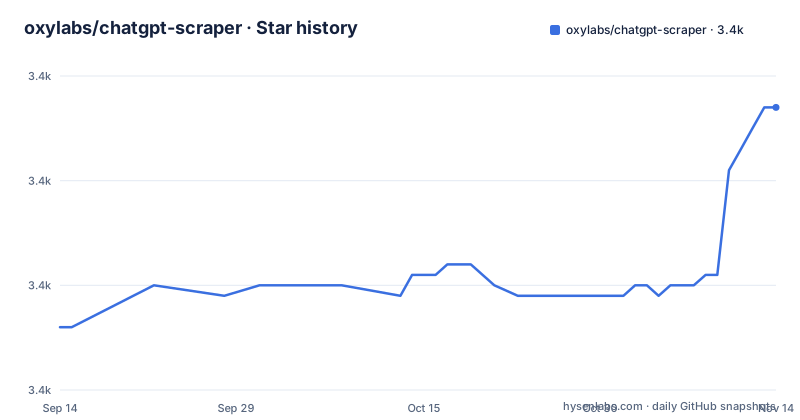
Star history
- oxylabs/chatgpt-scraper3,387 ★ · +21
| Repository | 2026-09-14 | 2026-11-14 |
|---|---|---|
| oxylabs/chatgpt-scraper | 3.4k | 3.4k |
21 Stars in the last 61 days, measured from the daily GitHub snapshot. Compare with other projects
Editorial analysis
The repository holds documentation and nothing else
The top level listing is short enough to enumerate. There is the readme, three image files whose names describe them as a repositories banner and two product graphics, one example output file, and a directory of code examples for other programming languages. There is no source directory, no manifest, no test suite and no release history. The repository is recorded as a Java project, which reflects the language of the samples in that examples directory rather than anything that compiles. The licence field reads as unknown, and there are no tagged releases, so the project is versioned by whatever the vendor's own service happens to be doing. Read as a whole it is a landing page for a commercial product, which is why the readme carries affiliate parameters in its very first link.
import requests
from pprint import pprint

# Structure payload.
payload = {
    'source': 'chatgpt',
    'prompt': 'best supplements for better sleep',
    'parse': True,
    'geo_location': "United States",
    'callback_url': "https://your-server.com/oxylabs-callback"
}
One POST to one endpoint with seven parameters
The interface is a single POST to a versioned queries endpoint with basic authentication taking a username and a password. Two parameters are mandatory. The source parameter sets the scraper target and the documented value for this product is chatgpt. The prompt parameter carries the text, capped at 4000 characters, and the table describing it contains a typo that drops a letter from the word prompt. Five more are optional. search turns on web search and defaults to false. parse asks for structured results and also defaults to false. geo_location names a country to route the request from. callback_url is an endpoint of your own to receive results at. browser_instructions takes custom instructions for the headless browser, which is the parameter that exposes how the page is being driven rather than merely fetched.
parse is what turns an answer into an envelope
With parsing enabled the response arrives as JSON with a results array, and each element carries a job identifier, a status code, the URL that was visited, and a content object. Inside content the submitted prompt comes back, along with the specific model that produced the answer and two renderings of the response: a plain-text version and a Markdown version. A third field, markdown_json, holds a structured representation of that Markdown, where each item has a type and a children array. That last field is the one to reach for when the answer has to be fed into another tool rather than displayed, because it turns prose into something traversable without a second parse. The readme points at a complete example output file in the repository, and it also notes that a Markdown extraction is available for integration workflows involving AI tools.
Six fields only exist when the answer contains them
The response table marks several rows as conditional, returned only when that content is in the model's response, and they are the fields that make the payload unpredictable in shape. A citations array carries source references, each with a title, a url, text, a description and a section. A search_queries array holds the queries the model used, as plain strings. A links array holds inline source details as a url and a text pair. A shopping_products array carries product details including price, title, rating, currency, a formatted price string and a thumbnail. An ads array carries url, title, image_url, description and a nested advertiser_info object that itself holds a url, a name and an image_url. Separately, parse_status_code is documented with one value that means success and anything else meaning the parser failed to extract some or all structured fields.
The shape varies with the device and with the prompt
Two separate caveats in the documentation warn that a caller cannot assume a fixed response. One says the composition of elements may vary depending on whether the query was made from a desktop or a mobile device, which means the vendor does not fully control which surface answers and therefore does not guarantee the same field set twice. The other says the number of items and fields for a specific result type may vary depending on the submitted prompt. Taken together with the six conditional fields, that is three independent sources of variation in a single response, and a consumer that indexes into the JSON by position rather than by key will break. The readme also labels a JSON code block as an HTML example, which is a labelling slip rather than a difference in the data.
The feature claims are all about not being stopped
The section arguing why to choose the vendor is built entirely on the infrastructure the buyer would otherwise have to run. It claims the API handles proxy management, IP rotation and bot traffic management systems, so no engineering time goes to maintenance or adapting to website changes. It claims high success rates and a consistent data flow on that infrastructure. And it names the advanced features as custom browser instructions for a headless browser to emulate real user behaviour, automatic handling of CAPTCHAs, and geo-targeting for localised responses. Read plainly, those three are the reason the browser_instructions parameter exists and the reason the geo_location parameter is offered, and they are also what makes the terms of the target service the relevant question for anyone using it.
Three use cases, and all three are measurement
The stated applications fall into two families. The first is building training datasets, described as collecting diverse real-world conversational data at scale for training or fine-tuning large language models. The other two are measurement rather than training. SEO and competitor analysis means monitoring how competitors' brands and keywords are represented in AI-generated search results. Brand presence management means tracking brand mentions and content rankings to improve visibility strategies. Both measurement cases are the same query run repeatedly, which fits the API design: one prompt, one structured answer, a job identifier to correlate runs with, and an optional callback so a long series of queries does not need a client holding the connection open.
Editorial conclusion
chatgpt-scraper is useful to a developer who already has credentials for the service and needs to know the exact parameter names and the shape of the response, since the documentation is complete enough to skip the dashboard. It is not useful to anyone looking for something they can run locally, because there is nothing to install. Before building against it, read the vendor's own FAQ about legality, decide whether the paid endpoint and its account terms suit your use, and handle the conditional response fields defensively since their presence depends on the answer.
Frequently asked questions
Is AI data scraping legal?
The project raises this question rather than settling it. Its FAQ section opens with a question about whether scraping ChatGPT is legal and answers that the legality depends on the circumstances, and the terms of the service being scraped are a separate matter from the legality of the technique. What the documentation does provide is the request and response format for the vendor's own paid endpoint.
Is data scraping illegal?
The repository gives no legal advice. It documents a hosted API whose stated features include handling CAPTCHAs automatically, rotating IPs, managing proxies and emulating real user behaviour in a headless browser, and it leaves the question of permissibility to the reader and to the terms of the target service.
What are the risks of web scraping?
The project names the operational risks it removes rather than the legal ones: proxy management, IP rotation and bot traffic management are all handled by the service, and the stated benefit is not having to spend engineering time on maintenance or on adapting to website changes.
Do hackers use web scraping?
Nothing in this repository addresses hackers. The described uses are collecting conversational data for training or fine-tuning, monitoring how brands appear in AI-generated search results, and tracking brand mentions, all through the vendor's own authenticated endpoint.
Official sources
Add this badge to your README
If you maintain this project, the badge below links readers to this analysis and shows its maintenance status from the daily GitHub snapshot. Paste the markdown into your README; add ?metric=license or ?metric=stars to the image URL for a different field.

[](https://hysenlabs.com/projects/oxylabs-chatgpt-scraper)Star history chart for your README
[](https://hysenlabs.com/projects/oxylabs-chatgpt-scraper)Was this useful?