Genie-TTS: Running GPT-SoVITS V2 and V2ProPlus on CPU Through ONNX
GPT-SoVITS ONNX Inference Engine & Model Converter
At a glance
- What is it?
- Genie-TTS is a Python package that converts GPT-SoVITS V2 and V2ProPlus checkpoints to ONNX and runs them on a CPU, with a built-in FastAPI server. It does not handle V3 or V4 models, and its speed figures come from one laptop CPU.
- Who is it for?
- Genie-TTS fits people who already have GPT-SoVITS V2 or V2ProPlus voices and want them served from a CPU-only machine through a small Python API. It is the wrong tool for V3 or V4 models, which are still unchecked on the roadmap, and its latency numbers should be repeated on your own hardware before you size a deployment around them.
- Can I use it commercially?
- Yes. MIT is a permissive licence: you can use, modify and sell software built on it, as long as you keep its copyright and licence notices.
- Is it still maintained?
- Yes. The repository last received commits 24 days ago.
- What is it written in?
- Mainly Python, according to GitHub's language statistics.
Answers come from the project's GitHub data, last synced on November 25, 2026, and from our analysis. They are not legal advice.
Star history
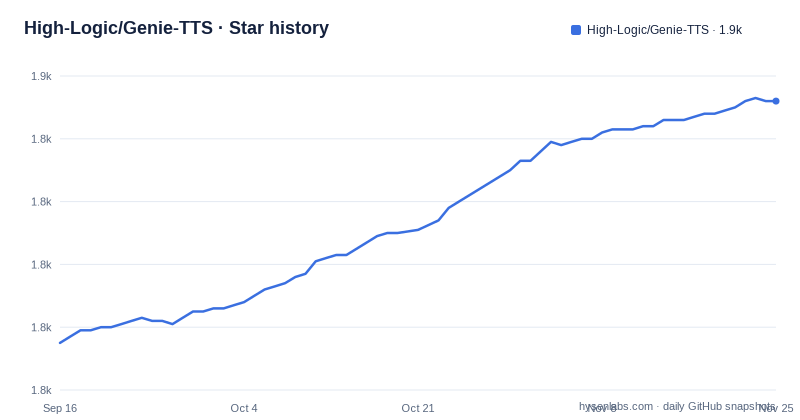
- High-Logic/Genie-TTS1,852 ★ · +77
| Repository | 2026-09-16 | 2026-11-25 |
|---|---|---|
| High-Logic/Genie-TTS | 1.8k | 1.9k |
77 Stars in the last 70 days, measured from the daily GitHub snapshot. Compare with other projects
Editorial analysis
Only V2 and V2ProPlus checkpoints convert, so newer GPT-SoVITS models are out
Genie-TTS is a lightweight inference engine built on GPT-SoVITS. It bundles TTS inference, ONNX model conversion and an API server in one package, installed under the name genie-tts. The supported model versions are GPT-SoVITS V2 and V2ProPlus, and the supported languages are Japanese, English, Chinese and Korean. Python 3.10 or newer is required.
The conversion step is a single function call that takes your .pth file, your .ckpt checkpoint and an output directory:
import genie_tts as genie

genie.convert_to_onnx(
    torch_pth_path=r"<YOUR .PTH MODEL FILE>",  # Replace with your .pth file
    torch_ckpt_path=r"<YOUR .CKPT CHECKPOINT FILE>",  # Replace with your .ckpt file
    output_dir=r"<ONNX MODEL OUTPUT DIRECTORY>"  # Directory to save ONNX model
)
The README tip says `convert_to_onnx` currently supports V2 and V2ProPlus models. The roadmap shows V3, V4 and more as an unchecked item. If your voice was trained on one of those versions, this engine cannot load it today, and you stay on the official PyTorch route. Conversion also needs `torch`, installed separately with `pip install torch`, so the lightweight runtime is only lightweight after conversion is done.
The 1.13 second latency figure is a first-inference number from one i7 laptop
The README's headline claim is near-instantaneous synthesis on a CPU. Its table compares three setups. First inference latency is 1.13s for Genie, 1.35s for the official PyTorch model and 3.57s for the official ONNX model. Runtime size is about 200MB for Genie, about several GB for PyTorch, and similar to Genie for the official ONNX model. Model size is about 230MB for Genie, similar for PyTorch, and about 750MB for the official ONNX model.
The footnote sets the scope: the latency data is the average over a test set of 100 Japanese sentences of roughly 20 characters each, run on an i7-13620H CPU.
Read that carefully. It is latency to the first result, not throughput, and the sentences were short and Japanese. It says nothing about long passages, other languages, or a different processor. The gap over official PyTorch is 0.22 seconds on that machine, so the gain that stands out is the size reduction and the avoided multi-gigabyte runtime, not a dramatic speedup. Treat the numbers as the author's own measurement and rerun them on your target hardware.
The first run downloads about 391MB, and GENIE_DATA_DIR must be set before the import
On first use, the library needs resource files of about 391MB and prompts you to download them automatically. If you prefer to fetch them by hand from the HuggingFace GenieData folder, you point the library at your copy with an environment variable, and the order matters:
import os

# Set the path to your manually downloaded resource files
# Note: Do this BEFORE importing genie_tts
os.environ["GENIE_DATA_DIR"] = r"C:\path\to\your\GenieData"

import genie_tts as genie

# The library will now load resources from the specified directory
Setting `GENIE_DATA_DIR` after `import genie_tts` is too late, according to the README's note. That makes the manual route fragile inside larger applications where another module may import the package first.
The download is also why an offline machine cannot simply pip install and run. The wheel carries model and key files for v2 and v2ProPlus under `Data`, per the package-data settings in pyproject.toml, but the roughly 391MB of resources still have to arrive from somewhere, either through the prompt or from a folder you copy over.
Chinese prosody needs optional RoBERTa assets that must not be used for other languages
Chinese gets a special path. The optional Chinese RoBERTa text features improve Chinese prosody and are used only for Chinese inference. You can fetch them separately or through the full download flow:
import genie_tts as genie

# Download only the optional Chinese RoBERTa assets
genie.download_roberta_data()

# Or use the built-in full resource download flow,
# which now also downloads the optional Chinese RoBERTa assets
genie.download_genie_data()
The README is explicit that these features should not be used for non-Chinese inference, meaning Japanese, English or Korean. So the optional assets are a Chinese-only upgrade, and mixing them into a Japanese pipeline is a misuse the README warns against.
The practical effect is that the full download flow, which now also fetches the RoBERTa assets, pulls more data than a Japanese-only deployment needs. If disk space or bandwidth matters, use the narrower route. The Chinese, Japanese, English and Korean text front ends are also separate dependencies, listed per language in the requirements file, so a language you never use still gets installed.
Predefined characters get you a voice, but a custom voice needs your own ONNX folder and reference audio
Without a GPT-SoVITS model of your own, the quick tryout loads a predefined character. The README names Mika from Blue Archive in Japanese, ThirtySeven from Reverse: 1999 in English, and Feibi from Wuthering Waves in Chinese, with the full list in the CharacterModels folder on HuggingFace.
import genie_tts as genie
import time

# Automatically downloads required files on first run
genie.load_predefined_character('mika')

genie.tts(
    character_name='mika',
    text='どうしようかな……やっぱりやりたいかも……!',
    play=True,  # Play the generated audio directly
)

genie.wait_for_playback_done()  # Ensure audio playback completes
For your own voice, the best-practice example has two steps. `genie.load_character` takes a character name, an `onnx_model_dir` containing the converted model, and a language code such as en, zh, jp or kr. `genie.set_reference_audio` then takes the same character name and a path to reference audio, used for emotion and intonation cloning.
The predefined characters come from commercial games, so check the terms around those voices before using them in a product. The call `play=True` plays audio through the sound device, which is why `wait_for_playback_done` exists: without it a script can exit before playback finishes.
The FastAPI server exposes only host, port and workers in its documented call
Genie includes a lightweight FastAPI server. Starting it is one call:
import genie_tts as genie

# Start server
genie.start_server(
    host="0.0.0.0",  # Host address
    port=8000,  # Port
    workers=1  # Number of workers
)
The example binds to 0.0.0.0, which listens on every network interface, and the call shows no authentication or access-control option. If you run it on a shared network, put it behind your own firewall or reverse proxy. The example sets one worker; the README does not say how the engine behaves with more.
Request formats and API details are not in the README itself. It sends you to the API Server Tutorial, a Python file under Tutorial/English in the repository. The README also recommends running GENIE in Administrator mode to avoid potential performance degradation, a Windows-flavoured caveat that matters if you service the API from a Windows host. The server and the playback features rely on fastapi, uvicorn and sounddevice, all of which are in the default dependencies.
onnxruntime is pinned to 1.22.1 and Docker images are still unchecked
The dependency list has one exact pin: `onnxruntime==1.22.1`. A comment in pyproject.toml, written in Chinese, says the version is pinned to avoid a performance regression in 1.23. The other dependencies, including onnx, numpy, soundfile, soxr, pydantic and huggingface_hub, are unpinned, so a fresh install picks up the latest of each. The G2P packages are language-specific: pyopenjtalk-plus for Japanese, nltk for English, pypinyin, g2pM and jieba_fast for Chinese, and jamo, ko_pron, g2pk2 and eunjeon for Korean. An optional `gui` extra adds PySide6.
The package is MIT licensed, at version 2.0.2 in pyproject.toml. The two GitHub releases, v2.0.2 on 2025-12-12 and v1.0.2 on 2025-09-09, are titled as unzip-and-run Windows bundles, which matches the roadmap item for out-of-the-box Windows bundles. The last push was on 2026-11-01.
The same roadmap leaves official Docker images unchecked. If you deploy containers, you will write the image yourself, including the onnxruntime pin and the 391MB resource download.
Editorial conclusion
Genie-TTS fits people who already have GPT-SoVITS V2 or V2ProPlus voices and want them served from a CPU-only machine through a small Python API. It is the wrong tool for V3 or V4 models, which are still unchecked on the roadmap, and its latency numbers should be repeated on your own hardware before you size a deployment around them.
Frequently asked questions
Which GPT-SoVITS versions does Genie-TTS support?
Genie-TTS supports GPT-SoVITS V2 and V2ProPlus, and convert_to_onnx currently handles only those two. Support for V3, V4 and more is an unchecked roadmap item.
How do I install Genie-TTS?
Install it with pip install genie-tts, which needs Python 3.10 or newer. The first run then downloads about 391MB of resource files, either through the library's prompts or manually from HuggingFace.
Does Genie-TTS need a GPU?
No. It is built for CPU inference, and its published latency figures come from an i7-13620H CPU. Converting your own models requires torch to be installed.
Official sources
Add this badge to your README
If you maintain this project, the badge below links readers to this analysis and shows its maintenance status from the daily GitHub snapshot. Paste the markdown into your README; add ?metric=license or ?metric=stars to the image URL for a different field.

[](https://hysenlabs.com/projects/high-logic-genie-tts)Star history chart for your README
[](https://hysenlabs.com/projects/high-logic-genie-tts)Was this useful?