NavMeshPlus: Unity's navmesh components extended to tilemaps, sprites and 2D colliders
Unity NavMesh 2D Pathfinding
At a glance
- What is it?
- NavMeshPlus is a fork of Unity's NavMeshComponents with source collectors for 2D geometry, so a top-down game can use the same navigation workflow as a 3D one. Here is what the repository gives you and what it leaves to the wiki.
- Who is it for?
- NavMeshPlus is worth adopting when your project is top-down and 2D and you want the NavMeshSurface workflow, bake button, gizmos and NavMeshAgent rather than a grid you hand-roll, because it reuses Unity's own components instead of replacing them. It is the wrong choice for a project on Unity's built-in 2D pathfinding, where the cost is lower than this package assumes, and the wrong choice if you need the wiki's guidance, since the README deliberately delegates most of it.
- Can I use it commercially?
- Yes. MIT is a permissive licence: you can use, modify and sell software built on it, as long as you keep its copyright and licence notices.
- Is it still maintained?
- Yes. The repository last received commits 5 days ago.
- What is it written in?
- Mainly C#, according to GitHub's language statistics.
Answers come from the project's GitHub data, last synced on October 23, 2026, and from our analysis. They are not legal advice.
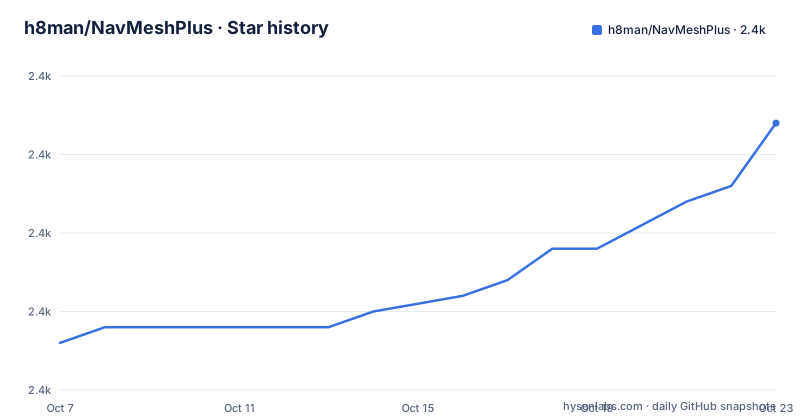
Star history
- h8man/NavMeshPlus2,367 ★ · +14
| Repository | 2026-10-07 | 2026-10-23 |
|---|---|---|
| h8man/NavMeshPlus | 2.4k | 2.4k |
14 Stars in the last 16 days, measured from the daily GitHub snapshot. Compare with other projects
Editorial analysis
A fork of Unity's own components, which is the whole idea
NavMeshPlus starts from a fork of Unity's NavMeshComponents repository, and that decision shapes everything else. It is not a competing navigation system; it is Unity's NavMeshSurface, NavMeshLink, NavMeshModifier and NavMeshModifierVolume with an extensions layer attached, so the bake workflow, the gizmos, the agent and the runtime API are the ones a 3D developer already knows.
The gap it fills is that Unity's stock NavMeshSurface works in 3D. Its source collection expects render meshes and 3D colliders, which a 2D project built from tilemaps, sprites and colliders simply does not have. The README states the extension plainly: in this repository you find an implementation of NavMeshSurface plus 2D extensions for tilemap, sprites and collider2D top-down games.
The relationship is also visible in the tree, which is mostly Unity package layout rather than source directories: `NavMeshComponents/`, `Gizmos/`, `Unity/`, `package.json` and a `navmeshplus.pdf`. Note that the repository carries no release tags at all, so version tracking happens through the `version` field in `package.json`, which reads 0.2.23.
A fork has a cost worth naming before anything else. Unity continues to change its own NavMeshComponents, and this repository has to absorb those changes itself. The last push was on 2026-08-29, so it is not abandoned, but a Unity upgrade that touches the base components is the situation where a fork either keeps up or becomes the problem.
What the bake actually does with your 2D scene
The README explains the mechanism in five steps, which is the most useful part of the page because it is the only place the conversion is described at all.
First, NavMeshSurface is used as the base implementation. Second, world bounds are calculated. Third, a source collector gathers tiles, sprites and 2D colliders. Fourth, a walkable mesh box is created from those world bounds. Fifth, the collected 2D geometry is converted into sources the way `NavMeshBuilder` would convert 3D geometry.
That fifth step is the crux. Rather than inventing a new baking path, the 2D collectors produce the same source representation the native builder expects, so the rest of the pipeline is unchanged. In practice that means the accuracy, agent radius and area settings you already know apply to 2D geometry too.
Three collectors ship with the surface: `NavMeshCollectSources2d` and `NavMeshCollectRootSources2d` handle the 2D gathering, and `NavMeshCacheSources2d` handles caching. The class names suggest the intended split, where one collector collects from child renderers or colliders and the other walks the scene from a root object, but the README does not spell out the difference and the wiki is where that is covered.
Six setup steps from the README, and the rotate step people miss
The numbered setup list in the README is the practical entry point, and one of its steps is the one that trips people up first.
1. Copy the repository into your Assets folder, or install it as a package. 2. Create an Empty Object at the scene root. 3. Add the Navigation Surface component to that object, then add NavMeshCollecSources2d after it. Note the README's spelling, `NavMeshCollecSources2d`, which drops the t from Collect. 4. Click Rotate Surface to XY, described as facing the surface toward the standard 2D camera at x -90, y 0, z 0. 5. Add the Navigation Modifier component to obstacle objects and override the area. 6. In Navigation Surface, hit Bake.
Step 4 is the one that matters and is easy to skim past. Unity's navmesh builder expects a surface oriented along the XZ plane, and a 2D game lives in XY. Without rotating the surface, the bake produces geometry in the wrong orientation and agents refuse to path. The README does not explain why the rotation is needed, only what to click, which is the point where the wiki earns its link.
Step 3's spelling is worth a second look too. If you are searching for the component by name in the inspector, the string in the README is not what the class is called, and typing the corrected spelling will not find it. That is a documentation inconsistency rather than a functional one, but it costs a confused afternoon for anyone setting this up from the README alone.
Three installation routes, and the folder name that has to be exact
The README offers three ways in, and they differ in how much they depend on Git being configured correctly.
Method 1 is downloading or cloning the repository into your project at `Packages/com.h8man.2d.navmeshplus`. Method 2 is adding a line to the `Packages/manifest.json` file under `dependencies`:
"com.h8man.2d.navmeshplus": "https://github.com/h8man/NavMeshPlus.git#master"Method 3 is the least typing of all: in the Package Manager, click `+` and choose Add Package from git URL, then paste `https://github.com/h8man/NavMeshPlus.git`.
The package identifier is not free choice, which is why the folder path in Method 1 has to be spelled exactly. The `name` field in `package.json` is `com.h8man.2d.navmeshplus`, and Unity derives what it looks for from that.
Git has to be installed and on your PATH for the git URL methods to work at all, which the README states outright. A fourth unofficial route is picking the scripts you need and placing them in `Assets` directly, which works for someone who wants one collector rather than the package, at the cost of losing the package manager's update path.
One version detail to check before you install: `package.json` declares `"unity": "2022.3"`, the lowest editor version the package claims. Unity's Package Manager will warn when a project is older than that, and the honest reason to look is that a package baked against one editor version often uses APIs unavailable in another.
Utility scripts and where the documentation actually lives
Four utility files carry the extension plumbing: `NavMeshExtensionsProvider.cs`, `NavMeshBuilder2d.cs`, `NavMeshExtension.cs` and `NavMeshBuilderState.cs`. The provider is the registration point that makes custom extensions discoverable, and the builder is the 2D-specific work the base implementation does not do.
The README then hands off. It links a wiki, a HOW-TO page, a demo repository called RedHotSweetPepper, and a Unity forum discussion thread on 2D navmesh components and the extensions system. That is an unusually complete set of escape hatches for a project this size, and it is also an admission that the README is a summary.
The consequences are worth planning around. Questions the README does not answer include what each of the two collectors does differently, how area costs and agent radius behave for 2D geometry, whether the bake is incremental when tiles change at runtime, and how the gizmos behave while editing. All four are decisions you need to make before committing, and all four are wiki material.
What the repository does settle is the architecture, and it settles it clearly: a base implementation from Unity, 2D-specific source collection, and a conversion step into the standard builder's source format. Anyone reading the four utility files will recognise the seams.
When to skip this package entirely
The first wrong case is a project already using Unity's built-in 2D pathfinding or a grid-based A* implementation of your own. NavMeshPlus exists to give you the NavMeshSurface experience in 2D; if you do not want that experience, the package buys you nothing and adds a bake step to your scene.
The second is a project whose navigation changes every frame at runtime. The README describes baking from scene geometry with a Bake button, which is a level-authoring workflow. Nothing in the repository describes rebuilding the mesh when a blocking object moves, and the presence of `NavMeshCacheSources2d` suggests caching rather than continuous rebuilds. For a game with destructible or sliding geometry, that is the question to ask the wiki before installing.
The third is a team that wants Unity's ongoing NavMeshComponents improvements for free. A fork tracks the upstream project on somebody's schedule. The last push on 2026-08-29 shows the work is happening, and the version in `package.json` has reached 0.2.23, which is a lot of iteration for a small package. But the repository has no tagged releases, so there is no published history to bisect when a Unity upgrade changes behaviour, and no changelog to read about what broke.
For a studio shipping a top-down 2D title and comfortable pinning a package version, none of this is disqualifying. It is a working, MIT-licensed, actively touched package that fills a real gap in Unity's 2D toolkit, with a demo project to check the workflow against before you commit to it.
Editorial conclusion
NavMeshPlus is worth adopting when your project is top-down and 2D and you want the NavMeshSurface workflow, bake button, gizmos and NavMeshAgent rather than a grid you hand-roll, because it reuses Unity's own components instead of replacing them. It is the wrong choice for a project on Unity's built-in 2D pathfinding, where the cost is lower than this package assumes, and the wrong choice if you need the wiki's guidance, since the README deliberately delegates most of it. What to verify first is that `NavMeshCollectSources2d` appears in the inspector after install, since a missing component usually means the package landed in the wrong folder, then that your tilemap colliders are the kind the collector reads, and that the 0.2.23 package targets the Unity version your project actually uses.
Frequently asked questions
How do I install NavMeshPlus in a Unity project?
Three routes are documented. Clone the repository into `Packages/com.h8man.2d.navmeshplus`, add an entry to `Packages/manifest.json` under dependencies, or paste the git URL into Package Manager under Add Package from git URL. Git must be installed and on your PATH for the last two, and the package requires Unity 2022.3 or newer.
What does NavMeshPlus add to Unity's NavMeshComponents?
A 2D source collection layer. The fork adds NavMeshCollectSources2d, NavMeshCollectRootSources2d and NavMeshCacheSources2d, which gather tiles, sprites and 2D colliders and convert them into the same source representation NavMeshBuilder expects, so the bake pipeline and NavMeshAgent behaviour stay the same as in 3D.
Why do I have to rotate the Navigation Surface to XY?
Unity's navmesh builder expects a surface in the XZ plane while a 2D game lives in XY, so the surface has to be rotated to x -90, y 0, z 0 before baking. The README gives the control to click without explaining the reason, and the resulting failure is agents refusing to path on geometry that looks correctly placed in the scene view.
Is NavMeshPlus maintained and under an active licence?
It is MIT licensed, the repository is not archived, and the last push was on 2026-08-29. Version tracking is through the `version` field in `package.json`, currently 0.2.23, since the repository publishes no tagged releases and carries no changelog. Being a fork of Unity's own components means upstream changes have to be absorbed manually.
Official sources
Add this badge to your README
If you maintain this project, the badge below links readers to this analysis and shows its maintenance status from the daily GitHub snapshot. Paste the markdown into your README; add ?metric=license or ?metric=stars to the image URL for a different field.

[](https://hysenlabs.com/projects/h8man-navmeshplus)Star history chart for your README
[](https://hysenlabs.com/projects/h8man-navmeshplus)Was this useful?