Doozer: A Consensus-Based In-Memory Store for Configuration and Coordination
GitHub describes it as A consistent distributed data store.. The repository metadata lists Go as its primary language. The metadata lists the MIT license. This article stays within the project description and details documented in the GitHub repository README.
At a glance
- What is it?
- Doozer is a highly available, fully consistent in-memory data store for small, critical data. It offers immediate client notifications and no leader, but its design limits it to data that fits in RAM and requires a separate backup tool.
- Who is it for?
- Adopt Doozer if you need a small, in-memory, fully consistent store for coordination data like master election or shared configuration, and you can run three to seven servers and manage backups separately. Do not use it for large datasets or when you need durable persistence built in.
- Can I use it commercially?
- Yes. MIT is a permissive licence: you can use, modify and sell software built on it, as long as you keep its copyright and licence notices.
- Is it still maintained?
- Probably not. The repository last received commits 129 months ago, on March 16, 2016.
- What is it written in?
- Mainly Go, according to GitHub's language statistics.
Answers come from the project's GitHub data, last synced on October 21, 2026, and from our analysis. They are not legal advice.
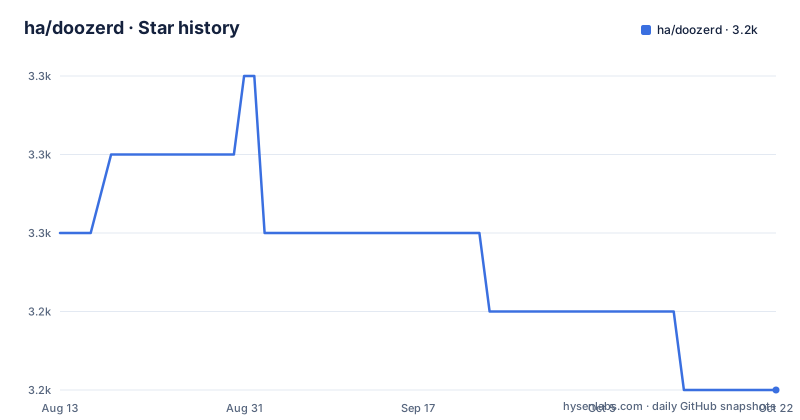
Star history
- ha/doozerd3,248 ★ · -2
| Repository | 2026-08-13 | 2026-10-21 |
|---|---|---|
| ha/doozerd | 3.3k | 3.2k |
-2 Stars in the last 69 days, measured from the daily GitHub snapshot. Compare with other projects
Editorial analysis
What Doozer Solves and Who It Targets
Doozer addresses a narrow but painful problem: keeping a small set of highly important data consistent across several machines while notifying clients the moment that data changes. The README is explicit about the scope: it is a store for small amounts of extremely important data, not a general-purpose database. The intended users are operators running distributed systems who need coordination primitives. The three example scenarios in the README are name service, database master election, and shared configuration. In each case, the data changes rarely, but when it does, every client must learn about the change immediately and without polling. Doozer's watch mechanism delivers that. The target audience is engineers who would otherwise hand-roll a consensus layer or rely on DNS with its caching delays. The README positions Doozer as a direct alternative to Apache Zookeeper and Google Chubby, so the intended user is someone already familiar with those coordination services and looking for a simpler, Go-based option.
The Mechanism: Full Replication, No Leader, Watch Notifications
The architecture is described in the README's 'How Does It Work?' section. A handful of machines, usually three, five, or seven, each run a doozerd server process. These processes communicate using a standard fully-consistent distributed consensus algorithm. The README does not name the specific algorithm, but the term 'fully-consistent' and the comparison to Chubby and Zookeeper imply a Paxos or Raft variant. Every doozerd process holds a complete copy of the datastore and serves both reads and writes. There is no distinguished master or leader, which is an unusual design choice. In most consensus systems, a leader handles writes, but here all nodes accept requests. This means clients can dial in to any server and get a consistent view. The data model and protocol are described in separate documents, doc/data-model.md and doc/proto.md, which are referenced but not included in the cleaned README. The watch mechanism is the key feature: clients subscribe to keys and receive immediate notifications on change, eliminating polling. The README states that the store never writes data to permanent files, so all data lives in memory on each node.
Getting Started: Commands and Configuration
The Quick Start section gives a concrete path to a running system. First, download the doozerd binary from the GitHub downloads page and put it in your PATH. Then do the same for the client tool, doozer. Start a server with a WebView listening on port 8080 using the command: doozerd -w ":8080". The -w flag enables a web interface, which is useful for inspecting the store. To write a key, pipe data into the add command: echo "hello, world" | doozer add /message. To read it back, run doozer get /message. The README says you can then open http://localhost:8080 and see the message. These commands are minimal and assume a single server, but the README's earlier description implies a multi-node setup for production. The configuration for a cluster is not shown in the README; it refers to the protocol spec and data model docs for details. The fire drill document, doc/firedrill.md, is mentioned as a way to test fault tolerance, but its contents are not included.
Limitations and Failure Modes
The most obvious limitation is that Doozer stores data entirely in memory. The README states this directly: 'Doozer is designed to store data that fits entirely in memory; it never writes data to permanent files.' This makes it the wrong tool for anything beyond small coordination data. If a node crashes, all data is lost unless a separate backup tool is used. The README mentions that 'a separate tool provides durable storage for backup and recovery,' but it does not name that tool or describe how to integrate it. This is a significant gap for production use. Another limitation is the requirement for an odd number of servers, typically three, five, or seven. Running fewer than three nodes means no fault tolerance, and running an even number can lead to split-brain scenarios. The README does not specify what happens if a network partition occurs, but with a fully-consistent consensus algorithm, availability will be sacrificed for consistency. That is a trade-off: if the cluster loses quorum, writes will fail. For a coordination store, that is often acceptable, but it is a failure mode to plan for. Finally, the README does not mention authentication or encryption, so the protocol may be insecure on untrusted networks.
Comparison with Apache Zookeeper
The README lists Apache Zookeeper as a similar project, and the difference in approach is worth spelling out. Zookeeper is a Java-based coordination service that also uses a consensus algorithm (Zab) and offers a hierarchical namespace with watches. Doozer is written in Go, which makes it easier to deploy in a Go-centric environment and avoids the JVM overhead. The README emphasizes that Doozer has no leader, whereas Zookeeper has a leader that handles writes, with followers serving reads. Doozer's leaderless design may simplify client logic, but it also means every node must participate in every write, which could limit write throughput. Zookeeper has a more mature ecosystem, with bindings for many languages and a longer track record. Doozer's README does not mention any language bindings beyond the doozer client tool, so integration may require writing your own client. Zookeeper also supports persistent storage via its transaction log and snapshots, while Doozer relies on an external backup tool. For teams already invested in Java or needing a battle-tested system, Zookeeper is a safer bet. Doozer's appeal is simplicity and a smaller footprint.
Maintenance and Upgrade Cost
The repository shows no recent releases and the last push date is unknown, which is a red flag for maintenance. The README lists Blake Mizerany and Keith Rarick as creators, and the project has a mailing list on Google Groups, but there is no mention of a release cadence or versioning policy. The MIT license is permissive, so you can fork and modify the code, but you will bear the cost of maintaining it yourself if the original authors stop. The README references a hacking guide (doc/hacking.md) and a contributor list via git shortlog, but no build instructions are given beyond downloading binaries. Upgrading would involve replacing the doozerd binary and possibly the client, but without release notes or a changelog, you cannot assess what changed. The protocol spec (doc/proto.md) is the only source of truth for compatibility, so you would need to read it before upgrading. Given the lack of recent activity, the upgrade cost may be high if you need to patch bugs or add features. The license does not restrict commercial use, but you must include the license text in distributions.
Editorial conclusion
Adopt Doozer if you need a small, in-memory, fully consistent store for coordination data like master election or shared configuration, and you can run three to seven servers and manage backups separately. Do not use it for large datasets or when you need durable persistence built in. Before adopting, verify the current maintenance status of the repository, as the last push date is unknown and no recent releases are listed, and test the backup and recovery workflow with your own fire drills.
Frequently asked questions
What does Doozer keep in memory and what does it write to disk?
Doozer is designed to store data that fits entirely in memory and never writes data to permanent files. A separate tool provides durable storage for backup and recovery.
Does a Doozerd cluster have a master or a leader?
No. Each doozerd process has a complete copy of the datastore and serves both read and write requests, so there is no distinguished master or leader.
How do Doozer clients learn that data has changed?
Connected clients are notified immediately when the data changes, with no polling, by subscribing to the names they are interested in.
How many machines does a Doozer deployment usually run?
A handful, usually three, five or seven, each running one doozer server process, with the processes coordinating through a standard fully-consistent distributed consensus algorithm.
Where do the Doozer server and client binaries come from?
The server archive comes from the downloads page of this repository and the client from the downloads page of the ha/doozer repository, and both are unpacked so the binaries sit on the PATH.
Official sources
Add this badge to your README
If you maintain this project, the badge below links readers to this analysis and shows its maintenance status from the daily GitHub snapshot. Paste the markdown into your README; add ?metric=license or ?metric=stars to the image URL for a different field.

[](https://hysenlabs.com/projects/ha-doozerd)Star history chart for your README
[](https://hysenlabs.com/projects/ha-doozerd)