LiveStream Agent Studio: a local-first Windows agent workspace for Douyin livestream commerce
A Windows local AI Agent Studio for Douyin livestream e-commerce, unifying streamer discovery, livestream insights, post-stream review, and short-video content direction into one intelligent workflow.
At a glance
- What is it?
- LiveStream Agent Studio bundles four agents (creator discovery, livestream transcription, traffic review, short-video scripting) behind a single local web UI on Windows. It is a v0.2.0-beta evaluation build that assumes you already pay for Alibaba Cloud Model Studio and OSS, and it does not run from source alone.
- Who is it for?
- Adopt it only if you are already inside the Douyin e-commerce data stack: a Chanmama account that can see the rankings you need, minute-level Ocean Engine E-commerce traffic exports, live recordings, and an Alibaba Cloud account you are willing to point at DashScope and a private OSS bucket.
- Can I use it commercially?
- Yes. MIT is a permissive licence: you can use, modify and sell software built on it, as long as you keep its copyright and licence notices.
- Is it still maintained?
- Yes. The repository last received commits 84 days ago.
- What is it written in?
- Mainly Python, according to GitHub's language statistics.
Answers come from the project's GitHub data, last synced on November 15, 2026, and from our analysis. They are not legal advice.
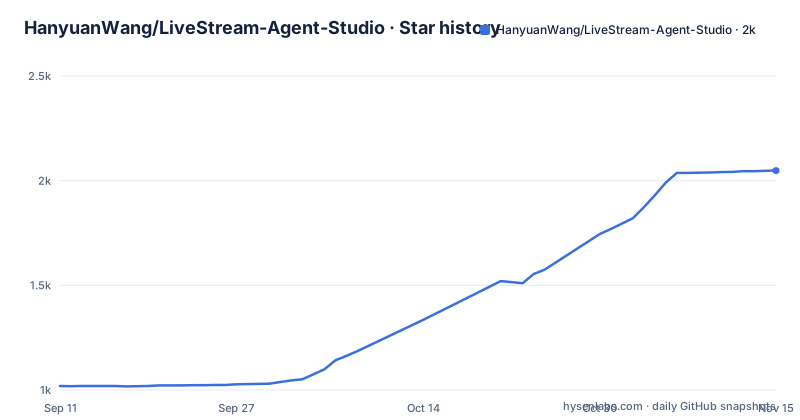
Star history
- HanyuanWang/LiveStream-Agent-Studio2,048 ★ · +1,029
| Repository | 2026-09-11 | 2026-11-15 |
|---|---|---|
| HanyuanWang/LiveStream-Agent-Studio | 1k | 2k |
1,029 Stars in the last 65 days, measured from the daily GitHub snapshot. Compare with other projects
Editorial analysis
The gap between a livestream recording and a usable review
A livestream commerce team finishes a four-hour session and ends up with three unconnected artifacts: a video file, a minute-level traffic export from Ocean Engine E-commerce, and whatever the host remembers saying. Turning those into a review means someone scrubs the video, types up the parts that mattered, then tries to line the timestamps up against the traffic curve by hand. LiveStream Agent Studio exists to collapse that into one pipeline. The README describes the target user plainly: operations, media-buying, content, and review teams who want rankings, recordings, transcripts, traffic data, and scripts to become "traceable and reusable workflows" rather than one-off files. The scope is deliberately narrow. It is a Windows application, it is local-first, and every input it names is a Douyin-side artifact: Chanmama rankings, Ocean Engine E-commerce traffic tables, Douyin livestream recordings, Douyin short-video links. If your work does not already produce those files, the tool has nothing to chew on.
Four agents, one task center, and where the data actually goes
The architecture is four agents plus two shared surfaces. Creator Scout reads Chanmama rankings or creator pages that the signed-in user can already see, produces structured creator profiles, and can push selected names into a recording list. Live Breakdown takes a full recording, extracts the audio, sends it to cloud transcription, and exports an Excel workbook with second-level timestamps. Live Review takes that transcript plus the same session's minute-level traffic table and aligns speech stages against entries, exits, concurrent viewers, watch time, engagement, product impressions, and product clicks, exporting Excel and Word reports. Video Director takes a short-video link the user pastes in, extracts a reference transcript, and generates an original spoken script, structure, storyboard, and shooting notes. The Task Center is the join point: progress, runtime status, failure reasons, and output files in one list. The important architectural fact is the word "cloud" in the transcription step. Despite the local-first framing, the audio leaves the machine. The README's setup section asks for a DashScope API key and a private OSS bucket, which is consistent with a flow where audio is uploaded to your own OSS and transcribed through Alibaba Cloud Model Studio. Local-first here means the UI, the task orchestration, and the output files stay on the Windows box, not that the media never leaves it. That distinction matters for anyone with talent contracts or unreleased product footage in the recording.
Installing from the release ZIP, not the source tree
The README is explicit that the source archive is not a working install. You download two files from Releases: LiveAgent-Studio-Windows-x64.zip and LiveAgent-Studio-Windows-x64.zip.sha256. The stated reason is that the application needs the .runtime directory and the bundled Agent directories inside the ZIP, so copying the EXE alone will not work. Verification is a one-liner in PowerShell from the directory holding the ZIP: (Get-FileHash .\LiveAgent-Studio-Windows-x64.zip -Algorithm SHA256).Hash, then compare against the .sha256 file. The README says not to run the package if the hash does not match or the source cannot be confirmed. After extracting the whole archive, LiveAgentStudio.exe opens http://127.0.0.1:4173/ in the default browser once the local service is ready. The launcher is not signed with a commercial code-signing certificate in this beta, so SmartScreen will likely warn. Then Settings & Connections asks for four things: your DashScope API key, a private OSS bucket, a RAM AccessKey restricted to the required bucket and object prefix, and optionally the full path to a local recording assistant executable if you want the "Add to Kuaidou Recording" step. The RAM scoping instruction is the one worth following literally. A key that can reach every bucket in the account is not what the setup page describes.
What breaks, and what the beta label is doing there
The README calls this the project's first public release and says it is intended for evaluation, testing, and internal research. Two consequences follow. First, the release badge in the README says v0.2.0-beta while the only listed release is tagged v1.0.0. That mismatch is the kind of detail that makes version pinning unreliable until the maintainer reconciles it. Second, there is no stated support policy, no changelog beyond the single release, and no description of what happens when a transcription job fails mid-run beyond the Task Center's promise to show failure reasons. The harder limitation is structural rather than incidental. Live Review depends on a minute-level traffic table from the same session. If the export is missing, or covers a different time window than the recording, or the recording starts late, the alignment has no anchor and the report degrades into a transcript with no traffic context. It assumes you bring matched inputs. The same is true of Creator Scout: it reads what the signed-in Chanmama account can see, so a tier of account without the ranking you want produces an empty candidate set, not an error message you can act on.
How this differs from assembling the parts yourself
The obvious alternative is not a competing product but a stack you already own: a speech-to-text API called from a script, pandas to join the transcript against the traffic CSV, and a document template for the review. That approach is more work up front and it is exactly what most teams do before they look for a tool. The difference in approach is where the state lives. A hand-rolled pipeline keeps everything in your repo, your credentials, and your file naming conventions, and it can be reshaped the moment your platform changes its export format. LiveStream Agent Studio trades that flexibility for a fixed four-agent workflow with a task center that tracks runs and outputs, which is the part scripts usually lack. The cost is that the workflow shape is the product. You cannot easily swap the transcription provider, and the Chanmama and Ocean Engine dependencies are baked into the agent definitions rather than configured. If your team's bottleneck is remembering which script produced which output, the task center earns its place. If your bottleneck is that your inputs never quite match the expected format, a fixed pipeline will not help you.
Licence, upkeep, and what running it actually costs
The source is MIT licensed, which permits commercial use, modification, and redistribution with the licence text retained. That covers the code in the repository and the bundled runtime in the ZIP; it does not cover the third-party services the application calls. Your real recurring cost is usage-based: DashScope inference for transcription and for the agent reasoning steps, plus OSS storage and request charges for the audio you upload and the files you keep. The repository README does not publish a cost estimate, and without running it there is no way to state one here. Upkeep has two sides. On the project side, an MIT-licensed beta with a single release and a version number that disagrees with its own release tag is a moving target; check the release notes before replacing a working install. On your side, the maintenance surface is credentials and paths: the DashScope key, the OSS bucket, the RAM AccessKey, and the optional recording assistant path all live in local settings, so a machine rebuild means reconfiguring all four. Note also that the README's own instruction is to validate on non-sensitive material first. That is not boilerplate here, given that audio is uploaded to cloud transcription and the tool is unsigned.
Editorial conclusion
Adopt it only if you are already inside the Douyin e-commerce data stack: a Chanmama account that can see the rankings you need, minute-level Ocean Engine E-commerce traffic exports, live recordings, and an Alibaba Cloud account you are willing to point at DashScope and a private OSS bucket. If your livestreams run on TikTok, Shopee, or a platform whose traffic reports do not match the minute-level table the Live Review agent expects, the alignment step has nothing to stand on and the tool is the wrong shape for you. Before loading real material, verify three things: that the ZIP hash matches the published .sha256 value, that the RAM AccessKey you create is scoped to the single bucket and object prefix the setup page asks for, and that a full test run on one non-sensitive recording produces a transcript whose second-level timestamps line up with the audio you fed it.
Frequently asked questions
What is HanyuanWang/LiveStream-Agent-Studio?
It is a local-first Windows AI workspace for livestream commerce teams, published as its first public release for evaluation, testing and internal research. It bundles four agents into one interface: creator discovery, livestream breakdown into timestamped transcripts, livestream review against traffic data, and short-video planning, plus a unified task centre and a local settings hub.
How do I install HanyuanWang/LiveStream-Agent-Studio?
Download LiveAgent-Studio-Windows-x64.zip and its .sha256 file from the repository's Releases page, check the archive hash with the Get-FileHash PowerShell command against the published value, extract the whole archive, and run LiveAgentStudio.exe. You need the bundled .runtime and agent directories, so copying only the executable will not work.
What credentials does HanyuanWang/LiveStream-Agent-Studio need?
Four items at first setup: your own Alibaba Cloud Model Studio DashScope API key, a private OSS bucket, a RAM AccessKey restricted to the required bucket and object prefix, and optionally the full local path to a recording assistant executable. Platform sign-in state is configured in the same place. A verification step checks the model and storage connections, and the documentation says to run tasks only after it passes.
Why does Windows show a SmartScreen warning for HanyuanWang/LiveStream-Agent-Studio?
The documentation states that the current Beta launcher is not signed with a commercial code-signing certificate, so SmartScreen may warn. It instructs users to run only packages downloaded from the repository's official Releases page and verified against the published SHA-256 checksum.
Does HanyuanWang/LiveStream-Agent-Studio work on macOS or Linux?
Nothing in the visible documentation suggests it does. The release asset is a Windows x64 archive, the verification step is given as a PowerShell command, and the dependency file in the repository root is named for the Windows platform. The workspace is described throughout as a Windows local-first tool.
Official sources
Add this badge to your README
If you maintain this project, the badge below links readers to this analysis and shows its maintenance status from the daily GitHub snapshot. Paste the markdown into your README; add ?metric=license or ?metric=stars to the image URL for a different field.

[](https://hysenlabs.com/projects/hanyuanwang-livestream-agent-studio)Star history chart for your README
[](https://hysenlabs.com/projects/hanyuanwang-livestream-agent-studio)Was this useful?