FastDFS: a tracker and storage file system for photo and video sites
FastDFS is a high performance distributed file system (DFS). It's major functions include: file storing, file syncing and file accessing, and design for high capacity and load balance. Wechat/Weixin public account (Chinese Language): fastdfs
At a glance
- What is it?
- FastDFS splits file serving into trackers that schedule access and grouped storage servers that hold the bytes. The README pitches it at image and video sites; the wiki, not the README, carries the install steps.
- Who is it for?
- Adopt FastDFS when you serve user-uploaded files at a scale where one machine's disks are the limit and you are willing to run tracker and storage processes yourself, and when GPL-3.0 fits how you ship. Do not adopt it as a general-purpose filesystem for databases, Kubernetes volumes or KVM images: the README points those users at FastCFS instead.
- Can I use it commercially?
- Yes, with conditions. GPL-3.0 is a copyleft licence: if you distribute software that includes it, you must release that software's source code under the same licence. Running it internally without distributing it does not trigger that obligation.
- Is it still maintained?
- Yes. The repository last received commits 2 days ago.
- What is it written in?
- Mainly C, according to GitHub's language statistics.
Answers come from the project's GitHub data, last synced on November 13, 2026, and from our analysis. They are not legal advice.
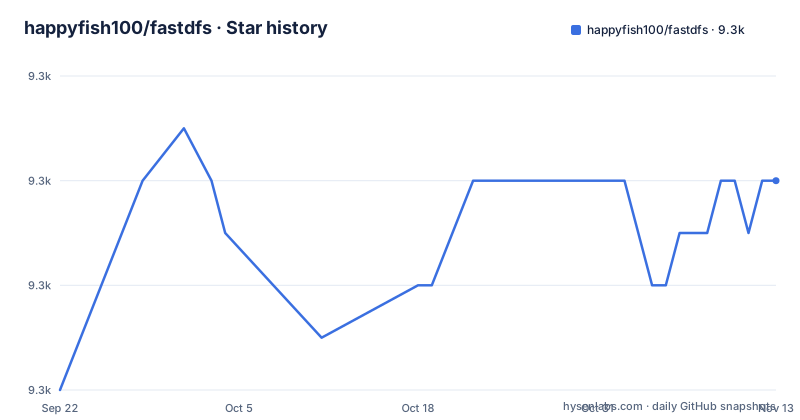
Star history
- happyfish100/fastdfs9,262 ★ · +4
| Repository | 2026-09-22 | 2026-11-13 |
|---|---|---|
| happyfish100/fastdfs | 9.3k | 9.3k |
4 Stars in the last 52 days, measured from the daily GitHub snapshot. Compare with other projects
Editorial analysis
What FastDFS solves, and who it is written for
The README states the target audience plainly: websites whose service is based on files, such as photo sharing and video sharing sites. The problem it addresses is capacity and load balancing. A single machine runs out of disk, and a single access path runs out of bandwidth, long before the application logic is the bottleneck. FastDFS answers both by separating scheduling from storage and by letting you add machines to either role without taking the service offline. The README says servers in the tracker or storage cluster can be added to or removed from the cluster at any time without affecting online services. That is the operational promise, and it is the reason to pick this over a plain NFS mount or a local disk with a backup job. The project is written in C and licensed GPL-3.0. It is not a general distributed filesystem in the sense that Ceph or FastCFS is: the README calls it a lightweight object storage solution and explicitly redirects people who need a filesystem for databases, Kubernetes and virtual machines to FastCFS, a separate project by the same author.
Tracker, storage group, and the two-part file ID
There are two roles. The tracker handles scheduling and load balancing for file access. The storage holds files and manages them: storing, syncing between peers, and serving access. A storage server also manages metadata, which the README describes as key and value pairs attached to a file, giving width=1024 as the example. Trackers form a peer-to-peer cluster with no single point of failure, and the README notes there is no traditional name server or meta server. Storage servers are organized into groups. Files in different groups are independent, so total system capacity is the sum of all group capacities. Within a group, every storage server holds the same files: they back each other up and share the load. When you add a server to an existing group, files already in that group are replicated to the new machine automatically, and the README says the system switches that server online for storage service only after replication finishes. Growth has two shapes. Add servers to a group to widen redundancy and read capacity; add a new group to raise total capacity. A file's identity is the group name plus the file name, and the README states the file ID is generated by FastDFS and acts as the credential for access. That last point has a security consequence the README does not discuss: anyone holding the ID can fetch the file, so access control has to live in front of the storage, not inside it.
Installing FastDFS: the README sends you to the wiki
The README does not contain installation steps. It gives a link to the FastDFS installation and configuration documentation in the project wiki, and the repository carries INSTALL, setup.sh, make.sh, a conf/ directory, init.d and systemd directories, and a docker/ directory. The wiki link is the authoritative path. The source tree is laid out so that the tracker and storage binaries come from their own directories, and the client library lives in client/, with headers installed under /usr/include/fastdfs/ by default according to the README. A first real use is uploading a file and reading it back, which the README points at client/test for. The C client is the reference implementation; the PHP extension ships in php_client/ inside the source tree, and Java and Go clients are separate repositories linked from the README. Because the file ID is the access credential, the first thing to confirm after upload is that the returned ID round-trips: upload, then download by that ID through the same client library. The repository also ships cpp_client, csharp_client, go_client, groovy_client, javascript_client, python_client, ruby_client, rust_client and typescript_client directories, but the README's SDK list names only C, PHP, Java and Go, so the rest are best treated as community code until you read them.
The nginx module and why it changes the deployment shape
The README lists a nginx extension module that can integrate with nginx. This matters more than it looks. Without it, every download goes through a client library call, which means your application servers carry the file traffic and the connection handling. With the module, nginx on the storage node serves the bytes directly and your application only hands out the file ID. That is the difference between a file system your app talks to and a file system your users talk to. The README does not document the module's configuration, so the wiki is again the place to look. The same README bullet list mentions IPv6, NAT networks, cross data center and hybrid cloud deployment, read-write separation, and cross data center disaster backup. Those are deployment claims rather than mechanisms described in the README, and anyone relying on them should read the wiki rather than assume the behaviour. One concrete capability that is described: appender files have truncate, append and modify APIs, and multi-threaded upload and download are supported, including resume from a broken point. If your workload is video uploads over flaky mobile connections, that resume support is the feature to evaluate first.
Where FastDFS is the wrong tool
The README itself draws the boundary, which is unusual and worth taking at face value. FastDFS is a lightweight object storage solution; if you need a general distributed file system for databases, Kubernetes and virtual machines such as KVM, the README points to FastCFS, which it says achieves strong data consistency and high performance. The phrase strong data consistency is doing real work there. FastDFS replicates files within a group, and the README describes a new server as coming online only after replication completes, but it does not describe a consistency model for concurrent writes or a POSIX interface. There is no mention of random writes, file locking, or mounting it as a filesystem. So a database, a container volume or a VM image store is out of scope. The second boundary is access control. The file ID is the credential. If you need per-user authorization on every read, you are building that layer yourself, in front of nginx or the client library. Third, the licence is GPL-3.0. That is a real constraint for products that link the client library and do not want to release their own code under a compatible licence. The README does not offer an alternative licence or a commercial exception, and it does offer technical support and customized development by email, which is a different thing from relicensing.
FastDFS compared with MinIO and FastCFS
Against MinIO, the difference is architectural rather than a matter of taste. MinIO presents an S3-compatible API; clients are ordinary HTTP clients and the protocol is the interface. FastDFS has no S3 API in the README. Its interface is a set of client libraries in C, PHP, Java and Go, plus the nginx module for serving downloads. That means you cannot point an existing S3 tool at FastDFS, and you cannot swap one for the other without rewriting the access layer. What you get in exchange is a smaller, more direct system: trackers that schedule, storage groups that replicate and balance, and a file ID composed of group name and file name. FastCFS is the closer comparison, and it is the one the README makes. Same author, different goal: FastCFS targets strong data consistency and the database, Kubernetes and KVM use cases that FastDFS does not claim. If your files are user uploads served over HTTP, FastDFS is the fit. If your files are volumes that need consistent reads and writes, FastCFS is the one the README names.
Maintenance, releases and upgrade cost
The repository is not archived, and the last push was on 2026-11-02. Releases are frequent and versioned: V6.18.1 on 2026-09-15, V6.17.1 on 2026-08-05, and V6.16.0 on 2026-07-05. A roughly monthly cadence at the 6.x line means upgrades are a recurring operational task, not a one-time install. The repository contains packaging material for that: fastdfs.spec for RPM builds, a debian/ directory, init.d and systemd unit directories, and docker/. The upgrade cost that the README does not address is what happens to a running cluster. It states that servers can be added to or removed from a cluster without affecting online services, and that a new storage server is switched online after its files are replicated. It says nothing about rolling a new version across existing tracker and storage nodes, or about whether the on-disk format changes between 6.x releases. Check HISTORY and the wiki before upgrading a production group. On licensing: GPL-3.0 covers the project, and the COPYING-3_0.txt file at the top level is the licence text. Whether your use of the client library triggers distribution obligations depends on how you link and ship it, which is a question for your own counsel, not something the README answers.
Editorial conclusion
Adopt FastDFS when you serve user-uploaded files at a scale where one machine's disks are the limit and you are willing to run tracker and storage processes yourself, and when GPL-3.0 fits how you ship. Do not adopt it as a general-purpose filesystem for databases, Kubernetes volumes or KVM images: the README points those users at FastCFS instead. Before committing, verify two things in the wiki: the tracker and storage configuration for your topology, and whether your language has a maintained client, since only C, PHP, Java and Go SDKs are listed in the README.
Frequently asked questions
What is FastDFS and what is it used for?
FastDFS is an open source distributed file system whose major functions are file storing, file syncing and file accessing. The README says it targets websites whose service is based on files, such as photo sharing and video sharing sites, and that it addresses high capacity and load balancing.
How do I install FastDFS?
The README does not contain installation steps; it links to the FastDFS installation and configuration documentation in the project wiki. The repository also ships INSTALL, setup.sh, make.sh, a conf/ directory, init.d and systemd directories, and a docker/ directory.
Which client SDKs does FastDFS provide?
The README lists the C client in the client/ subdirectory with headers installed by default under /usr/include/fastdfs/, a PHP extension in php_client/, and separate Java and Go SDK repositories. Other language client directories exist in the repository but are not named in the README's SDK list.
Does FastDFS work with nginx?
Yes. The README states that FastDFS provides a nginx extension module that can integrate with nginx. The README does not document the module's configuration, so the wiki is the place to check.
Is FastDFS a replacement for a general distributed file system?
No. The README describes FastDFS as a lightweight object storage solution and directs anyone who needs a general distributed file system for databases, Kubernetes and virtual machines such as KVM to FastCFS instead.
Official sources
Add this badge to your README
If you maintain this project, the badge below links readers to this analysis and shows its maintenance status from the daily GitHub snapshot. Paste the markdown into your README; add ?metric=license or ?metric=stars to the image URL for a different field.

[](https://hysenlabs.com/projects/happyfish100-fastdfs)Star history chart for your README
[](https://hysenlabs.com/projects/happyfish100-fastdfs)Was this useful?