The default branch is unstable, and Redis decides which modules to build from what is cloned under modules/
In-memory data structure server used as a cache, message broker, and document and vector query engine for real-time, data-driven applications.
At a glance
- What is it?
- Redis is an in-memory data structure server with a modules API, and this repository holds the server, its build files and the tests. Three details from the build files shape what you actually get. The default branch is named unstable, module inclusion is decided by what is cloned under modules/ rather than by a flag, and the top-level Makefile exports MAKE specifically to stop recipe shells on macOS resolving to Apple's stock make.
- Who is it for?
- Redis suits a team that wants a mature data structure server with a documented command set and extension API, and that will read the build files rather than assume a conventional layout. It does not suit someone who needs a single obvious install path, because the binary packages live in four separate repositories, the container images come from Docker Hub, and the source is on a branch called unstable.
- Can I use it commercially?
- Check first. The repository uses a licence we do not classify automatically, so read its LICENSE file before any commercial use.
- Is it still maintained?
- Yes. The repository received new commits within the last day.
- What is it written in?
- Mainly C, according to GitHub's language statistics.
Answers come from the project's GitHub data, last synced on November 13, 2026, and from our analysis. They are not legal advice.
Star history
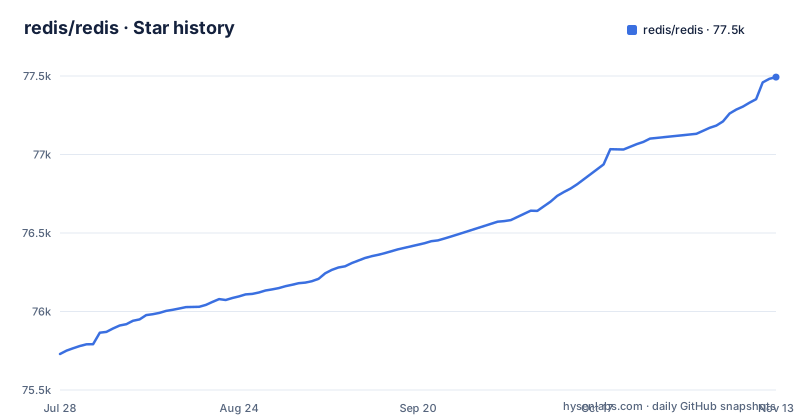
- redis/redis77,493 ★ · +1,764
| Repository | 2026-07-28 | 2026-11-13 |
|---|---|---|
| redis/redis | 75.7k | 77.5k |
1,764 Stars in the last 108 days, measured from the daily GitHub snapshot. Compare with other projects
Editorial analysis
The default branch is named unstable, and three release lines were patched in one day
The branch a clone lands on is called `unstable`, which is stated in the repository metadata rather than buried. The last push to it was on 2026-11-02, and the repository is not archived, so this is an active development branch and not a parking space.
The release list shows the other half of the picture. The most recent releases are 8.12-rc2 (2026-11-01), 8.12-rc1 (2026-10-29) and 8.10.3 (2026-10-26), so two release candidates and a patch release are current.
Which branch you clone decides what is unreleased, and which tag you package decides which release you are running.
The tree holds a `00-RELEASENOTES` file, so notes for a release live in the repository next to the code, which is where to look for what a given line contains.
Community Edition was renamed Redis Open Source at v8.0
The project changed its own name, and the README states it in one sentence: Redis Community Edition was renamed Redis Open Source with the v8.0 release. Anything written before that point calls the thing you install by the old name, which is a small trap when you are matching documentation to a binary.
Alongside it, Redis Ltd. offers Redis Software as a self-managed product with additional compliance, reliability and resiliency for enterprise scaling, and Redis Cloud as a fully managed service integrated with Google Cloud, Azure and AWS. The README does not enumerate which individual commands or capabilities sit behind which tier, and it links out to a page on redis.io for the differences.
That is the limit worth stating plainly. What you get from this repository is the open source build, and the boundary between it and the commercial products is documented off-repository. So a question of the form can I do X in the open source build cannot be answered from the README, and anyone planning on a feature has to check that page rather than infer from the fact that a command name sounds enterprise-shaped.
The packages you install are maintained in four other repositories
The getting-started section routes you away from this repository for almost everything. It lists Redis Cloud, the official Docker images for Alpine and Debian, and four binary distributions, and each of those four is a separate project: Snap in redis-snap, Homebrew in homebrew-redis, RPM in redis-rpm, and Debian in redis-debian.
The container route is a single command:
docker run -d -p 127.0.0.1:6379:6379 redis:latestThis binds the published port to localhost for a local test. Redis should be restricted to trusted clients; use firewall rules, authentication and transport protection as appropriate before deploying it. Docker versions older than 28 have a documented same-network caveat for localhost publishing.
So there are at least six places a running Redis can come from, and only one of them is this source tree. The practical consequence is that the build described in this README and the binary most people install are different code paths maintained by different means, and a bug fixed in one is not automatically present in the other.
It also means packaging lag is structural rather than accidental. A patch published as a tag here is not a package that exists, and the package managers are separate repositories with their own maintainers and their own release rhythms. Pinning a deployment means pinning a package.
Modules are included by what is on disk, not by a build flag
The top-level Makefile sets its default goal to `build` and keeps `SUBDIRS = src`, and then a comment explains something that would otherwise cost an afternoon. Goals with no explicit rule at the top level, such as `make distclean` and `make 32bit`, still recurse into `src` only, matching upstream Redis, and modules are never part of that.
The ordinary path is different. `make` and `make build` route through `scripts/build.sh`, and that script decides per-module inclusion from what is actually cloned under `modules/*/src`, not from a build flag. The module list itself comes from a manifest parser: the Makefile includes `modules/manifest.mk`, which turns `modules.yaml` into `AVAILABLE_MODULES`.
The consequence is that there is no flag to turn a module on. Presence of source is the switch, so enabling a capability is a checkout operation, and an empty `modules` directory produces a build that simply lacks it.
The same file has a small argument-capture mechanism for goals that take names. `make modules-update redistimeseries redisjson` is parsed by make as three separate goals, and the file captures the trailing two into `MODULES_ARGS` so only the first runs.
MAKE is exported so recipe shells do not fall back to Apple's make
One export in the Makefile carries a long comment and is worth reading before building on macOS. The top level explicitly exports `$(MAKE)` so that recipe shells, naming `scripts/build.sh` and `deploy.sh`, can read `$MAKE` and use the same make binary the user invoked.
The reason is a GNU make behaviour. MAKE is auto-propagated to recursive `$(MAKE) -C ...` sub-makes, but a recipe that is a shell script gets an empty `$MAKE` by default. Without the export, `MAKE_BIN="${MAKE:-make}"` inside those scripts falls back to a PATH lookup, and in a non-interactive recipe shell that lookup can resolve to Apple's stock `/usr/bin/make` 3.81, because the PATH ordering in a recipe shell is not the PATH ordering in your interactive shell.
So the failure mode is a build that works when you type it and behaves differently when make invokes it. If you are debugging a build difference on macOS, this is the first thing to check, and the fix is to invoke the make you meant to invoke rather than whatever the shell finds.
Sentinel is a second server in the same tree, with its own config and test runner
The repository does not hold one server. Alongside the data server there is a `sentinel.conf` next to `redis.conf`, a `runtest-sentinel` next to `runtest`, and a `runtest-moduleapi` beside both. Three test runners, two configuration files, and a `TLS.md` for transport security.
The practical effect is that a deployment configured from this tree has two configuration surfaces to get right, and running the data server's tests tells you nothing about the monitor. A change that passes `runtest` can still leave Sentinel misconfigured, because the two are tested by different entry points and configured through different files.
The surrounding files set the tone. There is a `MANIFESTO`, a `BUGS` file, `REDISCONTRIBUTIONS.txt`, `CODE_OF_CONDUCT.md`, `SECURITY.md` and a `codecov.yml` for coverage reporting, alongside `INSTALL` and `CONTRIBUTING.md`. Governance and policy documents sit in the same directory as the C sources, which is normal for a project of this age and means a reader browsing the tree is as likely to hit the manifesto as the allocator.
There is also a `docker` directory and a `tools` directory, and `utils` and `scripts` at the root, so the build support code lives outside `src` rather than beside it.
Editorial conclusion
Redis suits a team that wants a mature data structure server with a documented command set and extension API, and that will read the build files rather than assume a conventional layout. It does not suit someone who needs a single obvious install path, because the binary packages live in four separate repositories, the container images come from Docker Hub, and the source is on a branch called unstable. Before you build, decide whether you are targeting a release candidate or a patch release, since the latest releases are 8.12-rc2, 8.12-rc1 and 8.10.3, and remember that a module is enabled by having its source present, not by passing a flag.
Frequently asked questions
how to use redis
Redis is an in-memory data structure server reached over a simple text-based protocol, so you talk to it with a client that speaks that protocol, such as redis-cli, and the command set is documented at redis.io/commands. The README points to the full documentation at redis.io/docs and describes Redis Cloud, the official Docker images, and Snap, Homebrew, RPM and Debian packages as the fastest ways to get a running instance.
how to use redis cli
The README has a section on using Redis with redis-cli alongside the client library and Redis Insight options, and the README is the starting point for it. The starting points it does give are the introduction to Redis data types and the full list of Redis commands.
how to install redis
Without building from source, the README lists Redis Cloud, the official Docker images for Alpine and Debian, and four binary distributions, each maintained in its own repository: Snap, Homebrew, RPM and Debian. The container route is docker run -d -p 6379:6379 redis:latest. Building from source is covered separately, through the build section of the README.
how to use redis for caching
Caching is the first use case the README names, and it describes the support as multiple eviction policies, key expiration, and hash-field expiration. The stated pattern is quick access to frequently used data without going to the primary database. Hash-field expiration is the part that is specific to this server, since it expires individual fields inside a hash rather than the whole key.
how to use redis for rate limiting
Rate limiters appear in the README as one of the high-level semantics built on top of the low-level data structures, alongside counters, queues and leaderboards. The README points to its introduction to data types and the full list of commands for specifics.
Official sources
Where developers are discussing it
Posts on Hacker News, dev.to and Lobsters that link to this repository, found by our scan of those communities. 2 in the last 30 days; newest first.
- Redis 8.12-rc1's roaring bitmap type shrinks a sparse bitmap from 24MB to 239KBdev.to · Nov 8, 2026 · 7 points · 4 comments
- Redis 8.12 RC2's SEXPIRE command cuts a set membership check from two round trips to onedev.to · Nov 2, 2026 · 8 points · 2 comments
Add this badge to your README
If you maintain this project, the badge below links readers to this analysis and shows its maintenance status from the daily GitHub snapshot. Paste the markdown into your README; add ?metric=license or ?metric=stars to the image URL for a different field.

[](https://hysenlabs.com/projects/redis-redis)Star history chart for your README
[](https://hysenlabs.com/projects/redis-redis)Community discussions
Was this useful?